Repository navigation
Installation and Updates
PulseDeck ships prebuilt packages for Windows (x64), macOS (Apple Silicon & Intel), and Linux (x64) on the GitHub Releases page.
| File | Type | Best For |
|---|---|---|
PulseDeck-Setup-1.3.0.exe |
Standard NSIS Installer | Most users — creates Start Menu & Desktop shortcuts, registers uninstaller, and supports automatic in-app updates from Settings. |
PulseDeck-1.3.0-portable.exe |
Portable Executable | Running off a USB drive or without installing to Windows (checks for updates and opens the download link in your browser). |
Windows SmartScreen Bypass: Because PulseDeck is currently unsigned, Windows Defender SmartScreen may show "Windows protected your PC" the first time you run the installer. Click More info → Run anyway to continue.
| File | Architecture |
|---|---|
PulseDeck-1.3.0-mac-arm64.dmg (or .zip) |
Apple Silicon (M1 / M2 / M3 / M4) |
PulseDeck-1.3.0-mac-x64.dmg (or .zip) |
Intel Macs |
- Open the
.dmgfile matching your Mac and drag PulseDeck into Applications. -
macOS Gatekeeper Bypass: Because builds are currently unsigned and not notarized with an Apple Developer ID, macOS may block opening PulseDeck on first launch. Either:
- Attempt to open PulseDeck once, then go to System Settings → Privacy & Security and click Open Anyway, or
- Remove the quarantine attribute from Terminal after copying it into Applications:
xattr -cr /Applications/PulseDeck.app
| File | Format | Best For |
|---|---|---|
PulseDeck-1.3.0-linux-x86_64.AppImage |
Universal AppImage | All major Linux distributions (Arch, Ubuntu, Fedora, Mint, openSUSE, etc.) — no root required and supports automatic in-app updates via Settings. |
PulseDeck-1.3.0-linux-amd64.deb |
Debian / Ubuntu Package | Ubuntu, Debian, Linux Mint, Pop!_OS — integrates into your system launcher and package manager. |
PulseDeck-1.3.0-linux-x86_64.rpm |
RPM Package | Fedora, RHEL, Nobara, openSUSE — integrates into your system launcher and package manager. |
-
Run the AppImage:
chmod +x PulseDeck-1.3.0-linux-x86_64.AppImage
./PulseDeck-1.3.0-linux-x86_64.AppImage
Ubuntu 24.04+ Note: AppImages require FUSE 2 to mount. If launching fails with
dlopen(): error loading libfuse.so.2, installsudo apt install libfuse2t64(orlibfuse2on Ubuntu 22.04 / Debian), or run with--appimage-extract-and-run. -
Install the
.debpackage (Ubuntu / Debian / Mint / Pop!_OS):sudo apt install ./PulseDeck-1.3.0-linux-*.deb -
Install the
.rpmpackage (Fedora / RHEL / Nobara / openSUSE):sudo dnf install ./PulseDeck-1.3.0-linux-*.rpm
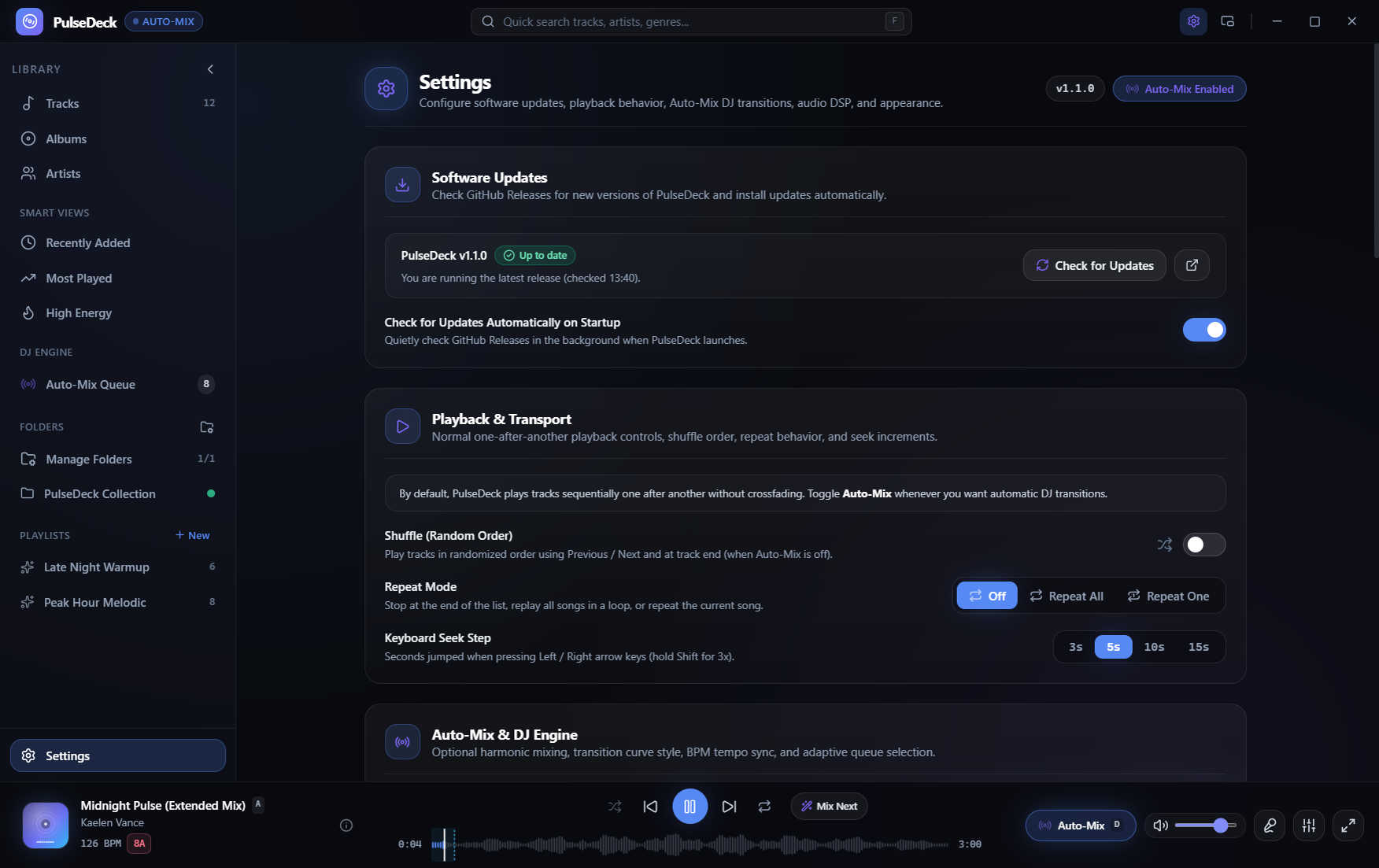
Starting with v1.1.1+ (and v1.3.0+ on Linux), PulseDeck includes a built-in updater powered by electron-updater and GitHub Releases (davide108/pulsedeck).
-
Windows Installed App (
PulseDeck-Setup-*.exe) & Linux AppImage (PulseDeck-*-linux-*.AppImage):- Open Settings → Software Updates (or leave Check for Updates Automatically on Startup enabled).
- Click Check for Updates. When a newer release is found on GitHub (
latest.ymlon Windows,latest-linux.ymlon Linux AppImage), PulseDeck shows the version badge and release notes. - Click Download & Install to stream the update in-app with a live progress bar, speed, and byte counter.
- Once downloaded, click Restart & Install (or simply quit PulseDeck when ready —
autoInstallOnAppQuitfinishes the upgrade automatically).
-
Windows Portable, macOS, and Linux
.deb/.rpmBuilds:- Checks GitHub Releases (
api.github.com/repos/davide108/pulsedeck/releases/latest) directly, displays the version & release notes, and provides a one-click Download Update button that opens the matching package asset for your OS/architecture. (Unsigned macOS builds and system-managed.deb/.rpmpackages cannot silently overwrite themselves in-app.)
- Checks GitHub Releases (
All library indexes, playlists, lyrics, play history, artwork thumbnails, and settings stay 100% local inside Electron's userData folder:
-
Windows:
%APPDATA%\pulsedeck\ -
macOS:
~/Library/Application Support/pulsedeck/ -
Linux:
~/.config/pulsedeck/(or$XDG_CONFIG_HOME/pulsedeck/)
Inside that directory:
-
library.db(+-wal/-shm) — SQLite database storing folders, track metadata, DSP analysis results, playlists, play history, lyrics, and settings. -
artwork/— Content-addressed (SHA-256) extracted album covers so identical covers across albums are stored only once.
Upgrading PulseDeck preserves all local data automatically without wiping your library, edits, or playlists.