Breakout is a prototyping tool for exploring the intersection of the web and the physical world. The popular Arduino platform and the Firmata protocol are leveraged to enable users to access physical input and output purely from javascript. This makes it easy for anyone familiar with javascript and basic web development to explore the possibilities of using sensors and actuators in their web applications. Furthermore, the Breakout framework includes a growing library of hardware abstractions such as buttons, leds, servo motors, accelerometers, gyros, etc enabling the user to easily interface with a range of sensors and actuators using just a few lines of javascript code.
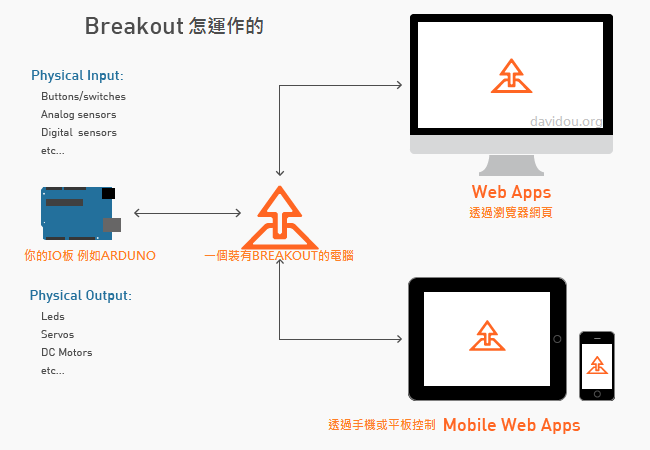
Breakout grew out of a need for a simple platform to enable designers to prototype functional web-based interfaces to the physical world. It is based largely on the Funnel toolkit and informed by the experiences of the developers of both Funnel and Breakout as designers, technologists and educators.
Breakout 現在還是 beta 板軟體.雖然 The API 已經穩定,但是還是有可能有bug發生. 如果你發現bug請回報.
更多細部的文件請看 breakoutjs.com 或其他的資料來源
<!DOCTYPE html>
<html>
<head>
<meta charset=utf-8 />
<title>Hello World</title>
</head>
  <body>
    <button id="ledToggle">Toggle LED</button>
    <p id="btnStatus"></p>
    <script src="../../dist/Breakout.js"></script>
    <script>
    var arduino = new BO.IOBoard("localhost", 8887);
    arduino.addEventListener(BO.IOBoardEvent.READY, function (event) {
      var led = new BO.io.LED(arduino, arduino.getDigitalPin(11)),
        button = new BO.io.Button(arduino, arduino.getDigitalPin(2)),
        toggleBtn = document.getElementById("ledToggle"),
        btnStatus = document.getElementById("btnStatus");

      toggleBtn.addEventListener("click", function (event) {
        led.toggle();
      });

      button.addEventListener(BO.io.ButtonEvent.PRESS, function (event) {
        btnStatus.innerHTML = "Button " + event.target.pinNumber + " pressed";
      });
      button.addEventListener(BO.io.ButtonEvent.RELEASE, function (event) {
        btnStatus.innerHTML = "Button " + event.target.pinNumber + " released";
      });
    });
    </script>
  </body>
</html>你可以在 Getting Started guide 這邊找到詳細的手冊
第一步是上傳 AdvancedFirmata 到你的 Arduino板 (或 Arduino-compatible) 並連接你要的感測器或元件
- 在下載或是複製好 Breakout 後, 進入
Breakout/firmware/AdvancedFirmata/並且在你的Arduino IDE軟體上打開 AdvancedFirmata.ino (需要 version 1.0 或更高的版本,建議 version 1.5.4 或更高). - Compile AdvancedFirmata 上傳至你的版子上
- 在你的板上接好你的按鈕, led 和 可變電阻器 像第三頁一樣 Breakout/examples/schematics.pdf.
下一步驟是去啟動 Breakout Server :
- 請確定你的板子接好了,並且把 AdvancedFirmata 燒錄進來了.
- 你可以在你的(mac, win or linux)找到 Breakout Server ,解壓縮並且打開軟體 Mac OS X 使用者 第一次可能需要 temporarily disable Gatekeeper 去啟動你的APP. Note: Linux users may need to run
sudo apt-get install librxtx-javaor manually install the librxtxSerial.so driver before launching the BreakoutServer.jar application. - 選好你的serial port .
- 如果你的防火牆是開的,請確定你的port 8887 可以通過(或找一個可以過的PORT).
- 按下 Connect 按鈕. 你應該會看到 "Server running on: [your server name]: 8887/" 這個訊息在"Connected to IOBoard on: [serial port name]"之後.
- 用瀏覽器打開 http://localhost:8887/examples/index.html 建議 Chrome (v14 or greater), Firefox (v11 or greater), or Safari (v5 or greater) 並且可以玩看範例.備註: 如果你在第四步驟有變更PORT的話,你可能需要更新一下你IO板(ARDUINO)上的PORT號.
Note OS X Mavericks users: You will need to disable the Mavericks App Nap feature for Breakout Server. Right-click on the Breakout Server icon then select Get Info. Check the Prevent App Nap box under the General section in the info panel.
如果你的智慧手機或是平板有支援websockets的話,你也可以使用 (Safari, Chrome for Android, Firefox Mobile). Instead of localhost:8887/examples/ 輸入你有跑Breakout Server電腦的ip或是名稱 (192.168.2.1:8887/examples/ or yourhostname.local:8887/examples/u). 當你的電腦在跑Breakout Server 軟體時 請確定你的行動裝置已經連上了某些WIFI網路.
想要更多使用 Breakout Server的資訊(包含多重CLIENT連線,變更webserver root 資料夾,啟用自動執行模式,或者透過手機使用Breakout) 請參閱 Using Breakout Server.
As an alternative to the Breakout Server application, a node.js-based server is also included. See the Using the node.js server for details.
Breakout 只支援 for Arduino 1.0 或更高的版本 Download Arduino.
你需要一個下列的 I/O 板:
- 一個 Arduino version Diecimila or newer (Uno, Fio, Mega, Pro, LilyPad, Leonardo, Due, 等等).
- Teensy 2.0, Teensy 3.0, Teensy++ 1.0 or 2.0
- 各種的 Arduino 相似板 --山寨板-- 應該也可以執行.
- 可以從 Test Environment 找到所有測試過的 I/O boards.
*In order to use Breakout with an Arduino Leonardo, Arduino Due or Teensy 3.0 board, you need to install Arduino 1.5.4 or higher.
作業系統 OS:
- Mac OS X 10.6 or higher
- Windows 8, 7 or XP (執行 Breakout Server需要Java JRE 1.6 或更高的版本)
- Has been tested successfuly on Ubuntu 11.10 running in 64-bit mode on an x86-64 processor
- 大部分古老的 OS X 和 Windows 也可以 但是沒測試過
- May work on other Linux distributions but has not been tested
瀏覽器 Desktop Browsers:
- Chrome version 14 或更高
- Firefox version 11 或更高
- Safari version 5 或更高
- Opera 12 或更高
手機瀏覽器 Mobile Browsers (browser must support websockets):
- Safari mobile
- Firefox mobile version 7 或更高
- Chrome for Android (for Android 4.0 或更高)
- 請參閱 Test Environment 有完整測試過的手機與平板列表
如果你有任何想法、建議與改進的話,歡迎來貢獻, 請與我們分享案例或是任何理想貢獻的東西.
To contribute, fork Breakout and create a feature branch off the dev branch.
Submit pull requests against the dev branch for bug fixes and small changes. For any
larger changes, please first start a discussion by opening a new issue.
See Breakout/build/README.md for instructions on building Breakout.
Breakout 是由 Jeff Hoefs所開發的.
Breakout 是基於 as3 library of Funnel. 作者也是 Funnel as3 library的貢獻者.
Logo 與圖示由Claire Lin設計.
Breakout Server uses webbit
Contributors:
Breakout is distributed under the terms of the MIT License. See the LICENSE file.
See the ChangeLog file.