



The goal of react-tracing is to enable React and React Native developers to build faster products by making the real-world performance visible. Although it is optimized for React and React Native we also support pure JS.
Details
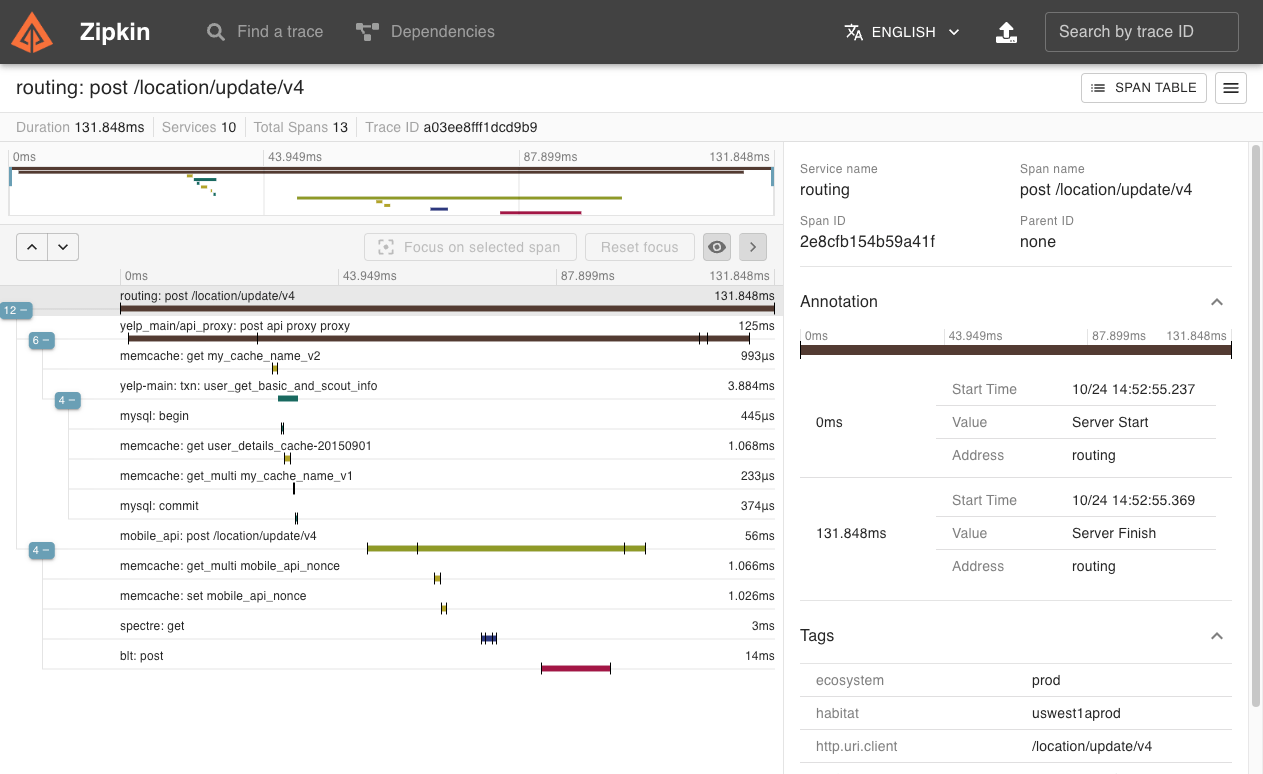
For this we want to use well-known tooling from the backend world and bring it to the frontend, so that engineering teams might gain a better understanding where a loading time improvement might help the most.Imagine having graphs like this showing real users using your (web-)app when you want to decide which performance issue to tackle next:
You need a Zipkin instance running on an accessible server.
For development puropses you can start one with docker: docker run -d -p 9411:9411 openzipkin/zipkin
import Tracing from "react-tracing";
const tracer = new Tracing({
    serviceName: "Frontend",
    endpoint: "http://localhost:9111",
    kind: "client", // default
});

// TRACKING HTTP REQUESTS
// ======================

// You have two options here depending on your style of usage
// a) You can either use it locally, enabling you to set a different service name per fetch
const defaultFetch = tracer.fetch();
const tracingXhr = tracer.xhr(XMLHttpRequest); // last param optional, otherwise a global is taken

// b) You can choose to let us handle everything for you
// This mutates the global fetch and XHR request
tracer.initGlobalNetworkTracer();

// You can define a span that generates you the span names, this is the default one.
// If you want to use the default and a third param pass anything that is not a function as the second parameter.
const getSpanName = ({ url, method, data }) => `client send ${method} to ${url} with data ${JSON.stringify(data)}`;
const tracedFetch = tracer.fetch(getSpanName, fetch); // last param optional, otherwise a global is taken


// TRACKING USER ACTIONS
// =====================

// You can use it in React
const Link = tracer.component("a")

// You can use it in React Native
const Touchable = tracer.component(TouchableHighlight);

// Every onPress / onClick / onLongPress is wrapped with a function like this
// The first argument is added as a callback to indicate when the interaction is done
const clickHanlder = function(done) {
    fetch("http://foo.de").then(...).finally(done);
};
const tracedClickHandler = tracer.wrap(clickHandler);

// Usage in the component
const MyTracedComponent = () => (
  <Touchable
    tracingName="create-new-order"
    // Either use static additional infos
    tracingInfo={{
      buttonLabel: 'ClickMe',
      userId: 42,
    }}
    // Or use dynamic ones
    tracingInfo={e => ({
      clickPosition: e.targetX,
    })}
    {...usualProps}
  >
    <Text>ClickMe</Text>
  </Touchable>
);


// ADD YOUR OWN TRACING
// ====================

function myVeryLongFunction() {
  tracing.startSpan("Long Function");
  asyncFunction().then(() => {
     tracing.startSpan("Synchronous Bitcoin Mining");
     try {
      mineBitcoinsAndDonateThem();
     } catch(e) {
       // Something went wrong, let's log the error
       tracing.log({
         miningError: e
       });
     }
     tracing.finishSpan();
  }).finally(() => {
    tracing.finishSpan();
  });
}Normally react-tracing manages the stack of spans for you and this works great because currently Javascript is single-threaded.
However there might be occasions where you want to manage this on your own, so react-tracing gives you the option to use your Stack implementation instead of ours and manage that thing on your own.
class MyLittleStack {
  constructor() {
    this.list = [];
  }

  push(item) {
    this.list.push(item);
  }

  pop() {
    return this.list.pop();
  }

  peek() {
    if (!this.list.length) {
      throw new Error("No items in stack");
    }

    return this.list[this.list.length - 1];
  }
}
import Tracing from "react-tracing";
const customStack = new MyLittleStack();
const tracer = new Tracing({
    ...allUsualOptions,
    stack: customStack,
});| Term | Description |
|---|---|
| span | a single operation that is traced |
| child span | like functions calls are nested, spans can be, too |
In other tracing solutions you have to define which span is the child of which, but react-tracing handles this for you.
Therefore react-tracing uses a stack, making use of Javascripts Single-Threadedness, to determine which spans should rely on each other.
This stack is stored in the global scope (it's a bit ugly, do you have a better idea?) under window.reactTracing.stack or global.reactTracing.stack.
Every time you send a fetch or xhr request react-tracing sets the X-B3-TraceId, X-B3-SpanId and so on tokens, so that your server can pick it up and extend the tracing context. As long as you use the instrumented fetch / XHR versions.
Thanks goes to these wonderful people (emoji key):
 Daniel Schmidt 💻 📖 🤔 |
|---|
This project follows the all-contributors specification. Contributions of any kind welcome!