- Frigate (Full Access-HASSOS-Addon) 0.14.1-f4f3cfa
- Frigate Home Assistant Integration 5.6.0
- Frigate Card 6.1.2
- Kiosk Mode 6.4.0
- HACS 2.0.1
- NGINX Home Assistant SSL proxy 3.11.1
- Duck DNS 1.18.0
- Mosquitto broker 6.4.1
- Home Assistant Core 2025.1.0
- Home Assistant Supervisor 2024.12.3
- Home Assistant Operating System 14.1
- Home Assistant Frontend 20250103.0
I have indeed read that the latest Frigate Hass update leads to WebRTC changes.
I thought I could fix it then, but unfortunately I can't get it to look like it did before.
Ok, I noticed that there was a small note in the Visual Card Editor about updating each camera.
This automatically adjusted the config in the yaml and the live view of the cameras is visible again.
However, the problem is still the following:
In the live view of the “Garage” camera on the Android app of HomeAssistant, I see a blue circle in the upper right corner and I cannot switch the camera to HD. I can switch the other cameras to HD.
Strange enough, I can switch "Garage" camera on Home Assistant Desktop-GUI to HD and there is no blue circle.
Short excerpt from the Frigate-Addon-protocol (I have replaced the last two digits of the IP with x) after I open Home Assistant Companion Android 2024.12.1-full:
2025-01-04 20:48:55.349013046 172.30.x.x - - [04/Jan/2025:21:48:55 +0100] "GET /api/garage/latest.jpg HTTP/1.1" 200 63955 "-" "HomeAssistant/2025.1.0 aiohttp/3.11.11 Python/3.13" "-"
2025-01-04 20:48:56.348394753 172.30.x.x - - [04/Jan/2025:21:48:56 +0100] "GET /api/garage/latest.jpg HTTP/1.1" 200 63470 "-" "HomeAssistant/2025.1.0 aiohttp/3.11.11 Python/3.13" "-"
2025-01-04 20:48:57.352568693 172.30.x.x - - [04/Jan/2025:21:48:57 +0100] "GET /api/garage/latest.jpg HTTP/1.1" 200 63566 "-" "HomeAssistant/2025.1.0 aiohttp/3.11.11 Python/3.13" "-"
2025-01-04 20:48:58.353368596 172.30.x.x - - [04/Jan/2025:21:48:58 +0100] "GET /api/garage/latest.jpg HTTP/1.1" 200 63722 "-" "HomeAssistant/2025.1.0 aiohttp/3.11.11 Python/3.13" "-"
2025-01-04 20:48:59.355558435 172.30.x.x - - [04/Jan/2025:21:48:59 +0100] "GET /api/garage/latest.jpg HTTP/1.1" 200 63565 "-" "HomeAssistant/2025.1.0 aiohttp/3.11.11 Python/3.13" "-"
2025-01-04 20:49:00.348196180 172.30.x.x - - [04/Jan/2025:21:49:00 +0100] "GET /api/garage/latest.jpg HTTP/1.1" 200 63608 "-" "HomeAssistant/2025.1.0 aiohttp/3.11.11 Python/3.13" "-"
This is what the config originally looked like and worked without big problems (except of to see/play alarm-records because livestream updated within 5sec during selection - however this was not important) till Frigate Card 6.x:
kiosk_mode:
  non_admin_settings:
    hide_header: true
    hide_sidebar: true
title: Home
views:
  - title: FRIGATECARD
    path: frigatecard
    subview: false
    type: sidebar
    badges: []
    cards:
      - type: vertical-stack
        cards:
          - type: custom:frigate-card
            cameras:
              - camera_entity: camera.hof
                title: Hof SD
                frigate:
                  camera_name: hof_sub
                triggers:
                  occupancy: false
                  motion: true
                  entities:
                    - binary_sensor.hof_all_occupancy
                dependencies:
                  cameras:
                    - hof_sub
                webrtc_card: {}
                go2rtc:
                  modes: []
                live_provider: go2rtc
              - camera_entity: camera.hof
                title: Hof HD
                live_provider: go2rtc
                id: hof_sub
                hide: true
            menu:
              style: hidden
              buttons:
                substreams:
                  icon: mdi:high-definition
                expand:
                  enabled: false
            view:
              default: live
              camera_select: live
              dark_mode: 'off'
              update_seconds: 5
              timeout_seconds: 10
              update_force: true
              scan:
                enabled: true
                untrigger_seconds: 10
            live:
              preload: true
              auto_mute: all
              auto_pause: never
              auto_play: all
              lazy_load: false
              controls:
                next_previous: {}
              layout:
                fit: fill
              microphone:
                disconnect_seconds: 2
            media_gallery:
              controls:
                thumbnails:
                  show_details: true
            media_viewer:
              auto_pause: hidden
              auto_mute: all
              auto_play: never
            image:
              layout: {}
          - type: custom:frigate-card
            cameras:
              - camera_entity: camera.garage
                title: Garage SD
                frigate:
                  camera_name: garage_sub
                triggers:
                  occupancy: false
                  motion: true
                  entities:
                    - binary_sensor.garage_all_occupancy
                dependencies:
                  cameras:
                    - garage_sub
                webrtc_card: {}
                go2rtc:
                  modes: []
                live_provider: go2rtc
              - camera_entity: camera.garage
                title: Garage HD
                live_provider: go2rtc
                id: garage_sub
                hide: true
            menu:
              style: hidden
              buttons:
                substreams:
                  icon: mdi:high-definition
                expand:
                  enabled: false
            view:
              default: live
              camera_select: live
              dark_mode: 'off'
              update_seconds: 5
              timeout_seconds: 10
              update_force: true
              scan:
                enabled: true
                untrigger_seconds: 10
            live:
              preload: true
              auto_mute: all
              auto_pause: never
              auto_play: all
              lazy_load: false
              controls:
                next_previous: {}
              layout:
                fit: fill
              microphone:
                disconnect_seconds: 2
            media_gallery:
              controls:
                thumbnails:
                  show_details: true
            media_viewer:
              auto_pause: hidden
              auto_mute: all
              auto_play: never
            image:
              layout: {}
          - type: custom:frigate-card
            cameras:
              - camera_entity: camera.front
                title: Front SD
                frigate:
                  camera_name: front_sub
                triggers:
                  occupancy: false
                  motion: true
                  entities:
                    - binary_sensor.front_all_occupancy
                dependencies:
                  cameras:
                    - front_sub
                webrtc_card: {}
                go2rtc:
                  modes: []
                live_provider: go2rtc
              - camera_entity: camera.front
                title: Front HD
                live_provider: go2rtc
                id: front_sub
                hide: true
            menu:
              style: hidden
              buttons:
                substreams:
                  icon: mdi:high-definition
                expand:
                  enabled: false
            view:
              default: live
              camera_select: live
              dark_mode: 'off'
              update_seconds: 5
              timeout_seconds: 10
              update_force: true
              scan:
                enabled: true
                untrigger_seconds: 10
            live:
              preload: true
              auto_mute: all
              auto_pause: never
              auto_play: all
              lazy_load: false
              controls:
                next_previous: {}
              layout:
                fit: fill
              microphone:
                disconnect_seconds: 2
            media_gallery:
              controls:
                thumbnails:
                  show_details: true
            media_viewer:
              auto_pause: hidden
              auto_mute: all
              auto_play: never
            image:
              layout: {}
        view_layout:
          position: main
      - square: false
        type: grid
        columns: 3
        cards:
          - type: picture
            image_entity: image.hof_person
          - type: picture
            image_entity: image.front_person
          - type: picture
            image_entity: image.garage_person
The above config then led to the problem:
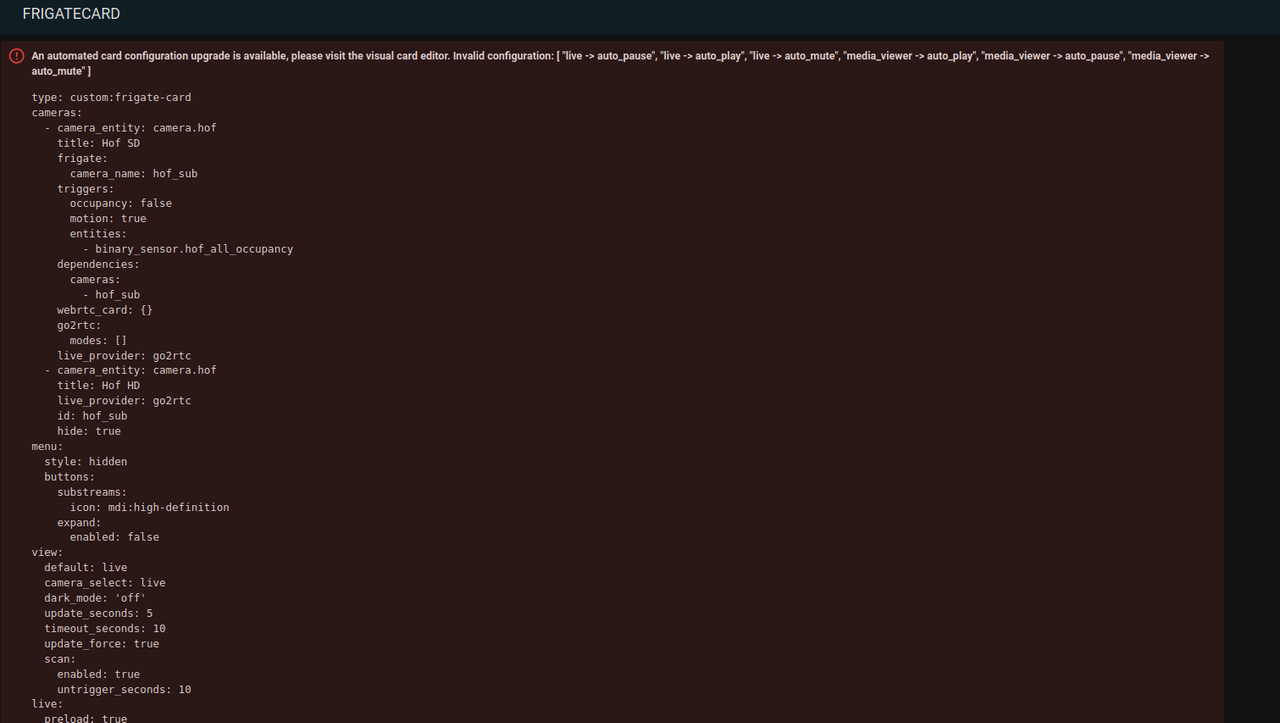
This is what the config looks like after update to Frigate Card 6.x and after I clicked on “Customize” or “Update” in the Visual Card Editor:
kiosk_mode:
  non_admin_settings:
    hide_header: true
    hide_sidebar: true
title: Home
views:
  - title: FRIGATECARD
    path: frigatecard
    subview: false
    type: sidebar
    badges: []
    cards:
      - type: vertical-stack
        cards:
          - type: custom:frigate-card
            cameras:
              - camera_entity: camera.hof
                title: Hof SD
                frigate:
                  camera_name: hof_sub
                triggers:
                  occupancy: false
                  motion: true
                  entities:
                    - binary_sensor.hof_all_occupancy
                dependencies:
                  cameras:
                    - hof_sub
                webrtc_card: {}
                go2rtc:
                  modes: []
                live_provider: go2rtc
              - camera_entity: camera.hof
                title: Hof HD
                live_provider: go2rtc
                id: hof_sub
                capabilities:
                  disable_except:
                    - substream
            menu:
              style: hidden
              buttons:
                substreams:
                  icon: mdi:high-definition
                expand:
                  enabled: false
            view:
              default: live
              camera_select: live
              dark_mode: 'off'
              interaction_seconds: 10
              triggers:
                untrigger_seconds: 10
                actions:
                  trigger: live
                filter_selected_camera: false
              default_reset:
                interaction_mode: all
                every_seconds: 5
            live:
              preload: true
              lazy_load: false
              controls:
                next_previous: {}
              microphone:
                disconnect_seconds: 2
            media_gallery:
              controls:
                thumbnails:
                  show_details: true
            media_viewer:
              auto_play: []
              auto_pause:
                - hidden
            image: {}
            cameras_global:
              dimensions:
                layout:
                  fit: fill
          - type: custom:frigate-card
            cameras:
              - camera_entity: camera.garage
                title: Garage SD
                frigate:
                  camera_name: garage_sub
                triggers:
                  occupancy: false
                  motion: true
                  entities:
                    - binary_sensor.garage_all_occupancy
                dependencies:
                  cameras:
                    - garage_sub
                webrtc_card: {}
                go2rtc:
                  modes: []
                live_provider: go2rtc
              - camera_entity: camera.garage
                title: Garage HD
                live_provider: go2rtc
                id: garage_sub
                capabilities:
                  disable_except:
                    - substream
            menu:
              style: hidden
              buttons:
                substreams:
                  icon: mdi:high-definition
                expand:
                  enabled: false
            view:
              default: live
              camera_select: live
              dark_mode: 'off'
              interaction_seconds: 10
              triggers:
                untrigger_seconds: 10
                actions:
                  trigger: live
                filter_selected_camera: false
              default_reset:
                interaction_mode: all
                every_seconds: 5
            live:
              preload: true
              lazy_load: false
              controls:
                next_previous: {}
              microphone:
                disconnect_seconds: 2
            media_gallery:
              controls:
                thumbnails:
                  show_details: true
            media_viewer:
              auto_play: []
              auto_pause:
                - hidden
            image: {}
            cameras_global:
              dimensions:
                layout:
                  fit: fill
          - type: custom:frigate-card
            cameras:
              - camera_entity: camera.front
                title: Front SD
                frigate:
                  camera_name: front_sub
                triggers:
                  occupancy: false
                  motion: true
                  entities:
                    - binary_sensor.front_all_occupancy
                dependencies:
                  cameras:
                    - front_sub
                webrtc_card: {}
                go2rtc:
                  modes: []
                live_provider: go2rtc
              - camera_entity: camera.front
                title: Front HD
                live_provider: go2rtc
                id: front_sub
                capabilities:
                  disable_except:
                    - substream
            menu:
              style: hidden
              buttons:
                substreams:
                  icon: mdi:high-definition
                expand:
                  enabled: false
            view:
              default: live
              camera_select: live
              dark_mode: 'off'
              interaction_seconds: 10
              triggers:
                untrigger_seconds: 10
                actions:
                  trigger: live
                filter_selected_camera: false
              default_reset:
                interaction_mode: all
                every_seconds: 5
            live:
              preload: true
              lazy_load: false
              controls:
                next_previous: {}
              microphone:
                disconnect_seconds: 2
            media_gallery:
              controls:
                thumbnails:
                  show_details: true
            media_viewer:
              auto_play: []
              auto_pause:
                - hidden
            image: {}
            cameras_global:
              dimensions:
                layout:
                  fit: fill
        view_layout:
          position: main
      - square: false
        type: grid
        columns: 3
        cards:
          - type: picture
            image_entity: image.hof_person
          - type: picture
            image_entity: image.front_person
          - type: picture
            image_entity: image.garage_person
How do I fix this with the second camera (Garage) so that HD switching works and the blue circle disappears?
Are there any other recommendations for improving the configuration?
Home Assistant Companion Android 2024.12.1-full:
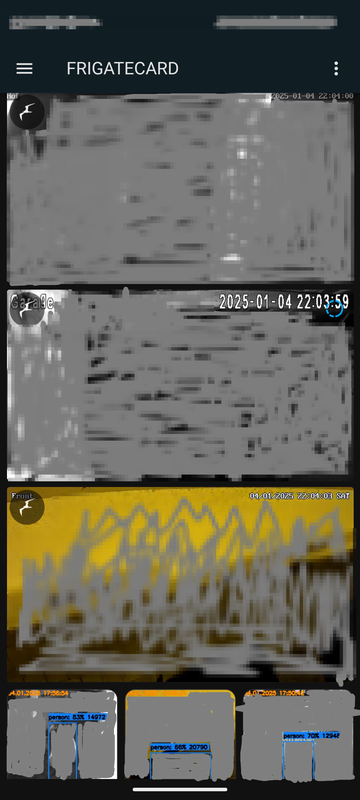
Edit: Another problem that I have just noticed:
Every time someone is detected in the cameras and thus triggers an alarm (e.g. person) and I see this in the Home Assistant dashboard in the livestream, the livestream from the respective cam is switched off for approx. 1 second.
As it is now it is useless. I try to restore backup to older version.




Edit: Now, back to Frigate Card 5.2.0. I think in the long run I'll have to ditch Home Assistant and find some good client mobile-app that picks up the Frigate streams from separate Frigate-Docker instance.
I have indeed read that the latest Frigate Hass update leads to WebRTC changes.
I thought I could fix it then, but unfortunately I can't get it to look like it did before.
Ok, I noticed that there was a small note in the Visual Card Editor about updating each camera.
This automatically adjusted the config in the yaml and the live view of the cameras is visible again.
However, the problem is still the following:
In the live view of the “Garage” camera on the Android app of HomeAssistant, I see a blue circle in the upper right corner and I cannot switch the camera to HD. I can switch the other cameras to HD.
Strange enough, I can switch "Garage" camera on Home Assistant Desktop-GUI to HD and there is no blue circle.
Short excerpt from the Frigate-Addon-protocol (I have replaced the last two digits of the IP with x) after I open Home Assistant Companion Android 2024.12.1-full:
This is what the config originally looked like and worked without big problems (except of to see/play alarm-records because livestream updated within 5sec during selection - however this was not important) till Frigate Card 6.x:
The above config then led to the problem:

This is what the config looks like after update to Frigate Card 6.x and after I clicked on “Customize” or “Update” in the Visual Card Editor:
How do I fix this with the second camera (Garage) so that HD switching works and the blue circle disappears?
Are there any other recommendations for improving the configuration?
Home Assistant Companion Android 2024.12.1-full:

Edit: Another problem that I have just noticed:
Every time someone is detected in the cameras and thus triggers an alarm (e.g. person) and I see this in the Home Assistant dashboard in the livestream, the livestream from the respective cam is switched off for approx. 1 second.
As it is now it is useless. I try to restore backup to older version.
Edit: Now, back to Frigate Card 5.2.0. I think in the long run I'll have to ditch Home Assistant and find some good client mobile-app that picks up the Frigate streams from separate Frigate-Docker instance.