Repository navigation
Releases: derpsn/access-virus-ti-revive
Release list
TI Revive 0.8.23

TI Revive 0.8.23 - Total Integration for the Access Virus TI without the old Access drivers, now with the
native plug-in "TI Revive Virus Control": looks and works like the original Virus Control and runs
natively on Windows, macOS (Apple Silicon and Intel) and Linux - no Rosetta, Wine or yabridge.
New in 0.8.23: export and freeze without a workaround. The original refused offline rendering, so you
had to find your DAW's real-time render setting or record the Virus live. TI Revive supports it: when your DAW
renders offline (export, freeze, offline bounce), the plug-in holds each block until the Virus has made its
sound. The render is right, but not faster than the song: the Virus plays in real time. Tested with REAPER on
Linux, Ableton Live on macOS and in a Windows 11 VM, and GarageBand.
New in 0.8.23: the original's sync error message. Like the original, the editor shows "A sync error
occurred. Press Stop and Play to clear." when the Virus reports several notes in a row that arrived too late
for their time stamp while your DAW plays. Stop and Play clears it.
Also in 0.8.23: after a Mac wakes from sleep, the plug-in starts its timing with the Virus again (before,
the notes stayed silent after waking); not tested on hardware yet. README and website: what owners reported
about the original plug-in, with links to the reports, and where TI Revive stands.
Since 0.8.22: reworked, modernized menus, the same on Windows, macOS and Linux. Every menu (value lists,
LOAD and SAVE, banks, libraries) is a window of its own, like the original's menus on Windows: it can reach
beyond the plug-in window and use the whole screen, with the original's columns (the Wavetable list: 4 columns
of 25). A submenu opens when the pointer rests on its entry for a moment, so you can move across other entries
into an open submenu, for example from RAM A to its patches past RAM B. Arrow keys, Return and Esc work; a
click elsewhere or switching to another window closes the menu.
Since 0.8.22: the REMOTE page. The Virus' remote templates with their names, knob names and MIDI
strings, the original's knob template list, template files to load and save, sent to the Virus like the
original. The knob template list also works with the 32-bit Access installation on Windows.
Since 0.8.21: closer to the original editor. We compared every page with the original Virus Control
side by side. Popup menus open at their control with 25 entries per column, like the original, on Windows,
macOS and Linux (macOS and Linux showed one long column before): the Wavetable list has 4 columns. Right-click
the table name inside the oscillator ring to open it, as in the original. The classic oscillator display
shows the original's waves, the HyperSaw display its lines, and a stored value above its range is shown
clamped like in the original (Vocoder Bands "32").
Since 0.8.21: PATCH UTILITY > INFO shows the TI Revive version, the version of the TI Revive service
and the Virus' OS version. The OS version is read once at connect, with the same read-only requests as the
original driver. The link opens the TI Revive website.
Also in 0.8.21: on Windows, installing the .msi directly removes the Installed apps entries of earlier
setup.exe installs. Virus TI Snow on macOS: USB 3 and the soft knobs work (user report, issue #4).
Since 0.8.20: the Control Center works next to your DAW on macOS and Linux too (it did on Windows):
device info, backups and Nerd mode while the plug-in plays. Its window now opens at the right size, it no
longer crashes on closing (Linux), and Windows setups from before 0.8.2 get the Access look as well. On
macOS the backup works when the Access installer had made Documents/Access Music as administrator: the
installer gives the folder back to you.
Since 0.8.20: duplicated tracks. The copy shows "Virus unavailable" again while the original plays (since
0.8.18 it looked usable), and REAPER on Linux no longer crashes when a track with the plug-in is duplicated.
Also in 0.8.20: Linux finds the factory patch libraries in a localized Documents folder (e.g. Dokumente);
no dropouts in the first seconds with 4096-sample host blocks; the plug-in shows "No Virus TI can be found"
when the TI Revive service is not running; for safety, TI Revive passes only standard read requests to the
Virus' USB control endpoint (nothing that could reach its flash). Every package now lists the third-party
code it contains (THIRD-PARTY-NOTICES.txt).
Since 0.8.18: projects bring back every patch setting. Projects saved the parts in an older format,
and the Virus reset about 20 newer settings when it loaded them: Input Mode, unison, arpeggiator mode,
chorus type, envelopes 3 and 4 and more. Projects now keep the current format, and older ones are converted
when they open. Settings that never reached the Virus in an older project open as the Virus played them.
A new project's chorus shows "Classic": that is what the Virus makes of the original's Init patch.
Since 0.8.18: the "No Virus TI can be found" page. Switch the Virus off or pull its cable while the
editor is open and it shows the original's page for a missing Virus; it goes away by itself when the Virus
is back. Known issue on Linux: after a cable replug, or when the Virus is switched on while no DAW runs, it
can come back without sound until it is switched off and on once (E175, next version).
Since 0.8.18: help notes say why a control is greyed out, for example "Inactive now: Chorus Type is
Off." or "depends on Input Mode, Input Atomizer."
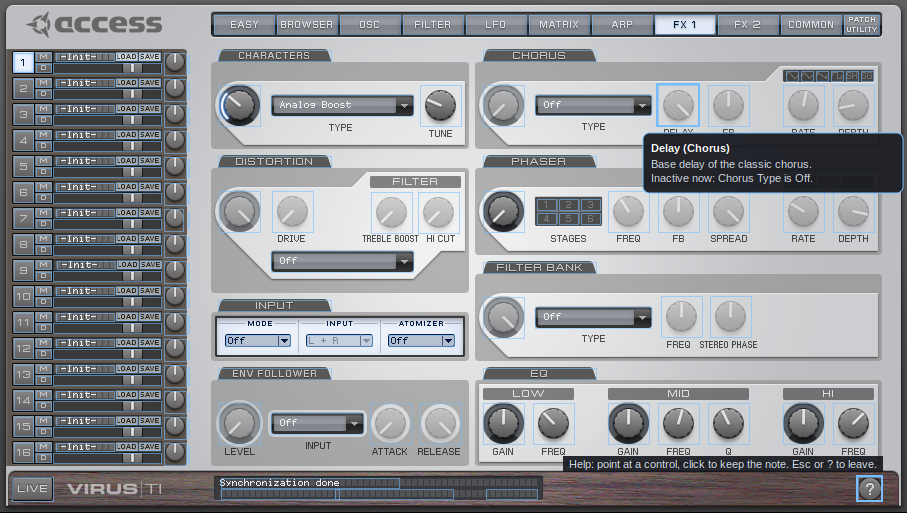
Help note on a greyed-out control, drawn from your own Access installer. TI Revive is not affiliated with Access Music or Kemper.
Since 0.8.17: audio from your DAW through the Virus. Set PATCH UTILITY > Preferences >
"Input and Output Configuration" to "3 Outs / 1 Input" and a part's Input Mode (FX 1 page) to Static or
Dynamic: the plug-in's sidechain input then goes into the Virus and through that part's filters and effects,
as in the original. REAPER: a 4-channel Virus track, the audio sent to channels 3/4. Ableton Live: pick the
track in the device's Sidechain section. Tested on Linux (REAPER) and macOS (Ableton Live 12), not yet on a
real Windows PC (it works in a Windows 11 VM with Ableton Live). The Audio Unit was tested in Logic Pro.
Since 0.8.17: help mode. Click the ? at the bottom right of the editor: every control gets a short note
on what it does. Point at a control to read it, click to keep the note on screen; clicks do not change values
in this mode, and the page tabs still work. Esc or ? ends it. The notes are written for TI Revive, not taken
from the Access manual.
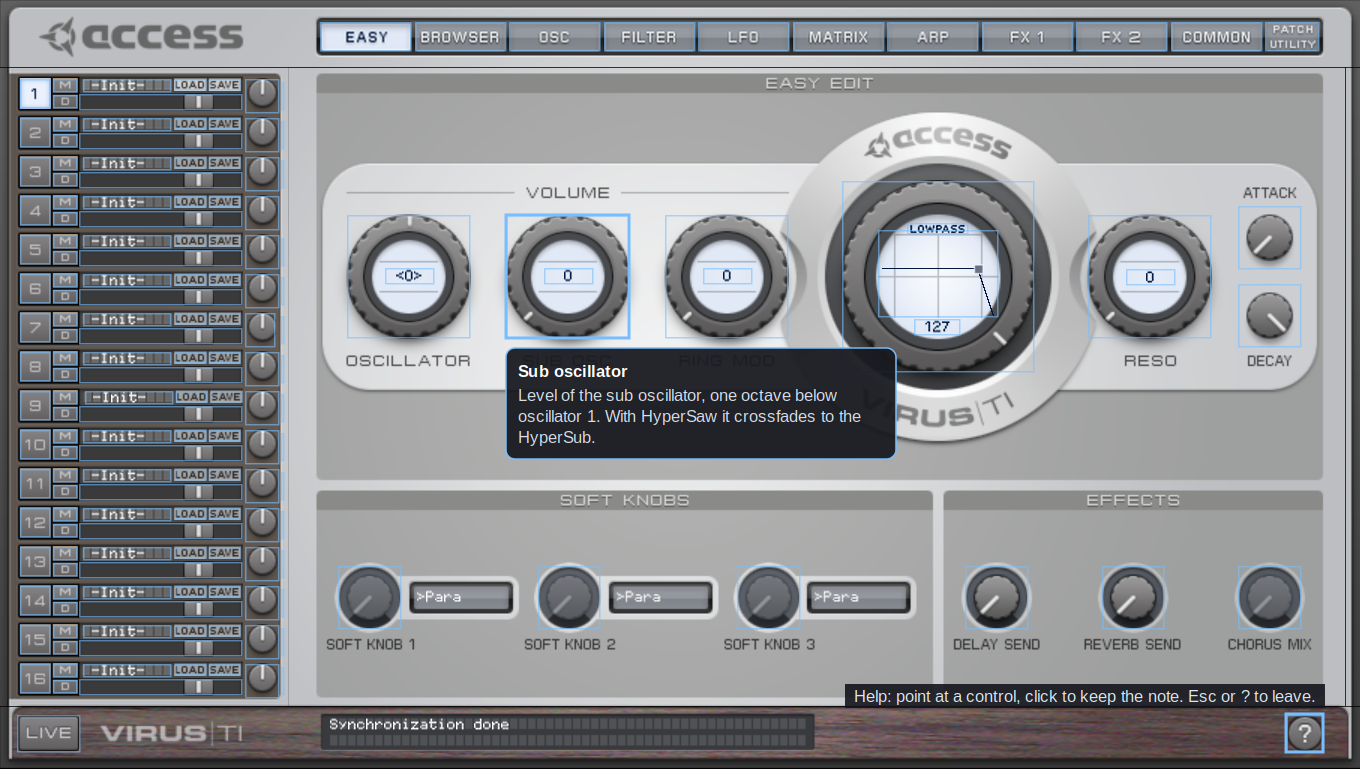
Help mode, drawn from your own Access installer. TI Revive is not affiliated with Access Music or Kemper.
Since 0.8.12: sharper editor on large screens. At 150 or 200 % (right-click the editor, or your
display scaling) the plug-in's images are now computed sharper from your own Access files instead of
being stretched. Linux: reopening the editor no longer crashes the DAW (since 0.8.0), and the menus open
where you click at 150 and 200 %.
Since 0.8.10: steadier connection. Switch the Virus off and on (or replug it) while your DAW runs:
the plug-in now waits until it is ready and plays in time again. Start your DAW before the Virus is on: the
plug-in sends its start-up and your project's sounds as soon as the Virus is there (before they were lost).
Windows: two DAWs no longer use the Virus at the same time - the second one shows "Virus unavailable" and
takes over when the first one closes. USB 3 now also works in "3 Outs / 1 Input".
Since 0.8.9: the third USB output. Like the original Virus Control, you can now use USB 3: in the
plug-in open PATCH UTILITY > Preferences and set "Input and Output Configuration" to "3 Outs / No Input".
Then a part's output can be "USB3 L+R" and its sound comes out of the plug-in's Out 3 - for example for
bass, lead and pad on three separate mixer channels in your DAW. The setting is kept for this computer.
Thanks for asking (issue #4)!
Since 0.8.8: soft knobs on the Virus change the sound. Turning the three soft knobs on the Virus itself
now changes the sound (0.8.7 only moved them in the editor). After a preset chosen on the Virus is loaded,
your current mod wheel, breath, expression and other controller positions are sent again, like the
original Virus Control does.
Since 0.8.7: presets and soft knobs on the Virus itself. A preset you choose on the Virus (its
display, knobs or buttons) now loads into the plug-in and sounds - before, the part kept its old sound and
the plug-in stayed on the old patch. The three soft knobs work in both directions now: in the editor they
control the parameter their destination selects (Easy page), and when you turn them on the Virus the
plug-in follows. Thanks for the reports (issue #4)!
Since 0.8.6: steadier start-up. The plug-in now waits until the Virus has really worked through its
start-up messages and your project's sound, instead of a fixed 4 seconds: the first notes play in time,
also when a duplicated track takes over the Virus (before, the first notes after the takeover could be
up to 2 s late).
Since 0.8.5: one plug-in instance per Virus, also on Windows. Duplicating a track with the plug-in
(e.g. in Ableton) no longer puts the Virus out of time: the copy shows "Virus unavailable" like the original
Virus Control, and when you delete the first instance, the copy takes over the Virus and plays in time
after a short start-up. Thanks for the report (issue #6)!
Since 0.8.4: bigger editor. Right-click an empty spot of the...
TI Revive 0.8.22
TI Revive 0.8.22 - Total Integration for the Access Virus TI without the old Access drivers, now with the
native plug-in "TI Revive Virus Control": looks and works like the original Virus Control and runs
natively on Windows, macOS (Apple Silicon and Intel) and Linux - no Rosetta, Wine or yabridge.
New in 0.8.22: reworked, modernized menus, the same on Windows, macOS and Linux. Every menu (value lists,
LOAD and SAVE, banks, libraries) is a window of its own, like the original's menus on Windows: it can reach
beyond the plug-in window and use the whole screen, with the original's columns (the Wavetable list: 4 columns
of 25). A submenu opens when the pointer rests on its entry for a moment, so you can move across other entries
into an open submenu, for example from RAM A to its patches past RAM B. Arrow keys, Return and Esc work; a
click elsewhere or switching to another window closes the menu.
New in 0.8.22: the REMOTE page. The Virus' remote templates with their names, knob names and MIDI
strings, the original's knob template list, template files to load and save, sent to the Virus like the
original. The knob template list also works with the 32-bit Access installation on Windows.
Since 0.8.21: closer to the original editor. We compared every page with the original Virus Control
side by side. Popup menus open at their control with 25 entries per column, like the original, on Windows,
macOS and Linux (macOS and Linux showed one long column before): the Wavetable list has 4 columns. Right-click
the table name inside the oscillator ring to open it, as in the original. The classic oscillator display
shows the original's waves, the HyperSaw display its lines, and a stored value above its range is shown
clamped like in the original (Vocoder Bands "32").
Since 0.8.21: PATCH UTILITY > INFO shows the TI Revive version, the version of the TI Revive service
and the Virus' OS version. The OS version is read once at connect, with the same read-only requests as the
original driver. The link opens the TI Revive website.
Also in 0.8.21: on Windows, installing the .msi directly removes the Installed apps entries of earlier
setup.exe installs. Virus TI Snow on macOS: USB 3 and the soft knobs work (user report, issue #4).
Since 0.8.20: the Control Center works next to your DAW on macOS and Linux too (it did on Windows):
device info, backups and Nerd mode while the plug-in plays. Its window now opens at the right size, it no
longer crashes on closing (Linux), and Windows setups from before 0.8.2 get the Access look as well. On
macOS the backup works when the Access installer had made Documents/Access Music as administrator: the
installer gives the folder back to you.
Since 0.8.20: duplicated tracks. The copy shows "Virus unavailable" again while the original plays (since
0.8.18 it looked usable), and REAPER on Linux no longer crashes when a track with the plug-in is duplicated.
Also in 0.8.20: Linux finds the factory patch libraries in a localized Documents folder (e.g. Dokumente);
no dropouts in the first seconds with 4096-sample host blocks; the plug-in shows "No Virus TI can be found"
when the TI Revive service is not running; for safety, TI Revive passes only standard read requests to the
Virus' USB control endpoint (nothing that could reach its flash). Every package now lists the third-party
code it contains (THIRD-PARTY-NOTICES.txt).
Since 0.8.18: projects bring back every patch setting. Projects saved the parts in an older format,
and the Virus reset about 20 newer settings when it loaded them: Input Mode, unison, arpeggiator mode,
chorus type, envelopes 3 and 4 and more. Projects now keep the current format, and older ones are converted
when they open. Settings that never reached the Virus in an older project open as the Virus played them.
A new project's chorus shows "Classic": that is what the Virus makes of the original's Init patch.
Since 0.8.18: the "No Virus TI can be found" page. Switch the Virus off or pull its cable while the
editor is open and it shows the original's page for a missing Virus; it goes away by itself when the Virus
is back. Known issue on Linux: after a cable replug, or when the Virus is switched on while no DAW runs, it
can come back without sound until it is switched off and on once (E175, next version).
Since 0.8.18: help notes say why a control is greyed out, for example "Inactive now: Chorus Type is
Off." or "depends on Input Mode, Input Atomizer."
Help note on a greyed-out control, drawn from your own Access installer. TI Revive is not affiliated with Access Music or Kemper.
Since 0.8.17: audio from your DAW through the Virus. Set PATCH UTILITY > Preferences >
"Input and Output Configuration" to "3 Outs / 1 Input" and a part's Input Mode (FX 1 page) to Static or
Dynamic: the plug-in's sidechain input then goes into the Virus and through that part's filters and effects,
as in the original. REAPER: a 4-channel Virus track, the audio sent to channels 3/4. Ableton Live: pick the
track in the device's Sidechain section. Tested on Linux (REAPER) and macOS (Ableton Live 12), not yet on a
real Windows PC (it works in a Windows 11 VM with Ableton Live). The Audio Unit was tested in Logic Pro.
Since 0.8.17: help mode. Click the ? at the bottom right of the editor: every control gets a short note
on what it does. Point at a control to read it, click to keep the note on screen; clicks do not change values
in this mode, and the page tabs still work. Esc or ? ends it. The notes are written for TI Revive, not taken
from the Access manual.
Help mode, drawn from your own Access installer. TI Revive is not affiliated with Access Music or Kemper.
Since 0.8.12: sharper editor on large screens. At 150 or 200 % (right-click the editor, or your
display scaling) the plug-in's images are now computed sharper from your own Access files instead of
being stretched. Linux: reopening the editor no longer crashes the DAW (since 0.8.0), and the menus open
where you click at 150 and 200 %.
Since 0.8.10: steadier connection. Switch the Virus off and on (or replug it) while your DAW runs:
the plug-in now waits until it is ready and plays in time again. Start your DAW before the Virus is on: the
plug-in sends its start-up and your project's sounds as soon as the Virus is there (before they were lost).
Windows: two DAWs no longer use the Virus at the same time - the second one shows "Virus unavailable" and
takes over when the first one closes. USB 3 now also works in "3 Outs / 1 Input".
Since 0.8.9: the third USB output. Like the original Virus Control, you can now use USB 3: in the
plug-in open PATCH UTILITY > Preferences and set "Input and Output Configuration" to "3 Outs / No Input".
Then a part's output can be "USB3 L+R" and its sound comes out of the plug-in's Out 3 - for example for
bass, lead and pad on three separate mixer channels in your DAW. The setting is kept for this computer.
Thanks for asking (issue #4)!
Since 0.8.8: soft knobs on the Virus change the sound. Turning the three soft knobs on the Virus itself
now changes the sound (0.8.7 only moved them in the editor). After a preset chosen on the Virus is loaded,
your current mod wheel, breath, expression and other controller positions are sent again, like the
original Virus Control does.
Since 0.8.7: presets and soft knobs on the Virus itself. A preset you choose on the Virus (its
display, knobs or buttons) now loads into the plug-in and sounds - before, the part kept its old sound and
the plug-in stayed on the old patch. The three soft knobs work in both directions now: in the editor they
control the parameter their destination selects (Easy page), and when you turn them on the Virus the
plug-in follows. Thanks for the reports (issue #4)!
Since 0.8.6: steadier start-up. The plug-in now waits until the Virus has really worked through its
start-up messages and your project's sound, instead of a fixed 4 seconds: the first notes play in time,
also when a duplicated track takes over the Virus (before, the first notes after the takeover could be
up to 2 s late).
Since 0.8.5: one plug-in instance per Virus, also on Windows. Duplicating a track with the plug-in
(e.g. in Ableton) no longer puts the Virus out of time: the copy shows "Virus unavailable" like the original
Virus Control, and when you delete the first instance, the copy takes over the Virus and plays in time
after a short start-up. Thanks for the report (issue #6)!
Since 0.8.4: bigger editor. Right-click an empty spot of the plug-in's editor and choose a size from
100 to 200 %; the choice is kept for new editors. The plug-in also follows the display scaling Windows
reports (e.g. 150 %). The Control Center has the same sizes under View > Size. Thanks for the suggestion!
Since 0.8.3: a DAW's plug-in scan no longer talks to the Virus (it connects only when the plug-in is
used); saved projects no longer grow by a few bytes on every save; on a first setup the start page shows how
long reading the Virus' banks will take (8-9 minutes once, then seconds). Thanks to the virus-ti-rework
project for the findings.
Since 0.8.2: TI Revive Control Center - in the look of Access' Virus Control Center (taken from your
Access installer, like the plug-in's skin): device info, backup of the RAM banks as patch libraries, library
conversion (.mid / .syx), and a Nerd mode that shows live what goes between TI Revive and the Virus
(decoded, read-only) plus the logs for bug reports. Also as the command line tool tirevive-cc. Firmware /
OS updates and flash functions are not supported, on purpose. Lin...
TI Revive 0.8.21
TI Revive 0.8.21 - Total Integration for the Access Virus TI without the old Access drivers, now with the
native plug-in "TI Revive Virus Control": looks and works like the original Virus Control and runs
natively on Windows, macOS (Apple Silicon and Intel) and Linux - no Rosetta, Wine or yabridge.
New in 0.8.21: closer to the original editor. We compared every page with the original Virus Control
side by side. Popup menus open at their control with 25 entries per column, like the original, on Windows,
macOS and Linux (macOS and Linux showed one long column before): the Wavetable list has 4 columns. Right-click
the table name inside the oscillator ring to open it, as in the original. The classic oscillator display
shows the original's waves, the HyperSaw display its lines, and a stored value above its range is shown
clamped like in the original (Vocoder Bands "32").
New in 0.8.21: PATCH UTILITY > INFO shows the TI Revive version, the version of the TI Revive service
and the Virus' OS version. The OS version is read once at connect, with the same read-only requests as the
original driver. The link opens the TI Revive website. The REMOTE page shows the remote templates
(read-only for now).
Also in 0.8.21: on Windows, installing the .msi directly removes the Installed apps entries of earlier
setup.exe installs. Virus TI Snow on macOS: USB 3 and the soft knobs work (user report, issue #4).
Since 0.8.20: the Control Center works next to your DAW on macOS and Linux too (it did on Windows):
device info, backups and Nerd mode while the plug-in plays. Its window now opens at the right size, it no
longer crashes on closing (Linux), and Windows setups from before 0.8.2 get the Access look as well. On
macOS the backup works when the Access installer had made Documents/Access Music as administrator: the
installer gives the folder back to you.
Since 0.8.20: duplicated tracks. The copy shows "Virus unavailable" again while the original plays (since
0.8.18 it looked usable), and REAPER on Linux no longer crashes when a track with the plug-in is duplicated.
Also in 0.8.20: Linux finds the factory patch libraries in a localized Documents folder (e.g. Dokumente);
no dropouts in the first seconds with 4096-sample host blocks; the plug-in shows "No Virus TI can be found"
when the TI Revive service is not running; for safety, TI Revive passes only standard read requests to the
Virus' USB control endpoint (nothing that could reach its flash). Every package now lists the third-party
code it contains (THIRD-PARTY-NOTICES.txt).
Since 0.8.18: projects bring back every patch setting. Projects saved the parts in an older format,
and the Virus reset about 20 newer settings when it loaded them: Input Mode, unison, arpeggiator mode,
chorus type, envelopes 3 and 4 and more. Projects now keep the current format, and older ones are converted
when they open. Settings that never reached the Virus in an older project open as the Virus played them.
A new project's chorus shows "Classic": that is what the Virus makes of the original's Init patch.
Since 0.8.18: the "No Virus TI can be found" page. Switch the Virus off or pull its cable while the
editor is open and it shows the original's page for a missing Virus; it goes away by itself when the Virus
is back. Known issue on Linux: after a cable replug, or when the Virus is switched on while no DAW runs, it
can come back without sound until it is switched off and on once (E175, next version).
Since 0.8.18: help notes say why a control is greyed out, for example "Inactive now: Chorus Type is
Off." or "depends on Input Mode, Input Atomizer."
Help note on a greyed-out control, drawn from your own Access installer. TI Revive is not affiliated with Access Music or Kemper.
Since 0.8.17: audio from your DAW through the Virus. Set PATCH UTILITY > Preferences >
"Input and Output Configuration" to "3 Outs / 1 Input" and a part's Input Mode (FX 1 page) to Static or
Dynamic: the plug-in's sidechain input then goes into the Virus and through that part's filters and effects,
as in the original. REAPER: a 4-channel Virus track, the audio sent to channels 3/4. Ableton Live: pick the
track in the device's Sidechain section. Tested on Linux (REAPER) and macOS (Ableton Live 12), not yet on a
real Windows PC (it works in a Windows 11 VM with Ableton Live). The Audio Unit was tested in Logic Pro.
Since 0.8.17: help mode. Click the ? at the bottom right of the editor: every control gets a short note
on what it does. Point at a control to read it, click to keep the note on screen; clicks do not change values
in this mode, and the page tabs still work. Esc or ? ends it. The notes are written for TI Revive, not taken
from the Access manual.
Help mode, drawn from your own Access installer. TI Revive is not affiliated with Access Music or Kemper.
Since 0.8.12: sharper editor on large screens. At 150 or 200 % (right-click the editor, or your
display scaling) the plug-in's images are now computed sharper from your own Access files instead of
being stretched. Linux: reopening the editor no longer crashes the DAW (since 0.8.0), and the menus open
where you click at 150 and 200 %.
Since 0.8.10: steadier connection. Switch the Virus off and on (or replug it) while your DAW runs:
the plug-in now waits until it is ready and plays in time again. Start your DAW before the Virus is on: the
plug-in sends its start-up and your project's sounds as soon as the Virus is there (before they were lost).
Windows: two DAWs no longer use the Virus at the same time - the second one shows "Virus unavailable" and
takes over when the first one closes. USB 3 now also works in "3 Outs / 1 Input".
Since 0.8.9: the third USB output. Like the original Virus Control, you can now use USB 3: in the
plug-in open PATCH UTILITY > Preferences and set "Input and Output Configuration" to "3 Outs / No Input".
Then a part's output can be "USB3 L+R" and its sound comes out of the plug-in's Out 3 - for example for
bass, lead and pad on three separate mixer channels in your DAW. The setting is kept for this computer.
Thanks for asking (issue #4)!
Since 0.8.8: soft knobs on the Virus change the sound. Turning the three soft knobs on the Virus itself
now changes the sound (0.8.7 only moved them in the editor). After a preset chosen on the Virus is loaded,
your current mod wheel, breath, expression and other controller positions are sent again, like the
original Virus Control does.
Since 0.8.7: presets and soft knobs on the Virus itself. A preset you choose on the Virus (its
display, knobs or buttons) now loads into the plug-in and sounds - before, the part kept its old sound and
the plug-in stayed on the old patch. The three soft knobs work in both directions now: in the editor they
control the parameter their destination selects (Easy page), and when you turn them on the Virus the
plug-in follows. Thanks for the reports (issue #4)!
Since 0.8.6: steadier start-up. The plug-in now waits until the Virus has really worked through its
start-up messages and your project's sound, instead of a fixed 4 seconds: the first notes play in time,
also when a duplicated track takes over the Virus (before, the first notes after the takeover could be
up to 2 s late).
Since 0.8.5: one plug-in instance per Virus, also on Windows. Duplicating a track with the plug-in
(e.g. in Ableton) no longer puts the Virus out of time: the copy shows "Virus unavailable" like the original
Virus Control, and when you delete the first instance, the copy takes over the Virus and plays in time
after a short start-up. Thanks for the report (issue #6)!
Since 0.8.4: bigger editor. Right-click an empty spot of the plug-in's editor and choose a size from
100 to 200 %; the choice is kept for new editors. The plug-in also follows the display scaling Windows
reports (e.g. 150 %). The Control Center has the same sizes under View > Size. Thanks for the suggestion!
Since 0.8.3: a DAW's plug-in scan no longer talks to the Virus (it connects only when the plug-in is
used); saved projects no longer grow by a few bytes on every save; on a first setup the start page shows how
long reading the Virus' banks will take (8-9 minutes once, then seconds). Thanks to the virus-ti-rework
project for the findings.
Since 0.8.2: TI Revive Control Center - in the look of Access' Virus Control Center (taken from your
Access installer, like the plug-in's skin): device info, backup of the RAM banks as patch libraries, library
conversion (.mid / .syx), and a Nerd mode that shows live what goes between TI Revive and the Virus
(decoded, read-only) plus the logs for bug reports. Also as the command line tool tirevive-cc. Firmware /
OS updates and flash functions are not supported, on purpose. Linux: the app needs gtkmm 3. Clean-ups: the
Linux broker no longer opens a TCP port; the macOS broker no longer runs the MIDI stand-in of the old
Access plug-in.
Windows 10/11 x64: download TI-Revive-0.8.21-setup.exe (or the same installer as TI-Revive-0.8.21.msi)
and put your own Access "Virus TI Software Suite" 64-bit .msi next to it. Run it (not code-signed:
SmartScreen -> More info -> Run anyway) and keep "Set up the Access Virus TI files now" checked: the Access
.msi is only unpacked, not installed. Sound card: ASIO device "TI Revive Virus Audio".
macOS 14.4+ (Apple Silicon and Intel): download TI-Revive-0.8.21-mac.zip, run TI Revive.pkg (not
signed: right-click > Open), then Set up Access Virus TI files.command with your own Access .pkg next
to it (only unpacked). VST3 and Audio Unit (Logic, GarageBand...
TI Revive 0.8.20
TI Revive 0.8.20 - Total Integration for the Access Virus TI without the old Access drivers, now with the
native plug-in "TI Revive Virus Control": looks and works like the original Virus Control and runs
natively on Windows, macOS (Apple Silicon and Intel) and Linux - no Rosetta, Wine or yabridge.
New in 0.8.20: the Control Center works next to your DAW on macOS and Linux too (it did on Windows):
device info, backups and Nerd mode while the plug-in plays. Its window now opens at the right size, it no
longer crashes on closing (Linux), and Windows setups from before 0.8.2 get the Access look as well. On
macOS the backup works when the Access installer had made Documents/Access Music as administrator: the
installer gives the folder back to you.
New in 0.8.20: duplicated tracks. The copy shows "Virus unavailable" again while the original plays (since
0.8.18 it looked usable), and REAPER on Linux no longer crashes when a track with the plug-in is duplicated.
Also in 0.8.20: Linux finds the factory patch libraries in a localized Documents folder (e.g. Dokumente);
no dropouts in the first seconds with 4096-sample host blocks; the plug-in shows "No Virus TI can be found"
when the TI Revive service is not running; for safety, TI Revive passes only standard read requests to the
Virus' USB control endpoint (nothing that could reach its flash). Every package now lists the third-party
code it contains (THIRD-PARTY-NOTICES.txt).
Since 0.8.18: projects bring back every patch setting. Projects saved the parts in an older format,
and the Virus reset about 20 newer settings when it loaded them: Input Mode, unison, arpeggiator mode,
chorus type, envelopes 3 and 4 and more. Projects now keep the current format, and older ones are converted
when they open. Settings that never reached the Virus in an older project open as the Virus played them.
A new project's chorus shows "Classic": that is what the Virus makes of the original's Init patch.
Since 0.8.18: the "No Virus TI can be found" page. Switch the Virus off or pull its cable while the
editor is open and it shows the original's page for a missing Virus; it goes away by itself when the Virus
is back. Known issue on Linux: after a cable replug, or when the Virus is switched on while no DAW runs, it
can come back without sound until it is switched off and on once (E175, next version).
Since 0.8.18: help notes say why a control is greyed out, for example "Inactive now: Chorus Type is
Off." or "depends on Input Mode, Input Atomizer."
Help note on a greyed-out control, drawn from your own Access installer. TI Revive is not affiliated with Access Music or Kemper.
Since 0.8.17: audio from your DAW through the Virus. Set PATCH UTILITY > Preferences >
"Input and Output Configuration" to "3 Outs / 1 Input" and a part's Input Mode (FX 1 page) to Static or
Dynamic: the plug-in's sidechain input then goes into the Virus and through that part's filters and effects,
as in the original. REAPER: a 4-channel Virus track, the audio sent to channels 3/4. Ableton Live: pick the
track in the device's Sidechain section. Tested on Linux (REAPER) and macOS (Ableton Live 12), not yet on a
real Windows PC (it works in a Windows 11 VM with Ableton Live). The Audio Unit was tested in Logic Pro.
Since 0.8.17: help mode. Click the ? at the bottom right of the editor: every control gets a short note
on what it does. Point at a control to read it, click to keep the note on screen; clicks do not change values
in this mode, and the page tabs still work. Esc or ? ends it. The notes are written for TI Revive, not taken
from the Access manual.
Help mode, drawn from your own Access installer. TI Revive is not affiliated with Access Music or Kemper.
Since 0.8.12: sharper editor on large screens. At 150 or 200 % (right-click the editor, or your
display scaling) the plug-in's images are now computed sharper from your own Access files instead of
being stretched. Linux: reopening the editor no longer crashes the DAW (since 0.8.0), and the menus open
where you click at 150 and 200 %.
Since 0.8.10: steadier connection. Switch the Virus off and on (or replug it) while your DAW runs:
the plug-in now waits until it is ready and plays in time again. Start your DAW before the Virus is on: the
plug-in sends its start-up and your project's sounds as soon as the Virus is there (before they were lost).
Windows: two DAWs no longer use the Virus at the same time - the second one shows "Virus unavailable" and
takes over when the first one closes. USB 3 now also works in "3 Outs / 1 Input".
Since 0.8.9: the third USB output. Like the original Virus Control, you can now use USB 3: in the
plug-in open PATCH UTILITY > Preferences and set "Input and Output Configuration" to "3 Outs / No Input".
Then a part's output can be "USB3 L+R" and its sound comes out of the plug-in's Out 3 - for example for
bass, lead and pad on three separate mixer channels in your DAW. The setting is kept for this computer.
Thanks for asking (issue #4)!
Since 0.8.8: soft knobs on the Virus change the sound. Turning the three soft knobs on the Virus itself
now changes the sound (0.8.7 only moved them in the editor). After a preset chosen on the Virus is loaded,
your current mod wheel, breath, expression and other controller positions are sent again, like the
original Virus Control does.
Since 0.8.7: presets and soft knobs on the Virus itself. A preset you choose on the Virus (its
display, knobs or buttons) now loads into the plug-in and sounds - before, the part kept its old sound and
the plug-in stayed on the old patch. The three soft knobs work in both directions now: in the editor they
control the parameter their destination selects (Easy page), and when you turn them on the Virus the
plug-in follows. Thanks for the reports (issue #4)!
Since 0.8.6: steadier start-up. The plug-in now waits until the Virus has really worked through its
start-up messages and your project's sound, instead of a fixed 4 seconds: the first notes play in time,
also when a duplicated track takes over the Virus (before, the first notes after the takeover could be
up to 2 s late).
Since 0.8.5: one plug-in instance per Virus, also on Windows. Duplicating a track with the plug-in
(e.g. in Ableton) no longer puts the Virus out of time: the copy shows "Virus unavailable" like the original
Virus Control, and when you delete the first instance, the copy takes over the Virus and plays in time
after a short start-up. Thanks for the report (issue #6)!
Since 0.8.4: bigger editor. Right-click an empty spot of the plug-in's editor and choose a size from
100 to 200 %; the choice is kept for new editors. The plug-in also follows the display scaling Windows
reports (e.g. 150 %). The Control Center has the same sizes under View > Size. Thanks for the suggestion!
Since 0.8.3: a DAW's plug-in scan no longer talks to the Virus (it connects only when the plug-in is
used); saved projects no longer grow by a few bytes on every save; on a first setup the start page shows how
long reading the Virus' banks will take (8-9 minutes once, then seconds). Thanks to the virus-ti-rework
project for the findings.
Since 0.8.2: TI Revive Control Center - in the look of Access' Virus Control Center (taken from your
Access installer, like the plug-in's skin): device info, backup of the RAM banks as patch libraries, library
conversion (.mid / .syx), and a Nerd mode that shows live what goes between TI Revive and the Virus
(decoded, read-only) plus the logs for bug reports. Also as the command line tool tirevive-cc. Firmware /
OS updates and flash functions are not supported, on purpose. Linux: the app needs gtkmm 3. Clean-ups: the
Linux broker no longer opens a TCP port; the macOS broker no longer runs the MIDI stand-in of the old
Access plug-in.
Windows 10/11 x64: download TI-Revive-0.8.20-setup.exe (or the same installer as TI-Revive-0.8.20.msi)
and put your own Access "Virus TI Software Suite" 64-bit .msi next to it. Run it (not code-signed:
SmartScreen -> More info -> Run anyway) and keep "Set up the Access Virus TI files now" checked: the Access
.msi is only unpacked, not installed. Sound card: ASIO device "TI Revive Virus Audio".
macOS 14.4+ (Apple Silicon and Intel): download TI-Revive-0.8.20-mac.zip, run TI Revive.pkg (not
signed: right-click > Open), then Set up Access Virus TI files.command with your own Access .pkg next
to it (only unpacked). VST3 and Audio Unit (Logic, GarageBand), no Rosetta. Allow your DAW to use the
microphone. Details: README-mac.txt.
Linux (x86_64, Ubuntu 22.04 / Debian 12+): download TI-Revive-0.8.20-linux.tar.gz, unpack it and run
./install.sh with your Access .msi (unpacked with msitools or Wine). Details: README-linux.txt.
Coming from 0.7.x: the classic plug-in "Virus TI (TI Revive)" is replaced; its projects open with
"TI Revive Virus Control". Virus TI Snow owners: please stay with 0.7.4 for now - the Snow is not
supported by 0.8.x yet (testers welcome).
Third-party code and its licenses: THIRD-PARTY-NOTICES.txt in every package; libusb-1.0.30.tar.bz2 is
the source of the LGPL library in the macOS and Linux broker.
Not affiliated with Access Music or Kemper. Contains no Access software. See the
README for how it works, limitations and uninstall.
TI Revive 0.8.18
TI Revive 0.8.18 - Total Integration for the Access Virus TI without the old Access drivers, now with the
native plug-in "TI Revive Virus Control": looks and works like the original Virus Control and runs
natively on Windows, macOS (Apple Silicon and Intel) and Linux - no Rosetta, Wine or yabridge.
New in 0.8.18: projects bring back every patch setting. Projects saved the parts in an older format,
and the Virus reset about 20 newer settings when it loaded them: Input Mode, unison, arpeggiator mode,
chorus type, envelopes 3 and 4 and more. Projects now keep the current format, and older ones are converted
when they open. Settings that never reached the Virus in an older project open as the Virus played them.
A new project's chorus shows "Classic": that is what the Virus makes of the original's Init patch.
New in 0.8.18: the "No Virus TI can be found" page. Switch the Virus off or pull its cable while the
editor is open and it shows the original's page for a missing Virus; it goes away by itself when the Virus
is back. Known issue on Linux: after a cable replug, or when the Virus is switched on while no DAW runs, it
can come back without sound until it is switched off and on once (E175, next version).
New in 0.8.18: help notes say why a control is greyed out, for example "Inactive now: Chorus Type is
Off." or "depends on Input Mode, Input Atomizer."
Help note on a greyed-out control, drawn from your own Access installer. TI Revive is not affiliated with Access Music or Kemper.
Since 0.8.17: audio from your DAW through the Virus. Set PATCH UTILITY > Preferences >
"Input and Output Configuration" to "3 Outs / 1 Input" and a part's Input Mode (FX 1 page) to Static or
Dynamic: the plug-in's sidechain input then goes into the Virus and through that part's filters and effects,
as in the original. REAPER: a 4-channel Virus track, the audio sent to channels 3/4. Ableton Live: pick the
track in the device's Sidechain section. Tested on Linux (REAPER) and macOS (Ableton Live 12), not yet on a
real Windows PC (it works in a Windows 11 VM with Ableton Live). The Audio Unit was tested in Logic Pro.
Since 0.8.17: help mode. Click the ? at the bottom right of the editor: every control gets a short note
on what it does. Point at a control to read it, click to keep the note on screen; clicks do not change values
in this mode, and the page tabs still work. Esc or ? ends it. The notes are written for TI Revive, not taken
from the Access manual.
Help mode, drawn from your own Access installer. TI Revive is not affiliated with Access Music or Kemper.
Since 0.8.12: sharper editor on large screens. At 150 or 200 % (right-click the editor, or your
display scaling) the plug-in's images are now computed sharper from your own Access files instead of
being stretched. Linux: reopening the editor no longer crashes the DAW (since 0.8.0), and the menus open
where you click at 150 and 200 %.
Since 0.8.10: steadier connection. Switch the Virus off and on (or replug it) while your DAW runs:
the plug-in now waits until it is ready and plays in time again. Start your DAW before the Virus is on: the
plug-in sends its start-up and your project's sounds as soon as the Virus is there (before they were lost).
Windows: two DAWs no longer use the Virus at the same time - the second one shows "Virus unavailable" and
takes over when the first one closes. USB 3 now also works in "3 Outs / 1 Input".
Since 0.8.9: the third USB output. Like the original Virus Control, you can now use USB 3: in the
plug-in open PATCH UTILITY > Preferences and set "Input and Output Configuration" to "3 Outs / No Input".
Then a part's output can be "USB3 L+R" and its sound comes out of the plug-in's Out 3 - for example for
bass, lead and pad on three separate mixer channels in your DAW. The setting is kept for this computer.
Thanks for asking (issue #4)!
Since 0.8.8: soft knobs on the Virus change the sound. Turning the three soft knobs on the Virus itself
now changes the sound (0.8.7 only moved them in the editor). After a preset chosen on the Virus is loaded,
your current mod wheel, breath, expression and other controller positions are sent again, like the
original Virus Control does.
Since 0.8.7: presets and soft knobs on the Virus itself. A preset you choose on the Virus (its
display, knobs or buttons) now loads into the plug-in and sounds - before, the part kept its old sound and
the plug-in stayed on the old patch. The three soft knobs work in both directions now: in the editor they
control the parameter their destination selects (Easy page), and when you turn them on the Virus the
plug-in follows. Thanks for the reports (issue #4)!
Since 0.8.6: steadier start-up. The plug-in now waits until the Virus has really worked through its
start-up messages and your project's sound, instead of a fixed 4 seconds: the first notes play in time,
also when a duplicated track takes over the Virus (before, the first notes after the takeover could be
up to 2 s late).
Since 0.8.5: one plug-in instance per Virus, also on Windows. Duplicating a track with the plug-in
(e.g. in Ableton) no longer puts the Virus out of time: the copy shows "Virus unavailable" like the original
Virus Control, and when you delete the first instance, the copy takes over the Virus and plays in time
after a short start-up. Thanks for the report (issue #6)!
Since 0.8.4: bigger editor. Right-click an empty spot of the plug-in's editor and choose a size from
100 to 200 %; the choice is kept for new editors. The plug-in also follows the display scaling Windows
reports (e.g. 150 %). The Control Center has the same sizes under View > Size. Thanks for the suggestion!
Since 0.8.3: a DAW's plug-in scan no longer talks to the Virus (it connects only when the plug-in is
used); saved projects no longer grow by a few bytes on every save; on a first setup the start page shows how
long reading the Virus' banks will take (8-9 minutes once, then seconds). Thanks to the virus-ti-rework
project for the findings.
Since 0.8.2: TI Revive Control Center - in the look of Access' Virus Control Center (taken from your
Access installer, like the plug-in's skin): device info, backup of the RAM banks as patch libraries, library
conversion (.mid / .syx), and a Nerd mode that shows live what goes between TI Revive and the Virus
(decoded, read-only) plus the logs for bug reports. Also as the command line tool tirevive-cc. Firmware /
OS updates and flash functions are not supported, on purpose. Linux: the app needs gtkmm 3. Clean-ups: the
Linux broker no longer opens a TCP port; the macOS broker no longer runs the MIDI stand-in of the old
Access plug-in.
Windows 10/11 x64: download TI-Revive-0.8.18-setup.exe (or the same installer as TI-Revive-0.8.18.msi)
and put your own Access "Virus TI Software Suite" 64-bit .msi next to it. Run it (not code-signed:
SmartScreen -> More info -> Run anyway) and keep "Set up the Access Virus TI files now" checked: the Access
.msi is only unpacked, not installed. Sound card: ASIO device "TI Revive Virus Audio".
macOS 14.4+ (Apple Silicon and Intel): download TI-Revive-0.8.18-mac.zip, run TI Revive.pkg (not
signed: right-click > Open), then Set up Access Virus TI files.command with your own Access .pkg next
to it (only unpacked). VST3 and Audio Unit (Logic, GarageBand), no Rosetta. Allow your DAW to use the
microphone. Details: README-mac.txt.
Linux (x86_64, Ubuntu 22.04 / Debian 12+): download TI-Revive-0.8.18-linux.tar.gz, unpack it and run
./install.sh with your Access .msi (unpacked with msitools or Wine). Details: README-linux.txt.
Coming from 0.7.x: the classic plug-in "Virus TI (TI Revive)" is replaced; its projects open with
"TI Revive Virus Control". Virus TI Snow owners: please stay with 0.7.4 for now - the Snow is not
supported by 0.8.x yet (testers welcome).
Not affiliated with Access Music or Kemper. Contains no Access software. See the
README for how it works, limitations and uninstall.
TI Revive 0.8.17
TI Revive 0.8.17 - Total Integration for the Access Virus TI without the old Access drivers, now with the
native plug-in "TI Revive Virus Control": looks and works like the original Virus Control and runs
natively on Windows, macOS (Apple Silicon and Intel) and Linux - no Rosetta, Wine or yabridge.
New in 0.8.17: audio from your DAW through the Virus. Set PATCH UTILITY > Preferences >
"Input and Output Configuration" to "3 Outs / 1 Input" and a part's Input Mode (FX 1 page) to Static or
Dynamic: the plug-in's sidechain input then goes into the Virus and through that part's filters and effects,
as in the original. REAPER: a 4-channel Virus track, the audio sent to channels 3/4. Ableton Live: pick the
track in the device's Sidechain section. Tested on Linux (REAPER) and macOS (Ableton Live 12), not yet on a
real Windows PC. Known issue: after reopening a project set Input Mode once more. The Audio Unit was tested
in Logic Pro for the first time.
New in 0.8.17: help mode. Click the ? at the bottom right of the editor: every control gets a short note
on what it does. Point at a control to read it, click to keep the note on screen; clicks do not change values
in this mode, and the page tabs still work. Esc or ? ends it. The notes are written for TI Revive, not taken
from the Access manual.
Help mode, drawn from your own Access installer. TI Revive is not affiliated with Access Music or Kemper.
Since 0.8.12: sharper editor on large screens. At 150 or 200 % (right-click the editor, or your
display scaling) the plug-in's images are now computed sharper from your own Access files instead of
being stretched. Linux: reopening the editor no longer crashes the DAW (since 0.8.0), and the menus open
where you click at 150 and 200 %.
Since 0.8.10: steadier connection. Switch the Virus off and on (or replug it) while your DAW runs:
the plug-in now waits until it is ready and plays in time again. Start your DAW before the Virus is on: the
plug-in sends its start-up and your project's sounds as soon as the Virus is there (before they were lost).
Windows: two DAWs no longer use the Virus at the same time - the second one shows "Virus unavailable" and
takes over when the first one closes. USB 3 now also works in "3 Outs / 1 Input".
Since 0.8.9: the third USB output. Like the original Virus Control, you can now use USB 3: in the
plug-in open PATCH UTILITY > Preferences and set "Input and Output Configuration" to "3 Outs / No Input".
Then a part's output can be "USB3 L+R" and its sound comes out of the plug-in's Out 3 - for example for
bass, lead and pad on three separate mixer channels in your DAW. The setting is kept for this computer.
Thanks for asking (issue #4)!
Since 0.8.8: soft knobs on the Virus change the sound. Turning the three soft knobs on the Virus itself
now changes the sound (0.8.7 only moved them in the editor). After a preset chosen on the Virus is loaded,
your current mod wheel, breath, expression and other controller positions are sent again, like the
original Virus Control does.
Since 0.8.7: presets and soft knobs on the Virus itself. A preset you choose on the Virus (its
display, knobs or buttons) now loads into the plug-in and sounds - before, the part kept its old sound and
the plug-in stayed on the old patch. The three soft knobs work in both directions now: in the editor they
control the parameter their destination selects (Easy page), and when you turn them on the Virus the
plug-in follows. Thanks for the reports (issue #4)!
Since 0.8.6: steadier start-up. The plug-in now waits until the Virus has really worked through its
start-up messages and your project's sound, instead of a fixed 4 seconds: the first notes play in time,
also when a duplicated track takes over the Virus (before, the first notes after the takeover could be
up to 2 s late).
Since 0.8.5: one plug-in instance per Virus, also on Windows. Duplicating a track with the plug-in
(e.g. in Ableton) no longer puts the Virus out of time: the copy shows "Virus unavailable" like the original
Virus Control, and when you delete the first instance, the copy takes over the Virus and plays in time
after a short start-up. Thanks for the report (issue #6)!
Since 0.8.4: bigger editor. Right-click an empty spot of the plug-in's editor and choose a size from
100 to 200 %; the choice is kept for new editors. The plug-in also follows the display scaling Windows
reports (e.g. 150 %). The Control Center has the same sizes under View > Size. Thanks for the suggestion!
Since 0.8.3: a DAW's plug-in scan no longer talks to the Virus (it connects only when the plug-in is
used); saved projects no longer grow by a few bytes on every save; on a first setup the start page shows how
long reading the Virus' banks will take (8-9 minutes once, then seconds). Thanks to the virus-ti-rework
project for the findings.
Since 0.8.2: TI Revive Control Center - in the look of Access' Virus Control Center (taken from your
Access installer, like the plug-in's skin): device info, backup of the RAM banks as patch libraries, library
conversion (.mid / .syx), and a Nerd mode that shows live what goes between TI Revive and the Virus
(decoded, read-only) plus the logs for bug reports. Also as the command line tool tirevive-cc. Firmware /
OS updates and flash functions are not supported, on purpose. Linux: the app needs gtkmm 3. Clean-ups: the
Linux broker no longer opens a TCP port; the macOS broker no longer runs the MIDI stand-in of the old
Access plug-in.
Windows 10/11 x64: download TI-Revive-0.8.17-setup.exe (or the same installer as TI-Revive-0.8.17.msi)
and put your own Access "Virus TI Software Suite" 64-bit .msi next to it. Run it (not code-signed:
SmartScreen -> More info -> Run anyway) and keep "Set up the Access Virus TI files now" checked: the Access
.msi is only unpacked, not installed. Sound card: ASIO device "TI Revive Virus Audio".
macOS 14.4+ (Apple Silicon and Intel): download TI-Revive-0.8.17-mac.zip, run TI Revive.pkg (not
signed: right-click > Open), then Set up Access Virus TI files.command with your own Access .pkg next
to it (only unpacked). VST3 and Audio Unit (Logic, GarageBand), no Rosetta. Allow your DAW to use the
microphone. Details: README-mac.txt.
Linux (x86_64, Ubuntu 22.04 / Debian 12+): download TI-Revive-0.8.17-linux.tar.gz, unpack it and run
./install.sh with your Access .msi (unpacked with msitools or Wine). Details: README-linux.txt.
Coming from 0.7.x: the classic plug-in "Virus TI (TI Revive)" is replaced; its projects open with
"TI Revive Virus Control". Virus TI Snow owners: please stay with 0.7.4 for now - the Snow is not
supported by 0.8.x yet (testers welcome).
Not affiliated with Access Music or Kemper. Contains no Access software. See the
README for how it works, limitations and uninstall.
TI Revive 0.8.12
TI Revive 0.8.12 - Total Integration for the Access Virus TI without the old Access drivers, now with the
native plug-in "TI Revive Virus Control": looks and works like the original Virus Control and runs
natively on Windows, macOS (Apple Silicon and Intel) and Linux - no Rosetta, Wine or yabridge.
New in 0.8.12: sharper editor on large screens. At 150 or 200 % (right-click the editor, or your
display scaling) the plug-in's images are now computed sharper from your own Access files instead of
being stretched. Linux: reopening the editor no longer crashes the DAW (since 0.8.0), and the menus open
where you click at 150 and 200 %.
Since 0.8.10: steadier connection. Switch the Virus off and on (or replug it) while your DAW runs:
the plug-in now waits until it is ready and plays in time again. Start your DAW before the Virus is on: the
plug-in sends its start-up and your project's sounds as soon as the Virus is there (before they were lost).
Windows: two DAWs no longer use the Virus at the same time - the second one shows "Virus unavailable" and
takes over when the first one closes. USB 3 now also works in "3 Outs / 1 Input".
Since 0.8.9: the third USB output. Like the original Virus Control, you can now use USB 3: in the
plug-in open PATCH UTILITY > Preferences and set "Input and Output Configuration" to "3 Outs / No Input".
Then a part's output can be "USB3 L+R" and its sound comes out of the plug-in's Out 3 - for example for
bass, lead and pad on three separate mixer channels in your DAW. The setting is kept for this computer.
Thanks for asking (issue #4)!
Since 0.8.8: soft knobs on the Virus change the sound. Turning the three soft knobs on the Virus itself
now changes the sound (0.8.7 only moved them in the editor). After a preset chosen on the Virus is loaded,
your current mod wheel, breath, expression and other controller positions are sent again, like the
original Virus Control does.
Since 0.8.7: presets and soft knobs on the Virus itself. A preset you choose on the Virus (its
display, knobs or buttons) now loads into the plug-in and sounds - before, the part kept its old sound and
the plug-in stayed on the old patch. The three soft knobs work in both directions now: in the editor they
control the parameter their destination selects (Easy page), and when you turn them on the Virus the
plug-in follows. Thanks for the reports (issue #4)!
Since 0.8.6: steadier start-up. The plug-in now waits until the Virus has really worked through its
start-up messages and your project's sound, instead of a fixed 4 seconds: the first notes play in time,
also when a duplicated track takes over the Virus (before, the first notes after the takeover could be
up to 2 s late).
Since 0.8.5: one plug-in instance per Virus, also on Windows. Duplicating a track with the plug-in
(e.g. in Ableton) no longer puts the Virus out of time: the copy shows "Virus unavailable" like the original
Virus Control, and when you delete the first instance, the copy takes over the Virus and plays in time
after a short start-up. Thanks for the report (issue #6)!
Since 0.8.4: bigger editor. Right-click an empty spot of the plug-in's editor and choose a size from
100 to 200 %; the choice is kept for new editors. The plug-in also follows the display scaling Windows
reports (e.g. 150 %). The Control Center has the same sizes under View > Size. Thanks for the suggestion!
Since 0.8.3: a DAW's plug-in scan no longer talks to the Virus (it connects only when the plug-in is
used); saved projects no longer grow by a few bytes on every save; on a first setup the start page shows how
long reading the Virus' banks will take (8-9 minutes once, then seconds). Thanks to the virus-ti-rework
project for the findings.
Since 0.8.2: TI Revive Control Center - in the look of Access' Virus Control Center (taken from your
Access installer, like the plug-in's skin): device info, backup of the RAM banks as patch libraries, library
conversion (.mid / .syx), and a Nerd mode that shows live what goes between TI Revive and the Virus
(decoded, read-only) plus the logs for bug reports. Also as the command line tool tirevive-cc. Firmware /
OS updates and flash functions are not supported, on purpose. Linux: the app needs gtkmm 3. Clean-ups: the
Linux broker no longer opens a TCP port; the macOS broker no longer runs the MIDI stand-in of the old
Access plug-in.
Windows 10/11 x64: download TI-Revive-0.8.12-setup.exe (or the same installer as TI-Revive-0.8.12.msi)
and put your own Access "Virus TI Software Suite" 64-bit .msi next to it. Run it (not code-signed:
SmartScreen -> More info -> Run anyway) and keep "Set up the Access Virus TI files now" checked: the Access
.msi is only unpacked, not installed. Sound card: ASIO device "TI Revive Virus Audio".
macOS 14.4+ (Apple Silicon and Intel): download TI-Revive-0.8.12-mac.zip, run TI Revive.pkg (not
signed: right-click > Open), then Set up Access Virus TI files.command with your own Access .pkg next
to it (only unpacked). VST3 and Audio Unit (Logic, GarageBand), no Rosetta. Allow your DAW to use the
microphone. Details: README-mac.txt.
Linux (x86_64, Ubuntu 22.04 / Debian 12+): download TI-Revive-0.8.12-linux.tar.gz, unpack it and run
./install.sh with your Access .msi (unpacked with msitools or Wine). Details: README-linux.txt.
Coming from 0.7.x: the classic plug-in "Virus TI (TI Revive)" is replaced; its projects open with
"TI Revive Virus Control". Virus TI Snow owners: please stay with 0.7.4 for now - the Snow is not
supported by 0.8.x yet (testers welcome).
Not affiliated with Access Music or Kemper. Contains no Access software. See the
README for how it works, limitations and uninstall.
TI Revive 0.8.10
TI Revive 0.8.10 - Total Integration for the Access Virus TI without the old Access drivers, now with the
native plug-in "TI Revive Virus Control": looks and works like the original Virus Control and runs
natively on Windows, macOS (Apple Silicon and Intel) and Linux - no Rosetta, Wine or yabridge.
New in 0.8.10: steadier connection. Switch the Virus off and on (or replug it) while your DAW runs:
the plug-in now waits until it is ready and plays in time again. Start your DAW before the Virus is on: the
plug-in sends its start-up and your project's sounds as soon as the Virus is there (before they were lost).
Windows: two DAWs no longer use the Virus at the same time - the second one shows "Virus unavailable" and
takes over when the first one closes. USB 3 now also works in "3 Outs / 1 Input".
Since 0.8.9: the third USB output. Like the original Virus Control, you can now use USB 3: in the
plug-in open PATCH UTILITY > Preferences and set "Input and Output Configuration" to "3 Outs / No Input".
Then a part's output can be "USB3 L+R" and its sound comes out of the plug-in's Out 3 - for example for
bass, lead and pad on three separate mixer channels in your DAW. The setting is kept for this computer.
Thanks for asking (issue #4)!
Since 0.8.8: soft knobs on the Virus change the sound. Turning the three soft knobs on the Virus itself
now changes the sound (0.8.7 only moved them in the editor). After a preset chosen on the Virus is loaded,
your current mod wheel, breath, expression and other controller positions are sent again, like the
original Virus Control does.
Since 0.8.7: presets and soft knobs on the Virus itself. A preset you choose on the Virus (its
display, knobs or buttons) now loads into the plug-in and sounds - before, the part kept its old sound and
the plug-in stayed on the old patch. The three soft knobs work in both directions now: in the editor they
control the parameter their destination selects (Easy page), and when you turn them on the Virus the
plug-in follows. Thanks for the reports (issue #4)!
Since 0.8.6: steadier start-up. The plug-in now waits until the Virus has really worked through its
start-up messages and your project's sound, instead of a fixed 4 seconds: the first notes play in time,
also when a duplicated track takes over the Virus (before, the first notes after the takeover could be
up to 2 s late).
Since 0.8.5: one plug-in instance per Virus, also on Windows. Duplicating a track with the plug-in
(e.g. in Ableton) no longer puts the Virus out of time: the copy shows "Virus unavailable" like the original
Virus Control, and when you delete the first instance, the copy takes over the Virus and plays in time
after a short start-up. Thanks for the report (issue #6)!
Since 0.8.4: bigger editor. Right-click an empty spot of the plug-in's editor and choose a size from
100 to 200 %; the choice is kept for new editors. The plug-in also follows the display scaling Windows
reports (e.g. 150 %). The Control Center has the same sizes under View > Size. Thanks for the suggestion!
Since 0.8.3: a DAW's plug-in scan no longer talks to the Virus (it connects only when the plug-in is
used); saved projects no longer grow by a few bytes on every save; on a first setup the start page shows how
long reading the Virus' banks will take (8-9 minutes once, then seconds). Thanks to the virus-ti-rework
project for the findings.
Since 0.8.2: TI Revive Control Center - in the look of Access' Virus Control Center (taken from your
Access installer, like the plug-in's skin): device info, backup of the RAM banks as patch libraries, library
conversion (.mid / .syx), and a Nerd mode that shows live what goes between TI Revive and the Virus
(decoded, read-only) plus the logs for bug reports. Also as the command line tool tirevive-cc. Firmware /
OS updates and flash functions are not supported, on purpose. Linux: the app needs gtkmm 3. Clean-ups: the
Linux broker no longer opens a TCP port; the macOS broker no longer runs the MIDI stand-in of the old
Access plug-in.
Windows 10/11 x64: download TI-Revive-0.8.10-setup.exe (or the same installer as TI-Revive-0.8.10.msi)
and put your own Access "Virus TI Software Suite" 64-bit .msi next to it. Run it (not code-signed:
SmartScreen -> More info -> Run anyway) and keep "Set up the Access Virus TI files now" checked: the Access
.msi is only unpacked, not installed. Sound card: ASIO device "TI Revive Virus Audio".
macOS 14.4+ (Apple Silicon and Intel): download TI-Revive-0.8.10-mac.zip, run TI Revive.pkg (not
signed: right-click > Open), then Set up Access Virus TI files.command with your own Access .pkg next
to it (only unpacked). VST3 and Audio Unit (Logic, GarageBand), no Rosetta. Allow your DAW to use the
microphone. Details: README-mac.txt.
Linux (x86_64, Ubuntu 22.04 / Debian 12+): download TI-Revive-0.8.10-linux.tar.gz, unpack it and run
./install.sh with your Access .msi (unpacked with msitools or Wine). Details: README-linux.txt.
Coming from 0.7.x: the classic plug-in "Virus TI (TI Revive)" is replaced; its projects open with
"TI Revive Virus Control". Virus TI Snow owners: please stay with 0.7.4 for now - the Snow is not
supported by 0.8.x yet (testers welcome).
Not affiliated with Access Music or Kemper. Contains no Access software. See the
README for how it works, limitations and uninstall.
TI Revive 0.8.9
TI Revive 0.8.9 - Total Integration for the Access Virus TI without the old Access drivers, now with the
native plug-in "TI Revive Virus Control": looks and works like the original Virus Control and runs
natively on Windows, macOS (Apple Silicon and Intel) and Linux - no Rosetta, Wine or yabridge.
New in 0.8.9: the third USB output. Like the original Virus Control, you can now use USB 3: in the
plug-in open PATCH UTILITY > Preferences and set "Input and Output Configuration" to "3 Outs / No Input".
Then a part's output can be "USB3 L+R" and its sound comes out of the plug-in's Out 3 - for example for
bass, lead and pad on three separate mixer channels in your DAW. The setting is kept for this computer.
Thanks for asking (issue #4)!
Since 0.8.8: soft knobs on the Virus change the sound. Turning the three soft knobs on the Virus itself
now changes the sound (0.8.7 only moved them in the editor). After a preset chosen on the Virus is loaded,
your current mod wheel, breath, expression and other controller positions are sent again, like the
original Virus Control does.
Since 0.8.7: presets and soft knobs on the Virus itself. A preset you choose on the Virus (its
display, knobs or buttons) now loads into the plug-in and sounds - before, the part kept its old sound and
the plug-in stayed on the old patch. The three soft knobs work in both directions now: in the editor they
control the parameter their destination selects (Easy page), and when you turn them on the Virus the
plug-in follows. Thanks for the reports (issue #4)!
Since 0.8.6: steadier start-up. The plug-in now waits until the Virus has really worked through its
start-up messages and your project's sound, instead of a fixed 4 seconds: the first notes play in time,
also when a duplicated track takes over the Virus (before, the first notes after the takeover could be
up to 2 s late).
Since 0.8.5: one plug-in instance per Virus, also on Windows. Duplicating a track with the plug-in
(e.g. in Ableton) no longer puts the Virus out of time: the copy shows "Virus unavailable" like the original
Virus Control, and when you delete the first instance, the copy takes over the Virus and plays in time
after a short start-up. Thanks for the report (issue #6)!
Since 0.8.4: bigger editor. Right-click an empty spot of the plug-in's editor and choose a size from
100 to 200 %; the choice is kept for new editors. The plug-in also follows the display scaling Windows
reports (e.g. 150 %). The Control Center has the same sizes under View > Size. Thanks for the suggestion!
Since 0.8.3: a DAW's plug-in scan no longer talks to the Virus (it connects only when the plug-in is
used); saved projects no longer grow by a few bytes on every save; on a first setup the start page shows how
long reading the Virus' banks will take (8-9 minutes once, then seconds). Thanks to the virus-ti-rework
project for the findings.
Since 0.8.2: TI Revive Control Center - in the look of Access' Virus Control Center (taken from your
Access installer, like the plug-in's skin): device info, backup of the RAM banks as patch libraries, library
conversion (.mid / .syx), and a Nerd mode that shows live what goes between TI Revive and the Virus
(decoded, read-only) plus the logs for bug reports. Also as the command line tool tirevive-cc. Firmware /
OS updates and flash functions are not supported, on purpose. Linux: the app needs gtkmm 3. Clean-ups: the
Linux broker no longer opens a TCP port; the macOS broker no longer runs the MIDI stand-in of the old
Access plug-in.
Windows 10/11 x64: download TI-Revive-0.8.9-setup.exe (or the same installer as TI-Revive-0.8.9.msi)
and put your own Access "Virus TI Software Suite" 64-bit .msi next to it. Run it (not code-signed:
SmartScreen -> More info -> Run anyway) and keep "Set up the Access Virus TI files now" checked: the Access
.msi is only unpacked, not installed. Sound card: ASIO device "TI Revive Virus Audio".
macOS 14.4+ (Apple Silicon and Intel): download TI-Revive-0.8.9-mac.zip, run TI Revive.pkg (not
signed: right-click > Open), then Set up Access Virus TI files.command with your own Access .pkg next
to it (only unpacked). VST3 and Audio Unit (Logic, GarageBand), no Rosetta. Allow your DAW to use the
microphone. Details: README-mac.txt.
Linux (x86_64, Ubuntu 22.04 / Debian 12+): download TI-Revive-0.8.9-linux.tar.gz, unpack it and run
./install.sh with your Access .msi (unpacked with msitools or Wine). Details: README-linux.txt.
Coming from 0.7.x: the classic plug-in "Virus TI (TI Revive)" is replaced; its projects open with
"TI Revive Virus Control". Virus TI Snow owners: please stay with 0.7.4 for now - the Snow is not
supported by 0.8.x yet (testers welcome).
Not affiliated with Access Music or Kemper. Contains no Access software. See the
README for how it works, limitations and uninstall.
TI Revive 0.8.8
TI Revive 0.8.8 - Total Integration for the Access Virus TI without the old Access drivers, now with the
native plug-in "TI Revive Virus Control": looks and works like the original Virus Control and runs
natively on Windows, macOS (Apple Silicon and Intel) and Linux - no Rosetta, Wine or yabridge.
New in 0.8.8: soft knobs on the Virus change the sound. Turning the three soft knobs on the Virus itself
now changes the sound (0.8.7 only moved them in the editor). After a preset chosen on the Virus is loaded,
your current mod wheel, breath, expression and other controller positions are sent again, like the
original Virus Control does.
Since 0.8.7: presets and soft knobs on the Virus itself. A preset you choose on the Virus (its
display, knobs or buttons) now loads into the plug-in and sounds - before, the part kept its old sound and
the plug-in stayed on the old patch. The three soft knobs work in both directions now: in the editor they
control the parameter their destination selects (Easy page), and when you turn them on the Virus the
plug-in follows. Thanks for the reports (issue #4)!
Since 0.8.6: steadier start-up. The plug-in now waits until the Virus has really worked through its
start-up messages and your project's sound, instead of a fixed 4 seconds: the first notes play in time,
also when a duplicated track takes over the Virus (before, the first notes after the takeover could be
up to 2 s late).
Since 0.8.5: one plug-in instance per Virus, also on Windows. Duplicating a track with the plug-in
(e.g. in Ableton) no longer puts the Virus out of time: the copy shows "Virus unavailable" like the original
Virus Control, and when you delete the first instance, the copy takes over the Virus and plays in time
after a short start-up. Thanks for the report (issue #6)!
Since 0.8.4: bigger editor. Right-click an empty spot of the plug-in's editor and choose a size from
100 to 200 %; the choice is kept for new editors. The plug-in also follows the display scaling Windows
reports (e.g. 150 %). The Control Center has the same sizes under View > Size. Thanks for the suggestion!
Since 0.8.3: a DAW's plug-in scan no longer talks to the Virus (it connects only when the plug-in is
used); saved projects no longer grow by a few bytes on every save; on a first setup the start page shows how
long reading the Virus' banks will take (8-9 minutes once, then seconds). Thanks to the virus-ti-rework
project for the findings.
Since 0.8.2: TI Revive Control Center - in the look of Access' Virus Control Center (taken from your
Access installer, like the plug-in's skin): device info, backup of the RAM banks as patch libraries, library
conversion (.mid / .syx), and a Nerd mode that shows live what goes between TI Revive and the Virus
(decoded, read-only) plus the logs for bug reports. Also as the command line tool tirevive-cc. Firmware /
OS updates and flash functions are not supported, on purpose. Linux: the app needs gtkmm 3. Clean-ups: the
Linux broker no longer opens a TCP port; the macOS broker no longer runs the MIDI stand-in of the old
Access plug-in.
Windows 10/11 x64: download TI-Revive-0.8.8-setup.exe (or the same installer as TI-Revive-0.8.8.msi)
and put your own Access "Virus TI Software Suite" 64-bit .msi next to it. Run it (not code-signed:
SmartScreen -> More info -> Run anyway) and keep "Set up the Access Virus TI files now" checked: the Access
.msi is only unpacked, not installed. Sound card: ASIO device "TI Revive Virus Audio".
macOS 14.4+ (Apple Silicon and Intel): download TI-Revive-0.8.8-mac.zip, run TI Revive.pkg (not
signed: right-click > Open), then Set up Access Virus TI files.command with your own Access .pkg next
to it (only unpacked). VST3 and Audio Unit (Logic, GarageBand), no Rosetta. Allow your DAW to use the
microphone. Details: README-mac.txt.
Linux (x86_64, Ubuntu 22.04 / Debian 12+): download TI-Revive-0.8.8-linux.tar.gz, unpack it and run
./install.sh with your Access .msi (unpacked with msitools or Wine). Details: README-linux.txt.
Coming from 0.7.x: the classic plug-in "Virus TI (TI Revive)" is replaced; its projects open with
"TI Revive Virus Control". Virus TI Snow owners: please stay with 0.7.4 for now - the Snow is not
supported by 0.8.x yet (testers welcome).
Not affiliated with Access Music or Kemper. Contains no Access software. See the
README for how it works, limitations and uninstall.