If you run into a problem, please open an issue so it can be tracked and fixed.
Track stocks, ETFs, and cryptocurrencies directly in Home Assistant — powered by Yahoo Finance, with a built-in Lovelace card featuring sparkline charts.
No API key required. Fully configured through the UI — no YAML needed.
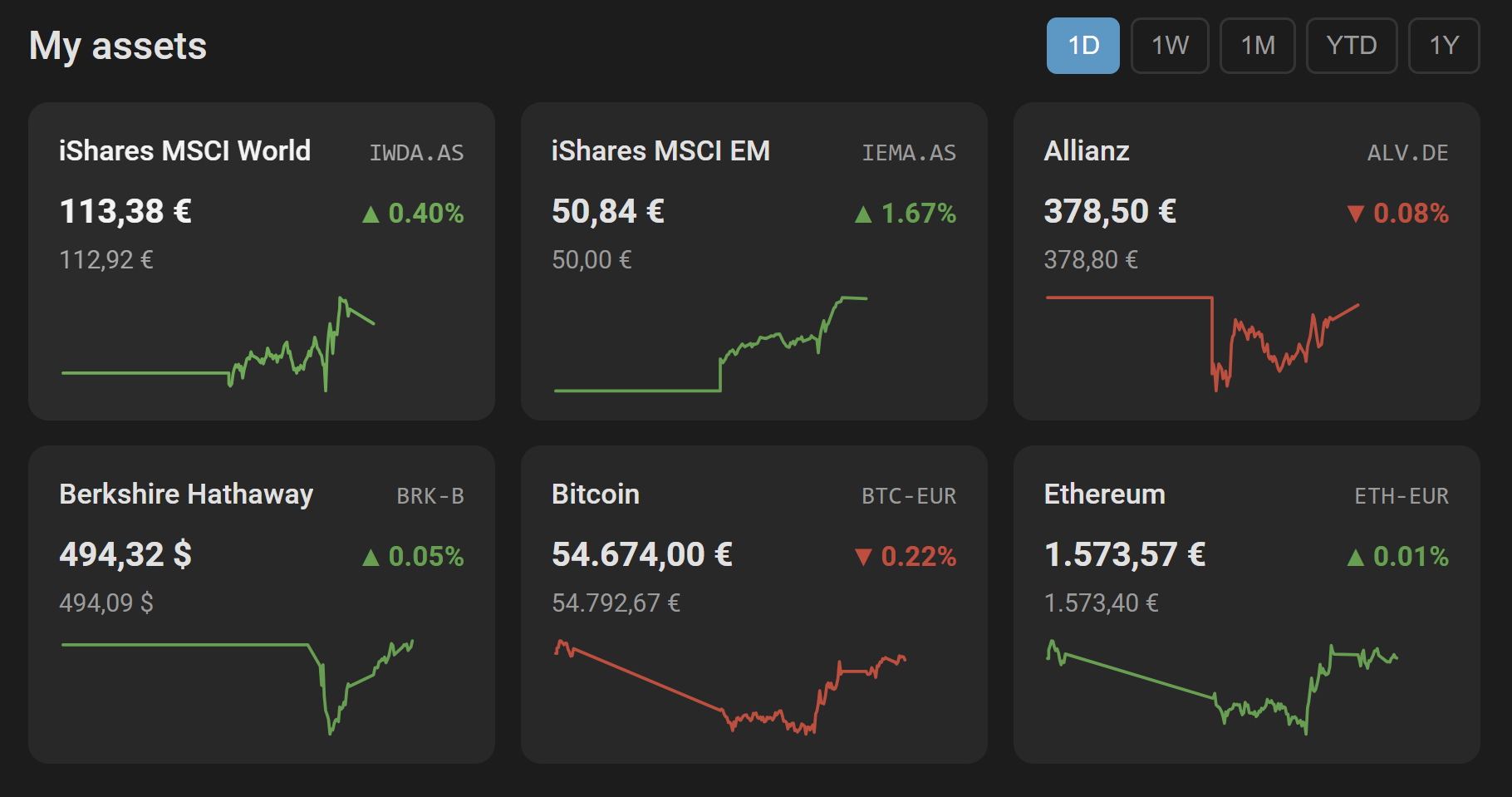
- Any asset on Yahoo Finance — stocks, ETFs, index funds, cryptocurrencies, commodities
- Sensor entity per asset — current price, daily change, market state and more as attributes
- History recording — works with the HA recorder out of the box (
SensorStateClass.MEASUREMENT) - Built-in Lovelace card — auto-registered, no manual resource setup required
- Sparkline charts for 5 time ranges: 1D · 1W · 1M · YTD · 1Y
- Short-term (1D/1W) charts use HA recorder data (resolution matches the configured poll interval)
- Long-term charts (1M/YTD/1Y) use daily closing prices from Yahoo Finance
- Currency conversion — display all assets in a single currency (EUR, USD, GBP, CHF, AUD, CAD, JPY, SEK, NOK, DKK, CNY, HKD), or RAW to show each asset in its native currency without conversion; rates refreshed every 15 minutes from frankfurter.dev, with automatic fallback to the last known rates if the source is temporarily unavailable
- Per-asset override — pin a single asset to its own display currency (e.g. keep one fund in GBP while the rest of the card shows EUR), configurable per row in the visual editor
- London Stock Exchange (GBp/GBX) — equities quoted in pence are automatically normalized to GBP before conversion, so values match what you see on the exchange
- FX-rate symbols (
…=X) — auto-detected and never converted, the quote is always shown as-is
- Reference price — period baseline shown below the current price (e.g. previous close for 1D, period start for 1W/1M/YTD/1Y)
- Click any tile to open the HA sensor detail dialog
- Tile size — choose S / M / L in the visual editor to control how many tiles fit per row
- Visual card editor with drag & drop to reorder assets
- 20 languages — UI adapts automatically to your HA language (en, de, fr, nl, es, it, pt, pl, sv, da, nb, fi, cs, hu, ru, zh, ja, ko, tr, ar)
- Configurable polling interval — 60 s to 24 h (default: 15 min)
- No API key required
- Home Assistant 2024.7 or newer (the integration serves the card through
async_register_static_paths, which older cores do not have) - Internet access (Yahoo Finance API + frankfurter.dev for currency rates)
- Open HACS in your Home Assistant sidebar
- Search for Easy Stock
- Click Download
- Restart Home Assistant
- Download or clone this repository
- Copy the
custom_components/easy_stock/folder into your HA config directory:config/ └── custom_components/ └── easy_stock/ - Restart Home Assistant
Restart Home Assistant, then force a fresh frontend load once. The update itself can still be served out of your browser's or app's cache, which makes it look like nothing changed.
- Browser: Ctrl+Shift+R (Cmd+Shift+R on macOS).
- Companion App: look for Reset frontend cache in the app's own settings — on iOS under Debug, on Android under Troubleshooting. The exact path moves between app versions, so search for that wording rather than following a fixed menu path. Then force-quit and reopen the app — the reset does not necessarily take effect until the app has actually restarted, and skipping this step is what makes an update look like it never arrived.
You only need to do this once per update, not every time you open a dashboard.
The integration registers the card itself — as a dashboard resource when your Lovelace resources are in storage mode (the default), and by injecting it through the frontend when they are in YAML mode, where the resource list is read-only. You should never have to add a resource by hand.
If the card is still missing:
- Confirm Easy Stock is listed under Settings → Devices & Services. Without a configured entry the integration never starts, and the card is not served at all.
- Open your browser's developer console and reload the dashboard. The card logs one line on
load:
[easy-stock-card] v0.4.0 loaded from http://<your-ha>:8123/easy_stock/easy-stock-card.js?v=….- No such line — the browser never loaded the file. Continue with step 3.
- Two such lines — a second, probably stale copy is registered. The card also warns which
copy was ignored. Remove the duplicate under Settings → Dashboards → ⋮ → Resources
(usually a leftover
/local/easy-stock-card.jsfrom an older manual install).
- Check Settings → Dashboards → ⋮ → Resources for an entry pointing at
/easy_stock/easy-stock-card.js?v=…. If it is missing, search your Home Assistant log foreasy_stock.frontend— it records on every start whether the card was registered as a dashboard resource, or why it fell back to the frontend injection. - Force a reload past the browser and service-worker cache — see After updating for the browser and Companion App variants. Opening the dashboard in a private window rules caching out entirely.
If none of that helps, please open an issue and
include the console line from step 2 and the easy_stock.frontend log lines from step 3.
Adding the resource manually is a last resort. If you do, use the plain URL
/easy_stock/easy-stock-card.js— but note it carries no?v=<hash>cache-buster, and the file is served with a 31-day cache header. After an update you will keep getting the old card until you hard-refresh every browser that has it cached. Remove the manual entry once the automatic registration works again.
- Go to Settings → Devices & Services → Add Integration
- Search for Easy Stock
- Fill in the form:
| Field | Description |
|---|---|
| Symbol | Yahoo Finance ticker (see examples below) |
| Name | Display name shown in the card (optional — falls back to the symbol if left empty) |
| Update interval | How often to poll Yahoo Finance in seconds (60–86400, default 900) |
Repeat for each asset you want to track. Each asset becomes its own sensor entity.
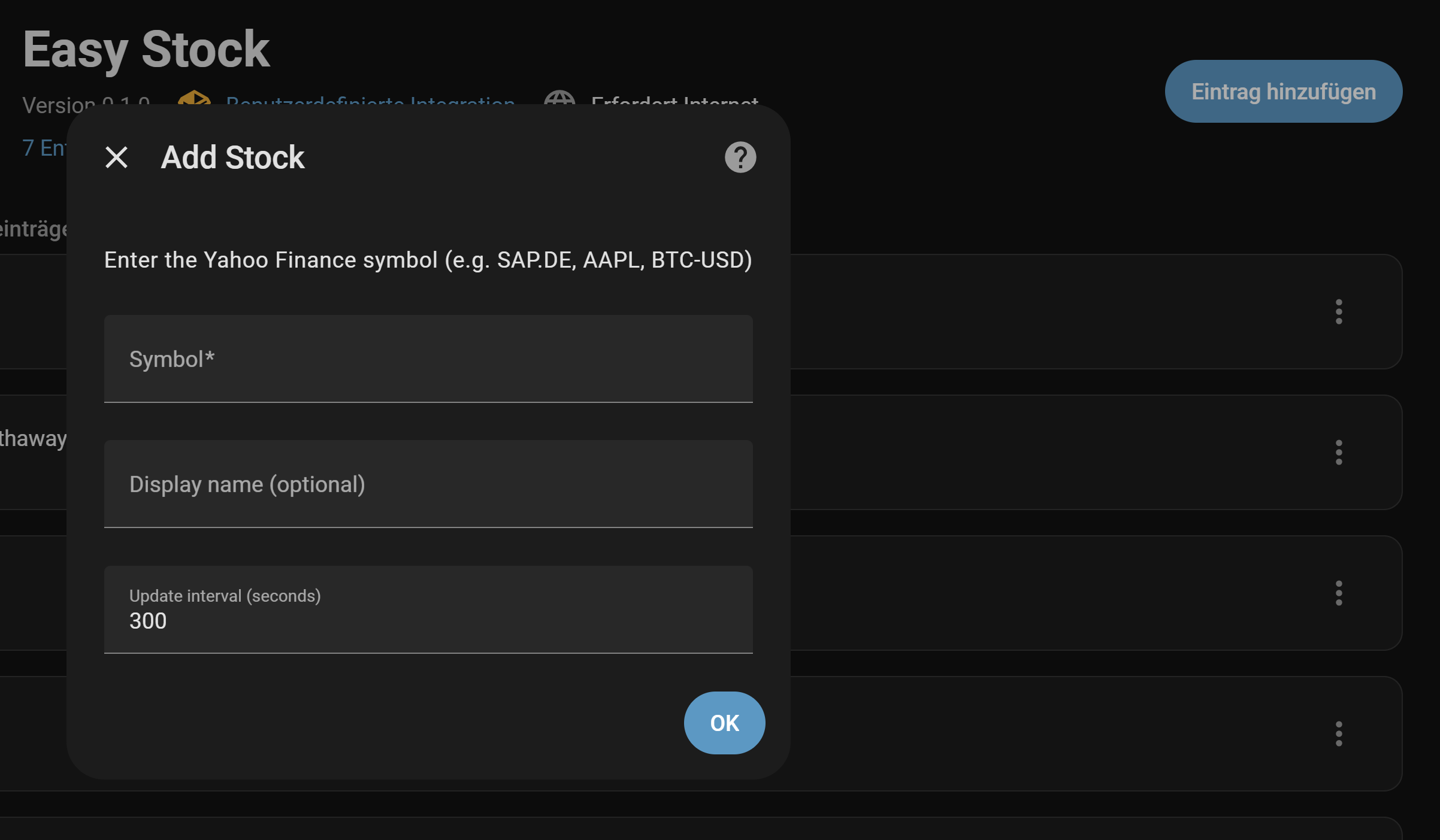
Use the search on finance.yahoo.com to find the exact ticker for your asset:
| Asset | Symbol |
|---|---|
| Apple | AAPL |
| iShares MSCI World (Amsterdam) | IWDA.AS |
| iShares MSCI World (Frankfurt) | EUNL.DE |
| Berkshire Hathaway B | BRK-B |
| Bitcoin / EUR | BTC-EUR |
| Ethereum / USD | ETH-USD |
| Gold (1 oz) ETC | 4GLD.DE |
| S&P 500 ETF | SPY |
Tip: For European ETFs the exchange suffix matters —
.DE(Frankfurt),.AS(Amsterdam),.MI(Milan),.VI(Vienna), etc.
The sensor state is the current price (numeric), and the unit of measurement is the asset's native trading currency (e.g. EUR, USD).
Each sensor additionally exposes the following state attributes:
| Attribute | Type | Description |
|---|---|---|
symbol |
string | Yahoo Finance ticker |
long_name |
string | Full asset name from Yahoo Finance |
currency |
string | Native trading currency (e.g. EUR, USD) |
market_state |
string | REGULAR, CLOSED, PRE, POST |
change |
float | Absolute price change from previous close |
change_pct |
float | Percentage change from previous close |
previous_close |
float | Previous closing price |
price_is_live |
bool | true while the exchange is in session (or the asset trades 24/7) |
traded_today |
bool | true once the asset produced a price today — stays true after the close |
The card is automatically registered when the integration loads — no manual resource configuration needed.
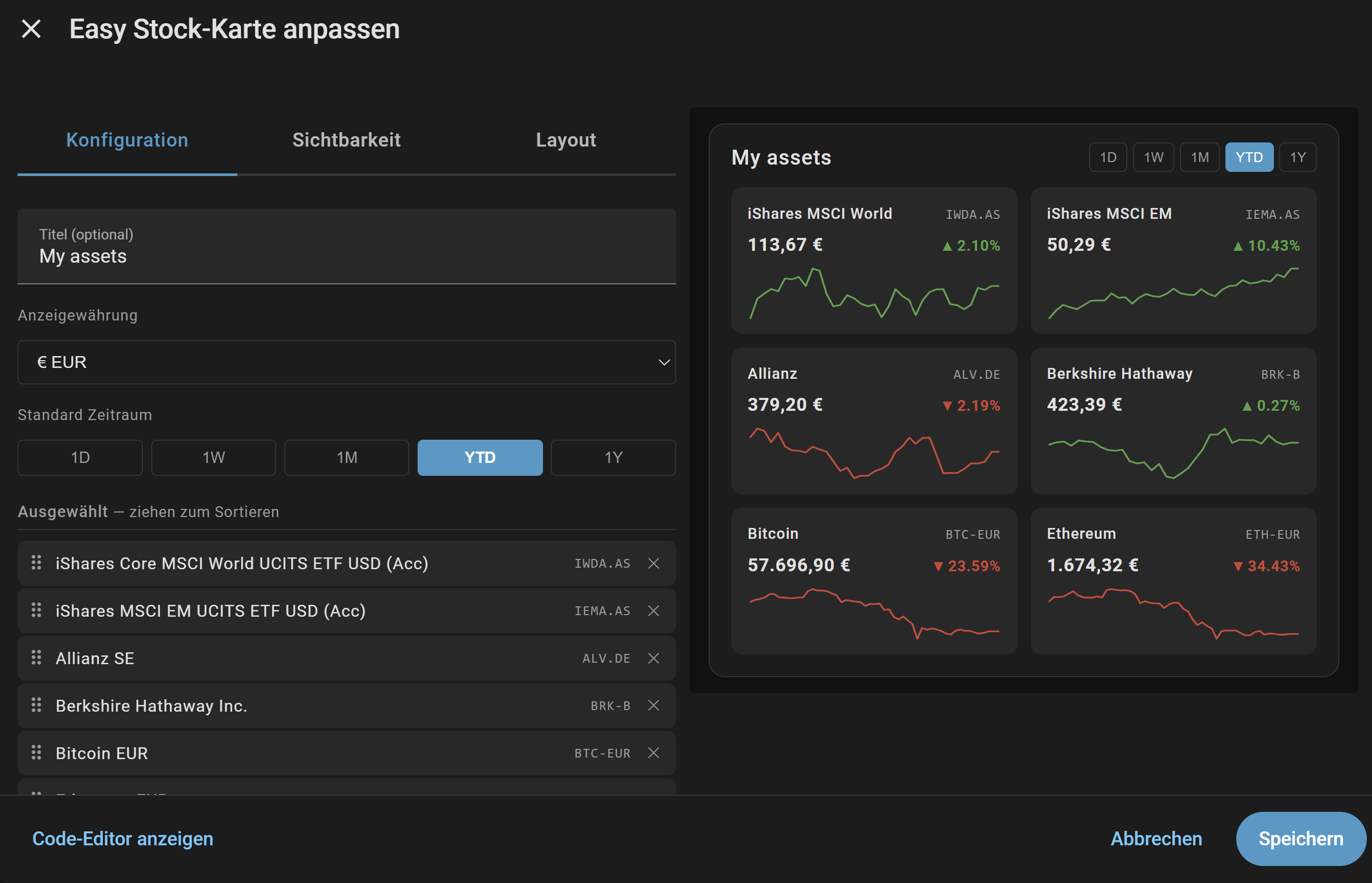
- Edit your dashboard → Add Card → search for Easy Stock Card
- Select the assets to display and configure the card using the visual editor
type: custom:easy-stock-card
title: My Portfolio          # optional
display_currency: EUR        # optional — EUR (default), USD, GBP, CHF, AUD, CAD, JPY, SEK, NOK, DKK, CNY, HKD, RAW
default_range: "1T"          # optional — 1T (1D), 1W, 1M, YTD, 1J (1Y) — default: 1T
tile_size: small             # optional — small (default), medium, large
entities:
  - sensor.aapl                                          # use the card-level display_currency
  - sensor.iwda_as
  - entity: sensor.vusa_l                                # per-asset override — show this one in GBP
    display_currency: GBP
  - sensor.btc_eur
Resolution order for the displayed currency of a tile: per-asset override (if set) → FX-rate auto-detect (for
…=Xsymbols, never converted) → card-leveldisplay_currency→EURdefault.RAW(card-level or per-asset) bypasses conversion entirely and shows the value in the asset's native trading currency.
| Value | Meaning | Data source |
|---|---|---|
1T |
1 Day | HA recorder (resolution = poll interval) |
1W |
1 Week | HA recorder (resolution = poll interval) |
1M |
1 Month | Yahoo Finance daily closes |
YTD |
Year to date | Yahoo Finance daily closes |
1J |
1 Year | Yahoo Finance daily closes |
Note: 1D and 1W charts use HA recorder data. Resolution depends on the configured poll interval (default: 15 min). Until enough history has accumulated, the card falls back automatically: the 1D chart shows a two-point line from the previous close to the current price; the 1W chart uses the last 4 daily closes from Yahoo Finance. Full resolution for the 1W view builds up over 7 days. Charts for 1M, YTD, and 1Y are sourced entirely from Yahoo Finance and are available from the first update.
The card does not appear / "Custom element doesn't exist: easy-stock-card"
- See The card does not appear under Installation for the full
checklist — the quick version is: check the browser console for the card's
[easy-stock-card] v… loaded from …line, then clear the cached frontend as described under After updating (Ctrl+Shift+R in a browser, Reset frontend cache in the Companion App) to get past a stale service-worker cache
An Easy Stock resource is left over after uninstalling
- Removing the integration under Settings → Devices & Services also removes its dashboard
resource. Uninstalling through HACS without removing the integration first cannot do that, so
a resource pointing at
/easy_stock/easy-stock-card.jsstays behind and 404s on every page load. Delete it under Settings → Dashboards → ⋮ → Resources
No data / sensor unavailable
- Verify the ticker symbol is correct on finance.yahoo.com
- Some symbols require the exchange suffix (e.g.
IWDA.ASnot justIWDA) - Check Home Assistant logs for detailed error messages
1D/1W chart is flat or empty
- The HA recorder may not have built up enough history yet — check back after a few polling cycles
- Ensure the
recorderintegration is enabled in yourconfiguration.yaml
Currency conversion not working
- The card fetches rates from frankfurter.dev (European Central Bank data) — ensure your HA instance has internet access
- To intentionally turn conversion off (for a single asset or the whole card), set
display_currencytoRAW
LSE share price looks 100× too high
- This used to happen because the London Stock Exchange quotes most equities in pence (
GBp/GBX). Easy Stock now normalizes pence to pounds automatically before conversion, so values should match the price you see on the exchange. If you still see a wrong value, please open an issue with the affected ticker.
Wrong display name
- Set a custom Name in the integration configuration (Settings → Devices & Services → Easy Stock → Configure)
Infos in German language
MIT