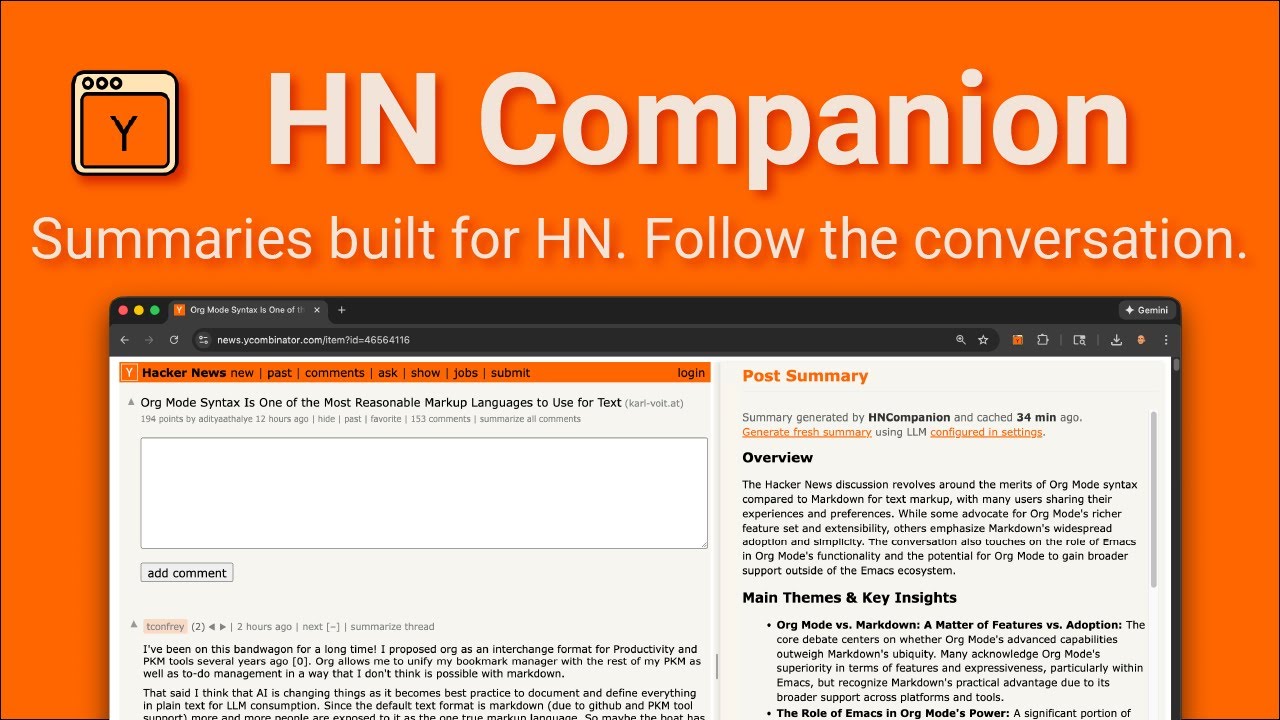
AI-powered summaries tuned to HN's threaded discussions + Vim-style keyboard navigation.
Chrome Web Store • Firefox Add-ons • Website - hncompanion.com • Wiki
HN Companion is a browser extension that helps you catch up on lengthy HN discussions with AI summaries that understand thread structure, deep dive to conversations and navigate seamlessly with Vim-style keyboard shortcuts.
Features: HN-aware summaries • Keyboard navigation • Multiple AI providers • Free cached summaries • Privacy-focused • Open source
👉 See hncompanion.com for full feature details, demos, and AI setup guides.
-
Summaries Built for HN
- Understands thread hierarchy, conversation flow, and rankings
- Highlights key debates, contrasting viewpoints, and side discussions
- Cached summaries available for popular stories
-
Follow the Conversation
- Jump to specific comments from the summary
- Navigate to other comments by the same author (
[and]) - Hover on username to preview user profile (karma, account info)
-
Fully Customizable
- Bring your own API key (OpenAI, Anthropic, Google, OpenRouter)
- Or run locally with Ollama for complete privacy
- Customize system and user prompts in settings
-
Keyboard-First Navigation
- Vim-inspired shortcuts (
h,j,k,l) for intuitive movement - Collapse/expand threads (
c) and jump to first comment (gg) - Press '?' anytime to view all shortcuts
- Vim-inspired shortcuts (
-
Privacy-Focused & Open Source
- No tracking or analytics
- Runs only on Hacker News pages
- Open source on GitHub
- Install: Chrome • Firefox
- Visit news.ycombinator.com
- Press
?to view keyboard shortcuts - Click "summarize" on any discussion (uses free cached summaries when available)
Need AI setup? See below for provider configuration.
HN Companion supports multiple AI providers. Choose one and configure it in the extension settings.
# 1. Install Ollama from https://ollama.com
# 2. Configure CORS for browser extension access

# macOS/Linux
launchctl setenv OLLAMA_ORIGINS "chrome-extension://*,moz-extension://*"

# Windows
setx OLLAMA_ORIGINS "chrome-extension://*,moz-extension://*"

# 3. Restart Ollama- Get API key from platform.openai.com
- Enter in extension settings
- Get API key from console.anthropic.com
- Enter in extension settings
- Get API key from aistudio.google.com/apikey
- Enter in extension settings
- Get API key from openrouter.ai/settings/keys
- Enter API key and model name in extension settings
- Recommended model:
anthropic/claude-3.5-sonnet - See all models at openrouter.ai/models
git clone https://github.com/hncompanion/browser-extension.git
cd browser-extension

# Install dependencies
pnpm install

# Start development server
pnpm run dev              # Chrome
pnpm run dev:firefox # Firefox| Command | Description |
|---|---|
pnpm run dev |
Chrome development with hot reload |
pnpm run dev:firefox |
Firefox development with hot reload |
pnpm run build |
Production build for Chrome |
pnpm run build:firefox |
Production build for Firefox |
pnpm test |
Run test suite |
src/
├── entrypoints/
│   ├── background/         # Background service worker
│   ├── content/            # Content scripts (HN page enhancements)
│   └── options/            # Extension settings page
├── lib/
│   ├── llm-summarizer.js   # AI provider integrations
│   ├── messaging.js        # Extension messaging
│   └── utils.js            # Shared utilities
└── tests/                  # Test files
See the Wiki for architecture details, HN page structure documentation, and implementation notes
?//- Toggle help panelo- Open post in new window
j/k- Next/previous postc- Open comments page
j/k- Next/previous commentl/h- Next child/parent comment[/]- Previous/next comment by authors- Toggle summary panelr- Go to root commentgg- First commentz- Scroll to currentc- Collapse/expand commentu- Undo last comment navigation
Officially supported: Chrome, Firefox, and Edge. Also works on Chromium-based browsers like Brave, Arc, and Vivaldi.
Contributions are welcome! Please:
- Check existing issues or open a new one
- Fork the repository and create a feature branch
- Submit a pull request with clear description of changes
For questions, use GitHub Discussions.
- Website: hncompanion.com - Features, demos, setup guides, and FAQ
- Wiki: Technical documentation - Architecture, implementation details, and developer notes
- Issues: Report bugs
- Discussions: Ask questions
MIT Licensed - free to use, modify, and distribute.
Note
Note: This extension is not endorsed by, affiliated with, or sponsored by Y Combinator or Hacker News.