fix(desktop): make right-click work in the in-app browser, and stop passkey requests hanging for 3 minutes - #3459
Conversation


Right-clicking a browsed page did nothing: no context-menu listener was
ever registered on the browser tab's WebContentsView. The overlay menu
machinery already existed and already declared a "page" source, but the
main process only ever emitted "tab".

- build a params-driven menu (editable, selection, link, image, page)
- size the overlay from item count instead of a fixed 4-item height
- stop secondary-button pointerdown from dismissing the menu it opens
…passkey

Electron 35 has no working WebAuthn authenticator, so passkey requests
hung for 180s before a generic NotAllowedError, with no explanation.

Detect publicKey credential requests in the page's main world, settle
them immediately with a real NotAllowedError so the site can fall back
to password/magic-link, and offer to open the page in the user's own
browser. Gated on a live platform-authenticator probe, so this goes
quiet once Electron can actually service passkeys.
Visual validation measured a ~13px transparent strip below the menu: the
overlay view was sized from a guessed 36px row height while rows render
at 34.56px. That strip belongs to the overlay compositor surface, so it
silently swallowed clicks meant for the page.

Measure the rendered menu and apply exact bounds, and dismiss on
backdrop pointer-down so any residual area behaves correctly.

Adds evals/specs/builtin-browser-context-menu-passkey.slow.test.ts.
The sizing assertion hardcoded 212px from the old guessed-height
implementation. Assert the invariant instead: the overlay view must match
its rendered content within 1px, so it can neither clip the menu nor
leave a transparent strip that swallows clicks.

|
The latest updates on your projects. Learn more about Vercel for GitHub.
|


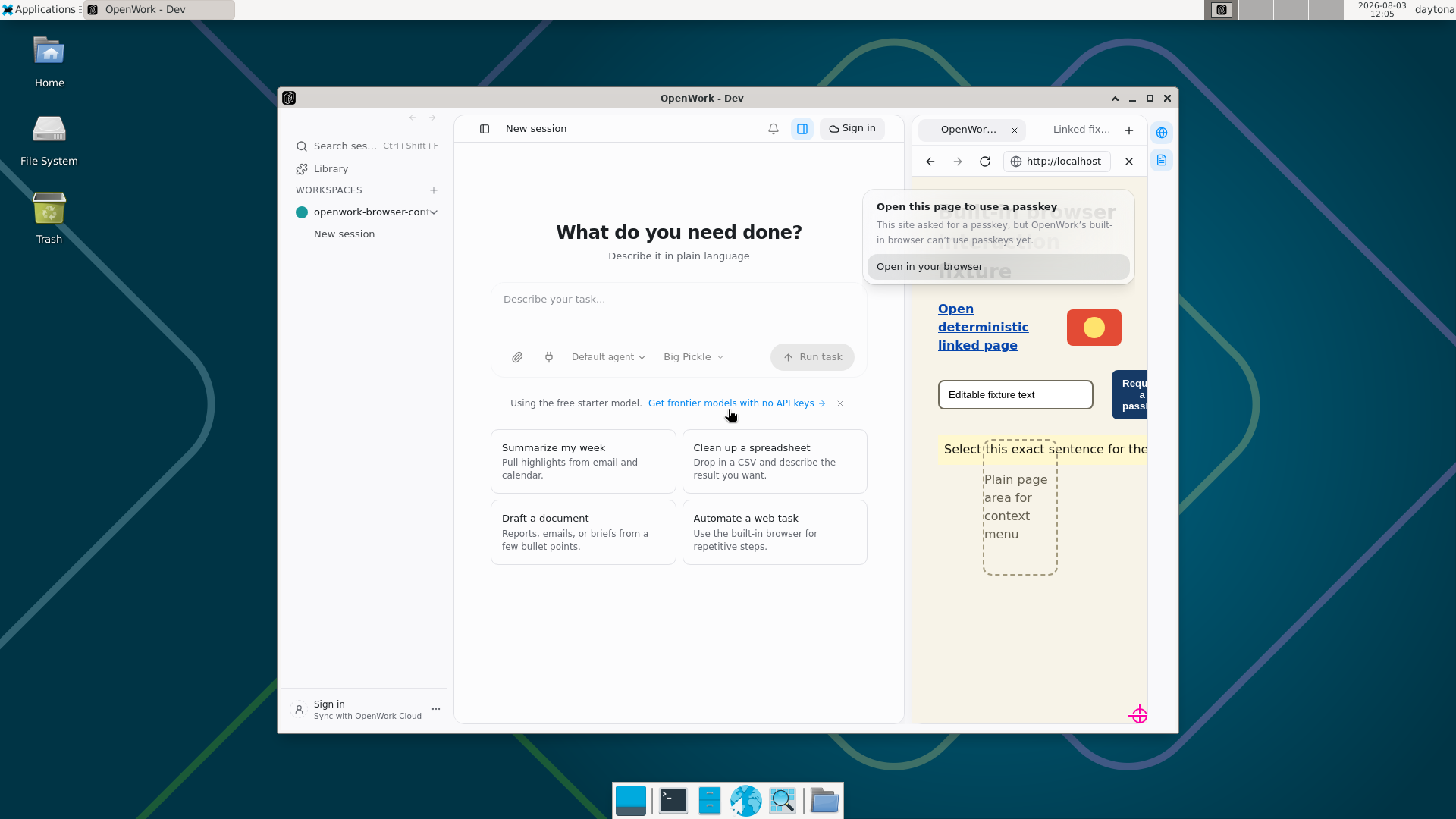
Photo roll — built-in-browser-page-menus-and-passkeys-work-in-electron-with-os-level-visual-e — 9/9 frames passed · 17 facts✅ 9/9 frames passed · 17 facts · 34 expectations passed · 0 failed ℹ️ FACT — 1. The real app under test is Electron 35Mozilla/5.0 (X11; Linux x86_64) AppleWebKit/537.36 (KHTML, like Gecko) OpenWork-Dev/0.0 Chrome/134.0.6998.205 Electron/35.7.5 Safari/537.36
ℹ️ FACT — 2. page context menu overlay height matches its rendered content without clipping or a large dead gap{"overlayHeight":200,"contentHeight":199.8125,"metrics":{"ariaLabel":"page context menu","labels":["Back","Forward","Reload","Copy Page URL","Open Page in Browser"],"innerWidth":196,"innerHeight":200,"itemHeights":[34.5625,34.5625,34.5625,34.5625,34.5625],"separatorFootprints":[13],"menuRect":{"x":1,"y":1,"width":194,"height":197.8125,"top":1,"right":195,"bottom":198.8125,"left":1},"contentHeight":199.8125,"lastItemBottom":192.8125,"scrollHeight":200},"visibleTrailingGap":6,"transparentBottomSpace":1.1875}
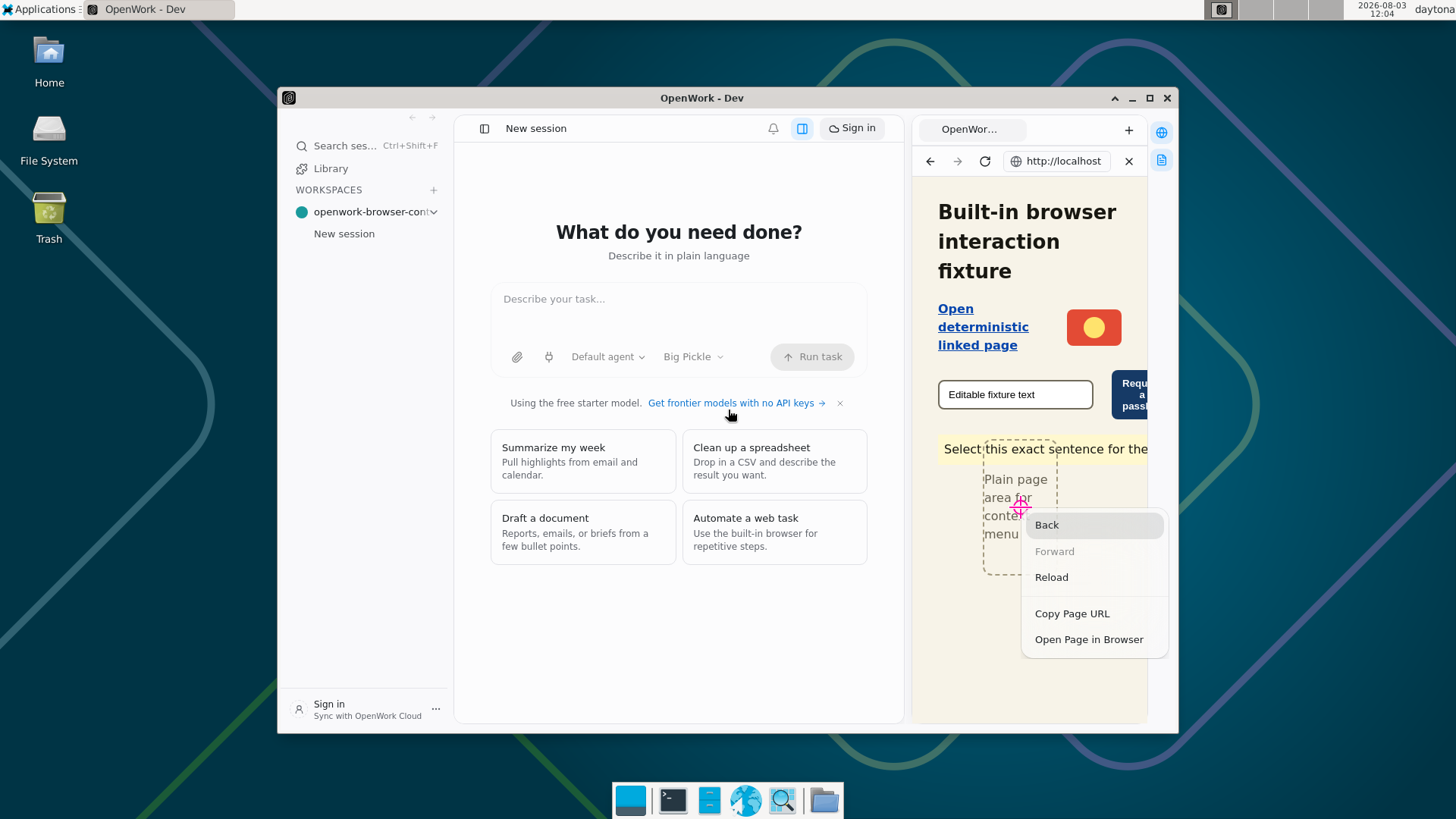
ℹ️ FACT — 3. A real CDP right-click on plain page area opens Back / Forward / Reload / Copy Page URL / Open Page in Browser and is not instantly dismissed["Back","Forward","Reload","Copy Page URL","Open Page in Browser"]
✅ PASS — 4. The in-app browser visibly shows a five-item page context menu with Back, Forward, Reload, Copy Page URL, and Open Page in Browser
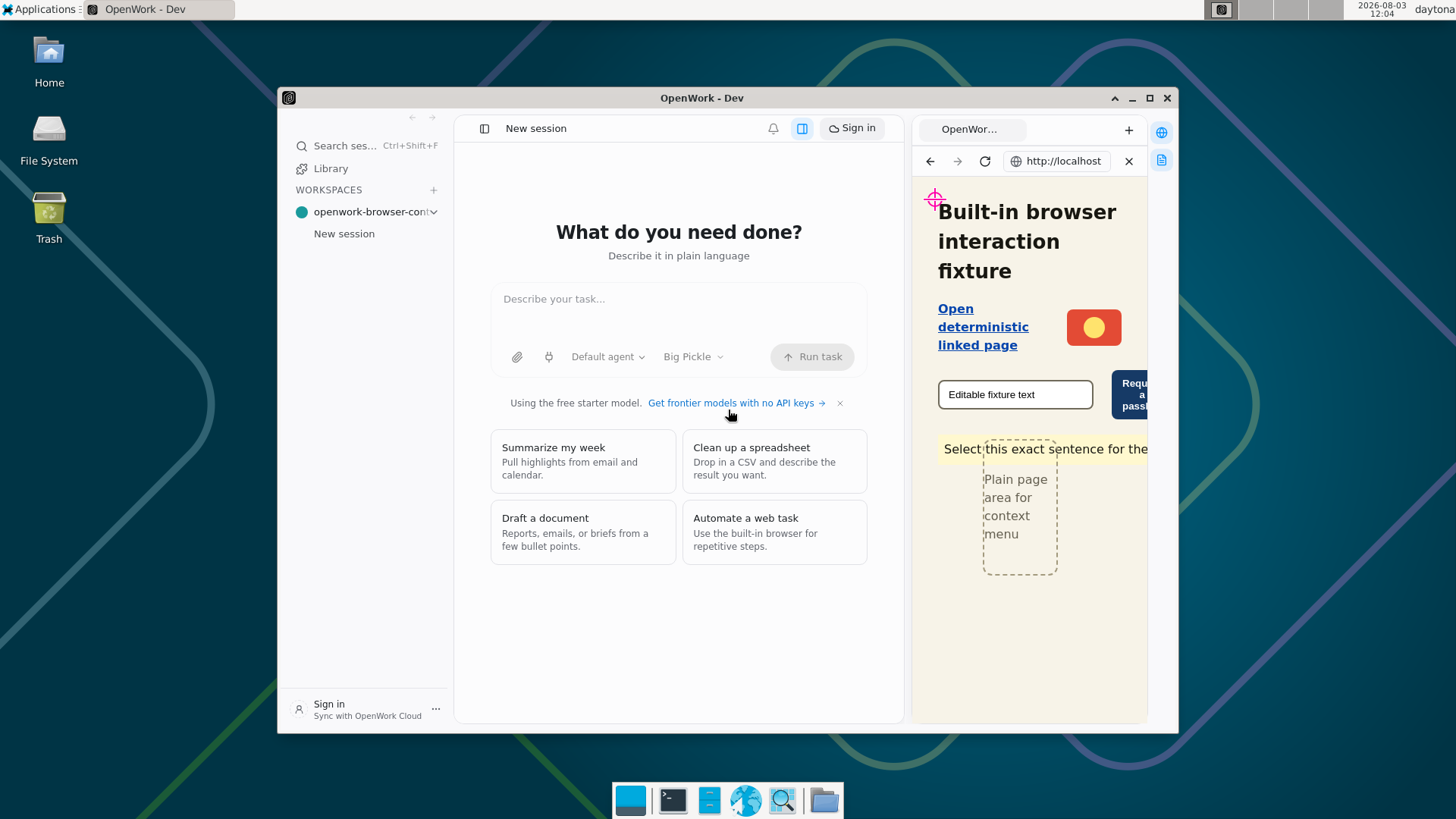
ℹ️ FACT — 5. Choosing Copy Page URL writes the browsed page URL to the OS clipboardhttp://localhost:43127/index.html
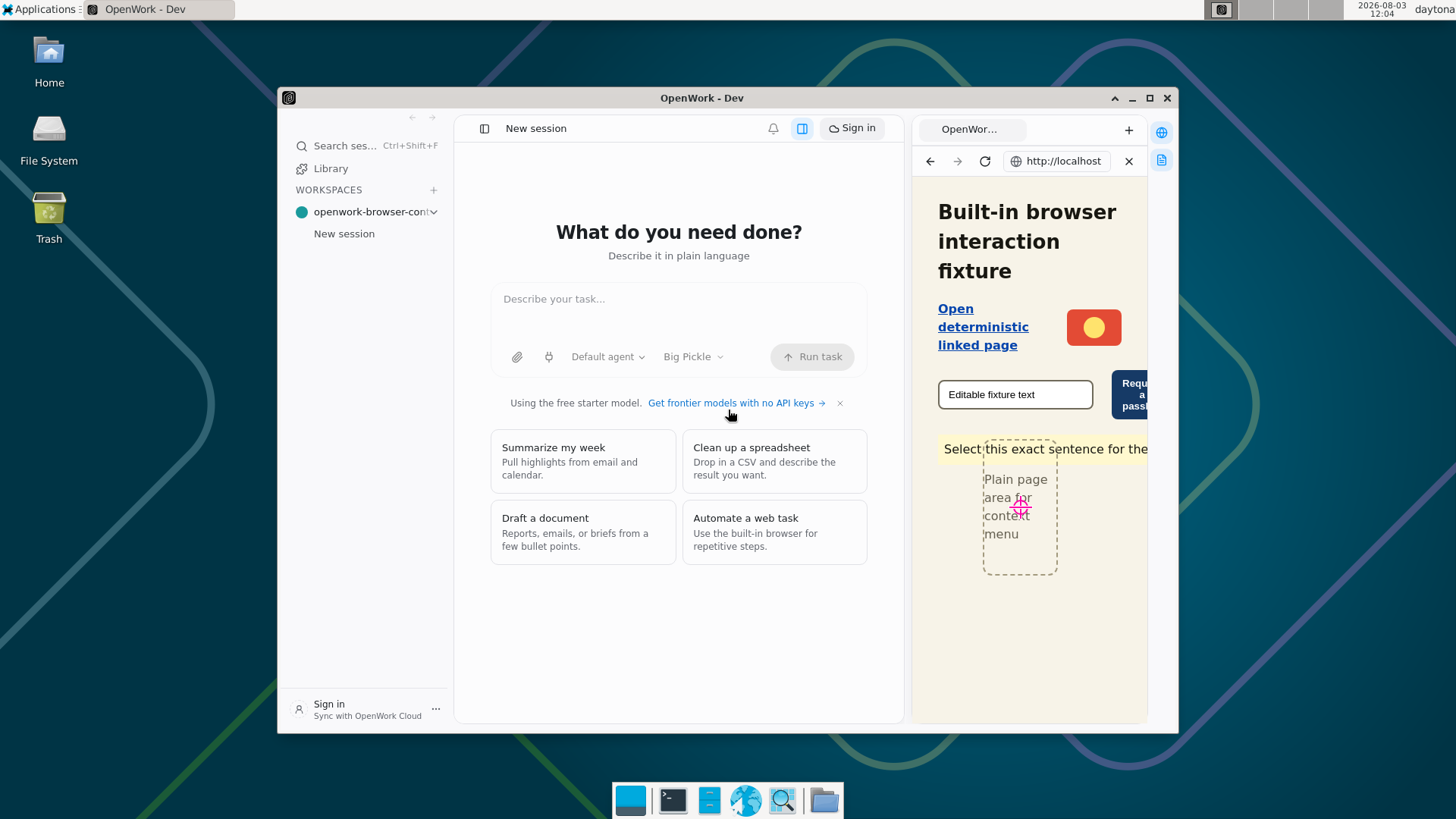
✅ PASS — 6. After a left-click on the browsed page, no page or tab context menu is visible anywhere in the OpenWork window
✅ PASS — 7. After pressing Escape, no page or tab context menu is visible anywhere in the OpenWork window
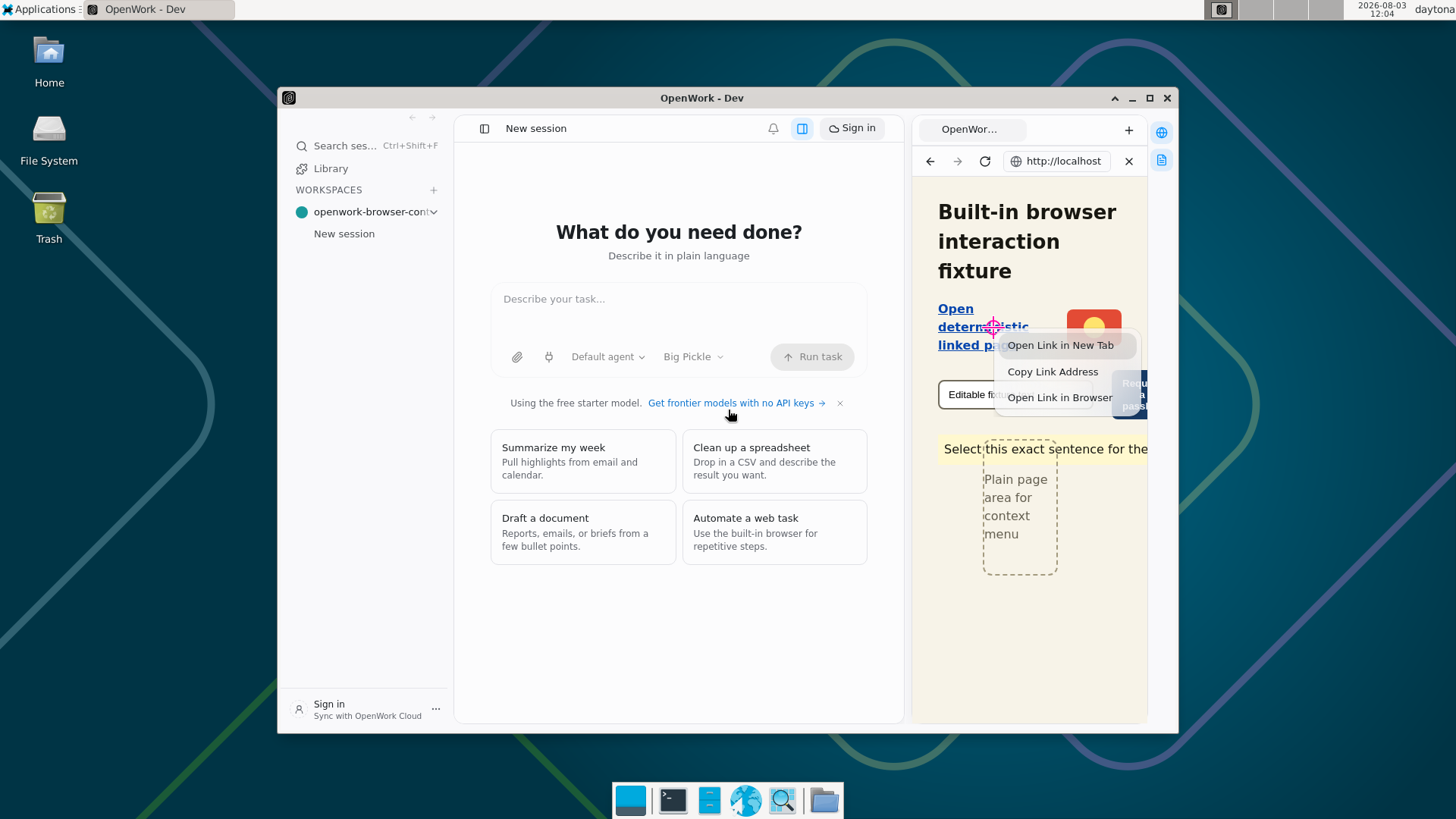
ℹ️ FACT — 8. page context menu overlay height matches its rendered content without clipping or a large dead gap{"overlayHeight":118,"contentHeight":117.6875,"metrics":{"ariaLabel":"page context menu","labels":["Open Link in New Tab","Copy Link Address","Open Link in Browser"],"innerWidth":196,"innerHeight":118,"itemHeights":[34.5625,34.5625,34.5625],"separatorFootprints":[],"menuRect":{"x":1,"y":1,"width":194,"height":115.6875,"top":1,"right":195,"bottom":116.6875,"left":1},"contentHeight":117.6875,"lastItemBottom":110.6875,"scrollHeight":118},"visibleTrailingGap":6,"transparentBottomSpace":1.3125}
ℹ️ FACT — 9. Right-clicking a link exposes the three link actions["Open Link in New Tab","Copy Link Address","Open Link in Browser"]
✅ PASS — 10. The in-app browser visibly shows Open Link in New Tab, Copy Link Address, and Open Link in Browser for the fixture link
ℹ️ FACT — 11. Choosing Open Link in New Tab opens the link in one new in-panel tab{"before":{"activeTabId":"tab_msd6lhrg_1","tabs":[{"id":"tab_msd6lhrg_1","url":"http://localhost:43127/index.html"}]},"after":{"activeTabId":"tab_msd6mgp7_2","tabs":[{"id":"tab_msd6lhrg_1","url":"http://localhost:43127/index.html"},{"id":"tab_msd6mgp7_2","url":"http://localhost:43127/linked.html"}]}}
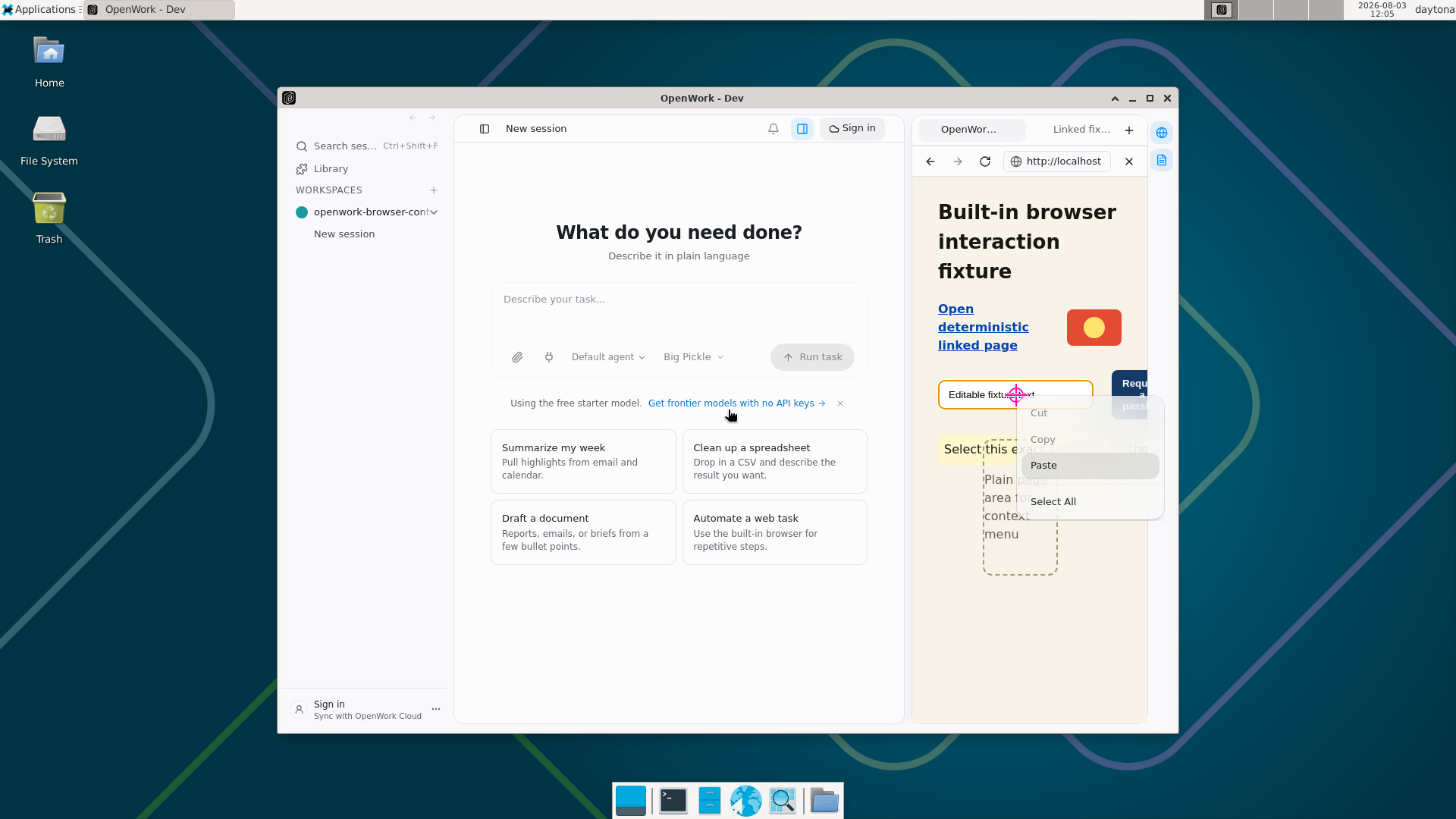
ℹ️ FACT — 12. page context menu overlay height matches its rendered content without clipping or a large dead gap{"overlayHeight":166,"contentHeight":165.25,"metrics":{"ariaLabel":"page context menu","labels":["Cut","Copy","Paste","Select All"],"innerWidth":196,"innerHeight":166,"itemHeights":[34.5625,34.5625,34.5625,34.5625],"separatorFootprints":[13],"menuRect":{"x":1,"y":1,"width":194,"height":163.25,"top":1,"right":195,"bottom":164.25,"left":1},"contentHeight":165.25,"lastItemBottom":158.25,"scrollHeight":166},"visibleTrailingGap":6,"transparentBottomSpace":1.75}
ℹ️ FACT — 13. Right-clicking an editable text input exposes Cut / Copy / Paste / Select All["Cut","Copy","Paste","Select All"]
✅ PASS — 14. The in-app browser visibly shows Cut, Copy, Paste, and Select All for the text input
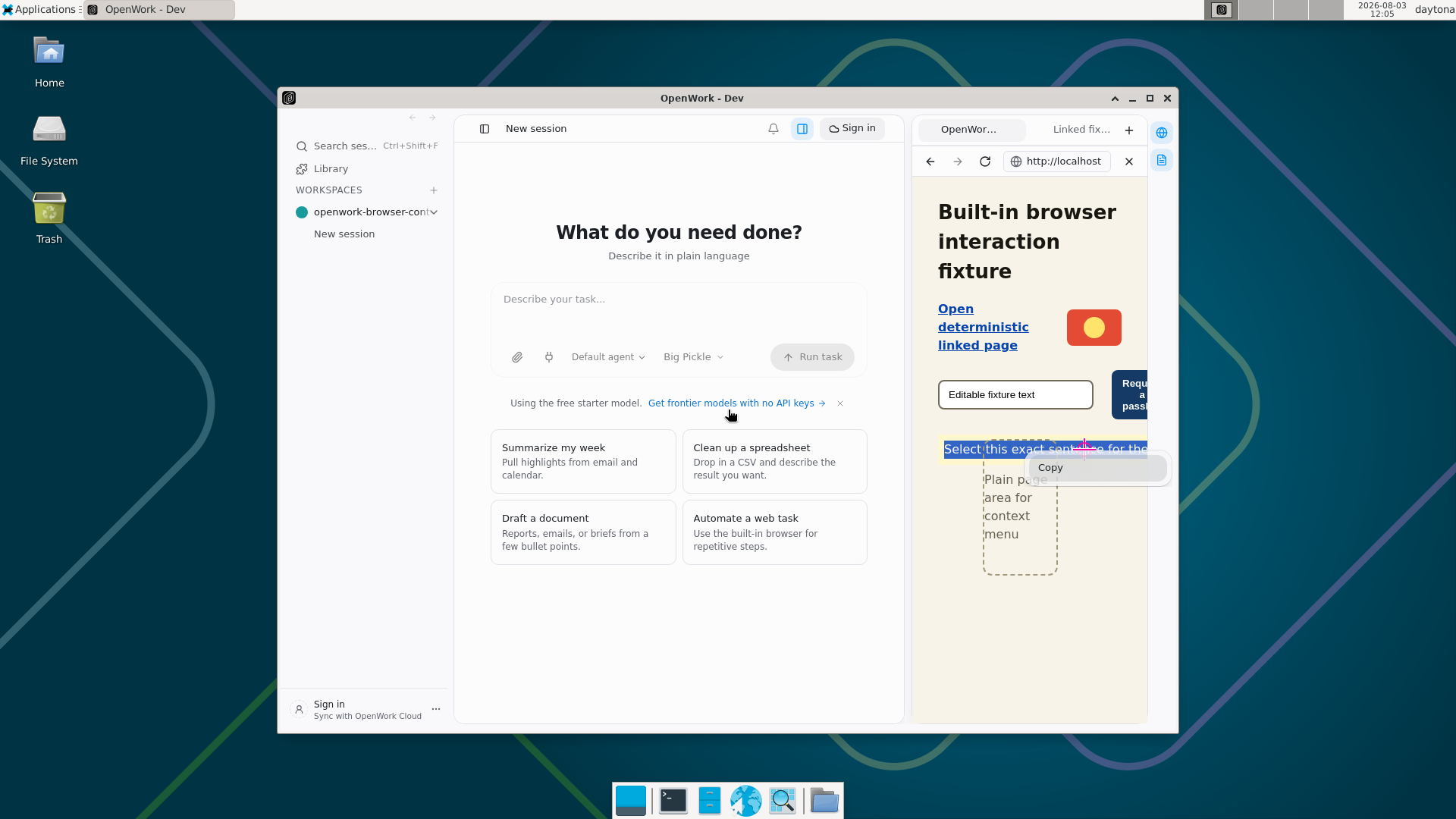
ℹ️ FACT — 15. page context menu overlay height matches its rendered content without clipping or a large dead gap{"overlayHeight":49,"contentHeight":48.5625,"metrics":{"ariaLabel":"page context menu","labels":["Copy"],"innerWidth":196,"innerHeight":49,"itemHeights":[34.5625],"separatorFootprints":[],"menuRect":{"x":1,"y":1,"width":194,"height":46.5625,"top":1,"right":195,"bottom":47.5625,"left":1},"contentHeight":48.5625,"lastItemBottom":41.5625,"scrollHeight":49},"visibleTrailingGap":6,"transparentBottomSpace":1.4375}
ℹ️ FACT — 16. Right-clicking selected non-editable text exposes Copy["Copy"]
✅ PASS — 17. The selected sentence is visibly highlighted and its context menu contains the single Copy action
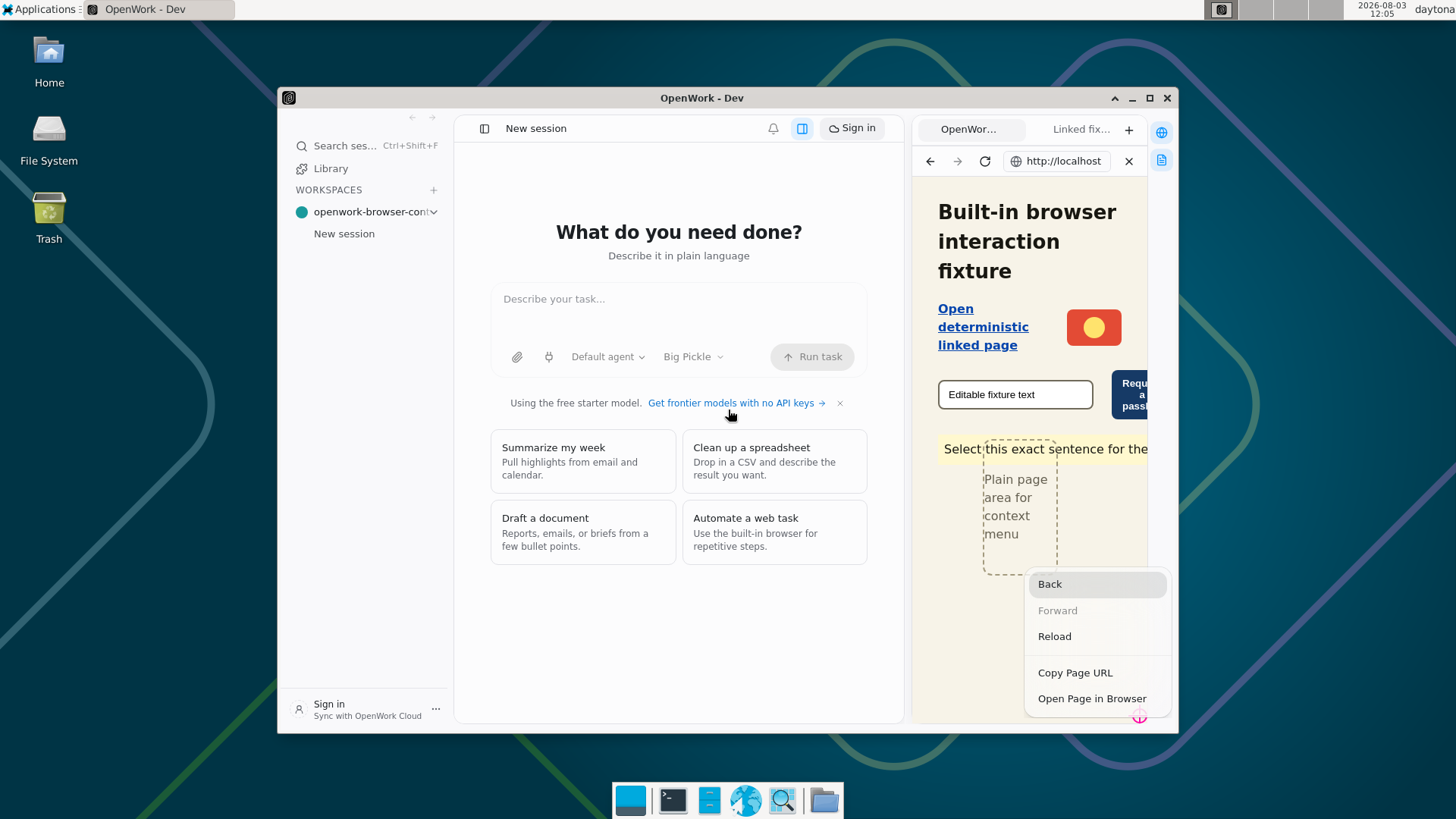
ℹ️ FACT — 18. page context menu overlay height matches its rendered content without clipping or a large dead gap{"overlayHeight":200,"contentHeight":199.8125,"metrics":{"ariaLabel":"page context menu","labels":["Back","Forward","Reload","Copy Page URL","Open Page in Browser"],"innerWidth":196,"innerHeight":200,"itemHeights":[34.5625,34.5625,34.5625,34.5625,34.5625],"separatorFootprints":[13],"menuRect":{"x":1,"y":1,"width":194,"height":197.8125,"top":1,"right":195,"bottom":198.8125,"left":1},"contentHeight":199.8125,"lastItemBottom":192.8125,"scrollHeight":200},"visibleTrailingGap":6,"transparentBottomSpace":1.1875}
ℹ️ FACT — 19. A bottom-right page right-click keeps the complete five-item menu at its calculated item-count height{"point":{"x":300,"y":711},"edgeMenu":{"ariaLabel":"page context menu","labels":["Back","Forward","Reload","Copy Page URL","Open Page in Browser"],"innerWidth":196,"innerHeight":200,"itemHeights":[34.5625,34.5625,34.5625,34.5625,34.5625],"separatorFootprints":[13],"menuRect":{"x":1,"y":1,"width":194,"height":197.8125,"top":1,"right":195,"bottom":198.8125,"left":1},"contentHeight":199.8125,"lastItemBottom":192.8125,"scrollHeight":200}}
✅ PASS — 20. Near the bottom-right browser edge, the complete five-item page context menu is shifted left and up so it remains fully on-screen and unclipped
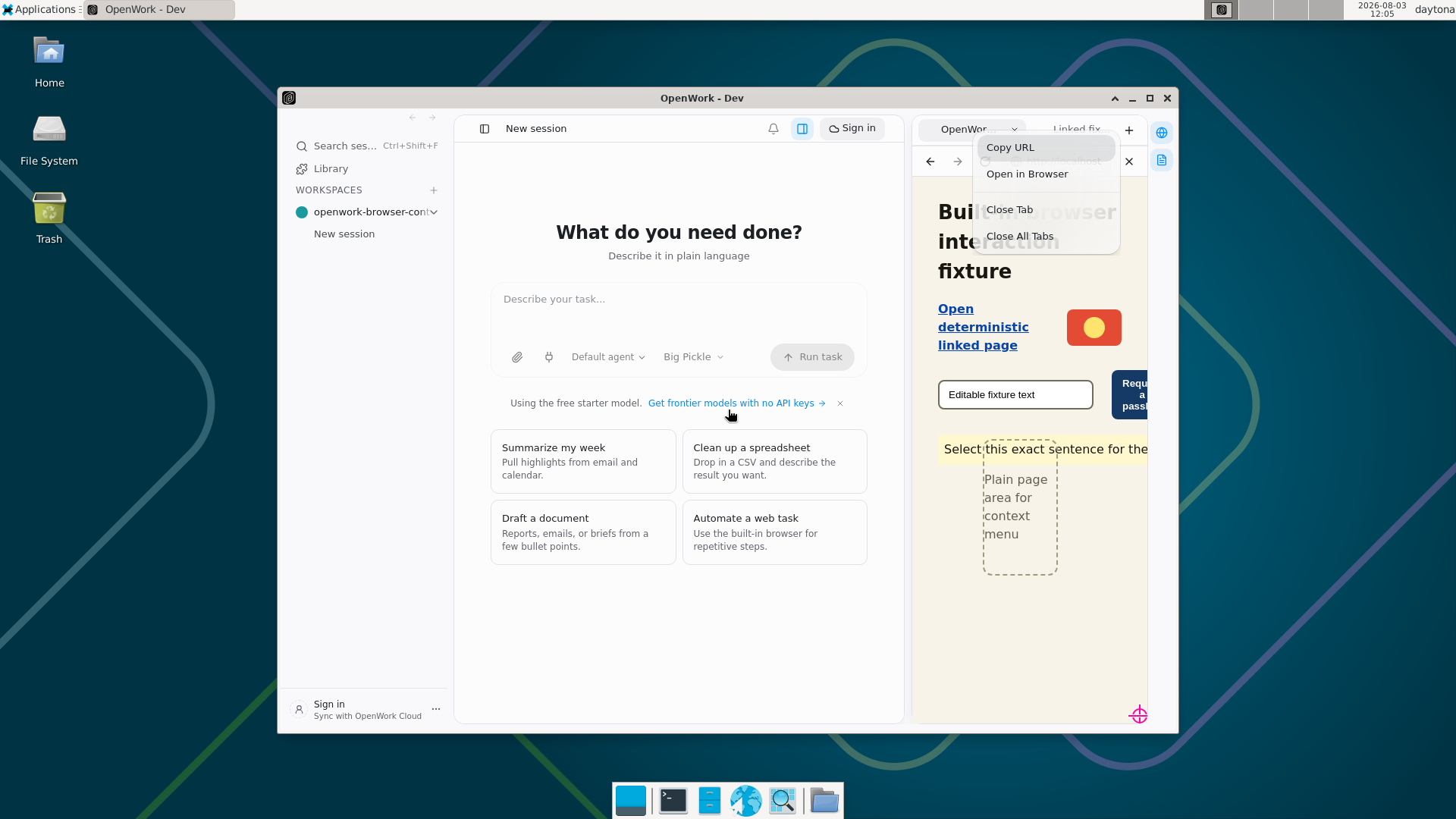
ℹ️ FACT — 21. tab context menu overlay height matches its rendered content without clipping or a large dead gap{"overlayHeight":166,"contentHeight":165.25,"metrics":{"ariaLabel":"tab context menu","labels":["Copy URL","Open in Browser","Close Tab","Close All Tabs"],"innerWidth":196,"innerHeight":166,"itemHeights":[34.5625,34.5625,34.5625,34.5625],"separatorFootprints":[13],"menuRect":{"x":1,"y":1,"width":194,"height":163.25,"top":1,"right":195,"bottom":164.25,"left":1},"contentHeight":165.25,"lastItemBottom":158.25,"scrollHeight":166},"visibleTrailingGap":6,"transparentBottomSpace":1.75}
ℹ️ FACT — 22. Right-clicking the browser tab strip preserves the original four-item tab menu["Copy URL","Open in Browser","Close Tab","Close All Tabs"]
✅ PASS — 23. The browser tab strip visibly shows its original four-item menu: Copy URL, Open in Browser, Close Tab, and Close All Tabs
ℹ️ FACT — 24. navigator.credentials.get({ publicKey }) settles under 2s with a real NotAllowedError DOMException{"settled":true,"elapsedMs":0.5999999999767169,"resolved":false,"name":"NotAllowedError","isDomException":true,"constructorName":"DOMException"}
ℹ️ FACT — 25. The passkey fast-fail offers Open in your browser["Open in your browser"]
✅ PASS — 26. The in-app browser visibly offers Open in your browser after the fixture requests a passkey
Roll created 2026-08-03T12:04:13.288Z · Source: |
![github-actions[bot]](https://avatars.githubusercontent.com/in/15368?s=60&v=4)

Electron only gained a working WebAuthn platform authenticator in 41.5.0
via app.configureWebAuthn; 35.x had no authenticator at all.

- Electron 35.7.5 -> 41.10.3 (Chromium 146, Node 24, native ABI 141->145)
- force native rebuilds so better-sqlite3 and node-pty match the new ABI
- add the keychain-access-groups entitlement, kept in sync with the
  signing Team ID from a single source of truth
- call configureWebAuthn first inside whenReady(); calling it earlier
  trips a native SIGTRAP

Touch ID credentials are device-bound and macOS-only: iCloud, 1Password,
phone and USB-key passkeys are still not usable, so the fast-fail
fallback stays in place for them.
Chromium 146 enforces that clipboard writes come from a focused
document, which exposed that hiding the overlay never handed focus back
to the page. Copy actions from the page context menu silently failed on
Electron 41.
79138dc to
f6b7db2
Compare
![diff-warden[bot]](https://avatars.githubusercontent.com/u/118544361?s=60&v=4)

There was a problem hiding this comment.
Warden security clearance: clear. No new security issues found in this diff (f6b7db2f0031b3eabe82e0dc2e96d15cf0a724b2). Automated clearance satisfies the required-review gate only — a human still reviews and merges. Analysis run
1 participant

Two bugs reported in the built-in browser: right-click did nothing, and passkeys were unusable.
Right-click did nothing
No
context-menulistener was ever registered on the browser tab'sWebContentsView. The overlay menu machinery already existed and already declared a"page"source — the main process only ever emitted"tab", so page right-clicks fell on the floor.Now builds a
params-driven menu:Two traps handled: a secondary-button
pointerdownused to dismiss the very menu it opened, andcontext-menucoordinates are local to the tab view so they need offsetting against the overlay's window-relative bounds.Passkeys hung for 180 seconds
Electron 35 has no working WebAuthn authenticator at all —
isUserVerifyingPlatformAuthenticatorAvailable()isfalseand requests hang for exactly 180s before a genericNotAllowedError. That silent 3-minute stall is what "I can't use it" actually felt like.Requests now settle in ~0.6ms with a real
DOMException/NotAllowedErrorso the site runs its own password/magic-link fallback immediately, and the user is offered to open the page in their real browser. Gated on a live capability probe, not a version check, so it goes quiet automatically once Electron can service passkeys (see the follow-up PR).Real passkey support needs Electron ≥ 41.5.0 and is stacked in a follow-up.
Overlay sizing defect (found by validation)
Visual proof measured a ~13px transparent strip below the menu: the overlay was sized from a guessed 36px row height while rows render at 34.56px. That strip belongs to the overlay compositor surface, so it silently swallowed clicks meant for the page. The overlay now measures its rendered content and applies exact bounds (200px view vs 199.81px content), and dismisses on backdrop click.
Tests
evals/specs/builtin-browser-context-menu-passkey.slow.test.ts— new, drives the real app with real CDP right-clicks.Because a
WebContentsViewembedded in another window is a separate compositor surface (invisible to CDPPage.captureScreenshotfrom both its own and the parent target), the menu is proven with OS-level X11 capture.26/26 frames, 34/34 expectations. Screenshots confirm menus land on the click markers, edge-clamp near the window bottom/right, and are unclipped. Also covered: item actions (clipboard, new tab), backdrop/Escape dismissal, the tab-strip 4-item regression guard, and passkey timing + error name.
Also green:
pnpm typecheck,pnpm --filter @openwork/desktop typecheck:electron,pnpm --filter @openwork/desktop test(174 passed / 1 skipped).Pre-existing and unrelated:
pnpm evals:typecheckfails onden-trim-page-headers.flow.ts(FlowContext.page).