Measuring
It is extremely important that you let the print cool down completely to avoid any warping. Warping will cause incorrect measurements.
After cooling, remove the print from your print bed before measuring. Do not try to measure the print while it is still on your bed! Keeping the print on your bed while measuring it might prevent you from detecting natural shrinkage that will occur when you remove the print from it. You don't use functional parts that are attached to your bed, so you should allow that shrinkage to happen so that you can identify it and correct it.
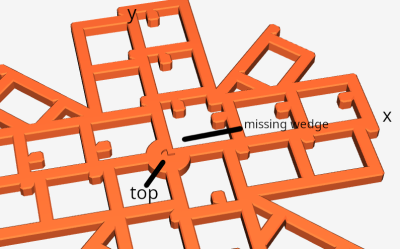
The print has markings to help you orient it correctly while measuring. The center of the print has a small divot on top inside the central disk, and there is a quadrant with a wedge missing from the central disk. When oriented with the missing wedge to the top right, the x-axis is left-right, and the y-axis is up-down.
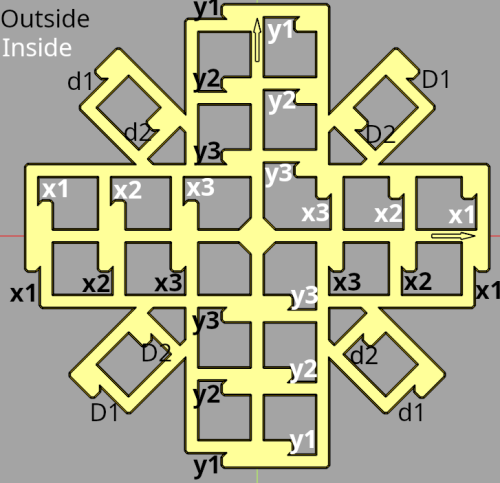
You can measure the print in any order you want. However, the measurements are ordered in the spreadsheet as
- Outside x (x1, x2, x3, etc. in black)
- Inside x (x1, x2, x3, etc. in white)
- Outside y (y1, y2, y3, etc. in black)
- Inside y (y1, y2, y3, etc. in white)
- Up/right diagonal ('capital D', D1, D2, D3, etc.)
- Down/right diagonal ('lowercase d', d1, d2, d3, etc.)
Interior points should be measured with the top of your calipers. Note that the top of the calipers are offset from each other so that they can close. Calistar has rests that you can wedge the calipers against to ensure you're getting a flush measurement. But, this means that you must orient the print in a certain fashion. See the following images for details (thanks and credit to C. Jacobs on Printables for the photos and advice to add documentation on this):
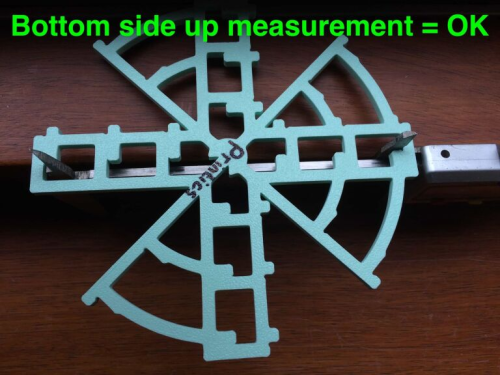
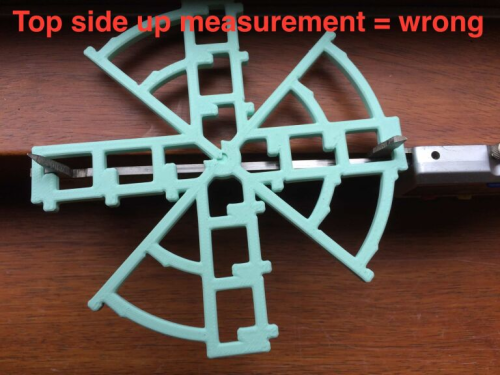
Thus you cannot measure the interior from the bottom of Calistar, you must measure from the top.
You can measure each location up to three times and enter them into the spreadsheet. If you get bored after only two measurements, that's OK, you can stop. If you printed a 150x5 Calistar and realized you don't actually have the patience to measure all 5 locations, that's cool.
Note: It is highly recommended that for every outer measurement, you have a corresponding inner measurement to offset a wrong/uncalibrated flow value or E-steps on your printer. So, for example, if you measured location x1 from the outside, you should also measure it from the corresponding inside measure point. This does not matter for the diagonals, as only outer measurements are used for skew estimation.
Next: Dimensionality or skew correction