Repository navigation
Server Configuration
All environment variables, Docker and Compose setup, TLS/reverse proxy, admin access, storage options, and production hardening for the GSBS server.
| Variable | Default | Description |
|---|---|---|
GSBS_ADDR |
:8080 |
Listen address (e.g. 0.0.0.0:8080) |
GSBS_TLS_CERT |
(unset) | PEM certificate path — set together with GSBS_TLS_KEY to serve HTTPS natively (since 5.2.4). A reverse proxy (see COMPOSE) remains the recommended TLS path; native TLS suits proxy-less LAN setups with self-signed or internal-CA certs |
GSBS_TLS_KEY |
(unset) | PEM private-key path for GSBS_TLS_CERT. Setting only one of the pair refuses to start |
GSBS_DB |
gsbs.db |
Path to the SQLite database. Use a path in a mounted volume for persistence. |
GSBS_SESSION_SECRET |
(required) |
Required — must be 32+ characters and not a placeholder or the server refuses to start (since 4.0.0). Signs WebUI session cookies, CSRF tokens, and TOTP login tokens. Generate: openssl rand -base64 32. GSBS_INSECURE_DEV_SECRET=1 bypasses the check for local dev only |
GSBS_ADMIN_USERNAME |
(empty) | If set, only this username can access the /admin pages |
GSBS_ALLOW_REGISTER |
true |
Set false to block new user registrations in production |
GSBS_SAVE_ROOT |
(unset) | When set, saves are stored as files on disk instead of SQLite BLOBs. Recommended: /app/data/gamesaves
|
GSBS_MIGRATE_BLOBS_TO_FS |
(unset) | Set 1 on startup to export existing BLOB saves to GSBS_SAVE_ROOT
|
GSBS_DRY_RUN_MIGRATION |
(unset) | Set 1 to preview schema migrations without writing. Remove after preview. |
GSBS_MAX_STORAGE_BYTES |
(unlimited) | Global storage limit in bytes; 0 = unlimited |
GSBS_READ_ONLY |
false |
Set true to disable push and delete (pull and read still work) |
GSBS_SAVE_VERSION_RETENTION |
8 |
Save versions kept per slot (recommended 5–10) |
GSBS_SAVE_VERSION_MAX_AGE_DAYS |
0 |
Also delete versions older than this many days (0 = off). The newest 3 versions per file always survive |
GSBS_AUDIT_RETENTION_DAYS |
180 |
Days of audit-log history kept (pruned daily at 03:30; 0 = keep forever) |
GSBS_MANIFEST_FETCH_RETENTION_DAYS |
30 |
Days of manifest-fetch log kept (0 = keep forever) |
GSBS_STATS_RETENTION_DAYS |
730 |
Days of stats snapshots kept (0 = keep forever) |
GSBS_LOG_LEVEL |
info |
Structured log level: debug, info, warn, error
|
GSBS_LOG_MAX_BYTES |
20971520 |
Rotate the server log file at this size in bytes (0 = never rotate) |
GSBS_LOG_MAX_BACKUPS |
3 |
Rotated log files kept (server.log.1 … .N) |
GSBS_SERVICE_LOG_PATH |
C:\ProgramData\GSBS\logs\server.log (Windows service mode) |
Preferred file path for server logs (used by service mode and by console mode when set) |
GSBS_LOG_FILE |
(unset) | Legacy/compatibility file path for server logs when GSBS_SERVICE_LOG_PATH is not set |
GSBS_TOKEN_MAX_AGE |
2160h |
Max client token lifetime (default 90 days) |
GSBS_TRUST_PROXY |
(unset) | Number of trusted reverse proxies in front; enables X-Forwarded-For / X-Real-IP
|
GSBS_TOTP_KEY_FILE |
<db dir>/gsbs-keys/totp.key |
At-rest encryption key file for 2FA secrets (auto-created 0600). Back it up with the database |
GSBS_BACKUP_DIR |
<db dir>/backups |
Destination for scheduled backups; setting it also enables the schedule |
GSBS_BACKUP_CRON |
0 5 * * * |
Backup schedule override (admin setting otherwise) |
GSBS_BACKUP_S3_ENDPOINT |
(unset) | S3-compatible endpoint for offsite upload (e.g. s3.eu-central-1.amazonaws.com, minio.lan:9000) |
GSBS_BACKUP_S3_BUCKET / _ACCESS_KEY / _SECRET_KEY / _PREFIX / _INSECURE
|
(unset) | Bucket, credentials (env-only — never stored in the DB), optional key prefix, _INSECURE=1 for plain HTTP |
GSBS_METRICS_TOKEN |
(unset) | Bearer token required to access /metrics
|
| Variable | Default | Scope |
|---|---|---|
GSBS_RATE_LIMIT_AUTH |
20,1m |
Login/register/TOTP per IP |
GSBS_RATE_LIMIT_PUSH |
120,1m |
Push per user |
GSBS_RATE_LIMIT_PULL |
60,1m |
Pull per user |
GSBS_RATE_LIMIT_MANIFEST |
60,1m |
Manifest fetches |
GSBS_RATE_LIMIT_GENERAL |
300,1m |
General API per user |
| Variable | Default | Description |
|---|---|---|
GSBS_PCGW_CRON |
0 3 * * 1 |
Cron expression for incremental PCGW sync (weekly Monday 03:00). Overrides admin Settings when set; use "" to disable via env. When unset, schedule is configurable from admin Settings. |
GSBS_PCGW_FULL_CRON |
(unset) | Optional cron for a full PCGW resync |
GSBS_PCGW_RATE_LIMIT |
2s |
Delay between PCGW HTTP requests |
GSBS_PCGW_MAX_PAGES_PER_RUN |
5000 |
Max pages to ingest per sync run. Interrupted runs resume from checkpoint. |
GSBS_PCGW_USER_AGENT |
GSBS/<version> (+https://...) |
User-Agent for PCGamingWiki requests |
GSBS_PCGW_STORE_FULL_WIKITEXT |
true |
Set false to skip storing full-page zstd wikitext |
| Variable | Default | Description |
|---|---|---|
GSBS_PCGW_SYNC_SOURCE |
(from DB) |
s3 (manifest bundle). The retired api and legacy github values normalize to s3. |
GSBS_PCGW_BUNDLE_URL |
Official gsbs-manifest URL | Full bundle URL |
GSBS_PCGW_BUNDLE_DELTA_URL |
Official delta URL | Delta bundle for seeded servers |
GSBS_PCGW_BUNDLE_CRON |
0 3 * * 1 |
Bundle fetch schedule when source is github
|
See MANIFEST_BUNDLE.md in the main repo.
The repository includes ready-to-use Compose files:
| File | Use case |
|---|---|
docker-compose.yml |
Production — prebuilt image + Caddy TLS |
docker-compose.dev.yml |
Local dev — build from source, port 8080 |
Production startup:
cp .env.example .env   # set GSBS_SESSION_SECRET
docker compose up -d
Local development:
docker compose -f docker-compose.dev.yml up --buildOpen http://localhost:8080.
See the compose-caddy.yml, compose-nginx.yml, and compose-traefik.yml examples for reverse proxy alternatives.
The server does not terminate TLS. Run it behind a reverse proxy that handles HTTPS.
Caddy (recommended — automatic HTTPS):
your-domain.com {
  reverse_proxy localhost:8080
}
nginx:
server {
    listen 443 ssl;
    server_name your-domain.com;
    location / {
        proxy_pass http://localhost:8080;
        proxy_set_header Host $host;
        proxy_set_header X-Forwarded-Proto https;
    }
}
Traefik: See compose-traefik.yml.
Set GSBS_TRUST_PROXY=1 when behind a proxy so the server trusts X-Forwarded-For for rate limiting. The value is the number of proxies you control: the client IP is taken that many hops from the right of the chain, because each proxy appends the peer it saw. Raise it only if you genuinely run a chain (e.g. 2 for a CDN in front of your own proxy) — a value larger than the real chain lets callers spoof their IP.
All server state lives in a single SQLite database (GSBS_DB). Mount it to a Docker volume so data persists across container restarts:
volumes:
  - gsbs-data:/app/data
environment:
  GSBS_DB: /app/data/gsbs.db
  GSBS_SAVE_ROOT: /app/data/gamesaves  # recommended
With GSBS_SAVE_ROOT set, file bytes are stored on disk under that directory; SQLite holds metadata only. Without it, saves are stored as inline BLOBs (legacy, works but grows the DB file).
Warning: The server uses SQLite WAL mode. A plain
cp gsbs.dbwhile running may produce an inconsistent backup. Use one of these safe methods.
Option A — stop the container first:
docker stop gsbs
cp /path/to/data/gsbs.db /path/to/backup/
cp /path/to/data/gsbs.db-wal /path/to/backup/ 2>/dev/null || true
docker start gsbs
Option B — live backup (no downtime):
sqlite3 /path/to/data/gsbs.db "VACUUM INTO '/path/to/backup/gsbs-backup.db'"Also back up GSBS_SAVE_ROOT if set (it holds save file bytes outside SQLite).
| Endpoint | Auth | Purpose |
|---|---|---|
GET /api/health |
None | Liveness — returns {"status":"ok"}
|
GET /api/health?ready=1 |
None | Readiness — runs a 2s DB check; 503 if DB is slow/down |
Docker Compose health check:
healthcheck:
  test: ["CMD", "wget", "-q", "-O", "-", "http://localhost:8080/api/health"]
  interval: 30s
  timeout: 5s
  retries: 3
start_period: 15sThe admin interface is available at /admin (session required + must match GSBS_ADMIN_USERNAME if set).
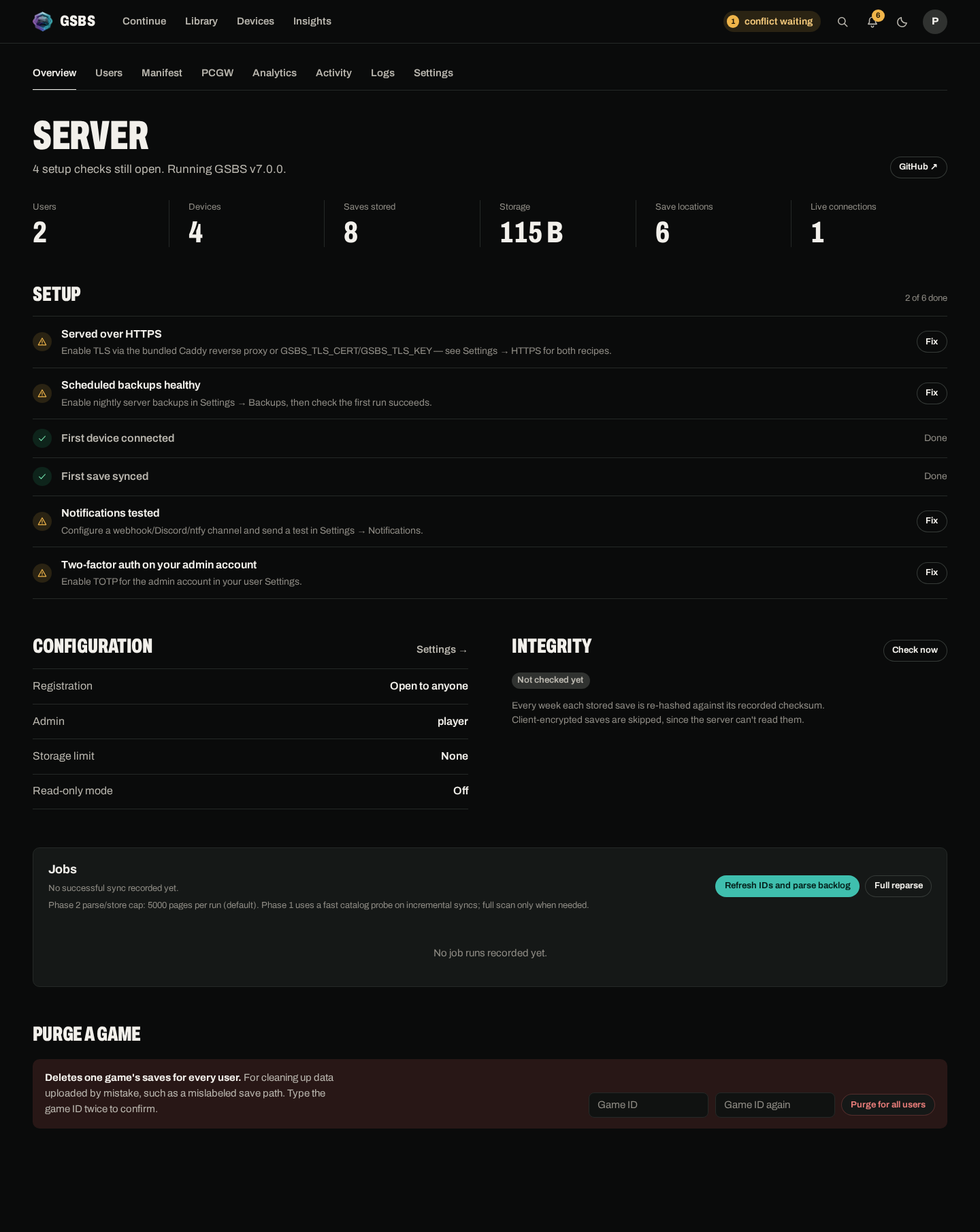
| Route | Description |
|---|---|
/admin |
Overview — SVG charts, global stats, server config |
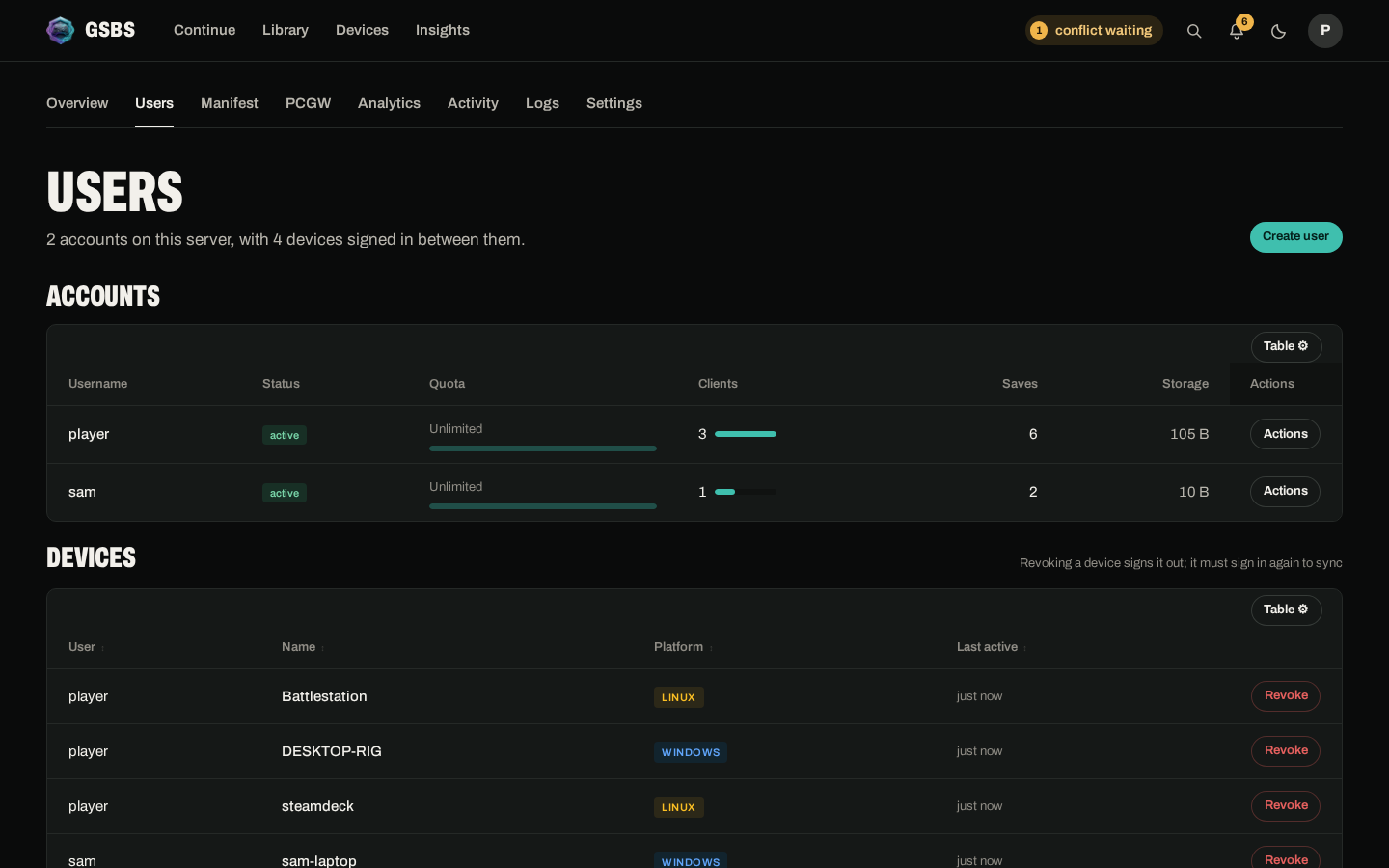
/admin/users |
User list, client-count bars, revoke client tokens |
/admin/manifest |
Server manifest search and pagination |
/admin/activity |
Jobs, manifest fetches, audit log, stats snapshots |
/admin/logs |
Server log viewer with level/text filters and auto-refresh (file source only) |
/admin/settings |
PCGW cron, filters, first-start auto sync |
/admin/analytics |
Storage, active clients, sync volume, PCGW coverage |
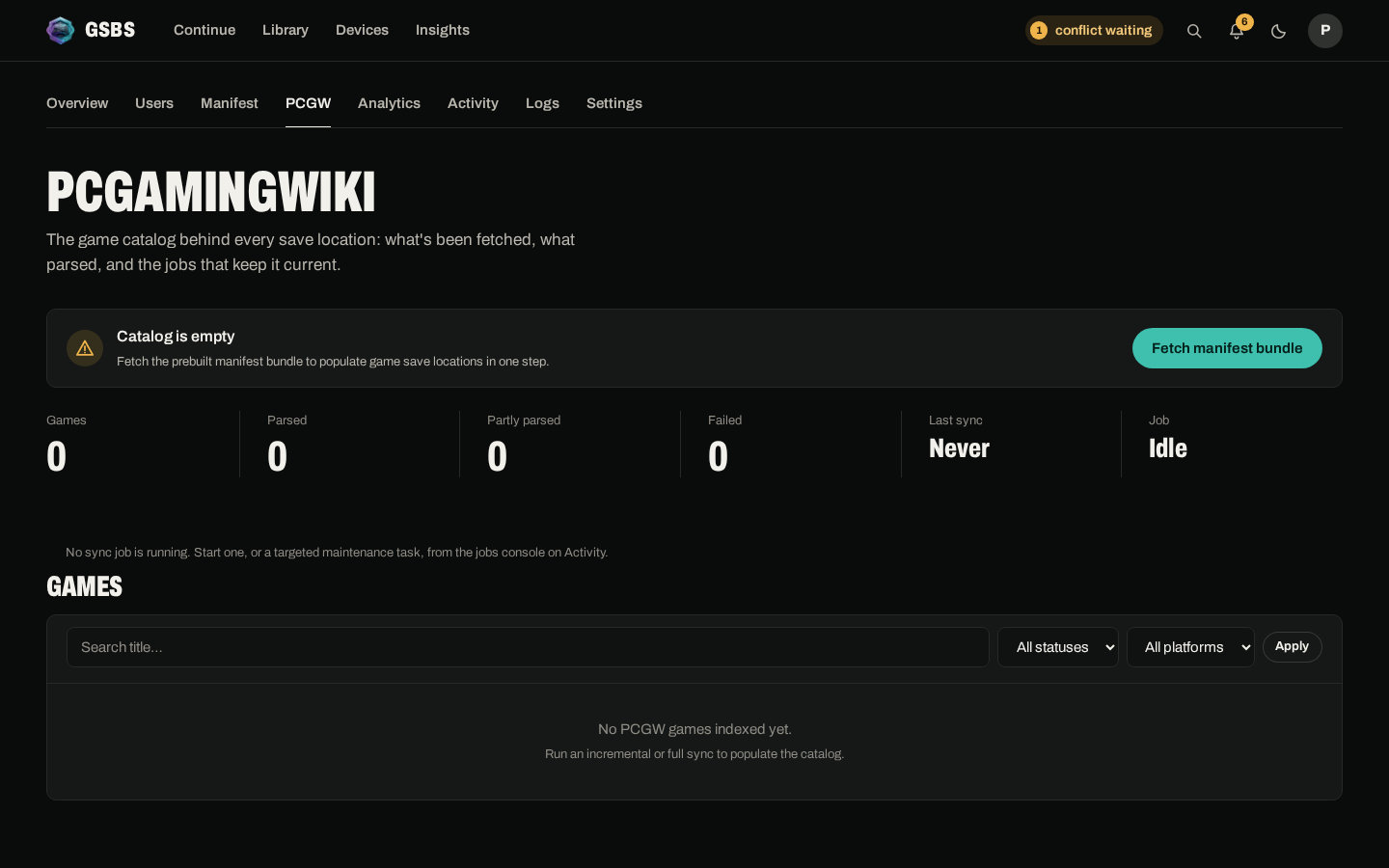
/admin/pcgw |
PCGW catalog search, sync controls, per-game detail, export/import |
| Users management | PCGW management |
|---|---|
 |
 |
PCGW sync (admin):
| Action | How |
|---|---|
| Run incremental sync | Admin → PCGW → Incremental Sync |
| Clear large backlog | Admin → PCGW → Auto Catch-Up |
| Ingest never-fetched IDs only | Advanced Maintenance → Parse Missing Only |
| Retry failed/partial pages | Advanced Maintenance → Retry Failed Pages |
| Unblock dead-letter pages | Advanced Maintenance → Reset Dead Letter |
| Force full catalog rescan + backlog | Advanced Maintenance → Full Reparse |
| Bump manifest for clients | Advanced Maintenance → Rebuild Save Locations |
| Refresh catalog IDs only | Advanced Maintenance → Refresh Catalog Only |
| Export manifest bundle | GET /admin/pcgw/export/manifest.json.gz |
| Import bundle | Admin → PCGW → Import |
| Push manifest to clients | Admin → Push manifest (sends SSE event) |
Notes:
-
/admin/logschecks log sources in this order:GSBS_SERVICE_LOG_PATH,GSBS_LOG_FILE, then Windows defaultC:\ProgramData\GSBS\logs\server.log. - If none of those files exist yet,
/admin/logsshows guidance with attempted paths. Console mode still falls back to stdout when file logging is not configured or fails. - PCGW destructive actions now use a simple popup confirmation instead of typed confirmation.
Windows admins can install the server with gsbs-server-setup-X.Y.Z-windows-amd64.exe from Releases.
The server binary supports native Service Control Manager (SCM) mode.
gsbs-server-windows-amd64.exe --install-service
gsbs-server-windows-amd64.exe --start-service
gsbs-server-windows-amd64.exe --stop-service
gsbs-server-windows-amd64.exe --uninstall-service
Notes:
- Service name:
GSBSServer(display nameGSBS Server). - SCM host mode uses
--serviceautomatically when the service starts. - Console behavior is unchanged: run the binary with no service flags.
- In service mode, logs go to
GSBS_SERVICE_LOG_PATH(orC:\ProgramData\GSBS\logs\server.logif unset).
What the wizard does:
- Installs binaries in
C:\Program Files\GSBS(admin-required install). - Writes environment config to
C:\ProgramData\GSBS\server.envwith comments and defaults. - Lets you generate
GSBS_SESSION_SECRETin-wizard (or enter your own). - Installs and starts the
GSBS ServerWindows Service by default. - Adds Start Menu shortcuts for service start/stop/restart/status, open admin, edit config, and open config/log folders.
Security notes:
- Treat
GSBS_SESSION_SECRETandGSBS_METRICS_TOKENas secrets; never commit them to git. - Keep
ProgramData\GSBSrestricted to administrators/service users on shared systems.
- Set
GSBS_SESSION_SECRETto 32+ random bytes. - Set
GSBS_ALLOW_REGISTER=falseafter creating your accounts. - Set
GSBS_ADMIN_USERNAMEto restrict admin access. - Run behind HTTPS (Caddy, nginx, or Traefik).
- Set
GSBS_TRUST_PROXY=1if behind a reverse proxy. - Mount
GSBS_DBandGSBS_SAVE_ROOTto a persistent volume. - Pin the server to a specific Docker tag in production (not
:latest). - Set up a backup schedule for the SQLite database.
- Configure
GSBS_PCGW_CRONor leave unset to use admin Settings.
- Runtime image: Alpine 3.23.4 with
apk upgradeat build time. - Server runs as non-root user
gsbs(UID/GID 1000). - The Docker entrypoint ensures
/app/datais owned bygsbsbefore dropping privileges. - Go dependencies: built with current
golang.org/x/cryptoandgolang.org/x/sys. - After a fresh build with current
go.mod: expect 0 Critical / 0 High from Go modules.