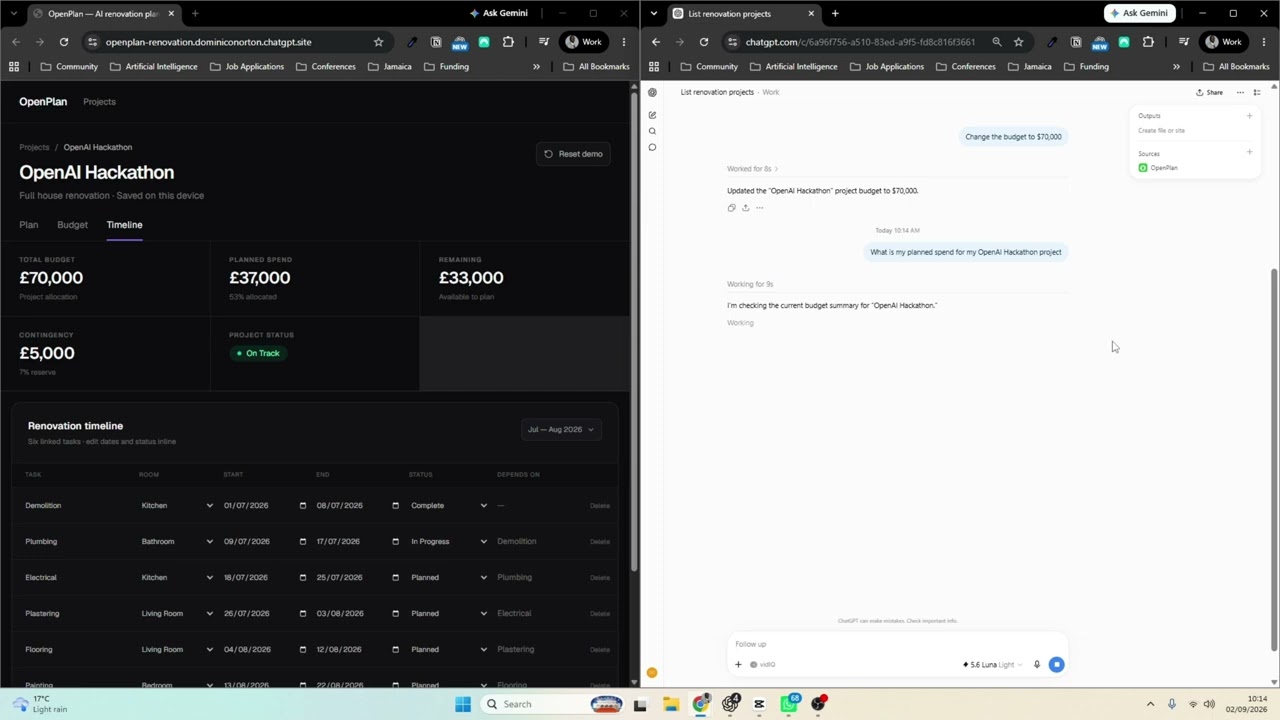
Watch the OpenPlan demo on YouTube
OpenPlan is an AI-assisted home renovation planner that gives homeowners one place to manage projects, floors, spaces, budgets, renovation items, schedules, dependencies, notes, and vendor-related activity. Its web interface is the central source of truth, while WebMCP and a remote MCP endpoint make the same information easy to query and update conversationally from ChatGPT.
- Live app: https://openplan-renovation.dominiconorton.chatgpt.site
- MCP endpoint:
https://openplan-renovation.dominiconorton.chatgpt.site/api/mcp
The live demo and MCP endpoint are intentionally unauthenticated. Anyone can read, create, update, or delete the shared demo data, so do not enter private or sensitive renovation information.
The inspiration for OpenPlan is the difficulty of managing multiple vendors during home renovation projects and the need to streamline and centralise communication. Many homeowners undertaking renovations also work full time and do not have time to navigate complex interfaces just to add, update, remove, delete, or query something simple.
While the UI remains the centralised source of truth, OpenPlan WebMCP lowers the barrier for homeowners to manage their home renovation projects effectively. A homeowner can work visually in OpenPlan or ask ChatGPT to make the same changes through natural language.
- Multiple renovation projects
- Floors with vertically listed spaces
- Space budgets, statuses, notes, and renovation items
- Live project budget calculations
- Editable timeline tasks and dependencies
- Shared hosted persistence using Cloudflare D1
- Browser-native WebMCP tools
- Streamable HTTP MCP endpoint for ChatGPT
- Visible activity history for changes made through tools
- React, TypeScript, and Next.js-compatible Vinext
- Tailwind CSS
- Zustand for responsive client state
- Cloudflare D1 for shared project persistence
- Model Context Protocol SDK
- OpenAI Sites-compatible deployment output
Requirements: Node.js 22.13 or newer and npm.
git clone YOUR_FORK_URL
cd OpenPlan
npm install
npm run dev
Open the local URL printed in the terminal. To validate a production build:
npm run buildThe hosted API expects a D1 database binding named DB. Purely visual client-side development can run without a hosted database, but shared persistence and the remote MCP endpoint require that binding.
OpenPlan exposes a Streamable HTTP MCP endpoint at:
https://openplan-renovation.dominiconorton.chatgpt.site/api/mcp
Enable Developer Mode in ChatGPT, create a new app/connection, select a public MCP endpoint, and enter the full URL above. ChatGPT will discover tools for projects, floors, spaces, budgets, items, notes, and timeline tasks. Fork owners should replace this URL with https://YOUR_DEPLOYED_DOMAIN/api/mcp after deploying their own copy.
The demo endpoint is intentionally unauthenticated. Anyone who knows the endpoint URL can read, create, update, and delete its data. Do not use this configuration for private renovation information or a multi-user production service. Add authentication and per-user authorization before storing sensitive data.
- Fork this repository on GitHub and clone your fork.
- Install dependencies with
npm install. - Create a new Cloudflare D1 database for your deployment.
- Apply
drizzle/0000_openplan_projects.sqlto the new database. - Configure the deployment with a D1 binding named
DB. - Replace the existing Sites project reference in
.openai/hosting.jsonwith a project created in your own account. Do not deploy a fork against the original OpenPlan project ID. - Run
npm run buildand deploy the generated Site through OpenAI Sites, or deploy the Cloudflare Worker-compatible output using your own Cloudflare workflow. - Open
https://YOUR_DEPLOYED_DOMAIN/api/mcpand confirm that it responds as your MCP endpoint. - Add that endpoint to ChatGPT as a new developer-mode app.
If you keep the endpoint unauthenticated, use a disposable demo database and assume that all data is public and mutable. For a real household or commercial deployment, add authentication before sharing the URL.
The browser store provides immediate editing while components/RemoteSync.tsx synchronises the active project with the hosted API. The website API and MCP server operate on the same D1 records, so updates made in ChatGPT appear in the OpenPlan interface and vice versa.
See WEBMCP.md for more information about the available browser tools.
OpenPlan is available under the MIT License.