A Transaction is a group of tasks or group of commands (work) that modifies the data stored in the Databases. It can also be defined as single unit of work that is performed on the database.
- In SQL to start a transaction we use
BEGIN TRANSACTION - And then series of statements or commands for the particular task.
- A transaction is not completed without rollback or commit transaction.
ROLLBACK TRANSACTION
- It is a statement which is used to rollback (restore) the database into the previous state.
COMMIT TRANSACTION
- COMMIT TRANSACTION is used to modify the database permenently.
The entire cycle is called a Transaction.
The Term ACID stands for Atomicity, Consistency ,Isolation,Durability.
These 4 properties play a very important role in maintaining the data-integrity.
This properties ensures that the database transaction is completed entirely. It never leaves in the transcations in the half-completed state.
It means All or Nothing. If any operation is performed on a data it should be executed completely or not executed at all (There is no partial execution on the data).
Eg:- Let us assume a person is transfering some amount from account A to account B. Let's say he started the transaction and the amount is debited from account A but not credited into the account B (operation failed). Then we use rollback transaction to go back to the previous state. If the transaction is completed only then we commit out database.
It simply states that any changes to a values in an instance are consistent with the values in other instance. At the end of transaction all the data must be left in the consistent state.
Eg:- If an amount is debited from a account. The same amount will be credited to the other account not more or less.
This ensures data consistency in the database.
Isolation occures when there is a concurrent transactions. It states that we can convert a parallel schedule into serial schedule.
When two or more transactions occur simultaneously. The data from one transaction should not effect the other transaction untill it is commited.
Eg:- Let's say there are 2 transactions T1 and T2 which is performed on the database concurrently. What isolation says is first perform one operation T1 and then go to T2.(T1->T2) or (T2->T1). Let's say a person is transfering an amount 20 Rs to one account B and 30 Rs to another account C. First the amount of 20 Rs will be debited from his account and later balance is updated in his account after that from the remaining balance the 30 Rs will be debited.
When two or more events is happening parallely the consistency of the data is remained.
Durability says that all the updates and modifications performed on the database are committed permanently. Once a cycle of Transcation is completed.
Normalization is a technique of organizing databases into multiple related tables, in order to reduce data redundency.
If there is duplicate data it takes lots of space and also reduces the performance when performing operations. so,we use Normalizations techniques to overcome this problem.
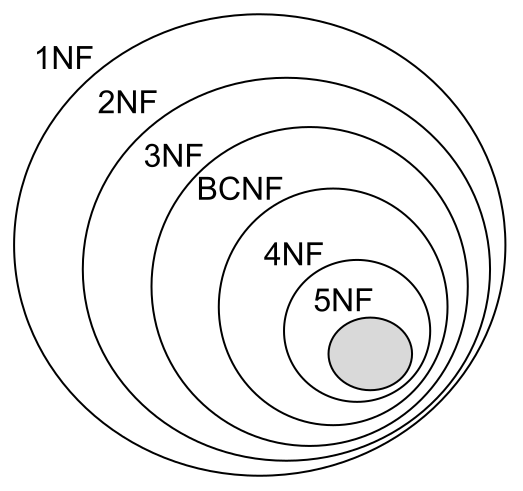
It states that each single cell must have a single value. All the records must be unique. It should follow the rule of Atomicity.
Database should be in 1 NF and necessarily consist of a single column primary key.
The database should be in 2 NF and must not have any transitive functional dependencies. (For suppose you had a table which has name and gender as the attributes if you change the name of the person to female person then you should also change the gender of that specific person. This dependency is called Transitive functional dependency.)
In 3 NF when there is a transitive dependency column we remove that column and make a another table with unique-keys .
It is also known as 3.5 Normal Form, Where you divide your tables further so that there would only one candidate key is present.
A JOIN clause is used to combine rows from two or more tables, Based on the common column present in both the tables.
Types of Joins
- Inner Join
- Right Join
- Left Join
- Full Join

It only returns the data from which it has a common matches for that column.
SELECT table.column1 FROM table1
  INNER JOIN table2 ON table1.       common_column = table2.common_column;
In the above example it only retrives the data from common_column which has common values in both the tables.
It returns all the records from the left table and only the matched data from the right table.
SELECT column FROM table1
  LEFT JOIN table2 ON table1.comm_colum = table2.comm_colum;
It returns all the records from the right table and only the matched data from the left table.
SELECT column FROM table1
  RIGHT JOIN table2 ON table1.comm_colum = table2.comm_colum;
It returns all the data from left and right tables
SELECT column FROM table1
 FULL OUTER JOIN table2 ON table1.comm_colum = table2.comm_colum;
Aggregate functions are used to perform calculations on multiple rows of a specific column of the data.
These are used to summarize the data.
- SUM()
- COUNT()
- AVG()
- MIN()
- MAX()
This function is used to calculate the sum of all the values in a specific column.
SELECT SUM(marks) FROM student;
This function is used to total number of records are present in the table.
SELECT COUNT(marks) FROM Students
WHERE marks>50;
The above Example gives the total count of students who marks is greater than 50.
This function is used to compute the average of values for a specified column
SELECT AVG(marks) FROM Students;
This gives the average marks of the class.
This function is used to find the minimun value in a specific column which is mentioned.
SELECT MIN(marks) FROM students;
The above command give the least marks obtained in the students table.
This function is used to find the maximum value in a specific column which is mentioned.
SELECT MAX(marks) FROM students;
The above commands gives the marks of student who scored highest.
In DBMS we have key word to filter the data based on a specific condition.
There are many way's to filter the data from the table.
We use WHERE clause in DBMS to get the specific data which satisifies that condition in the table.
SELECT * FROM students WHERE marks>60;
The above commands retrives only the records of student table who scored more than 60.
It is used to read only the first 5 records of the data from the table
SELECT * FROM students
LIMIT 5
It only reads the first 5 records from the students table.
With the help of OFFSET we can specify where our data should start reading from.
SELECT * FROM students
LIMIT 5 OFFSET 2;
It display's 5 records of the data starting from 2nd record.
GROUP BY clause is used to group the data based on categorical column data.
SELECT class,AVG(Marks) FROM students
GROUP BY class;
The above command gives the average marks of each class.
ORDER BY clause is used to sort the data based upon the specific column.
SELECT marks FROM students
ORDER BY marks ASC| DESC;
ASC stands for Ascending order. It display's the marks in the ascending order.
DESC stands for descending order. It display's the marks in the descending order.
Triggers are sql commands that are automatically executed in response to certain events on a particular table. This helps in maintaining the integrity of the data. In simple terms it helps to automate the tasks.
Let's say there is a task which needs to performed frequently like Good Morning mail to all the employees daily. It consumes lot of time to do this task repeatedly. In order to automate this we use triggers.
create trigger [trigger_name]
[before | after]
{insert | update | delete}
on [table_name]
[for each row]
[trigger_body]
Before or After statement tells us when to perform the Triggers.
- BEFORE:- It runs the triggers before the trigger statement is run.
- AFTER:- It runs the triggers after the trigger statemnts are run.
DROP TRIGGER <Trigger Name>;
BEFORE INSERT Triggers are used to update or modify records before saving in the database.
AFTER INSERT Triggers are used to access the field values that are set by the system and to effect changes in other records.
- It helps in maintaining the integrity of the data.
- Automating the tasks.
- It helps in catching the errors.
- Triggers are useful for inspecting the data.
- Triggers imposes load on servers.
- Triggers can be very hard to troubleshoot because they execute automatically in the database.
- Triggers can't provide all kind validations.
Accessing the same data by number of transactions at the same time is called concurrent access.
Eg:- Buying the movie tickets at the same time by number of people.
- Dirty Read
- Non-Repetable Reads
- Phantom Reads
- serialization anomaly
Let's say there are 2 transactions T1 and T2. if T1 is updating the data but it isn't commited yet mean while the T2 transaction which reads the data has performed then the T2 transaction will get the previous data not the updated data. This is called Dirty Reads.
This happends when you see the different output's when you call the same transaction in the business logic.
(T1-> Read, T2-> Update, T1-> Read)
In the above example at first T1 reads the data. Next T2 updates the table and then again T1 reads the data but this time your output will be different as T2 modified the data.
A transaction re-executes a query returning a set of rows that satisfy a search condition and finds that the set of rows satisfying the condition has changed due to another recently-committed transaction.
The result of successfully committing a group of transactions is inconsistent with all possible orderings of running those transactions one at a time.
When there is a concurrent transactions on the database we need to isolate the data for each transaction.
To avoid the problems which are caused by the concurrent transactions we use Transaction Isolation Levels
There are 4 types of transaction levels
- Read uncommitted
- Read committed
- Repeatable read
- Serializable
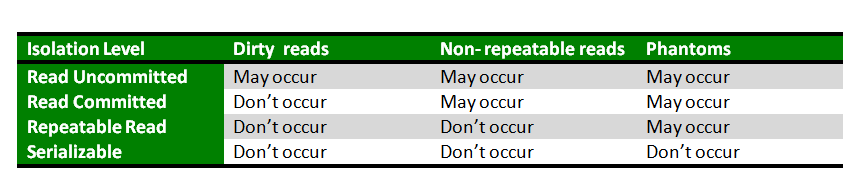
The above table explains with the use of specific level of transaction we can avoid the anomalies faced by concurrent Transaction.
Locking is a mechanism in DBMS which is used to over the problems which are caused by the concurrent access.
There are 2 types of locking modes
- Share lock mode (Read Lock Mode)
- Exclusive lock mode (Write Lock Mode)
It allows the associated resources to be shared,depending on the operations involved. Several transactions can acquire share locks in the same resource.
It prevents the associates resources from being shared. This lock mode is obtained to modify the data. The first transaction to lock a resource exclusively is the only transaction that can alter the resource until the exclusive lock is released.
- Share-Share is allowed (Two users can simultaneously read the data)
- Share-Exclusive is allowed (While one is reading the data the other can modify it is allowed)
- Exclusive- Share is allowed (While one is updating the other one can read the data.)
- Exclusive-Exclusive is not allowed (While one is updating the data the other one can't update the data which is prohibited.)
Locks are placed at 2 Levels
- Row level
- Tabel level
In this only the rows which you are updaing are locked not the whole Table.
It is used to prevent 2 transactions from modifying the same row.While 1 transaction is performing a task the other transaction is waiting for that to complete that transaction only then this transaction will execute.
Row-level locking leads to a problem called dead-lock. Dead-Lock:- It occurs when both are waiting for each other.
Here the entire table is locked. Table-level locking prevents all the operations on the table.(we can't modify,perform any operation on that table.)
The term CAP refers to Consistency,Availability,Partition tolerance.It states that it is impossible for a database to offer more than two out of these three.
The data should remain consistent even after the execution of an Transaction. This means once data is written, any future read request should contain that data. For example, after updating the order status, all the clients should be able to see the same data.
This means that the database should be always available for any Transaction.
Partition Tolerance means that the system should continue to function even if the communication among the servers is not stable.
For example, the servers can be divided into multiple groups that may or may not communicate with one another. In this case, if a portion of the database is inaccessible, the remaining portions are always unaffected.
Index is a database object that helps in quick retrivel of data from the table. It helps in navigating the data faster.
- Indexes are created on the columns, The columns on which the index is created is called index key.
Syntax to create a index
CREATE INDEX index_name ON table_name;
A unique index does not allow any duplicate values to be inserted into the table.
CREATE UNIQUE INDEX index_name
on table_name (column_name);
A composite index is an index on two or more columns of a table.
CREATE INDEX index_name
on table_name (column1, column2);
- when a column contains a wide range of values.
- A column does not contain a large number of null values.
- When we need a faster retrival of data from the table.
- https://www.sqlshack.com/locking-sql-server/
- https://www.tutorialspoint.com/What-are-the-advantages-disadvantages-and-restrictions-of-using-MySQL-triggers
- https://sqlbolt.com/lesson/select_queries_with_joins
- https://www.geeksforgeeks.org/concurrency-control-in-dbms/
- https://aksakalli.github.io/2012/03/12/database-normalization-and-normal-forms-with-an-example.html
- https://www.javatpoint.com/acid-properties-in-dbms
- https://www.geeksforgeeks.org/transaction-isolation-levels-dbms/
- https://www.tutorialspoint.com/sql/sql-indexes.html
- https://www.postgresql.org/docs/9.5/transaction-iso.html