feat(zsh): add context argument completion#3130
Merged
Merged
Conversation


Codecov Report
Additional details and impacted files@@ Coverage Diff @@
## master #3130 +/- ##
==========================================
+ Coverage 57.09% 60.65% +3.55%
==========================================
Files 299 308 +9
Lines 18731 29012 +10281
==========================================
+ Hits 10695 17598 +6903
- Misses 7166 10393 +3227
- Partials 870 1021 +151 |


Signed-off-by: acouvreur <alexiscouvreur.pro@gmail.com>

Contributor
Author
|
Any update on merge @thaJeztah ? 😄 |
acouvreur
changed the title

Member
|
I guess this one dropped off my list; let me close/reopen to get a fresh run of CI |

This file contains hidden or bidirectional Unicode text that may be interpreted or compiled differently than what appears below. To review, open the file in an editor that reveals hidden Unicode characters.
Learn more about bidirectional Unicode characters
Sign up for free
to join this conversation on GitHub.
Already have an account?
Sign in to comment
3 participants


Add this suggestion to a batch that can be applied as a single commit.This suggestion is invalid because no changes were made to the code.Suggestions cannot be applied while the pull request is closed.Suggestions cannot be applied while viewing a subset of changes.Only one suggestion per line can be applied in a batch.Add this suggestion to a batch that can be applied as a single commit.Applying suggestions on deleted lines is not supported.You must change the existing code in this line in order to create a valid suggestion.Outdated suggestions cannot be applied.This suggestion has been applied or marked resolved.Suggestions cannot be applied from pending reviews.Suggestions cannot be applied on multi-line comments.Suggestions cannot be applied while the pull request is queued to merge.Suggestion cannot be applied right now. Please check back later.
- What I did
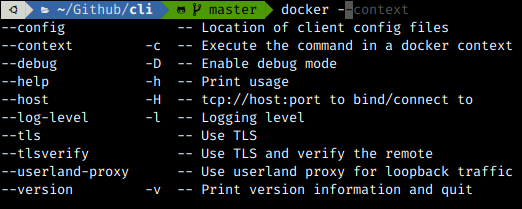
Add a
-c --contextdocker option completion, resolves-cand--contextwith the description "Execute the command in a docker context".And resolves available contexts
docker -c=<tab>It also adds the context to the
docker_optionsso the completion is depending on the given context.- How I did it
This use the same function to list contexts previously added and use of docker_options variable
- How to verify it
Type
docker --<tab>should add a--context optionThen type
docker --context <tab>should give you the list of contexts availableHave a distant context and try to inspect a resource on it
docker -c my-context inspect <TAB>should list you the resources of the given context.- Description for the changelog
add docker --context argument completion
- A picture of a cute animal (not mandatory but encouraged)