Expected behavior
Docker should start without errors.
Actual behavior
It's not working at all and will not start, despite trying many things. This is the output of docker ps:
Error response from daemon: dial unix /Users/daniel/Library/Containers/com.docker.docker/Data/docker.raw.sock: connect: no such file or directory
Information
- macOS Version: 12.4
- Intel chip or Apple chip: Apple
- Docker Desktop Version: 4.8.2 (79419)
The app has not working at all since updating to macOS Monterey 12.4 today. It was working fine before then.
I've tried the following:
- Clicking any of the troubleshooting buttons, such as these does nothing. It's completely unresponsive:
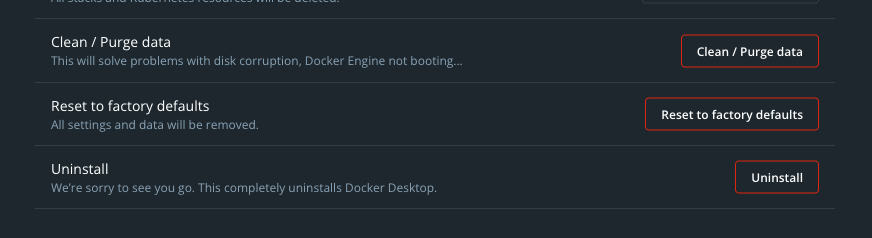
- Reinstalling
docker with brew doesn't work:
brew uninstall --cask docker
brew install --cask docker
-
Uninstalling the app from Brew, and then installing the Apple Silicon .dmg from your website didn't work.
-
Removing the app's files and then reinstalling via step 1 or 2 didn't work:
rm -rf ~/.docker
rm -rf ~/Library/Saved Application State/com.electron.docker-frontend.savedState
rm -rf ~/Library/Preferences/com.electron.docker-frontend.plist
rm -rf ~/Library/Preferences/com.docker.docker.plist
rm -rf ~/Library/Group\ Containers/group.com.docker/
rm -rf ~/Library/Cookies/com.docker.docker.binarycookies
rm -rf ~/Library/Caches/com.docker.docker
rm -rf ~/Library/Application\ Support/Docker\ Desktop/
- Restarting my Mac doesn't work.
- Restarting the Docker app doesn't work.
- Killing all Docker processes with the Activity Monitor doesn't work.
- Deleting the app from
/Applications and then reinstalling it doesn't work.
Output of /Applications/Docker.app/Contents/MacOS/com.docker.diagnose check
diagnostics.log
Steps to reproduce the behavior
I'm not sure how to reproduce this.
Expected behavior
Docker should start without errors.
Actual behavior
It's not working at all and will not start, despite trying many things. This is the output of
docker ps:Information
The app has not working at all since updating to macOS Monterey 12.4 today. It was working fine before then.
I've tried the following:
dockerwithbrewdoesn't work:Uninstalling the app from Brew, and then installing the Apple Silicon .dmg from your website didn't work.
Removing the app's files and then reinstalling via step 1 or 2 didn't work:
/Applicationsand then reinstalling it doesn't work.Output of
/Applications/Docker.app/Contents/MacOS/com.docker.diagnose checkdiagnostics.log
Steps to reproduce the behavior
I'm not sure how to reproduce this.