- [X ] I have tried with the latest version of my channel (Stable or Edge)
- [X ] I have uploaded Diagnostics
- Diagnostics ID: 1A70911D-D295-46EF-BEB8-B713DD128CEF/20200211163221
Expected behavior
I expect docker to start.
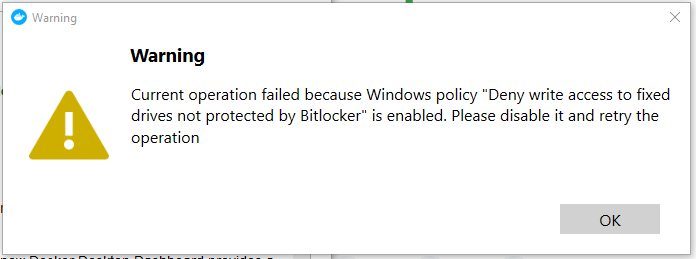
Actual behavior
Instead, I get the attached message. Docker shows up in the toolbar with a red icon.
Information
- Windows Version:
Windows 10 Enterprise Version 1909 OS Build 18363.592
- Docker Desktop Version: v19.03.5
- Are you running inside a virtualized Windows e.g. on a cloud server or on a mac VM: No.
Steps to reproduce the behavior
- ... Install Docker Desktop.
- ... Start docker desktop. (As administrator or regular user id. Both methods produce the same result.)
- Watch error message appear.
- Ask a system administrator to change the registry key - the error goes away!
- Reboot pc or restart Docker Desktop - the error is back.

Expected behavior
I expect docker to start.

Actual behavior
Instead, I get the attached message. Docker shows up in the toolbar with a red icon.
Information
Windows 10 Enterprise Version 1909 OS Build 18363.592
Steps to reproduce the behavior