Releases: docwitson/Alice-Madness-Returns-Co-op
Release list
Alice Co-op 0.1.0-alpha.2

Alice Co-op 0.1.0-alpha.2
Launcher, installation and stability update. The network protocol remains
version 29; gameplay synchronization is largely unchanged from alpha.1.
Download
Recommended — launcher installer
Download AliceCoop-0.1.0-alpha.2-installer.zip
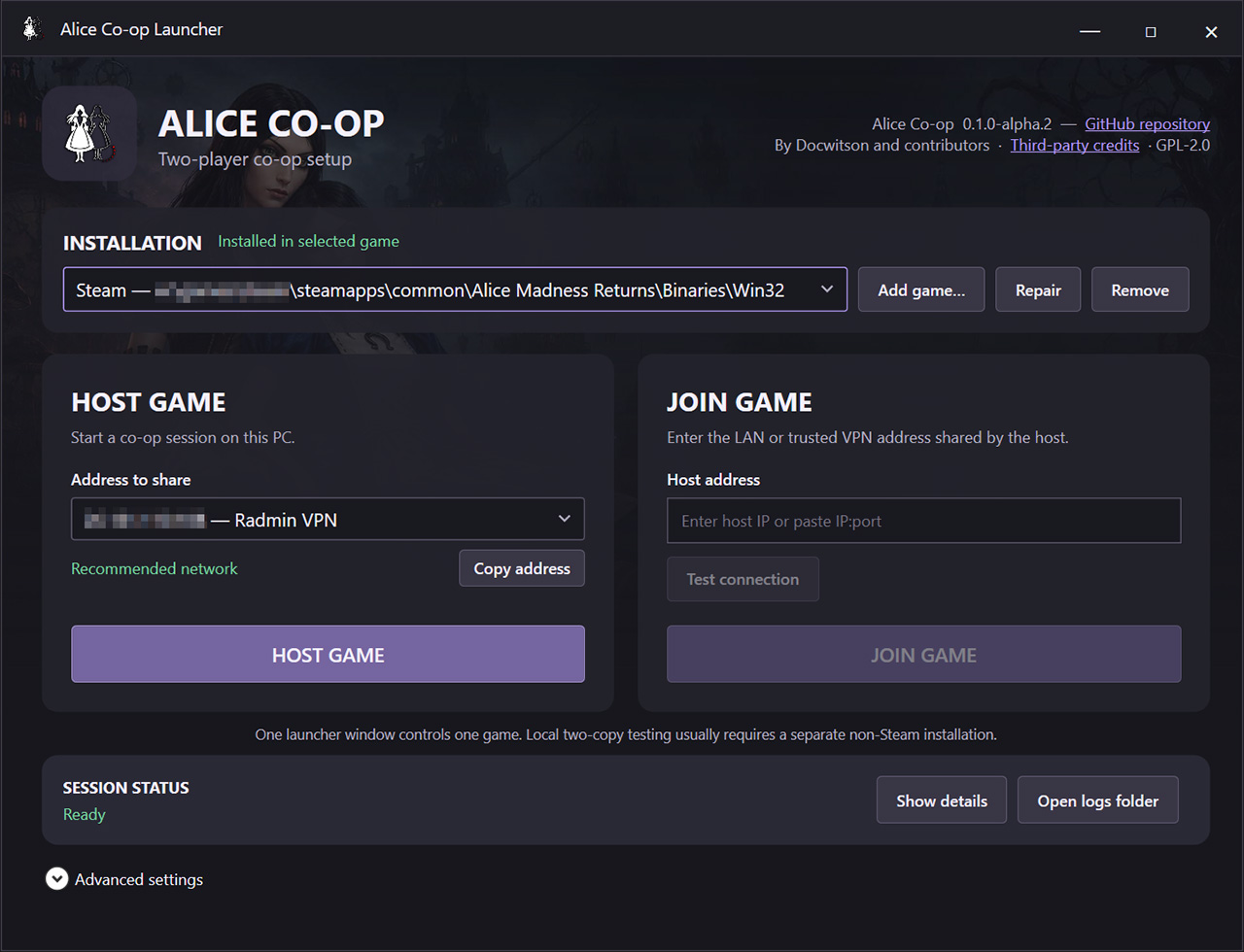
Extract the archive to any folder, run AliceCoopLauncher.exe, select the game,
and choose Install. The launcher handles hosting, joining, the relay and
normal connection settings.
Advanced — manual drop-in
Download AliceCoop-0.1.0-alpha.2-drop-in.zip
Use this only for manual drag-and-drop installation, BAT/INI launching or
development. Extract it directly beside AliceMadnessReturns.exe.
What's new
- Graphical installation, repair and removal for Steam, EA App and custom game
copies. - Guided Host Game and Join Game setup with address copying, connection
testing, firewall setup and user-facing session status. - Multiple saved game installations and isolated settings for each launcher
window. - Cleaner packages: normal installations copy only the runtime payload; manual
scripts and documentation stay underAdvanced. - Fixed overlay placement after resolution or window-size changes.
- Fixed relay clients timing out while a game is still starting.
- Completed internal code reorganization, automated package verification and
lifecycle diagnostics without changing protocol 29.
Updating from alpha.1
- Close the game and relay on both PCs.
- Download and extract the recommended installer above.
- Run the new launcher, select the existing game installation and choose
Install or Repair. - Update both players to alpha.2 before connecting.
The installer preserves customized AliceCoop.ini and MadnessPatch.ini and
backs up an existing dinput8.dll when needed.
Before playing
- Back up saves and use a dedicated client co-op profile.
- Use localhost, a trusted LAN or a trusted VPN; do not expose the relay directly
to the public Internet. - Existing alpha limitations in scripted encounters, remote visuals and locally
simulated world mechanisms still apply.
Launcher installation guide ·
Manual installation guide ·
Known issues
Alice Co-op 0.1.0-alpha.1
Alice Co-op is an experimental two-player cooperative mod for the Windows version of Alice: Madness Returns. Each player runs their own game process while a lightweight UDP relay exchanges player, animation, enemy, world and cutscene state.
▶ Watch the release trailer on YouTube
▶ Watch the installation and setup guide
Warning
This is an alpha playtest release. Back up your saves, use a dedicated co-op profile, and expect occasional checkpoint restarts or manual recovery in heavily scripted encounters.
Downloads
AliceCoop-0.1.0-alpha.1-drop-in.zip— recommended: extract directly into the folder containingAliceMadnessReturns.exe(Binaries\Win32).AliceCoop-0.1.0-alpha.1.zip— installer package: extract anywhere and runInstall-AliceCoop.bat.AliceCoop-0.1.0-alpha.1-SHA256SUMS.txt: checksums for both archives.
Both players must install this exact version. The included dinput8.dll already combines Alice Co-op with MadnessPatch 3.1.1; a separate MadnessPatch installation is not required.
Highlights
- Two independently controlled Alice characters visible to both players.
- Remote movement, combat actions, weapons, hair, dress and presentation effects.
- Host-authoritative ordinary enemies with shared health, death and target changes.
- Shared breakable props, coordinated death/checkpoint recovery and menu lifecycle.
- Synchronized interaction cinematics and trigger cutscenes with recovery controls.
- Optional verified host-to-client profile synchronization with automatic backup.
- Standalone relay and configurable host/client launch scripts for localhost, LAN or a trusted VPN.
Before playing
Read the documentation and known limitations:
English README · Русское описание · Installation · Установка · Known issues
The relay has no authentication or encryption. Use it only over localhost, a trusted LAN, or a trusted VPN. Do not expose its UDP port directly to the public Internet.
Credits and license
Alice Co-op is based on MadnessPatch by Wemino and contributors. The combined work is distributed under GNU GPL version 2.0.
This is an unofficial community project. No retail game files are included.
Support development on Boosty · Project updates on Telegram · YouTube