Nocturne 1.4.0: only the clock

 dotcomjack
DotcomJack
dotcomjack
DotcomJack
af20026
dotcomjack
DotcomJack
Only the clock
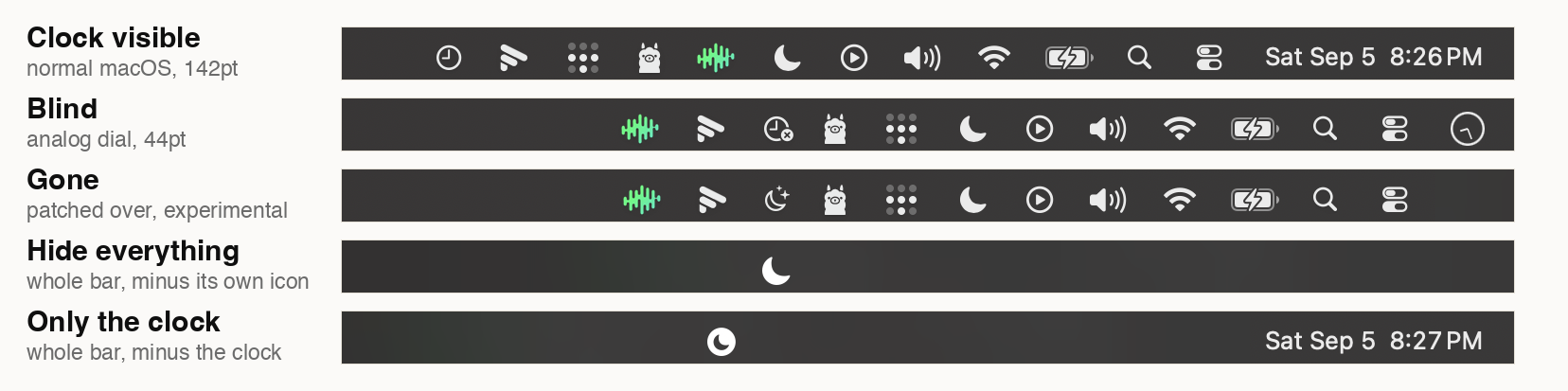
Everything but the clock goes blank. A fifth mode, and Hide everything
turned inside out: the strip covers the menu bar from its left edge to the
clock's left edge and stops there, so every icon goes and the time stays
exactly as readable as it was. Clicks still pass through. For the person whose
problem is the twenty icons rather than the time.
Offered everywhere the other modes are: the menu bar menu, Settings, and the
Focus filter picker in System Settings, so a Focus can now put every icon away
and leave the clock.
Three things measured rather than assumed
There is nothing to the right of the clock, so nothing is drawn there. On
macOS 26.6.2 the clock's window runs to the screen edge on a notched MacBook
(x=1588, 142pt wide on a 1728pt screen, which is 2pt past the edge) and sits
flush on an external display. A second strip to the right would be a dark
sliver beside the clock with nothing under it, which reads as a bug.
It leaves one seam, and only one. Hide everything has none because its only
edge is the bar's own bottom edge. Only the clock adds a vertical edge where the
strip stops at the clock, and the fill picker is offered for it for the same
reason it is offered for Gone.
It is the one covering mode that wants a digital clock. Arriving from Blind,
Gone or Hide everything puts the readout back first and waits for Control
Center to settle before the strip goes up, on the same path the analog swap
already used.
Hover to show works here too, and on more than one display only the bar you
are pointing at uncovers. Nocturne's own icon is redrawn on top of the strip,
as in Hide everything, so the way out stays visible.
Tests
74 checks to 103. The arithmetic behind the new mode lives in
MenuBarGeometry, Foundation-only so it can be checked without a window
server, and it is fuzzed: 20,000 random bar and clock layouts, and the strip
never reaches the clock and never leaves the bar. The mode table is now pinned
per case, so a future mode cannot inherit somebody else's coverage from a
default: branch. Validated by mutation: three deliberate defects (cover the
whole bar, turn the clock analog, borrow Hide everything's coverage) and all
three caught.
One limit worth stating
A display whose current Space is a full-screen app keeps its menu bar
uncovered, in every covering mode, if the menu bar is set to stay visible in
full screen. The strip is built with fullScreenNone so it never floats over a
video, and that is the trade. Measured with Safari full screen on an external
display: the strip exists at alpha 1 and the window server reports it off
screen. Not new in this release, but not written down before.
Install
Open the disk image and drag Nocturne to Applications, or:
brew install --cask dotcomjack/tap/nocturneSigned with a Developer ID, notarized and stapled, app and disk image both.
Universal. macOS 14 or later. No permissions, no private APIs, no account.