Problem description:
The default color of a Label is SystemColors.ControlText. However, starting with .NET Core 3.0, it is rendered with SystemColors.WindowText color in HighContrast mode. This can produce the following issue with a high contrast color set using inverted Window/Control colors:
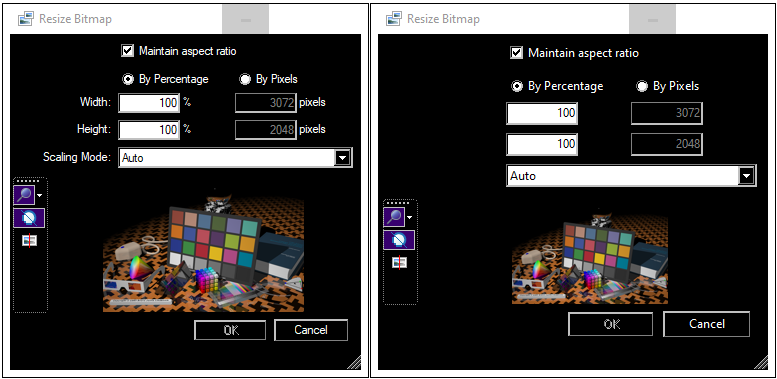
On the left side there is the .NET Framework 4.5 version, whereas on the right the .NET 5.0. Notice the disappeared labels.
Expected behavior:
In high contrast mode, a Label with default colors should not disappear on a control that also has the default SystemColors.Control color.
Minimal repro:
- Create a customized high contrast theme where Control and Window colors are inverses of each other.
- Create a
Form with a Label on it. Or just use this application, which is the source of the screenshot above.
Note: It's actually doesn't really make sense to create such a theme because Window/Control colors are often misused even in Windows settings but it is very useful for testing purposes.
Further remarks:
The culprit is this line of code, which is not present in the framework version. Unfortunately this solution overrides any explicitly set colors, so it cannot be fixed without overriding OnPaint or handling the Paint event.
Btw, this theme helped me to detect other issues, too; however these can be fixed by explicitly set colors:
- A
TextBox uses Window and WindowText colors, but in ReadOnly mode the background changes to Control, while text color remains WindowText. Fortunately TextBox allows explicitly set colors so I can adjust the ForeColor in ReadOnly mode
- Similarly to
Label, the default cell style of a DatagridView also uses ill-paierd colors (and also the default header cell style), but these can be overridden as well.

.NET Core Version:
All versions from .NET Core 3.0 to .NET 5
Have you experienced this same bug with .NET Framework?:
No
Problem description:
The default color of a
LabelisSystemColors.ControlText. However, starting with .NET Core 3.0, it is rendered withSystemColors.WindowTextcolor in HighContrast mode. This can produce the following issue with a high contrast color set using inverted Window/Control colors:On the left side there is the .NET Framework 4.5 version, whereas on the right the .NET 5.0. Notice the disappeared labels.
Expected behavior:
In high contrast mode, a
Labelwith default colors should not disappear on a control that also has the defaultSystemColors.Controlcolor.Minimal repro:
Formwith aLabelon it. Or just use this application, which is the source of the screenshot above.Further remarks:
The culprit is this line of code, which is not present in the framework version. Unfortunately this solution overrides any explicitly set colors, so it cannot be fixed without overriding
OnPaintor handling thePaintevent.Btw, this theme helped me to detect other issues, too; however these can be fixed by explicitly set colors:
TextBoxusesWindowandWindowTextcolors, but inReadOnlymode the background changes toControl, while text color remainsWindowText. FortunatelyTextBoxallows explicitly set colors so I can adjust theForeColorinReadOnlymodeLabel, the default cell style of aDatagridViewalso uses ill-paierd colors (and also the default header cell style), but these can be overridden as well.