Conversation


|
/azp run |

|
Azure Pipelines successfully started running 2 pipeline(s). |

|
Ups 🙄 |
|
Commenter does not have sufficient privileges for PR 7031 in repo dotnet/winforms |
This comment was marked as resolved.
This comment was marked as resolved.
 kirsan31
force-pushed
the
DGV_FlakyTests
branch
2 times, most recently
from
kirsan31
force-pushed
the
DGV_FlakyTests
branch
2 times, most recently
from
c60d213 to
8623e37
Compare
|
"azp run" only works for those with write access. To rerun the build pipeline you can either (f-)push or close-reopen.
|
kirsan31
force-pushed
the
DGV_FlakyTests
branch
7 times, most recently
from
760c344 to
3b4db3b
Compare
|
On 11 run we found another one flaky test or may be something new? |
kirsan31
force-pushed
the
DGV_FlakyTests
branch
11 times, most recently
from
6e86fa4 to
217fda9
Compare

| // Flaky tests, see: https://github.com/dotnet/winforms/issues/6739 | ||
| control.Invalidated += (sender, e) => | ||
| { | ||
| Assert.True(++invalidatedCallCount <= expectedInvalidatedCallCount, |

There was a problem hiding this comment.
You mentioned in the description that you wanted to print out Environment.StackTrace, no?
There was a problem hiding this comment.
We will see it if assert inside event handler fail. For example:
System.Windows.Forms.Tests.DataGridViewTests.DataGridView_RowHeadersWidth_SetWithHandle_GetReturnsExpected(rowHeadersWidthSizeMode: EnableResizing, rowHeadersVisible: False, autoSize: True, value: 4, expectedValue: 4, expectedInvalidatedCallCount: 1) [FAIL]
  Input: EnableResizing, False, True, 4
  Expected: True
  Actual:   False
  Stack Trace:
    ...\winforms\src\System.Windows.Forms\tests\UnitTests\System\Windows\Forms\DataGridViewTests.cs(1127,0): at System.Windows.Forms.Tests.DataGridViewTests.<>c__DisplayClass40_0.<DataGridView_RowHeadersWidth_SetWithHandle_GetReturnsExpected>b__0(Object sender, InvalidateEventArgs e)
    ...\winforms\src\System.Windows.Forms\src\System\Windows\Forms\Control.cs(8212,0): at System.Windows.Forms.Control.OnInvalidated(InvalidateEventArgs e)
    ...\winforms\src\System.Windows.Forms\src\System\Windows\Forms\Control.cs(7091,0): at System.Windows.Forms.Control.NotifyInvalidate(Rectangle invalidatedArea)
    ...\winforms\src\System.Windows.Forms\src\System\Windows\Forms\Control.cs(6432,0): at System.Windows.Forms.Control.Invalidate(Rectangle rc, Boolean invalidateChildren)
    ...\winforms\src\System.Windows.Forms\src\System\Windows\Forms\Control.cs(6396,0): at System.Windows.Forms.Control.Invalidate(Rectangle rc)
    ...\winforms\src\System.Windows.Forms\src\System\Windows\Forms\DataGridView.Methods.cs(10109,0): at System.Windows.Forms.DataGridView.InvalidateInside()
    ...\winforms\src\System.Windows.Forms\src\System\Windows\Forms\DataGridView.cs(3666,0): at System.Windows.Forms.DataGridView.set_RowHeadersWidthInternal(Int32 value)
    ...\winforms\src\System.Windows.Forms\src\System\Windows\Forms\DataGridView.cs(3650,0): at System.Windows.Forms.DataGridView.set_RowHeadersWidth(Int32 value)
    ...\winforms\src\System.Windows.Forms\tests\UnitTests\System\Windows\Forms\DataGridViewTests.cs(1138,0): at System.Windows.Forms.Tests.DataGridViewTests.DataGridView_RowHeadersWidth_SetWithHandle_GetReturnsExpected(DataGridViewRowHeadersWidthSizeMode rowHeadersWidthSizeMode, Boolean rowHeadersVisible, Boolean autoSize, Int32 value, Int32 expectedValue, Int32 expectedInvalidatedCallCount)
       at System.RuntimeMethodHandle.InvokeMethod(Object target, Void** arguments, Signature sig, Boolean isConstructor)
       at System.Reflection.RuntimeMethodInfo.InvokeNonEmitUnsafe(Object obj, IntPtr* arguments, Span`1 argsForTemporaryMonoSupport, BindingFlags invokeAttr)
P.s. I noticed that the input parameters were always there (they were just cut off on the page and it was hard to see them). 😳
So, Input parameters pattern are: rowHeadersVisible: True and columnHeadersVisible: True ...
kirsan31
force-pushed
the
DGV_FlakyTests
branch
2 times, most recently
from
0d7c54b to
d00de1e
Compare
|
Extra invalidate call stack: at System.Windows.Forms.Tests.DataGridViewTests.<>c__DisplayClass40_0.<DataGridView_RowHeadersWidth_SetWithHandle_GetReturnsExpected>b__0(Object sender, InvalidateEventArgs e) in /_/src/System.Windows.Forms/tests/UnitTests/System/Windows/Forms/DataGridViewTests.cs:line 1127
at System.Windows.Forms.Control.OnInvalidated(InvalidateEventArgs e) in /_/src/System.Windows.Forms/src/System/Windows/Forms/Control.cs:line 8212
at System.Windows.Forms.Control.NotifyInvalidate(Rectangle invalidatedArea) in /_/src/System.Windows.Forms/src/System/Windows/Forms/Control.cs:line 7091
at System.Windows.Forms.Control.Invalidate(Rectangle rc, Boolean invalidateChildren) in /_/src/System.Windows.Forms/src/System/Windows/Forms/Control.cs:line 6432
at System.Windows.Forms.Control.Invalidate(Rectangle rc) in /_/src/System.Windows.Forms/src/System/Windows/Forms/Control.cs:line 6396
at System.Windows.Forms.DataGridView.set_TopLeftHeaderCell(DataGridViewHeaderCell value) in /_/src/System.Windows.Forms/src/System/Windows/Forms/DataGridView.cs:line 4364
at System.Windows.Forms.DataGridView.get_TopLeftHeaderCell() in /_/src/System.Windows.Forms/src/System/Windows/Forms/DataGridView.cs:line 4337
at System.Windows.Forms.DataGridView.GetCellInternal(Int32 columnIndex, Int32 rowIndex) in /_/src/System.Windows.Forms/src/System/Windows/Forms/DataGridView.Methods.cs:line 7274
at System.Windows.Forms.DataGridView.OnCellMouseEnter(DataGridViewCellEventArgs e) in /_/src/System.Windows.Forms/src/System/Windows/Forms/DataGridView.Methods.cs:line 13019
at System.Windows.Forms.DataGridView.UpdateMouseEnteredCell(HitTestInfo hti, MouseEventArgs e) in /_/src/System.Windows.Forms/src/System/Windows/Forms/DataGridView.Methods.cs:line 29638
at System.Windows.Forms.DataGridView.OnRowHeadersWidthChanged(EventArgs e) in /_/src/System.Windows.Forms/src/System/Windows/Forms/DataGridView.Methods.cs:line 18823
at System.Windows.Forms.DataGridView.set_RowHeadersWidthInternal(Int32 value) in /_/src/System.Windows.Forms/src/System/Windows/Forms/DataGridView.cs:line 3677
at System.Windows.Forms.DataGridView.set_RowHeadersWidth(Int32 value) in /_/src/System.Windows.Forms/src/System/Windows/Forms/DataGridView.cs:line 3650
at System.Windows.Forms.Tests.DataGridViewTests.DataGridView_RowHeadersWidth_SetWithHandle_GetReturnsExpected(DataGridViewRowHeadersWidthSizeMode rowHeadersWidthSizeMode, Boolean rowHeadersVisible, Boolean autoSize, Int32 value, Int32 expectedValue, Int32 expectedInvalidatedCallCount) in /_/src/System.Windows.Forms/tests/UnitTests/System/Windows/Forms/DataGridViewTests.cs:line 1138
at System.RuntimeMethodHandle.InvokeMethod(Object target, Void** arguments, Signature sig, Boolean isConstructor)
at System.Reflection.RuntimeMethodInfo.InvokeNonEmitUnsafe(Object obj, IntPtr* arguments, Span`1 argsForTemporaryMonoSupport, BindingFlags invokeAttr)It's obvious that mouse pointer involved here 😁 I will update after investigation... --- UPD --- Yes, the problem is in random mouse position. Point ptMouse = PointToClient(Control.MousePosition);then in I think similar problem may be with every control in current tests. We need to take strict control over cursor position in such situations. Unfortunately I don't know your test infra (relation between screen and client coordinates) to solve this by myself... |
| control.OnColumnHeadersHeightChanged(eventArgs); | ||
| Assert.Equal(1, callCount); | ||
| Assert.True(control.IsHandleCreated); | ||
| Assert.Equal(0, invalidatedCallCount); |
There was a problem hiding this comment.
You could replace strict comparison with (invalidatedCallCount < 2). Or you could replace look up the call stack inside the Invalidated event handler and don't increment the counter for call stacks with Mouse entered the cell and invalidated it method(s).
There was a problem hiding this comment.
Obviously, these tests were written without taking into account the mouse pointer, i.e. it shouldn't be above the control.
You could replace strict comparison with (invalidatedCallCount < 2).
This will eliminate the original test in case of mouse not above the cell and not strictly right in case of mouse above the cell (there can be 2 invalidates in case of column test and even 3 (or maybe more?) in case of row test).
Or you could replace call stack inside the Invalidated event handler and don't increment the counter for call stacks with Mouse entered the cell and invalidated it method(s).
This will eliminate the original test in case of mouse above the cell.
And I think that overall this is not right to have unpredictable random variable (mouse pointer) in tests...
We have lots (about 4k) of invalidate count checks in WinForms tests, and all of them potentially can be affected by this problem :(
So, the best solution will be to have control of mouse pointer location. And explicitly set it out of the tested control for such invalidate tests. But I don't know how difficult it is to achieve this.
There was a problem hiding this comment.
Would be great to Moq the Mouse of cause.

There was a problem hiding this comment.
We can't mock the system-wide singletons like mouse or the clipboard.
What we can do in the tests though is to set the mouse to one of the corners. Given that some of the tests place controls at (0, 0), it probably not the corner to take. I'd put the mouse at the (Screen.PrimaryScreen.WorkingArea.Width, Screen.PrimaryScreen.WorkingArea.Height) at the start of each test. I'm pretty sure we can do it here:
I'd also add an assertion here to verify the mouse is still there at the end of the test to weed out any tests that involve the mouse (and have those moved to the UI integration tests project):
There was a problem hiding this comment.
💭 We should probably rename the fixture too, since it's doing more than dealing with the ThreadException event.
 Tanya-Solyanik
added
the
waiting-author-feedback
Tanya-Solyanik
added
the
waiting-author-feedback
 ghost
removed
the
waiting-author-feedback
ghost
removed
the
waiting-author-feedback
 RussKie
added
the
waiting-author-feedback
RussKie
added
the
waiting-author-feedback
 ghost
removed
the
waiting-author-feedback
ghost
removed
the
waiting-author-feedback
|
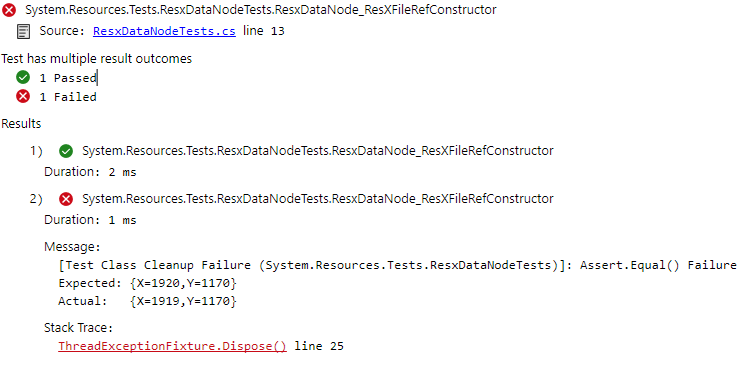
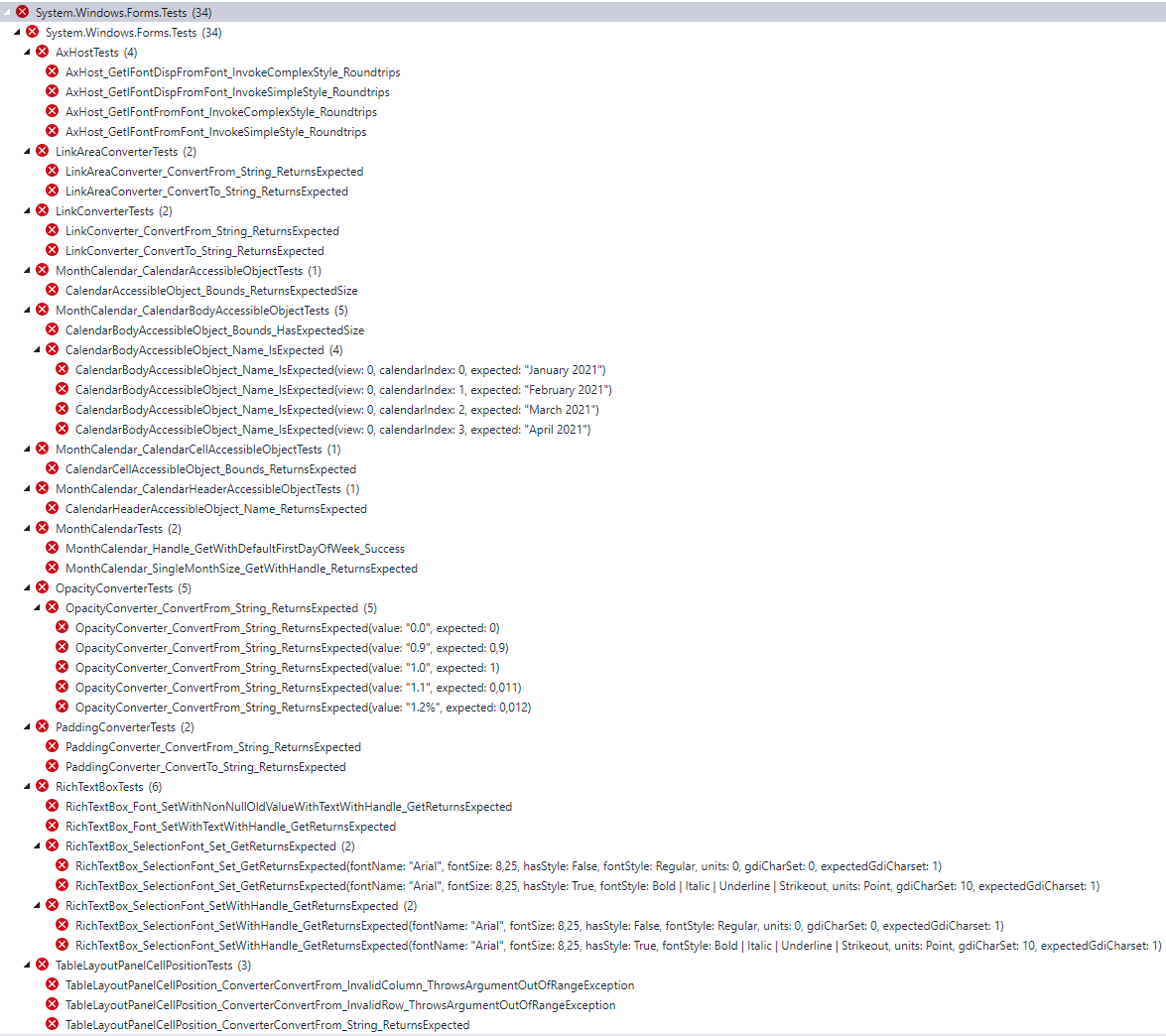
@RussKie once again sorry for the long delay :( Done. I tried this, but a huge number of tests failed due to the fact that the cursor moved by one pixel (even if I held the mouse over the table): Name suggestion? P.s. |
 kirsan31
changed the title
kirsan31
changed the title
|
/cc @RussKie about failing tests. The bottom of my previous post. |
|
Ah, how cool! More region-specific failed tests! :) Can you please try applying @vladimir-krestov do you or anyone from your team observe similar issues with tests failing due to the regional settings? |
That's bizarre. Is mouse repositioned before each test? |

|
/azp run |
|
Azure Pipelines successfully started running 2 pipeline(s). |
| public virtual void Dispose() | ||
| { | ||
| Application.ThreadException -= OnThreadException; | ||
| //Xunit.Assert.Equal(new Drawing.Point(Screen.PrimaryScreen.WorkingArea.Width, Screen.PrimaryScreen.WorkingArea.Height), Cursor.Position); |
There was a problem hiding this comment.
This should go, but since there is more work in this area is lined up I'm going to take it as is with the promise that this will get fixed in a follow up PR.
Yes very strange :( |
|
Just a random crazy thought, what if we hid the cursor for the duration of a test? It wouldn't cause any invalidation events, would it? |
|
@RussKie https://dev.azure.com/dnceng/public/_build/results?buildId=1920544&view=ms.vss-test-web.build-test-results-tab&runId=49742938&resultId=104397&paneView=debug (need to click exit full screen mode button) at System.Windows.Forms.Tests.DataGridViewTests.<>c__DisplayClass40_0.<DataGridView_RowHeadersWidth_SetWithHandle_GetReturnsExpected>b__0(Object sender, InvalidateEventArgs e) in /_/src/System.Windows.Forms/tests/UnitTests/System/Windows/Forms/DataGridViewTests.cs:line 1126
at System.Windows.Forms.Control.OnInvalidated(InvalidateEventArgs e) in /_/src/System.Windows.Forms/src/System/Windows/Forms/Control.cs:line 8263
at System.Windows.Forms.Control.NotifyInvalidate(Rectangle invalidatedArea) in /_/src/System.Windows.Forms/src/System/Windows/Forms/Control.cs:line 7142
at System.Windows.Forms.Control.Invalidate(Rectangle rc, Boolean invalidateChildren) in /_/src/System.Windows.Forms/src/System/Windows/Forms/Control.cs:line 6472
at System.Windows.Forms.Control.Invalidate(Rectangle rc) in /_/src/System.Windows.Forms/src/System/Windows/Forms/Control.cs:line 6436
at System.Windows.Forms.DataGridView.set_TopLeftHeaderCell(DataGridViewHeaderCell value) in /_/src/System.Windows.Forms/src/System/Windows/Forms/DataGridView.cs:line 4364
at System.Windows.Forms.DataGridView.get_TopLeftHeaderCell() in /_/src/System.Windows.Forms/src/System/Windows/Forms/DataGridView.cs:line 4337
at System.Windows.Forms.DataGridView.GetCellInternal(Int32 columnIndex, Int32 rowIndex) in /_/src/System.Windows.Forms/src/System/Windows/Forms/DataGridView.Methods.cs:line 7275
at System.Windows.Forms.DataGridView.OnCellMouseEnter(DataGridViewCellEventArgs e) in /_/src/System.Windows.Forms/src/System/Windows/Forms/DataGridView.Methods.cs:line 13024
at System.Windows.Forms.DataGridView.UpdateMouseEnteredCell(HitTestInfo hti, MouseEventArgs e) in /_/src/System.Windows.Forms/src/System/Windows/Forms/DataGridView.Methods.cs:line 29642
at System.Windows.Forms.DataGridView.OnRowHeadersWidthChanged(EventArgs e) in /_/src/System.Windows.Forms/src/System/Windows/Forms/DataGridView.Methods.cs:line 18828
at System.Windows.Forms.DataGridView.set_RowHeadersWidthInternal(Int32 value) in /_/src/System.Windows.Forms/src/System/Windows/Forms/DataGridView.cs:line 3677
at System.Windows.Forms.DataGridView.set_RowHeadersWidth(Int32 value) in /_/src/System.Windows.Forms/src/System/Windows/Forms/DataGridView.cs:line 3650
at System.Windows.Forms.Tests.DataGridViewTests.DataGridView_RowHeadersWidth_SetWithHandle_GetReturnsExpected(DataGridViewRowHeadersWidthSizeMode rowHeadersWidthSizeMode, Boolean rowHeadersVisible, Boolean autoSize, Int32 value, Int32 expectedValue, Int32 expectedInvalidatedCallCount) in /_/src/System.Windows.Forms/tests/UnitTests/System/Windows/Forms/DataGridViewTests.cs:line 1137
at InvokeStub_DataGridViewTests.DataGridView_RowHeadersWidth_SetWithHandle_GetReturnsExpected(Object, Object, IntPtr*)
at System.Reflection.MethodInvoker.Invoke(Object obj, IntPtr* args, BindingFlags invokeAttr)The main question - why? 🤷♂️ And then we can try your random crazy thought... But I have very limited time those days and on next week go to vocation 🙄 |
ghost
locked as resolved and limited conversation to collaborators
3 participants


Attempt to investigate DGV flaky tests. #6926 #6739
Both tests fail due to extra invalidate. To investigate further we need to understand 2 things:
rowHeadersVisible: True/columnHeadersVisible: TrueFails by run №:
11: Windows_x86-xunit
System.Windows.Forms.Tests.ToolStripItemTests.ToolStripItem_ImageKey_ShouldSerializeValueWithOwnerWithImageList_Success
27: Windows_arm64-xunit
System.Windows.Forms.Tests.DataGridViewTests.DataGridView_DefaultCellStyles_Rendering
29: Windows_x64-xunit
System.Windows.Forms.Tests.DataGridViewTests.DataGridView_RowHeadersWidth_SetWithHandle_GetReturnsExpected. Got it!
The problem is in random cursor position during tests.
Microsoft Reviewers: Open in CodeFlow