An MCP server that catalogs the command-line tools available on the current machine — what exists, where it lives, which copy actually runs, its version/identity, and (on demand) what it can do — and, when a tool is missing, how to install it.
It exposes a single, self-describing tool, get_clis, designed to be cheap enough to keep in an
agent's context on every turn.
Source code is maintained in a separate repository — github.com/dotutils/list-cli-mcp-impl — which is currently private.
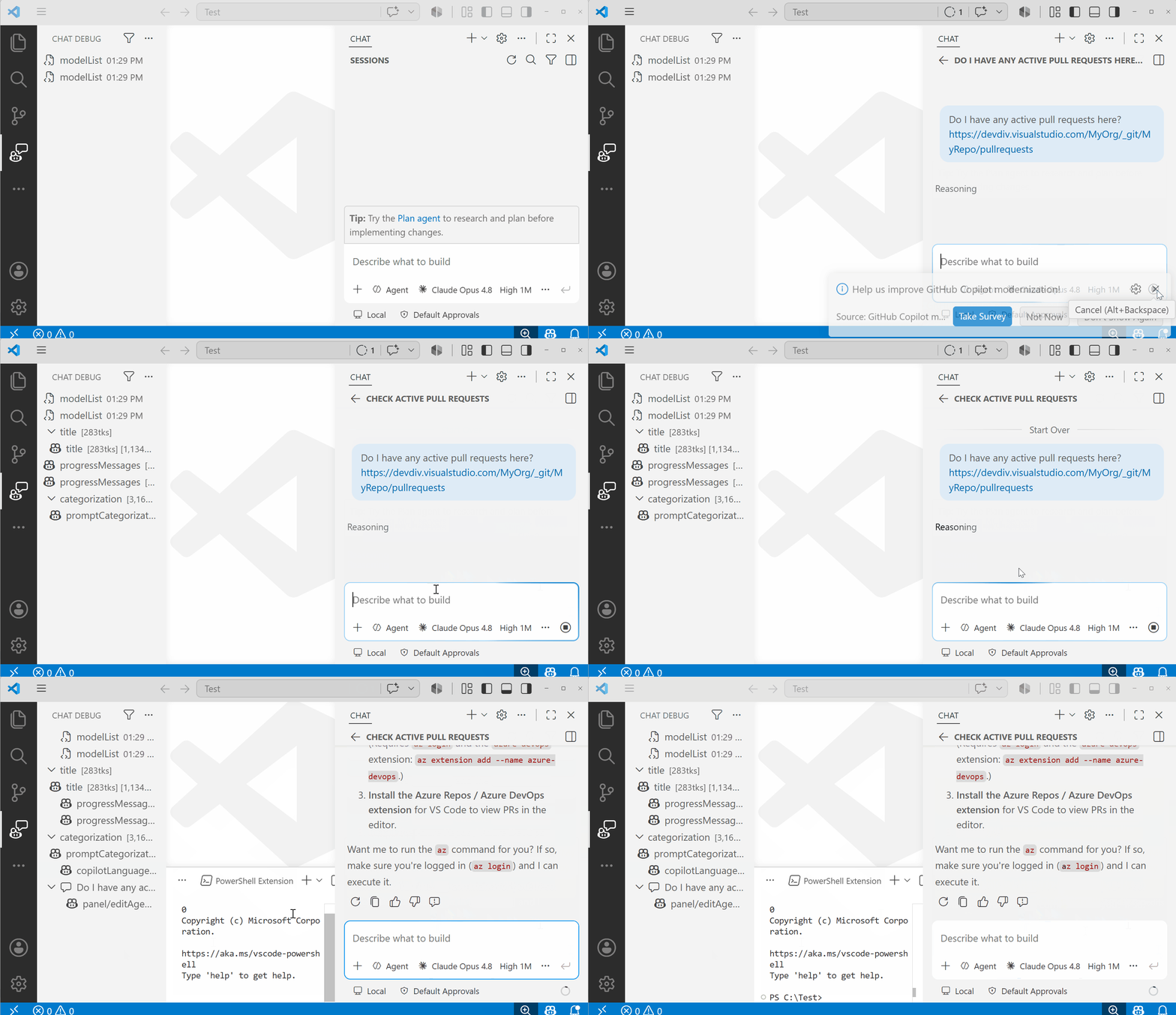
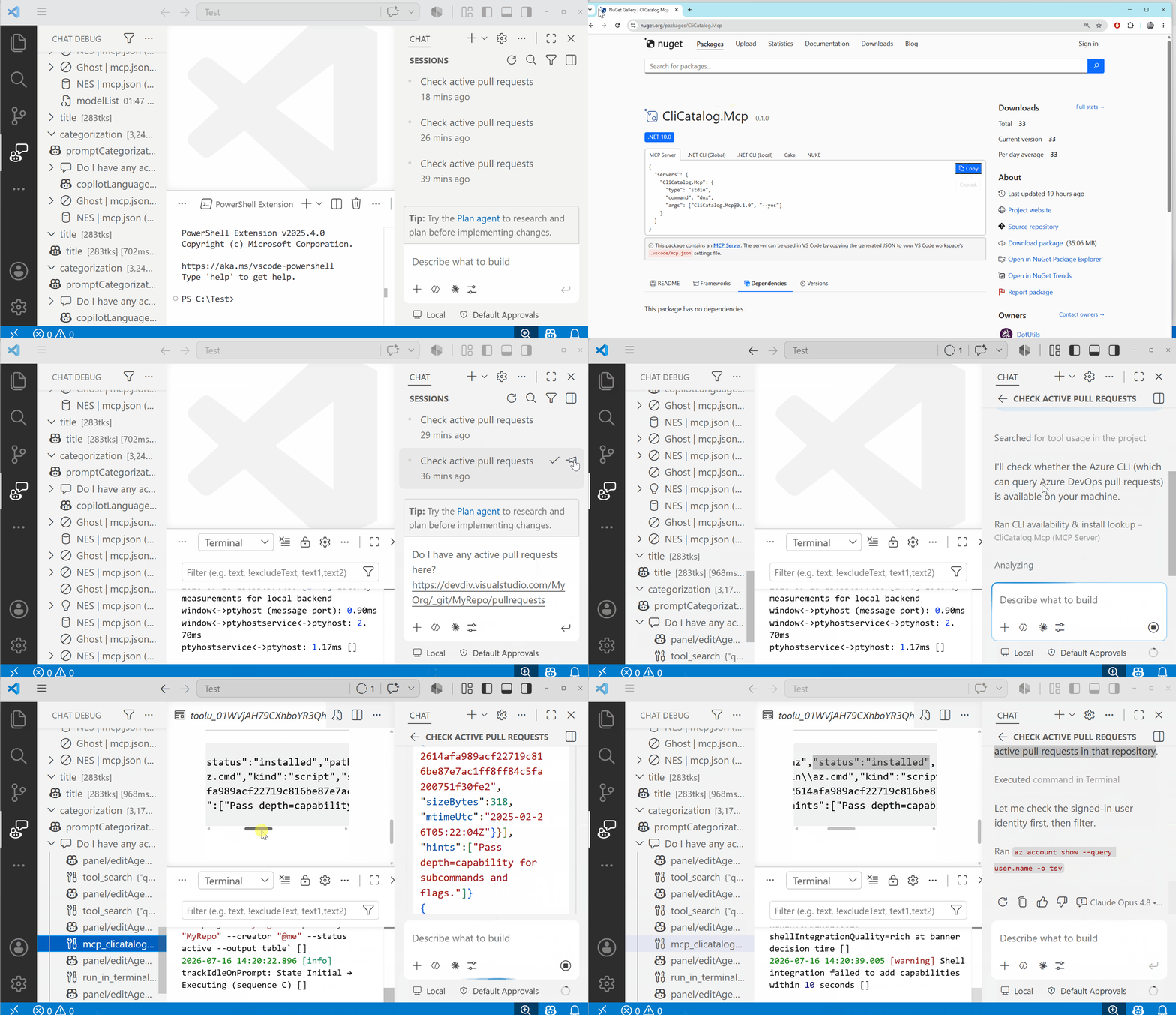
An agent is asked to fetch data from Azure DevOps. Without a catalog of what's installed, it can't tell that
the machine already has the az CLI (with the azure-devops extension) that would answer the question — so
it gives up or guesses. With this server in context, the agent discovers az via get_clis, and just runs it.
Without the MCP — doesn't realize az is available |
With the MCP — finds and uses the az CLI |
|---|---|
 |
 |
- Stop guessing whether a CLI exists. Before an agent runs
rg,docker,gh,jq,kubectl, … it can check availability instantly instead of failing on a missing command. - Explain shadowing. When the same command lives in several
PATHdirectories, it reports the winner and the shadowed copies — the answer to "why am I getting the wrongpython?". - Capability discovery. Ask by intent ("json diff", "container runtime") and get a ranked shortlist. When the client supports MCP Sampling, results are ranked semantically by the client's model.
- Install suggestions. A miss returns typo corrections ("did you mean
rg?") and per-manager install commands (winget / scoop / brew / apt) — as advisory text only. Beyond the bundled catalog, a miss also consults live package managers (winget on Windows; npm on any platform) so tools outside the curated list still get an install suggestion (source: "online"). On by default; opt out withCLICATALOG_ONLINE_INSTALL_SEARCH=0, and suppressed entirely underexecution-policy=never. - Onboarding / environment diagnostics. A fast, structured inventory of a dev box, CI runner, or container.
Discovery is tiered so callers pay only for the depth they need:
| Depth | Answers | Cost |
|---|---|---|
existence (L1, default) |
name, absolute path, kind, PATH shadowing | instant, no execution |
identity (L2) |
version, file hash, architecture | moderate; non-executing sources first |
capability (L3) |
description, subcommands, flags | opt-in; --help probing only with allowExec |
Safe by default: L1 never executes anything; L2 prefers non-executing sources (Windows PE version resource, file metadata); L3 execution is opt-in, time-boxed, and sandboxed-in-intent (closed stdin, disabled pager, hard timeout, output cap). The server never installs or modifies anything.
- .NET 10 SDK (pinned via global.json).
dotnet build list-cli-mcp.slnx -c Release
dotnet run --project src/CliCatalog.Mcp # starts the stdio server (waits for an MCP client)The host is published to NuGet.org as a .NET tool (command name cli-catalog-mcp, package id
CliCatalog.Mcp), so it can be run without a persistent install via dnx (the .NET 10 one-off tool
runner, similar to npx). It is downloaded and cached on first use:
dnx CliCatalog.Mcp --yes           # latest published version
dnx CliCatalog.Mcp@0.1.0 --yes     # or pin a specific version
Or install it once and get a cli-catalog-mcp command on your PATH:
dotnet tool install -g CliCatalog.Mcp             # from NuGet.org
cli-catalog-mcp # starts the stdio serverPoint your client at the server over stdio. The smallest config uses dnx, which downloads and runs
the published package on demand — no install step. --yes skips the download confirmation prompt (required
because the client runs the server non-interactively):
If you installed it globally (dotnet tool install -g CliCatalog.Mcp), point at the command directly:
{
  "servers": {
    "cli-catalog": {
      "type": "stdio",
      "command": "cli-catalog-mcp"
    }
  }
}
For local development against a source checkout, run it via dotnet run:
{
  "servers": {
    "cli-catalog": {
      "type": "stdio",
      "command": "dotnet",
      "args": ["run", "--project", "src/CliCatalog.Mcp", "-c", "Release"]
    }
  }
}All parameters are optional; the mode is chosen by which you pass:
| Param | Type | Default | Purpose |
|---|---|---|---|
name |
string | string[] | — | Check/inspect specific command(s); a miss adds corrections + install options. |
query |
string | — | Discover tools by capability; returns a ranked shortlist. |
depth |
existence | identity | capability |
existence |
How much detail to return. |
scope |
installed | installable | both |
installed |
Search installed tools and/or known catalogs. |
cursor |
string | — | Opaque pagination token from a previous nextCursor. |
allowExec |
bool | false |
Permit --help/--version probing when no non-executing source exists. |
Behavior by input:
- no arguments → list installed commands (paginated).
name→ resolve the winner + full shadowing chain + details atdepth; a miss returnsdid-you-mean+ install options.query→ ranked shortlist (semantic when Sampling is available, otherwise lexical full-text).
Example — a miss with correction + install options:
{
  "results": [{
    "name": "ripgrepp", "status": "not-found",
    "didYouMean": [{ "name": "rg", "package": "ripgrep", "distance": 1 }],
    "install": [{ "manager": "winget", "id": "BurntSushi.ripgrep.MSVC", "command": "winget install BurntSushi.ripgrep.MSVC" }]
  }],
  "hints": ["Pass scope=installable to search tools you could install."]
}
Example — a miss for a tool outside the bundled catalog, answered by the live winget search
(source: "online"):
{
  "results": [{
    "name": "eza", "status": "not-found",
    "install": [{ "manager": "winget", "id": "eza-community.eza", "command": "winget install eza-community.eza" }],
    "source": "online", "confidence": 0.55
  }]
}
Results are structured JSON only, and every capability/identity field is tagged with its source (and
confidence where applicable) so agents know how a value was derived.
Operator-facing, read at startup:
| Variable | Meaning |
|---|---|
CLICATALOG_INCLUDE_PATHS |
Explicit PATH-separated dirs to scan (skips the process PATH unless combined with the next). |
CLICATALOG_ALSO_SCAN_PROCESS_PATH |
1/true to also scan the process PATH alongside includes. |
CLICATALOG_EXCLUDE_PATHS |
PATH-separated dirs to skip. |
CLICATALOG_EXECUTION_POLICY |
never | on-demand (default) | allowlist. |
CLICATALOG_EXEC_ALLOWLIST / CLICATALOG_EXEC_DENYLIST |
Comma-separated command names for allowlist policy. |
CLICATALOG_ONLINE_INSTALL_SEARCH |
0/false to disable the live package-manager install search (winget / npm) on a miss. On by default. |
CLICATALOG_ONLINE_INSTALL_TIMEOUT_MS |
Timeout for a single online install-search probe (default 10000). |
CLICATALOG_PAGE_SIZE |
Page size for the no-arg list. |
CLICATALOG_CACHE_PATH |
SQLite cache path, or memory for an in-memory cache. Defaults to a per-user cache dir. |
src/CliCatalog.Core   # scanning, cache (SQLite + FTS5), change detection, enrichment, sampling — no MCP dep
src/CliCatalog.Mcp    # stdio host: the get_clis tool, resources, list_changed notifier
tests/                # unit, exec-hazard/security, and stdio end-to-end tests
docs/                 # design & implementation plan
The server is useful today (L1–L3 discovery, lexical + Sampling-based query, install suggestions), but
several higher-fidelity features from the design plan
are still ahead:
- Bridge to completion-spec databases for high-fidelity capabilities. Instead of scraping
--help, pull structured subcommands/flags/descriptions from the existing completion corpora — carapace (carapace <cmd> export, ~1000+ commands, millisecond exports) and bundled Fig / Amazon Q specs (400+ popular CLIs). These are the well-known "tool description" databases that power shell autocompletion, giving accurate L3 data mostly without executing the target. - Semantic search over the catalog (local embeddings). Layer an optional, offline ONNX embedding
retriever (e.g. bge-small / MiniLM) onto the existing FTS5
querymode for a hybrid lexical+semantic match — so intent queries like "container runtime" rank well even without a client model. Off by default. - Richer provenance resolvers. Map each binary back to its owning package manager (winget / scoop /
choco, apt / dnf, brew,
command-not-found) — non-executing where possible — to answer "who installed thisnode?" and to strengthen install suggestions. - Trust & tamper signals. Per-entry signature/hash verdicts (WinVerifyTrust / codesign /
dpkg -V/rpm -V) by default, with opt-in network attestation (Sigstore / SLSA) and an OSV/NVD vulnerability overlay; Elicitation-gated warnings fortampered/untrustedbinaries. Includes a learned-spec store that persists inferred capability specs keyed by(path, sha256, version). - Push-based change detection. Optional
FileSystemWatcherinvalidation with richerlist_changeddiffs, beyond the current TTL + on-miss refresh. - Runtime guard companion (out of scope for v1). A separate shell-hook / PATH-shim component that queries this server's trust oracle before commands run — documented, not built here.
See docs/design-and-implementation-plan.md for the full design, rationale, and roadmap.