|
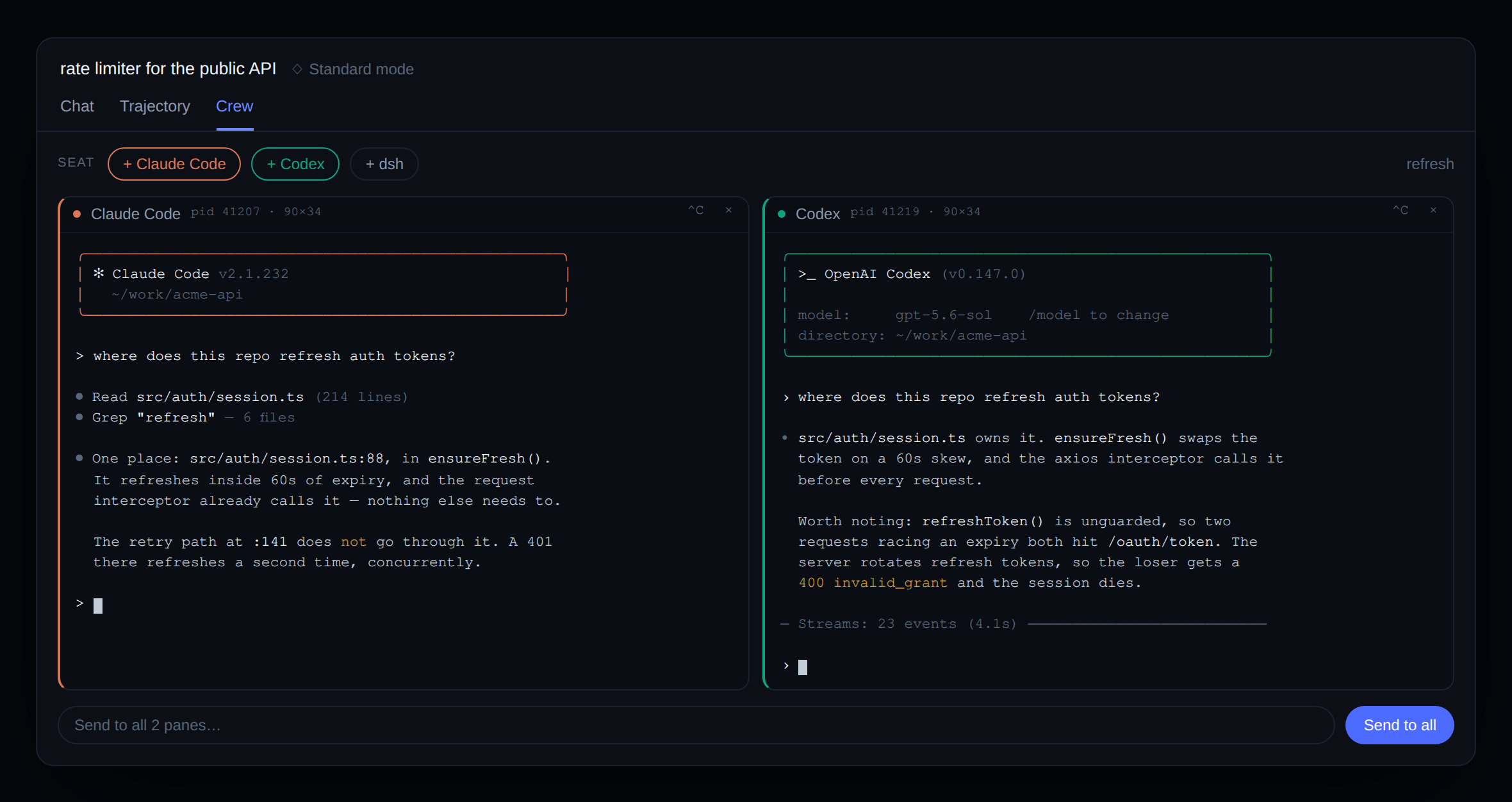
English | 中文 Claude Code and Codex, running as live terminals beside dsh. You watch them work. You can take the keyboard.dsh can already delegate to them —
|
|





dsh plugin --profile web add @dshworks/dsh-crew
dsh --profile web
dsh plugin forwards to pnpm, so pnpm must be on PATH. A Crew tab
appears beside Chat and Trajectory in the next session.
Nothing else to configure. The seat bar shows every crew member it can
find, and disables the ones it cannot — with the reason on the button, so
a missing codex reads as codex is not on the host PATH rather than a
launch that fails a second later.
The human half is the split view: a seat bar, and one pane per seated agent. The pane is a real terminal — colour, cursor addressing, the product's own TUI — because the plugin carries the CLI's bytes rather than reimplementing its surface. Type into it whenever you want; interrupt it with Ctrl-C; or use the broadcast line to put one message into every live pane at once and watch two agents answer the same question side by side.
The agent half is five tools, so the model in the center column can run the team:
crew_list                              → who can be seated, who already is
crew_seat(agent: "claude")             → starts a pane, returns its id + first screen
crew_send(pane: "…", message: "…")     → types it, presses Enter, waits for quiet
crew_send(…, run_in_background: true)  → returns a job id; the answer arrives as a notice
crew_peek(pane: "…")                   → the screen right now, as the human sees it
crew_dismiss(pane: "…")                → ends the process
That shared surface is the point. The delegation and the observation are
the same terminal — the agent's crew_send and your eyes are looking at
one screen, not at a task API and a log.
Turn the tools off with tools: false and the split view still works; the
crew is then human-driven only.
A coding agent's answer arrives over tens of seconds. A fire-and-forget
send would force the model to poll in a loop and burn a turn per sample,
so crew_send returns when the pane settles — the rendered screen
unchanged for a quiet period. On timeout it says so and tells the model to
crew_peek later; the crew member keeps working.
"Quiet" alone is not enough in either direction, and all three corrections came from real CLIs rather than from the test shell:
- Enter is typed separately from the message. Both products read one
burst ending in a carriage return as a paste and keep the return as a
newline, so
message + "\r"in a single write fills the composer and submits nothing. The pane then goes quiet — and a settle-on-quiet rule would hand the model back its own unsent question as the answer. - An unpainted screen is not a settled one. A CLI that has not drawn its first frame is perfectly quiet, so seating waits for content as well as calm before reporting a crew member ready.
- The first screen may be a dialog, and the plugin will not answer it.
In a directory it has not been trusted in, each product opens on its own
trust prompt instead of a composer. The tools say so and hand it to the
caller: answer the dialog with
crew_send— an empty message presses Enter — and send the task only once the composer is up. A task sent into a dialog is typed into the dialog, and its digits can pick an option; that is how a "count from 1 to 12" prompt once chose 2. No, quit. Auto-answering a product's trust prompt is not the plugin's decision to make.
crew_send with run_in_background: true puts the same wait on the
harness's job seam instead of the calling turn:
crew_send(pane, message, run_in_background: true)
  → started crew job crew-1 — job_output to read, crew_peek to watch
  … the model keeps working; the human watches the pane …
  → background job crew-1 (crew: Codex ← Reply with exactly …) finished
  → job_output(crew-1) → what the crew member said
The job is owned by the calling agent, so job_list and job_output
follow the harness's own session fence, and the completion notice wakes an
idle model rather than being lost. job_kill stops the watch, sends SIGINT
to the pane's foreground, and leaves the pane seated — a cancelled
delegation is not a reason to close a terminal someone is watching. Whether
that SIGINT also ends the crew member's current turn is the product's
decision, and some of them listen for Escape instead; the pane staying open
is what makes that recoverable, because the human can take the keyboard.
It needs ctx.jobs and a job controller the calling agent can reach;
without them the tool says exactly that instead of throwing. Set
enableRunInBackground: false to remove the parameter.
Either way the result is the new lines rather than the whole viewport:
the screen is diffed against a mark taken just before typing, so the model
reads the answer instead of finding it again inside a banner it has already
seen. A CLI that repaints in place produces no usable delta, and then the
viewport is returned as it always was — and screen carries it regardless.
Raw terminal bytes are the right thing to send a browser and the wrong thing to put in a context window: a full-screen CLI positions its cursor absolutely and repaints, so the stream is mostly escape sequences and the same text several times over. Stripping escapes does not fix it — it yields overlapping fragments in arrival order, not the screen.
So the host runs the same emulator the browser runs, headless, over the
same bytes. crew_peek returns the grid a human is actually looking at.
That is the only reason this plugin depends on a terminal emulator at all.
| id | label | command |
|---|---|---|
claude |
Claude Code | claude |
codex |
Codex | codex |
dsh |
dsh | dsh |
Each is spawned in its interactive form — the plain command with no prompt argument, which is what drops the CLI into its own terminal UI rather than one-shot mode.
A roster entry is data, not code. Adding a fourth agent is one row in config — never a new package:
# ~/.dsh/profiles/web/cordis.patch.yml
- id: dsh-crew
  config:
    agents:
      - id: aider
        label: Aider
        command: aider
        accent: '#7c3aed'
A row whose id matches a built-in overrides that built-in field by
field, so pointing claude at a wrapper script is one line. enabled: false removes one.
| Key | Default | Meaning |
|---|---|---|
agents |
[] |
Extra crew members, or overrides of the built-ins by id. |
trustedHosts |
[] |
Authorities besides loopback that may reach the routes. Match the deployment's --trusted-host values. |
cols / rows |
100 / 30 |
Pane geometry when the browser does not measure one. |
scrollbackBytes |
262144 |
Raw output retained per pane so a reload repaints its screen. |
maxPanesPerSession |
6 |
Panes one session may hold open at once. |
graceMs |
3000 |
SIGTERM-to-SIGKILL grace when a pane closes. |
tools |
true |
Expose the five crew tools to the dsh agent. |
enableRunInBackground |
true |
Offer crew_send's run_in_background. Needs the harness job seam. |
A pane starts a process on the operator's machine, so the two routes this plugin mounts are held to a stricter standard than a read-only one.
- The workspace is never chosen by the browser. It comes from the dsh session the request names, exactly as the harness's own subagent providers derive theirs. An unresolvable session is refused, not defaulted — falling back to the server's cwd would start an agent with write access to whatever directory dsh was launched from, on nothing more than an unrecognized id.
- Both routes are fenced on the
Hostauthority (loopback, or a declaredtrustedHostsentry) and onSec-Fetch-Site/Origin. A malformedtrustedHostsentry fails the load, not a later request. - The control route requires
application/json. That is load-bearing: a cross-site "simple" request — the one a browser sends with no CORS preflight — cannot set it, so a hostile page cannot reach a side-effectful operation blind. - The WebSocket needs a single-use token minted by the control route and redeemable for 30 seconds, which is what proves a fence-passing caller asked for that stream.
- A tool call may only touch its own session's panes.
- Nothing here writes the session log. Raw terminal bytes are not conversation state.
The fence answers "did this come from the dsh UI on this machine". It is not authentication, and network reachability remains the webserver's bind policy — if you expose dsh beyond localhost, that is the decision that matters. See SECURITY.md.
- No native dependency. The PTY comes from the harness's subprocess
seam (
ctx.subprocess.spawnTerminal), so this package inherits its credential scrub and process-tree teardown and ships no compiled addon.node-ptyis a devDependency, used only to test against real PTYs. TERMis set by the pane, not inherited. The harness server is normally started from a non-interactive shell, so its ambientTERMisdumb— and a coding CLI that reads that correctly concludes it is not on a terminal and turns off colour, which is precisely the output a pane exists to show. Panes declarexterm-256color/truecolor, which is what the browser end actually is.dist/client.jsis committed. Installing this package must not require a build step.npm testrunsbuild-client --checkfirst, so a stale bundle fails CI instead of shipping.
pnpm install
pnpm test                   # 33 tests, against real PTYs, real sockets, and the real fence
CREW_REAL_CLI=1 pnpm test   # + 4 more that seat the real claude and codex
The opt-in suite is where the wire shape stays honest: it seats each product in a throwaway workspace, answers whatever dialog it opens on, and makes it reply to a two-line message — foreground and background. It needs credentials and spends model tokens, which is why it is off by default.
See CONTRIBUTING.md.
MIT — see LICENSE.