Repository navigation
Correcting a Region
Sometimes the atlas draws a structure and this app draws it wrongly — the outline stops short, the area is far off its mirror on the other hemisphere, or a region the plate clearly prints has no area at all. The fixer is how you say so, by marking the plate rather than by describing it in words.
You do not need a clone, a login, or any knowledge of the pipeline. You do need to be looking at a plate and to be able to say what is wrong with it.
What a correction corrects. Nothing in the app is drawn by hand. Every region is cut from three inputs: the tracing of the printed drawing, the seeds (the printed abbreviations, and the ends of the lines the atlas draws from them), and the section outline. A wrong region is one of those three being wrong. Your marks say where the truth is on the plate; the session that applies them works out which input is at fault and fixes that one. See Data Files for what each input is.
In a browser, with nothing installed — open the fixer. It reads the same published data the Explorer does. Pick works; Inspect, Recut and QC image are off, because those run the extraction itself and there is no Python behind a static page. Commit works through the GitHub API with a token you supply.
From a clone, which is the full tool:
pip install -r tools/requirements.txt
python3 tools/atlasfix.py 19 --abbr S1DZ      # the plate, and the region in question
python3 tools/atlasfix.py --draft FILE        # back to a saved draft
It serves the page on 127.0.0.1 and opens a browser on it. Nothing leaves the machine
until you press Commit.
From a phone, with the repository on some machine on the same network:
python3 tools/atlasfix.py 19 --host 0.0.0.0
It prints the address to open. The URL carries a key minted for that run, because bound
past loopback the port is reachable by anything on the network and this writes files and
pushes branches. On a network you would not hand a shell to, tunnel instead:
ssh -L 8770:127.0.0.1:8770 the-machine.
In MATLAB — matlab/AtlasRegionFix.m does the same job and writes the same file.
┌───────────────────────────────────────────────────────────────┐
│  ◀ [plate] ▶  drawing│nissl│myelin│mri     Guide   Commit     │  header
├──────────────────────┬────────────────────────────────────────┤
│  The region          │                                        │
│   [find a structure] │                                        │
│                      │                                        │
│  Mark what is wrong  │              the plate,                │
│   Pick Seed+ Seed−   │        with the tracing over it        │
│   Boundary  Extent   │                                        │
│                      │                                        │
│  The correction      │                                        │
│   [what is wrong]    │                                        │
│   Undo Clear Save    ├────────────────────────────────────────┤
│                      │  −1.85, 4.20 mm   in S1DZ    tracing ☑ │  status
│  Against the pipeline│                               extents ☑ │
│   Inspect Recut QC   │                                        │
└──────────────────────┴────────────────────────────────────────┘
The plate comes up in the frame the tracings are in, with the tracing over it (dashed where the atlas prints it dashed), every region's outline as it stands, the printed labels with the line and tip where the atlas draws one, and the section outline. A click acts, a drag pans, the wheel or two fingers zoom, and the status bar reads the pointer in millimetres. The checkboxes at the bottom turn the tracing and the extents off when they are in the way.
On a phone the panel becomes a sheet with one bar left up, so the plate keeps the screen.
Press 1–5, or click them.
| What it is for | |
|---|---|
| Pick | Read what is there. Which face the point falls in, how big it is, which printed labels seed that face, which region holds the point today, and how far the nearest traced ink is. Start here — it usually tells you which of the four causes you are looking at. |
| Seed + | A point that is inside the region. Without a box named beside it this is a seed of its own; naming one makes it stand in for that printed box, whose own seed then withdraws. |
| Seed − | A point that is not inside it. |
| Boundary | A run of boundary the tracing missed, solid or dashed as the atlas prints it. Click the vertices, Enter or double-click to finish. Draw its ends onto the traced ink — the pipeline only bridges a 20 px gap. |
| Extent | The outline the region should have. Its own ring comes up as a polygon to pull into shape — drag a vertex, click an edge to add one, alt-click to delete one — or click a fresh one. |
An Extent is evidence, not an input: only the runs of it that lie off ink already traced get traced, and the extents are re-cut from that. You are not drawing the answer, you are showing where the answer is.
Write a sentence or two in the correction box saying what is wrong. That is what the session applying it reads first, and it matters more than the number of marks.
Undo (or Z / Backspace) drops the last mark. Save writes the draft to a file and Open reads one back, so a correction can be left half-finished.
Every correction so far has been one of these. Pick is how you tell them apart.
| Cause | How it looks |
|---|---|
| A run of tracing is missing | Two regions the atlas separates are one face, so one name has both and the other has a scrap — or a strip is walled off from the label that names it. The boundary's ends sit on ink. → Boundary |
| A seed lands in the wrong face | The label is printed outside its region and the line from it was misread, or the word sits on a boundary and got pulled into the neighbour. Pick puts the region's own box in a face another name letters. → Seed + |
| A label was never read | The plate prints the name and nothing seeds the face. → say so in the box; it is a label fix, not a mark |
| An island was culled | A structure drawn clear of the section — free of the outline — can never be named, so it has no area at all. → say so in the box |
There is a worked example of each below, on the plate it was reported from.
The four rows above are not a taxonomy written for this page. They are four regions that
were reported and fixed: S1DZ, layer 1 and ML in
#77, and the right MCPC in
#97. Each walk-through below is
the fixer open on the repository as it stood when the region was reported, beside the
same plate as the site draws it now, so the numbers in the panel are the numbers that were
wrong and the numbers that replaced them.
What is worth taking from them is the method rather than the plates: what Pick says, which of the five tools that answer calls for, and how little of the pipeline you have to know to be right.
The atlas prints the dysgranular zone on both hemispheres. The app drew 0.4253 mm² in two rings — a proper band on the right, and on the left the scrap you can see beside the word that names it. Pick in the strip running up from it says what is there.

ML -4.130  DV -2.877 mm   page 1079, 955
  face #55 of 3191 px (0.157 mm²), seeded by no printed label
  today: in no region
  nearest traced ink: 11.6 page px
  -> an unlettered face: a seed names it.
The strip is a face of its own — the extraction cut it — and no printed label seeds it, so nobody has it. unnamed faces in the status bar fills every such face, which is how the strip shows up pale against the regions either side of it.
That is the first row of the table: the region is walled off from its label. So mark a
Seed + where S1DZ is, and a Boundary along the run the tracing missed — dashed,
because the atlas prints that boundary dashed, with both ends put down on traced ink.

Two marks and a sentence. Recut applies them to a scratch copy and cuts the plate again, which takes about ten seconds and touches nothing in your working tree.

recut plate 19: 40 regions, 13 changed
  S1DZ     0.4253 -> 0.6157 mm2
  S1FL     3.3602 -> 3.3574 mm2
  S1J      2.9045 -> 2.8758 mm2
These are the outlines the pipeline would write — not an estimate of them. A two-point boundary is a chord, so this recut is a straight line where the atlas prints a curve of dashes, which is why 0.6157 here and 0.6143 in the correction as it was finally applied. A tenth of a percent, from a mark made with two clicks.
What was actually at fault. The tracing, and only the tracing: a 30 px run of the
dashed S1J/S1DZ boundary was missing, and the two dangling ends it left sat 30.0 px
from their own continuation and under 20 from the S1FL line beside them, so BRIDGE_PX
welded each of them sideways across the band. #77 traced the run along the printed dashes
as a cubic fitting the chord to a mean of 0.33 px, and kept no seed at all — with the
boundary there the printed word reaches its own strip. S1DZ came out at 0.6143 mm²,
which is what its mirror measures.

The seed was evidence, not the fix. That is the division of labour the whole tool rests on: the marks and the sentence say where the truth is on the plate, and the session that applies them decides which input was wrong.
MCPC measured 0.8824 mm² in two rings — four and a half times its own left-hand nucleus.
Pick out in the tegmental field it had reached into:

ML +1.161  DV -4.993 mm   page 1833.2, 1256
  face #257 of 17920 px (0.884 mm²), seeded by MCPC, TG
  today: inside MCPC
  nearest traced ink: 47.3 page px
seeded by MCPC, TG is the tell. One face, two names claiming it, and the one holding it
is the small nucleus rather than the field TG is printed in. Now Pick the nucleus
itself, under the printed word:

ML +0.704  DV -4.783 mm   page 1768, 1226.1
  face #283 of 2396 px (0.118 mm²), seeded by no printed label
  today: in no region
  nearest traced ink: 20.9 page px
  -> an unlettered face: a seed names it.
The nucleus is a face, it is the 2,396 px mirror of the one the left-hand word seeds, and
nothing seeds it. So the region's own box is in the wrong face: second row of the table,
one Seed +. Choose stands in for MCPC[0] beside the tool, so the seed replaces
that printed box rather than adding a second one.
![Seed + inside the nucleus, standing in for MCPC[0]](images/fixer-mcpc-seed.png)
What was actually at fault. The seed. The atlas prints MCPC across the boundary of
the nucleus rather than beside it, so the box centre falls on the ink, locate() has
nothing to seed, and it snaps to whichever face fills most of the sixty pixels around it —
which here was the tegmental field. #97 wrote one row of seed_overrides putting the seed
8 px inside the nucleus. MCPC goes 0.8824 to 0.2824 mm² and comes out symmetric,
0.1231 right against 0.1592 left; TG goes 1.0766 to 1.7984 mm² and comes out
symmetric too.

The panel now reads printed 2 times: MCPC[0] (on a line), MCPC[1]. (on a line) marks a
box seeded somewhere other than its own word — at the end of a line the atlas draws, or, as
here, at a point a correction put there.
Layer 1 of cortex had no area on plate 17 at all. One screen says both halves of why: the fact line under the region list, and Pick on the lamina.

no area on this plate · printed 0 times

ML +2.810  DV -6.357 mm   page 2068.9, 1449.8
  face #114 of 7039 px (0.347 mm²), seeded by no printed label
  today: in no region
  nearest traced ink: 3.8 page px
  -> an unlettered face: a seed names it.
printed 0 times is the thing to notice. The plate prints 1 four times along the pia —
you can read them beside the 2 and the 3 in the picture — and the reading found none of
them, so there is no box to seed with. The geometry, meanwhile, is fine: the face is cut,
it is 0.347 mm², and it is unlettered. There is nothing to mark here.
A seed would name one of the four arcs and leave the other three, and it would record as a
hand-placed override a label the atlas prints perfectly well. Say so in the box and send
it: it is a label fix, and the session that applies it goes to the reading, not to the
geometry.
What was actually at fault. The reading. A bare 1 cannot be found by matching the
word — it scores 0.98 against the 1 inside S1DZ, M1 and Cg1, and against the
printed coordinate ticks — so #77 anchored the match to the neighbourhood of a 2 or a 3
already read, the digits being set as a stack, and put every candidate beside the printed
page. Seven boxes over three plates. Plate 17 gives layer 1 back 0.8732 mm² in four rings.

ML reads printed, no area in the list: the plate prints its name once and the app draws
nothing. Pick on the island the word sits on:

ML -0.169  DV -7.610 mm   page 1643.7, 1628
  no face here (on a traced line, or outside the section)
  today: in no region
  nearest traced ink: 2.3 page px
(The ML opening that reading is the mediolateral coordinate, not the structure; the fixer
reads every point as ML, DV.)
no face here with the pointer well inside a drawn structure, and 2.3 px of ink beside it,
is the fourth row: the section outline lost the island, and a face outside the outline can
never be named. You can see it in the picture — the mammillary body is drawn clear of the
rest of the section, and the outline runs round everything except it.
Nothing to mark again. Say it in the box.
What was actually at fault. The outline. brain_outline keeps a component only if it
is larger than max(400 px, 2% of the largest); this island is 1,628 px against a 5,131
floor, so it was dropped. #77 traced it by the same steps — which reproduce the committed
main polygon vertex for vertex — and kept it as a second polygon. ML comes back at
0.4216 mm², and over the atlas it now spans plates 34-36.

Exactly two components that rule drops carry a printed name over the 62 plates, and the
other was the same report on a different page: och on plate 22, 3,515 px against a floor
of 4,331, which left the optic chiasm with a hole in the middle of a run the published
index gives as 21-25. It was traced and kept in
#79. Both islands are far over the
400 px floor and were dropped only for being small beside a whole section.
From a clone, three buttons run the real thing against your draft:
- Inspect — where each mark lands today, in the same sentences the applying session will read.
- Recut — applies the draft to a scratch copy and cuts the plate again, then draws the outlines that come back. These are the outlines the pipeline would write. About ten seconds, and it touches nothing in your working tree.
-
QC image — writes
qc/chk_corr_<id>.pngbeside the plate.
On the published page these are off and say why. You can still send a correction without them; the session that applies it runs them and reports what it found.
Commit validates the draft and writes corrections/<id>.json on a branch of its own,
correction/<id>. It shows you the file first, and dry run there writes it under
build/corrections/ and stops — which is the way to look at what would be sent.
From a clone it builds the branch in a temporary git worktree cut from origin/main, so
the checkout you are reading the plate from is untouched and the branch carries one commit.
From the published page there is no git, so it goes through the GitHub API and needs a fine-grained personal access token with Contents: read and write on the repository. The token is kept in your browser's local storage and never leaves it; Forget the token in the panel clears it.
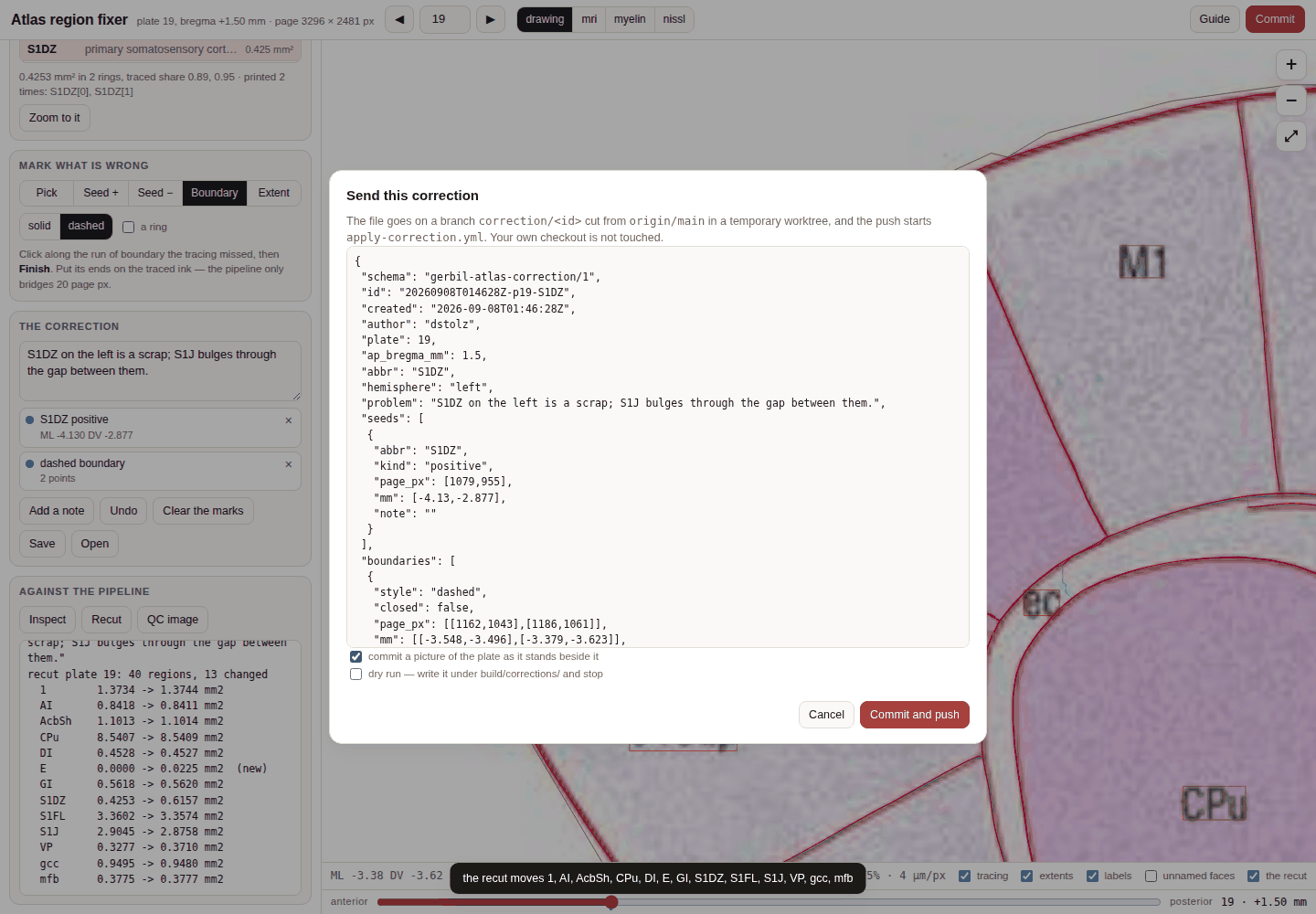
The file in that sheet is the whole of what is sent. Everything in the pull request that follows — which input moved, by how much, and what it did to every region on the plate — is worked out from it.
Pushing that branch starts the Apply correction workflow. A Claude Code session reads
your file, works out which of the four inputs is at fault, fixes that input and nothing
downstream, rebuilds the extents and everything cut from them — the meshes, the label
volume, the tables, the pages — runs every check, writes the CHANGELOG and METHODS entries,
and opens a pull request against main saying what moved and by how much. Once CI is green
the pull request merges, and because GitHub Pages serves main, the site updates.
So the thing to get right is the marks and the sentence. You are not expected to know which input was wrong, and you should not try to fix the drawing yourself.
- What the region outlines are and are not: Accuracy and Caveats
- The files the pipeline reads and writes: Data Files
- Something else looks wrong: Troubleshooting