Releases: duhaoze2007/MiniDevCppForMac
Release list
V1.0

Mini Dev-C++ 1.0
Release notes / 发布说明 · tag v1.0.0 · 2026-09-14
Mini Dev-C++ 1.0 — the Dev-C++ 4.9.9.2 experience on macOS
English
Highlights
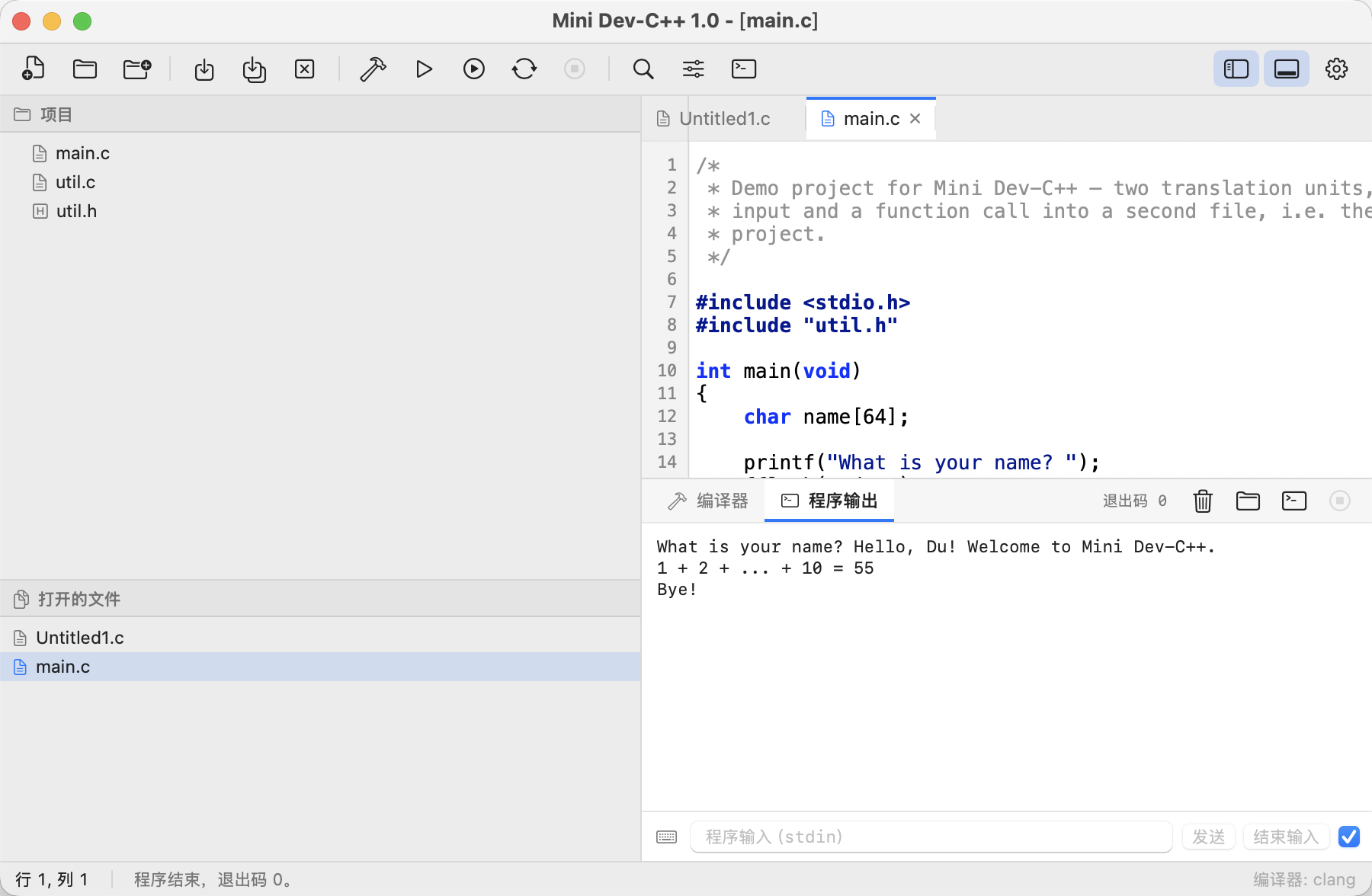
Mini Dev-C++ is a lightweight C IDE for macOS that recreates the Dev-C++ 4.9.9.2 workflow —
the same menu bar, project explorer, compile/run/console loop — rebuilt from scratch with
SwiftUI for macOS 14 and later. 1.0 is the first public release: the whole edit → compile →
run → inspect-diagnostics cycle works end to end, in three languages, in light and dark.
What's included
- Dev-C++ menu bar and toolbar — File, Edit, Search, View, Project, Execute, Tools, Window,
Help, with the familiar command bar grouping (new / open / save, compile, run, compile & run,
rebuild, stop, find, run parameters, terminal). - C-focused editor — the Dev-C++ colour scheme (bold blue reserved words, navy preprocessor
lines and string literals, grey comments), line-number gutter, smart indentation on{,
}de-indent, configurable tab width / spaces, word wrap, current-line highlight, ⌘/ comment
toggle and the native find & replace bar. - Real build pipeline — drives the local
clang: a single file compiles on its own, or open a
folder as a project and every.c/.cpp/.mfile is compiled and linked into one
executable, exactly like a Dev-C++ project. Selectable C standard, extra flags,-g, and the
output location (next to the sources, Dev-C++ style, or in abuild/subfolder). - Clickable diagnostics — clang errors and warnings are parsed into the Compiler tab; click
one to jump to that line, with the complete compiler log underneath. - Program console — runs the compiled program inside the app with live stdout/stderr, an
interactive stdin field (send line / send EOF / stop), the exit code, and one-click
“Run in Terminal” for programs that need a real terminal. - Run parameters — pass
argvarguments and pre-fill stdin, like Dev-C++'s
Execute ▸ Parameters. - English, 简体中文, 繁體中文 — follow the system or pin the language in Options; even the
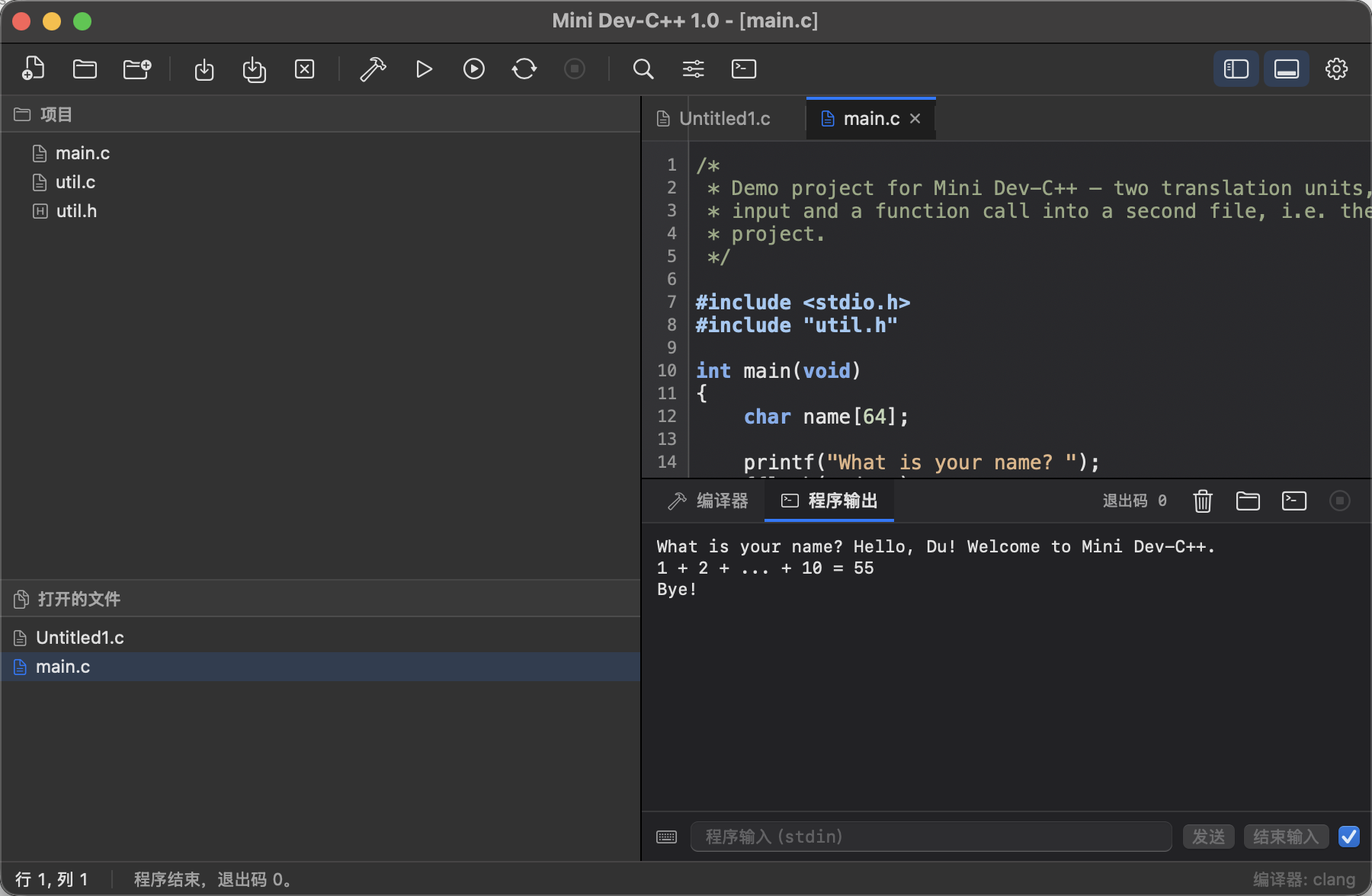
menus macOS builds itself are localized. - Light / dark / follow system — interface and editor palette adapt together.
- Completely offline — no networking code at all: no telemetry, no update checks, no accounts.
Sources only ever reach the local compiler.
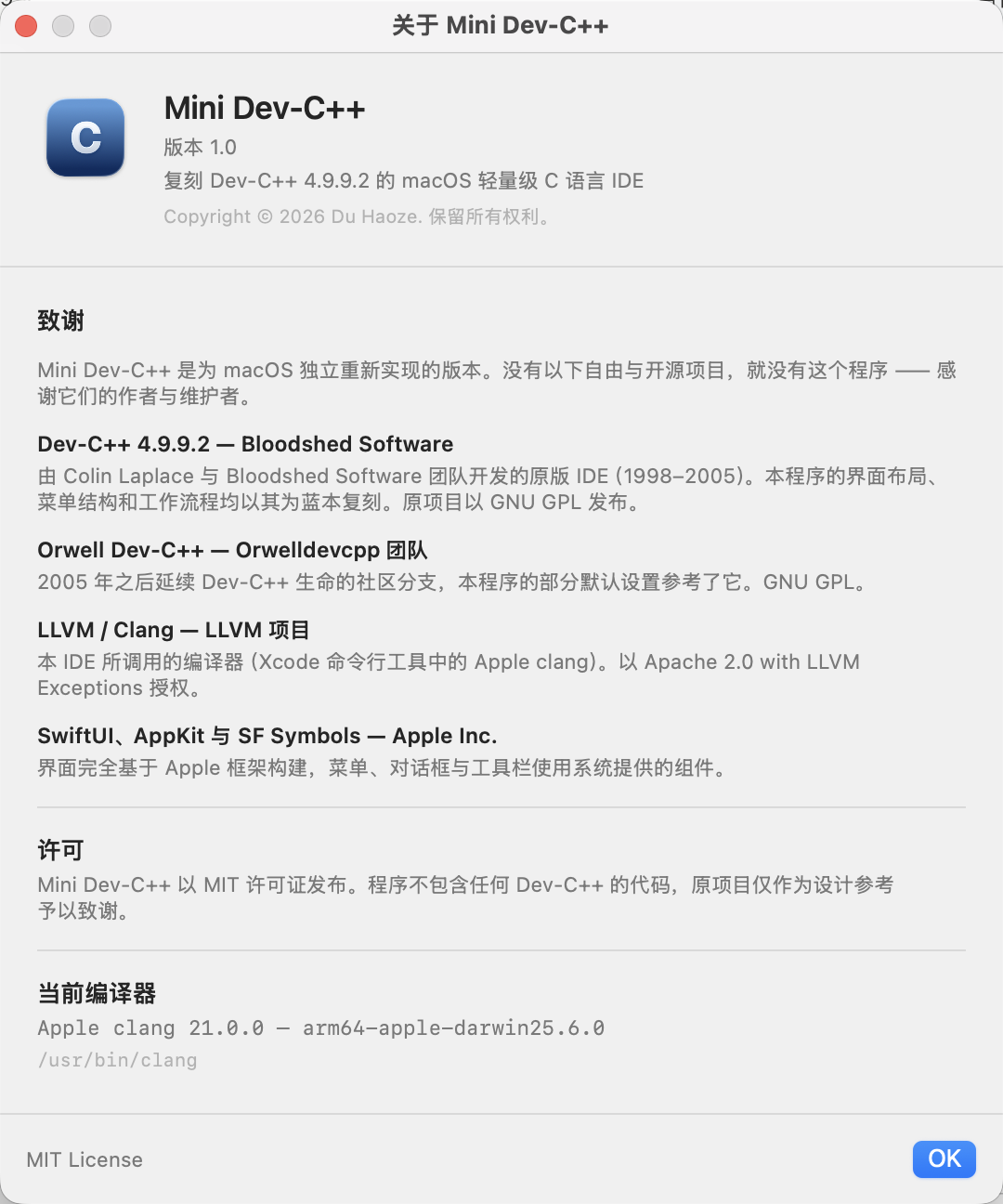
| Dark appearance | About & credits |
|---|---|
 |
 |
Requirements
- macOS 14.0 or later (Apple silicon or Intel).
- Xcode Command Line Tools for
clang—xcode-select --install. Full Xcode is not required.
Install
There is no pre-built binary attached to this release; build it from source (about a minute):
git clone git@github.com:duhaoze2007/MiniDevCppForMac.git
cd MiniDevCppForMac
bash build.sh
open "Mini Dev-C++.app"        # or drag it into /Applications
Building from source is also the honest way to reproduce the app: build.sh compiles, bundles,
copies the icon and the localized resources and ad-hoc signs the result. It prints the SDK it
selected — on a Command Line Tools-only Mac (no Xcode) it automatically falls back to the newest
installed SDK whose SwiftUI still declares its property wrappers as ordinary declarations, because
the SwiftUI macro plugin ships only inside Xcode.
Keyboard shortcuts
| Shortcut | Action |
|---|---|
⌘N / ⌘O / ⇧⌘O |
New file / Open file / Open folder as project |
⌘S / ⇧⌘S / ⌥⌘S |
Save / Save As / Save All |
⌘B / ⇧⌘B |
Compile / Rebuild all |
⌘R / ⌘⏎ / ⌘. |
Run / Compile & Run / Stop |
⌘F / ⌥⌘F / ⌘G / ⇧⌘G |
Find / Replace / Find next / Find previous |
⌘L |
Go to line |
⌘/ |
Comment or uncomment the selection |
⌘1 / ⌘2 |
Show or hide the project explorer / output window |
⌘+ / ⌘- |
Bigger / smaller editor font |
Not included (yet)
- No debugger (Dev-C++ 4.9.9.2's F8 GDB session is not reproduced);
-gsymbols are generated, so
you can debug the executable withlldbfrom a terminal. - No
.devproject file format: a project is a folder of sources. - No code completion, class browser or code folding.
- No pre-built/notarized binary — the bundle is ad-hoc signed, and macOS may ask for confirmation
the first time. - The app bundle is named
Mini Dev-C++.appwhile the repository isMiniDevCppForMac; the
product name in the app and its menus is Mini Dev-C++.
Verified before release
- Clean build from an empty
.builddirectory on macOS 26.6.2 (Apple silicon, Command Line Tools
only), then launched and driven through AppleScript: the demo project (Tests/DemoProject, two
translation units plus a header) was opened as a folder project, compiled with⌘Binto a single
DemoProjectexecutable, and run with⌘R; the Program Output tab showed the program's stdout and
exit code 0, and the same binary was run standalone from a shell with identical output. - Light and dark appearance, English / 简体中文 / 繁體中文 across the whole menu bar, the About
window (credits + compiler version), and both first-launch dialogs were each checked visually.
Credits
- Dev-C++ 4.9.9.2 — Bloodshed Software (Colin Laplace and team, 1998–2005, GNU GPL): the
original IDE whose layout, menus and workflow this app recreates. Its code is not used. - Orwell Dev-C++ — Orwelldevcpp Team (GNU GPL): the community fork that kept Dev-C++ alive
after 2005; several defaults here follow it. - LLVM / Clang — LLVM Project (Apache 2.0 with LLVM Exceptions): the compiler this IDE drives.
- SwiftUI, AppKit and SF Symbols — Apple Inc.: the interface is built entirely on Apple's
frameworks.
The same list is shown in the app under Help ▸ About Mini Dev-C++.
License
MIT License — see LICENSE.
Copyright © 2026 Du Haoze. Mini Dev-C++ contains no code from Dev-C++; the original project is
credited as the design reference only.
中文
亮点
Mini Dev-C++ 是一个为 macOS 打造的轻量级 C 语言 IDE,复刻 Dev-C++ 4.9.9.2 的使用体验 —— 相同的菜单栏、
项目浏览器、编译/运行/控制台流程 —— 用 SwiftUI 从零实现,支持 macOS 14 及以上。1.0 是首个公开发布版本:
从编辑、编译、运行到查看诊断信息的完整闭环已经跑通,三语言、浅色与深色齐备。
包含的内容
- Dev-C++ 的菜单栏与工具栏 —— 文件、编辑、搜索、视图、项目、运行、工具、窗口、帮助,以及熟悉的分组
命令栏(新建/打开/保存、编译、运行、编译并运行、全部重新编译、停止、查找、运行参数、终端)。 - 面向 C 的编辑器 —— Dev-C++ 配色(关键字蓝色加粗、预处理指令与字符串常量深蓝、注释灰色)、行号栏、
大括号智能缩进与}自动回退、Tab 宽度与"空格代替 Tab"可调、自动换行、当前行高亮、⌘/ 注释切换,
以及系统原生查找替换栏。 - 真实的编译流程 —— 调用本机
clang:打开单个文件即编译该文件;把文件夹作为项目打开后,其中的全部
.c/.cpp/.m会被编译并链接为同一个可执行文件,与 Dev-C++ 项目一致。可选择 C 标准、附加参数、
是否生成调试信息,以及输出位置(与源文件同目录的 Dev-C++ 风格,或build/子目录)。 - 可点击的诊断信息 —— 解析 clang 的错误与警告并显示在「编译器」标签中,点击即可跳转到对应行,
下方保留完整编译日志。 - 程序控制台 —— 编译后的程序在应用内运行,实时显示标准输出/错误,支持交互式 stdin
(发送一行/结束输入/停止),显示退出码,并可一键「在终端中运行」。 - 运行参数 —— 可传入
argv参数并预填标准输入,相当于 Dev-C++ 的「运行 ▸ 参数」。 - English、简体中文、繁體中文 —— 可跟随系统或在「选项」中固定;连 macOS 自行构建的菜单也一并本地化。
- 浅色/深色/跟随系统 —— 界面与编辑器配色同步切换。
- 完全离线 —— 不含任何网络代码:无遥测、无更新检查、无账号,源代码只会交给本机编译器。
| 深色外观 | 关于与致谢 |
|---|---|
|
|
环境要求
- macOS 14.0 或更高版本(Apple 芯片或 Intel)。
- 提供
clang的 Xcode 命令行工具:xcode-select --install,无需安装完整 Xcode。
安装
本次发布未附带预编译二进制,请从源码构建(约一分钟):
git clone git@github.com:duhaoze2007/MiniDevCppForMac.git
cd MiniDevCppForMac
bash build.sh
open "Mini Dev-C++.app" # 或拖入 /Applications从源码构建也是最可复现的方式:build.sh 会完成编译、打包、拷贝图标与本地化资源,并进行临时签名。
它会打印所选用的 SDK —— 在仅装命令行工具的 Mac(无 Xcode)上会自动回退到"最新一个 SwiftUI 仍以普通声明
而非宏提供属性包装器"的 SDK,因为 SwiftUI 的宏实现文件只随 Xcode 提供。
快捷键
| 快捷键 | 操作 |
|---|---|
⌘N / ⌘O / ⇧⌘O |
新建文件/打开文件/打开文件夹作为项目 |
⌘S / ⇧⌘S / ⌥⌘S |
保存/另存为/全部保存 |
⌘B / ⇧⌘B |
编译/全部重新编译 |
⌘R / ⌘⏎ / ⌘. |
运行/编译并运行/停止 |
⌘F / ⌥⌘F / ⌘G / ⇧⌘G |
查找/替换/查找下一个/查找上一个 |
⌘L |
转到行 |
⌘/ |
注释或取消注释选中行 |
⌘1 / ⌘2 |
显示或隐藏项目浏览器/输出窗口 |
⌘+ / ⌘- |
增大/减小编辑器字号 |
暂未包含
- 没有调试器(未复刻 Dev-C++ 4.9.9.2 的 F8 GDB 会话);但会生成
-g调试符号,可在终端用lldb调试。 - 没有
.dev工程文件格式:一个项目就是一个源码文件夹。 - 没有代码补全、类浏览器或代码折叠。
- 没有预编译/已公证的二进制 —— 应用为临时签名,macOS 首次打开时可能要求确认。
- 应用包名为
Mini Dev-C++.app,仓库名为MiniDevCppForMac;应用与菜单中的产品名是 Mini Dev-C++。
发布前已验证
- 在 macOS 26.6.2(Apple 芯片、仅命令行工具)上清空
.build后完整构建成功,随后启动并用 AppleScript
驱动:把示例项目(Tests/DemoProject,两个编译单元加一个头文件)作为文件夹项目打开,用⌘B编译为单个
DemoProject可执行文件,再用⌘R运行;「程序输出」标签显示程序标准输出与退出码 0,
同一二进制在终端独立运行输出一致。 - 浅色与深色外观、English/简体中文/繁體中文 的整套菜单栏、关于窗口(致谢与编译器版本)、
以及两个首次启动对话框均逐项截图核对。
致谢
- Dev-C++ 4.9.9.2 — Bloodshed Software(Colin Laplace 及团队,1998–2005,GNU GPL):原版 IDE,
本程序的界面布局、菜单结构和工作流程均以其为蓝本复刻,未使用其代码。 - Orwell Dev-C++ — Orwelldevcpp 团队(GNU GPL):2005 年后延续 Dev-C++ 生命的社区分支,
本程序的部分默认设置参考了它。 - LLVM / Clang — LLVM 项目(Apache 2.0 with LLVM Exceptions):本 IDE 调用的编译器。
- SwiftUI、AppKit 与 SF Symbols — Apple Inc.:界面完全基于 Apple 框架构建。
同一份名单也显示在应用内「帮助 ▸ 关于 Mini Dev-C++」中。
许可
MIT 许可证 —— 详见 LICENSE。
Copyright © 2026 Du Haoze。程序不包含任何 Dev-C++ 的代码,原项目仅作为设计参考予以致谢。