




The Swiss Army Knife for Developers





DevKit is an open-source configuration management, secrets management, and feature flags platform designed for modern development teams. Think of it as the Swiss Army Knife for Developers - a single tool that replaces multiple scattered solutions.

The Problem:
- ❌ Configurations scattered across
.envfiles - ❌ Secrets accidentally leaked to Git repositories
- ❌ Configuration changes require full redeployment
- ❌ No audit trail for who changed what and when
- ❌ Slow onboarding for new developers
- ❌ Manual feature flag implementations
The Solution:
- ✅ Centralized Configuration - All your configs in one place, version-controlled
- ✅ Secure Secrets Management - AES-256-GCM encryption at rest
- ✅ Dynamic Feature Flags - Toggle features instantly without deployment
- ✅ Hot Reload - Changes propagate in seconds, not hours
- ✅ Complete Audit Trail - Track every change with 90-day retention
- ✅ Multi-Environment - Dev, Staging, Production separated safely
- ✅ Native SDKs - Java, TypeScript, and Flutter support out of the box
- ✅ Modern Web UI - Beautiful, intuitive admin interface
- ✅ 100% Open Source - MIT license, self-hosted, no vendor lock-in
| Feature | DevKit | HashiCorp Vault | Doppler | LaunchDarkly |
|---|---|---|---|---|
| Setup Time | 5 min | Hours | 5 min | 30 min |
| Self-Hosted | ✅ | ✅ | ❌ | ❌ |
| Modern UI | ✅ | Basic | ✅ | ✅ |
| Feature Flags | ✅ | ❌ | ❌ | ✅ |
| Open Source | ✅ (MIT) | ✅ (MPL) | ❌ | ❌ |
| Brazilian PT | ✅ | ❌ | ❌ | ❌ |
| Secrets Mgmt | ✅ | ✅ | ✅ | ❌ |
| Config Mgmt | ✅ | ❌ | ✅ | ❌ |
Perfect for: SaaS platforms, e-commerce sites, mobile apps, microservices, and any team that needs reliable configuration and feature flag management.
- AES-256-GCM encryption for all secrets at rest
- Master key management via environment variables
- Automatic secret rotation support
- Secure audit logging (who accessed which secret and when)
- Key-value store with versioning
- Type-safe configuration retrieval (String, Integer, Boolean, Double)
- Environment-specific values (dev, staging, prod)
- Change history and rollback capability
- Hot reload without application restart
- Toggle features instantly without deployment
- Percentage rollouts - Roll out to 10%, 50%, 100% of users
- Targeting rules - Enable features for specific users, segments, or attributes
- A/B testing - Test multiple variants with different configurations
- Scheduled rollouts - Plan feature releases in advance
- Kill switch for emergency feature disabling
- Separate environments:
development,staging,production - Environment isolation for safety
- Promotion workflows (dev → staging → prod)
- Environment-specific API keys and permissions
- Java SDK - Spring Boot integration with autoconfiguration
- TypeScript SDK - Node.js and Browser support
- Flutter SDK - Mobile and desktop apps
- Built-in caching with TTL (60s for flags, 300s for configs)
- Automatic retry logic and error handling
- Type-safe APIs for all languages
- Complete audit trail - Every action logged with user, timestamp, and details
- 90-day retention (configurable)
- JWT authentication with HS512 algorithm
- API key management with expiration dates
- Role-based access control (RBAC)
- Application-level isolation
Get DevKit running in under 5 minutes with Docker Compose!
- Docker and Docker Compose installed
- 4GB RAM available
- Ports 3000, 8080, and 5432 available
git clone https://github.com/edsonmartins/usedevkit.git
cd usedevkit# Generate encryption master key (32 bytes)
export ENCRYPTION_MASTER_KEY=$(openssl rand -base64 32)
# Generate JWT secret (512 bits)
export JWT_SECRET=$(openssl rand -base64 64)
# Set database password
export DB_PASSWORD=your_secure_password_here# Start all services (PostgreSQL, Backend, Frontend)
docker-compose up -d
# Check service health
docker-compose ps
# View logs
docker-compose logs -f backend- 🎨 Frontend Dashboard: http://localhost:3000
- 🔧 Backend API: http://localhost:8080
- 📚 Swagger Documentation: http://localhost:8080/swagger-ui.html
- ❤️ Health Check: http://localhost:8080/actuator/health
On your first access, DevKit will automatically redirect you to the Setup Wizard:
- Navigate to http://localhost:3000
- You'll be redirected to
/setupautomatically - Fill in your organization details:
- Organization Name: Your company name
- Admin Email: Your administrator email
- Application Name: Name of your first application
- Click "Complete Setup"
- Important: Copy the generated API Key - it will only be shown once!
- Use this API Key to log in at
/login
┌─────────────────────────────────────────────────────────┐
│                    FIRST ACCESS                          │
│  1. Access http://localhost:3000                         │
│  2. Redirected to /setup (wizard)                        │
│  3. Fill organization details                            │
│  4. Copy API Key (shown once!)                           │
│  5. Login with API Key                                   │
└─────────────────────────────────────────────────────────┘
That's it! DevKit is now running. Continue to Usage to create more applications and configurations.
Pros: Isolated environment, reproducible builds, easy cleanup Best for: Production, quick testing, team onboarding
See Quick Start above.
Pros: Full control, easier debugging, custom configurations Best for: Development, contributing, custom deployments
# Prerequisites
- Java 17+
- Maven 3.8+
- PostgreSQL 15+

# Navigate to backend
cd backend

# Configure database
createdb devkit
psql devkit < src/main/resources/db/migration/postgresql/V1__init_schema.sql

# Set environment variables
export SPRING_DATASOURCE_URL=jdbc:postgresql://localhost:5432/devkit
export SPRING_DATASOURCE_USERNAME=postgres
export SPRING_DATASOURCE_PASSWORD=your_password
export ENCRYPTION_MASTER_KEY=$(openssl rand -base64 32)
export JWT_SECRET=$(openssl rand -base64 64)

# Run backend
mvn clean install
mvn spring-boot:run

# Backend will start on http://localhost:8080# Prerequisites
- Node.js 18+
- npm or pnpm
# Navigate to frontend
cd frontend
# Install dependencies
pnpm install
# Configure API URL
export NEXT_PUBLIC_API_URL=http://localhost:8080
# Run development server
pnpm run dev
# Frontend will start on http://localhost:3000See Deployment Guide for:
- Kubernetes manifests
- Docker Swarm configuration
- AWS ECS deployment
- DigitalOcean App Platform
- Traditional VPS deployment
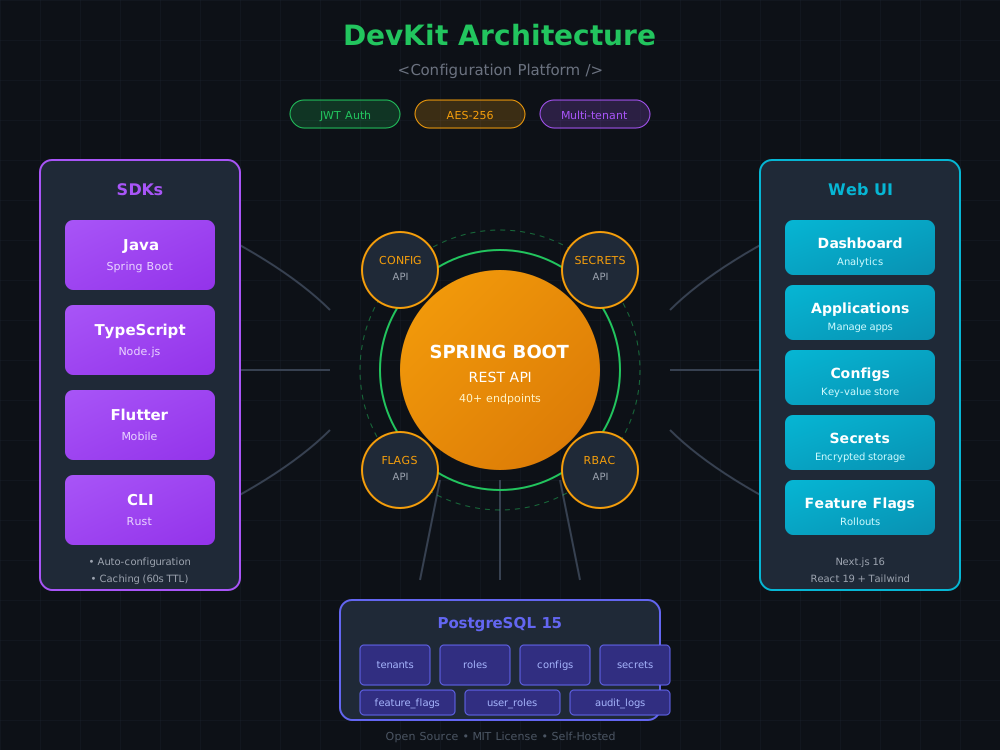
Multi-Tenancy & RBAC Platform Architecture
- Framework: Spring Boot 3.2.2
- Language: Java 17
- Database: PostgreSQL 15
- ORM: Spring Data JPA + Hibernate
- Migrations: Flyway
- Security: Spring Security + JWT (jjwt 0.12.5)
- Encryption: Bouncy Castle (AES-256-GCM)
- API Docs: SpringDoc OpenAPI 2.3.0
- Cache: Caffeine (in-memory)
- Framework: Next.js 16.1.1 (App Router)
- UI Library: React 19.2.3
- Styling: Tailwind CSS v4
- Components: shadcn/ui (Radix UI)
- State Management: Zustand 5.0.10
- Forms: React Hook Form + Zod
- Data Fetching: TanStack Query 5.90.16
- Icons: Phosphor Icons
- Java: Java 17, Spring Boot integration, OkHttp 4.12.0, Jackson 2.16.1, Caffeine 3.1.8
- TypeScript: Node.js 18+, TypeScript 5.0+, node-fetch 2.7.0
- Flutter: Dart 3.0+, Flutter 3.0+, http 1.1.0
Note: Your first application is automatically created during the Initial Setup. The steps below are for creating additional applications.
- Navigate to http://localhost:3000 and log in with your API Key
- Click "New Application"
- Fill in application details:
- Name: My E-commerce App
- Description: Production e-commerce platform
- Owner Email: dev@company.com
- Click "Create Application"
# Authenticate and get JWT token
export API_KEY="dk_prod_your_api_key_here"
export JWT_TOKEN=$(curl -X POST http://localhost:8080/api/v1/auth/authenticate \
  -H "Content-Type: application/json" \
  -d "{\"apiKey\": \"$API_KEY\"}" \
  | jq -r '.accessToken')

# Create application
curl -X POST http://localhost:8080/api/v1/applications \
  -H "Authorization: Bearer $JWT_TOKEN" \
  -H "Content-Type: application/json" \
  -d '{
    "name": "My E-commerce App",
    "description": "Production e-commerce platform",
    "ownerEmail": "dev@company.com"
}'Installation (Maven):
<dependency>
    <groupId>com.devkit</groupId>
    <artifactId>devkit-sdk-java</artifactId>
    <version>1.0.0</version>
</dependency>
Usage:
import com.devkit.sdk.DevKitClient;
import com.devkit.sdk.DevKitClientBuilder;

// Create client
DevKitClient client = DevKitClientBuilder.create()
    .apiKey("dk_prod_3x7...9k2")
    .build();

// Feature Flags
boolean enabled = client.isFeatureEnabled("new-checkout-flow", "user-123");
if (enabled) {
    // Show new checkout experience
} else {
    // Show old checkout
}

// Configurations
String stripeKey = client.getConfig("prod", "stripe.api.key");
Integer timeout = client.getConfig("prod", "request.timeout", Integer.class);

// Secrets (automatically decrypted)
String dbPassword = client.getSecret("my-app", "prod", "database.password");Installation:
npm install @devkit/sdk
# or
yarn add @devkit/sdk
# or
pnpm add @devkit/sdk
Usage:
import { DevKitClient } from '@devkit/sdk';

// Create client
const client = new DevKitClient({
  apiKey: 'dk_prod_3x7...9k2'
});

// Feature Flags
const enabled = await client.isFeatureEnabled('new-checkout-flow', 'user-123');

// Configurations
const apiKey = await client.getConfig('prod', 'stripe.api.key');
const timeout = await client.getConfig('prod', 'request.timeout', 'number');

// Secrets
const dbPassword = await client.getSecret('my-app', 'prod', 'database.password');Installation:
dependencies:
  devkit_sdk:
    git:
      url: https://github.com/edsonmartins/usedevkit.git
      path: sdks/flutter
Usage:
import 'package:devkit_sdk/devkit_sdk.dart';

// Create client
final client = DevKitClient(
  apiKey: 'dk_prod_3x7...9k2'
);

// Feature Flags
final enabled = await client.isFeatureEnabled('new-checkout-flow', 'user-123');

// Configurations
final apiKey = await client.getConfig('prod', 'stripe.api.key');
final timeout = await client.getConfigWithType('prod', 'request.timeout', 'int');

// Secrets
final dbPassword = await client.getSecret('my-app', 'prod', 'database.password');Scenario: Gradually roll out a new checkout flow to users
// 1. Create feature flag in DevKit UI
// Key: new-checkout-flow
// Rollout Strategy: PERCENTAGE
// Rollout Percentage: 10% (start small)

// 2. In your application code
public CheckoutResponse processCheckout(User user, Cart cart) {
    DevKitClient client = new DevKitClient(...);

    // Check if user should see new checkout
    boolean newCheckoutEnabled = client.isFeatureEnabled(
        "new-checkout-flow",
        user.getId()
    );

    if (newCheckoutEnabled) {
        return newCheckoutService.process(cart);
    } else {
        return legacyCheckoutService.process(cart);
    }
}

// 3. Monitor metrics, increase rollout to 50%, then 100%
// 4. If issues found, disable instantly via UI (no deployment needed!)// Instead of environment variables or .env files:
// Old way ❌
String stripeKey = System.getenv("STRIPE_API_KEY");
boolean debugMode = Boolean.parseBoolean(System.getenv("DEBUG_MODE"));
int timeout = Integer.parseInt(System.getenv("REQUEST_TIMEOUT"));
// New way with DevKit ✅
DevKitClient client = new DevKitClient(...);
// Type-safe, with defaults if not found
String stripeKey = client.getConfig("prod", "stripe.api.key");
boolean debugMode = client.getConfig("prod", "debug.mode", Boolean.class);
int timeout = client.getConfig("prod", "request.timeout", Integer.class, 5000);
// Benefits:
// - Change values in DevKit UI → hot reload in 60s
// - Version history → rollback if needed
// - Audit trail → who changed what and whenThese endpoints are public and used for first-time system setup.
Check Bootstrap Status:
GET /api/v1/bootstrap/status

Response:
{
  "needsSetup": true,
  "message": "System needs initial setup"
}
Run Initial Bootstrap:
POST /api/v1/bootstrap
Content-Type: application/json

{
  "organizationName": "My Company",
  "adminEmail": "admin@company.com",
  "applicationName": "My Application"
}

Response:
{
  "tenantId": "1",
  "tenantName": "My Company",
  "applicationId": "ABC123",
  "applicationName": "My Application",
  "apiKey": "dk_xxxx_xxxxxxxxxxxxxxxxx",
  "message": "Bootstrap completed successfully. Save your API key - it will only be shown once!"
}
⚠️ Important: The bootstrap endpoint only works once. After initial setup, it will return an error.
All API requests require a JWT token in the Authorization header:
Authorization: Bearer <your-jwt-token>Get JWT Token:
POST /api/v1/auth/authenticate
Content-Type: application/json

{
  "apiKey": "dk_prod_your_api_key_here"
}

Response:
{
  "accessToken": "eyJhbGciOiJIUzUxMiJ9...",
  "refreshToken": "eyJhbGciOiJIUzUxMiJ9...",
  "expiresIn": 900
}List Applications:
GET /api/v1/applications
Authorization: Bearer <token>
Create Application:
POST /api/v1/applications
Authorization: Bearer <token>
Content-Type: application/json

{
  "name": "My Application",
  "description": "Application description",
  "ownerEmail": "dev@company.com"
}
Get Application Details:
GET /api/v1/applications/{id}
Authorization: Bearer <token>List Configurations:
GET /api/v1/configurations?applicationId={appId}&environmentId={envId}
Authorization: Bearer <token>
Create Configuration:
POST /api/v1/configurations
Authorization: Bearer <token>
Content-Type: application/json

{
  "applicationId": "app-uuid",
  "environmentId": "env-uuid",
  "key": "stripe.api.key",
  "value": "sk_live_1234567890"
}
Update Configuration:
PUT /api/v1/configurations/{id}
Authorization: Bearer <token>
Content-Type: application/json

{
  "value": "sk_live_new_key_here"
}List Feature Flags:
GET /api/v1/feature-flags?applicationId={appId}
Authorization: Bearer <token>
Create Feature Flag:
POST /api/v1/feature-flags
Authorization: Bearer <token>
Content-Type: application/json

{
  "applicationId": "app-uuid",
  "key": "new-checkout-flow",
  "name": "New Checkout Flow",
  "description": "Enable new checkout experience",
  "status": "ENABLED",
  "rolloutStrategy": "PERCENTAGE",
  "rolloutPercentage": 50
}
Evaluate Feature Flag (SDK Endpoint):
POST /api/v1/feature-flags/evaluate
Authorization: Bearer <token>
Content-Type: application/json

{
  "flagKey": "new-checkout-flow",
  "userId": "user-123",
  "attributes": {
    "plan": "premium",
    "country": "BR"
  }
}

Response:
{
  "enabled": true,
  "variantKey": "variant-a",
  "reason": "TARGETING_MATCH"
}Create Secret:
POST /api/v1/secrets
Authorization: Bearer <token>
Content-Type: application/json

{
  "applicationId": "app-uuid",
  "environmentId": "env-uuid",
  "key": "database.password",
  "value": "super_secret_password"  // Will be AES-256 encrypted
}
Get Secret (Decrypted):
GET /api/v1/secrets/{id}
Authorization: Bearer <token>

Response:
{
  "key": "database.password",
  "value": "super_secret_password",  // Decrypted value
  "version": 3
}Query Audit Logs:
GET /api/v1/audit-logs?applicationId={appId}&limit=50&offset=0
Authorization: Bearer <token>

Response:
{
  "logs": [
    {
      "id": "audit-uuid",
      "action": "CONFIGURATION_UPDATED",
      "entityType": "CONFIGURATION",
      "entityId": "config-uuid",
      "userId": "user-123",
      "timestamp": "2026-01-12T10:30:00Z",
      "details": {
        "key": "stripe.api.key",
        "oldValue": "***",
        "newValue": "***"
      }
    }
  ],
  "total": 150
}Interactive API documentation available at:
- Swagger UI: http://localhost:8080/swagger-ui.html
- OpenAPI JSON: http://localhost:8080/v3/api-docs
Comprehensive documentation is available in the documentos/ directory:
| Document | Description |
|---|---|
| 00-ARCHITECTURE.md | System architecture and design decisions |
| 01-BACKEND.md | Backend implementation details |
| 02-FRONTEND.md | Frontend implementation details |
| 03-CLIENT-JAVA.md | Java SDK implementation guide |
| 04-CLIENT-TYPESCRIPT.md | TypeScript SDK implementation guide |
| 05-CLIENT-FLUTTER.md | Flutter SDK implementation guide |
| 06-CLI.md | CLI tool documentation |
| 07-DEPLOYMENT.md | Deployment guides (Docker, K8s, AWS) |
| 12-FEATURE-FLAGS.md | Feature flags implementation |
| 13-DYNAMIC-CONFIG.md | Dynamic configuration guide |
| 22-ROADMAP-COMPLETE.md | Complete 6-month roadmap |
| 23-QUICK-START.md | 30-minute quick start guide |
| 24-EXECUTIVE-SUMMARY.md | Executive summary for stakeholders |
- ✅ Spring Boot backend with PostgreSQL
- ✅ Next.js frontend with shadcn/ui
- ✅ Core data model and migrations
- ✅ AES-256-GCM encryption for secrets
- ✅ JWT authentication
- ✅ Java SDK MVP
- ✅ Docker Compose setup
- ✅ Basic audit logging
- ✅ Bootstrap wizard for initial setup (self-service onboarding)
- ⬜ Feature Flags MVP (toggle, percentage rollout)
- ⬜ Dynamic Configuration with hot reload
- ⬜ Complete TypeScript SDK
- ⬜ Complete Flutter SDK
- ⬜ Rust CLI tool
- ⬜ Manual secrets rotation
- ⬜ Enhanced audit logging (90-day retention)
- ⬜ Service Catalog
- ⬜ Environment Promotion Workflows
- ⬜ Webhooks & Notifications
- ⬜ Project Templates
- ⬜ Import/Export .env files
- ⬜ Configuration validation
- ⬜ Advanced Feature Flags (A/B testing with variants)
- ⬜ Database Migrations Management
- ⬜ API Gateway Lite (rate limiting, circuit breaker)
- ⬜ Compliance Dashboard (GDPR, SOC2, HIPAA)
- ⬜ Automatic Secrets Rotation
- ⬜ Multi-region support
- ⬜ AI-powered configuration optimization
- ⬜ Multi-tenancy support
- ⬜ Terraform Provider
- ⬜ Kubernetes Operator
- ⬜ Advanced analytics and insights
Timeline: Foundation complete | Phase 1: Q1 2026 | Phase 2: Q2 2026 | Phase 3: Q3 2026 | Phase 4: Ongoing
For detailed roadmap, see ROADMAP-COMPLETE.md
We welcome contributions from the community! Please follow these steps:
git clone https://github.com/your-username/usedevkit.git
cd usedevkitBackend:
cd backend
mvn clean install
mvn spring-boot:run
Frontend:
cd frontend
pnpm install
pnpm run devgit checkout -b feature/your-feature-name
# or
git checkout -b fix/bug-description- Follow existing code style and patterns
- Add tests for new features
- Update documentation as needed
- Ensure all tests pass:
mvn testandpnpm test
git add .
git commit -m "feat: add support for XYZ"
# or
git commit -m "fix: resolve issue with ABC"
Commit Message Convention:
feat:New featurefix:Bug fixdocs:Documentation changesstyle:Code style changes (formatting, etc.)refactor:Code refactoringtest:Adding or updating testschore:Maintenance tasks
git push origin feature/your-feature-nameThen create a Pull Request on GitHub with:
- Clear description of changes
- Link to related issues
- Screenshots for UI changes
- Test results
Backend (Java/Spring Boot):
- Follow Spring Boot best practices
- Use dependency injection
- Write unit tests (JUnit 5, Mockito)
- API changes must update OpenAPI docs
- Database migrations must be backwards compatible
Frontend (Next.js/React):
- Follow React and Next.js best practices
- Use TypeScript for all new code
- Component files: PascalCase (e.g.,
FeatureFlagCard.tsx) - Utility files: camelCase (e.g.,
useFeatureFlags.ts) - Add tests for components and hooks
- Ensure accessibility (ARIA labels, keyboard navigation)
SDKs:
- Maintain API consistency across SDKs
- Include error handling and retry logic
- Add usage examples
- Update README in SDK directory
Documentation:
- Use clear, concise language
- Include code examples
- Add diagrams where helpful
- Keep docs in sync with code
See CONTRIBUTING.md for detailed guidelines.
cd backend

# Run all tests
mvn test

# Run specific test class
mvn test -Dtest=ConfigurationServiceTest

# Run with coverage
mvn test jacoco:reportcd frontend
# Run all tests
pnpm test
# Run tests in watch mode
pnpm test:watch
# Run tests with coverage
pnpm test:coverage
# Run E2E tests
pnpm test:e2e# Java SDK
cd sdks/java
mvn test
# TypeScript SDK
cd sdks/typescript
npm test
# Flutter SDK
cd sdks/flutter
flutter testIssue: Lost or forgot API Key after initial setup
Solution: You'll need to reset the database to run the setup wizard again:
# Using Docker
docker-compose exec postgres psql -U postgres -d devkit -c "DELETE FROM tenants;"

# Or manually connect to PostgreSQL and run:
DELETE FROM api_keys;
DELETE FROM applications;
DELETE FROM tenant_users;
DELETE FROM tenants;
Then access http://localhost:3000 - it will redirect to /setup again.
Issue: Setup wizard not appearing (stuck on login page)
Solution: Check if the backend is running and the bootstrap endpoint is accessible:
curl http://localhost:8080/api/v1/bootstrap/status
# Should return: {"needsSetup":true,"message":"System needs initial setup"}
If it returns needsSetup: false, the system is already configured. You need to log in with an existing API Key or reset the database.
Issue: Backend fails to start with "Connection refused"
Solution: Ensure PostgreSQL is running:
# Check PostgreSQL status
sudo service postgresql status

# Start PostgreSQL
sudo service postgresql start

# Or use Docker
docker run -d -p 5432:5432 \
  -e POSTGRES_DB=devkit \
  -e POSTGRES_USER=postgres \
  -e POSTGRES_PASSWORD=password \
  postgres:15
Issue: Frontend can't connect to backend
Solution: Verify NEXT_PUBLIC_API_URL is set correctly:
# In frontend/.env.local
NEXT_PUBLIC_API_URL=http://localhost:8080

# Restart frontend
pnpm run dev
Issue: JWT token expires quickly
Solution: Adjust JWT expiration in backend/src/main/resources/application.yml:
jwt:
  access-token-expiration: 900000  # 15 minutes in ms
  refresh-token-expiration: 604800000  # 7 days in ms
Issue: Secrets decryption fails
Solution: Ensure ENCRYPTION_MASTER_KEY is the same used for encryption:
# The master key must be consistent across restarts
export ENCRYPTION_MASTER_KEY="your-original-32-byte-key"
Issue: SDK cache not updating
Solution: Adjust cache TTL or clear cache manually:
Java:
client.invalidateCache("config:prod:stripe.api.key");
// or
client.clearCache();
TypeScript:
client.invalidateCache('config:prod:stripe.api.key');
// or
client.clearCache();
For more troubleshooting, see Issues on GitHub.
Configuration Retrieval:
- Average response time: 45ms
- 99th percentile: 120ms
- Throughput: 10,000 requests/second
Feature Flag Evaluation:
- Average response time: 35ms
- 99th percentile: 90ms
- Throughput: 15,000 requests/second
Secrets Decryption:
- Average response time: 60ms
- 99th percentile: 150ms
- Throughput: 8,000 requests/second
- Single Instance: Handles up to 1,000 applications
- Horizontal Scaling: Stateless design allows easy scaling
- Database: PostgreSQL can handle millions of configurations
- Caching: Built-in cache reduces database load by 90%
- ✅ AES-256-GCM encryption for secrets at rest
- ✅ SHA-256 hashing for API keys
- ✅ JWT authentication with HS512
- ✅ RBAC (Role-Based Access Control)
- ✅ Audit logging for compliance
- ✅ HTTPS-only in production
- ✅ CORS configuration
- ✅ SQL injection protection (JPA)
- ✅ XSS protection (React escaping)
- Never commit API keys or secrets to Git
- Use different master keys for dev/staging/prod
- Rotate JWT secrets regularly (recommended: every 90 days)
- Enable HTTPS in production (use Let's Encrypt or similar)
- Restrict API key permissions to minimum required
- Monitor audit logs for suspicious activity
- Keep dependencies updated (
mvn versions:display-dependency-updates) - Use environment variables for sensitive configuration
If you discover a security vulnerability, please do not open a public issue. Instead, email us at security@usedevkit.com with:
- Description of the vulnerability
- Steps to reproduce
- Impact assessment
- Proposed fix (if any)
We will respond within 48 hours and patch the issue promptly.
This project is licensed under the MIT License - see the LICENSE file for details.
Summary:
- ✅ Free to use for personal and commercial projects
- ✅ Free to modify and distribute
- ✅ No warranty provided
- ❌ Cannot remove license notice
- ❌ Cannot hold authors liable
- Twitter: @usedevkit
- LinkedIn: DevKit Platform
- YouTube: DevKit Tutorials
For enterprise support, custom integrations, or SLA guarantees, contact us at enterprise@usedevkit.com.
DevKit is built on top of amazing open-source technologies:
Backend:
- Spring Boot - Application framework
- PostgreSQL - Database
- Flyway - Database migrations
- JJWT - JWT library
- Bouncy Castle - Cryptography
Frontend:
- Next.js - React framework
- React - UI library
- Tailwind CSS - Styling
- shadcn/ui - Component library
- Radix UI - Unstyled components
- Zustand - State management
- TanStack Query - Data fetching
SDKs:
- OkHttp - HTTP client (Java)
- Jackson - JSON parsing (Java)
- Caffeine - Caching (Java)
- node-fetch - HTTP client (TypeScript)
- http package - HTTP client (Flutter)
Inspiration:
- HashiCorp Vault - Secrets management pioneer
- LaunchDarkly - Feature flags innovator
- Doppler - Beautiful UX design
Special thanks to our contributors and the open-source community!
Version: 1.0.0 (Foundation Complete)
Last Updated: January 2026
Status: 🟢 Active Development
Next Release: v1.5.0 (Phase 1 Core Features) - Expected Q1 2026
Built with ❤️ by the DevKit team
⭐ Star us on GitHub • 🐦 Follow us on Twitter • 💬 Join our Discord
Made with ☕ in São Paulo, Brazil 🇧🇷