I want to be able to create different custom activities with the same switch functionality and additionally other fields and configurations for a specific problem, in the configuration part it works fine.
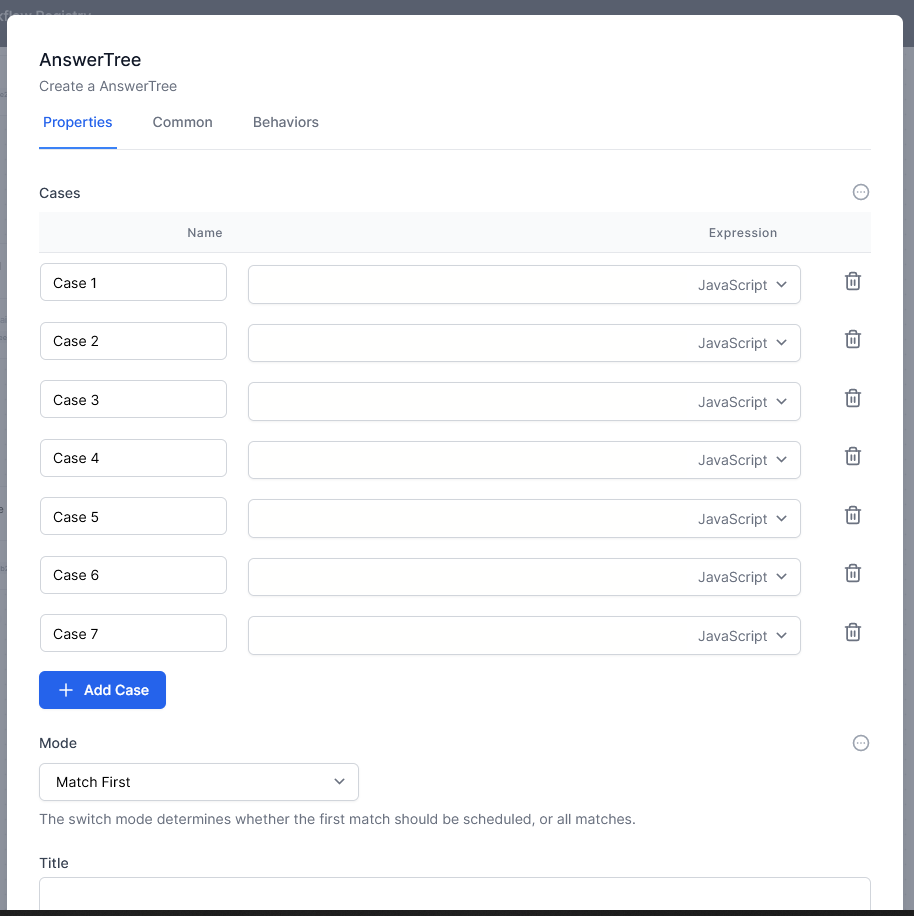
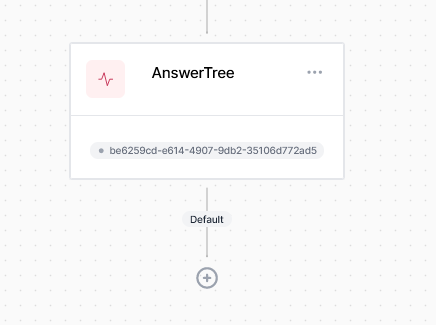
But when it comes to seeing the cases or as options in the designer to be able to decide what to do in each case, it is not shown, it may be configurations, in that case if possible I would like to know how the switch was configured to be able to show the option branches in the designer.
Initial configuration
 services.AddElsa(elsa => elsa
                    .UseMongoDbPersistence<ElsaMongoDbContext>(
                    options => options.ConnectionString = mongoDbConnectionString)
                    .AddConsoleActivities()
                    .AddHttpActivities(elsaSection.GetSection("Server").Bind)
                    .AddJavaScriptActivities()
                    .AddEmailActivities(elsaSection.GetSection("Smtp").Bind)
                    .AddQuartzTemporalActivities()
                    .AddActivity<AnswerTree>()
                );
Custom Activity
[Trigger(
       Category = "N5 CTA",
       DisplayName = "AnswerTree",
       Description = "Create a AnswerTree",
       Outcomes = new[] { OutcomeNames.Default }
   )]
    public class AnswerTree : Activity, INotificationHandler<ScopeEvicted>
    {

        [ActivityProperty(Hint = "The conditions to evaluate.", UIHint = "switch-case-builder", DefaultSyntax = "Switch")]
        public ICollection<SwitchCase> Cases { get; set; } = new List<SwitchCase>();

        [ActivityProperty(
            Hint = "The switch mode determines whether the first match should be scheduled, or all matches.",
            DefaultValue = SwitchMode.MatchFirst,
            SupportedSyntaxes = new[] { SyntaxNames.Literal, SyntaxNames.JavaScript, SyntaxNames.Liquid }
        )]

        public SwitchMode Mode { get; set; } = SwitchMode.MatchFirst;

        [ActivityProperty(
            UIHint = ActivityPropertyUIHints.SingleLine,
            Hint = "Nombre del Answer Tree (AT/name of flow)")]
        public string _title { get; set; }

        public bool EnteredScope
        {
            get => GetState<bool>();
            set => SetState(value);
        }
        protected override IActivityExecutionResult OnExecute(ActivityExecutionContext context)
        {
            if (!context.WorkflowInstance.Scopes.Contains(x => x.ActivityId == Id))
            {
                if (!EnteredScope)
                {
                    context.CreateScope();
                    EnteredScope = true;
                }
                else
                {
                    EnteredScope = false;
                    return Done();
                }
            }

            var matches = Cases.Where(x => x.Condition).Select(x => x.Name).ToList();
            var hasAnyMatches = matches.Any();
            var results = Mode == SwitchMode.MatchFirst ? hasAnyMatches ? new[] { matches.First() } : new string[0] : matches.ToArray();
            var outcomes = hasAnyMatches ? results : new[] { OutcomeNames.Default };

            return Outcomes(outcomes);
        }

        Task INotificationHandler<ScopeEvicted>.Handle(ScopeEvicted notification, CancellationToken cancellationToken)
        {
            if (notification.EvictedScope.Type != nameof(AnswerTree))
                return Task.CompletedTask;

            var data = notification.WorkflowExecutionContext.WorkflowInstance.ActivityData.GetItem(notification.EvictedScope.Id, () => new JObject());
            data.SetState(nameof(EnteredScope), false);
            data.SetState("Unwinding", false);

            return Task.CompletedTask;
        }
    }
I want to be able to create different custom activities with the same switch functionality and additionally other fields and configurations for a specific problem, in the configuration part it works fine.
But when it comes to seeing the cases or as options in the designer to be able to decide what to do in each case, it is not shown, it may be configurations, in that case if possible I would like to know how the switch was configured to be able to show the option branches in the designer.
Initial configuration
Custom Activity
[Trigger( Category = "N5 CTA", DisplayName = "AnswerTree", Description = "Create a AnswerTree", Outcomes = new[] { OutcomeNames.Default } )] public class AnswerTree : Activity, INotificationHandler<ScopeEvicted> { [ActivityProperty(Hint = "The conditions to evaluate.", UIHint = "switch-case-builder", DefaultSyntax = "Switch")] public ICollection<SwitchCase> Cases { get; set; } = new List<SwitchCase>(); [ActivityProperty( Hint = "The switch mode determines whether the first match should be scheduled, or all matches.", DefaultValue = SwitchMode.MatchFirst, SupportedSyntaxes = new[] { SyntaxNames.Literal, SyntaxNames.JavaScript, SyntaxNames.Liquid } )] public SwitchMode Mode { get; set; } = SwitchMode.MatchFirst; [ActivityProperty( UIHint = ActivityPropertyUIHints.SingleLine, Hint = "Nombre del Answer Tree (AT/name of flow)")] public string _title { get; set; } public bool EnteredScope { get => GetState<bool>(); set => SetState(value); } protected override IActivityExecutionResult OnExecute(ActivityExecutionContext context) { if (!context.WorkflowInstance.Scopes.Contains(x => x.ActivityId == Id)) { if (!EnteredScope) { context.CreateScope(); EnteredScope = true; } else { EnteredScope = false; return Done(); } } var matches = Cases.Where(x => x.Condition).Select(x => x.Name).ToList(); var hasAnyMatches = matches.Any(); var results = Mode == SwitchMode.MatchFirst ? hasAnyMatches ? new[] { matches.First() } : new string[0] : matches.ToArray(); var outcomes = hasAnyMatches ? results : new[] { OutcomeNames.Default }; return Outcomes(outcomes); } Task INotificationHandler<ScopeEvicted>.Handle(ScopeEvicted notification, CancellationToken cancellationToken) { if (notification.EvictedScope.Type != nameof(AnswerTree)) return Task.CompletedTask; var data = notification.WorkflowExecutionContext.WorkflowInstance.ActivityData.GetItem(notification.EvictedScope.Id, () => new JObject()); data.SetState(nameof(EnteredScope), false); data.SetState("Unwinding", false); return Task.CompletedTask; } }