Repository navigation
Interleaving
Paired reads come in two layouts. Most sequencers write two files, R1 and R2; some tools prefer one interleaved file, in which each mate 1 record is followed by its mate 2. interleave and deinterleave move between the two, checking every pair on the way.

Figure 1. Two files and one interleaved file hold the same pairs in a different order.
Both commands validate every record and match the mates' names (Paired reads) before writing a pair. They never trim, reorder, or repair anything.
z-fastq interleave R1.fastq.gz R2.fastq.gz > interleaved.fastq
z-fastq interleave R1.fastq.gz R2.fastq.gz | gzip > interleaved.fastq.gz
The result goes to standard output as plain FASTQ; pipe it to gzip to compress it. Add --pair-names exact when the whole first word of each name must match.
z-fastq deinterleave --out1 R1.fastq --out2 R2.fastq interleaved.fastq.gzThe first record of each pair goes to --out1, the second to --out2. Both must be new files; z-fastq never overwrites one. A failure partway, such as a broken pair, leaves the two files partly written.
Each input may be plain, gzip, or - for standard input, with at most one -. The first broken record, mismatched name, or unequal record count stops the run with a nonzero exit status (Automation).
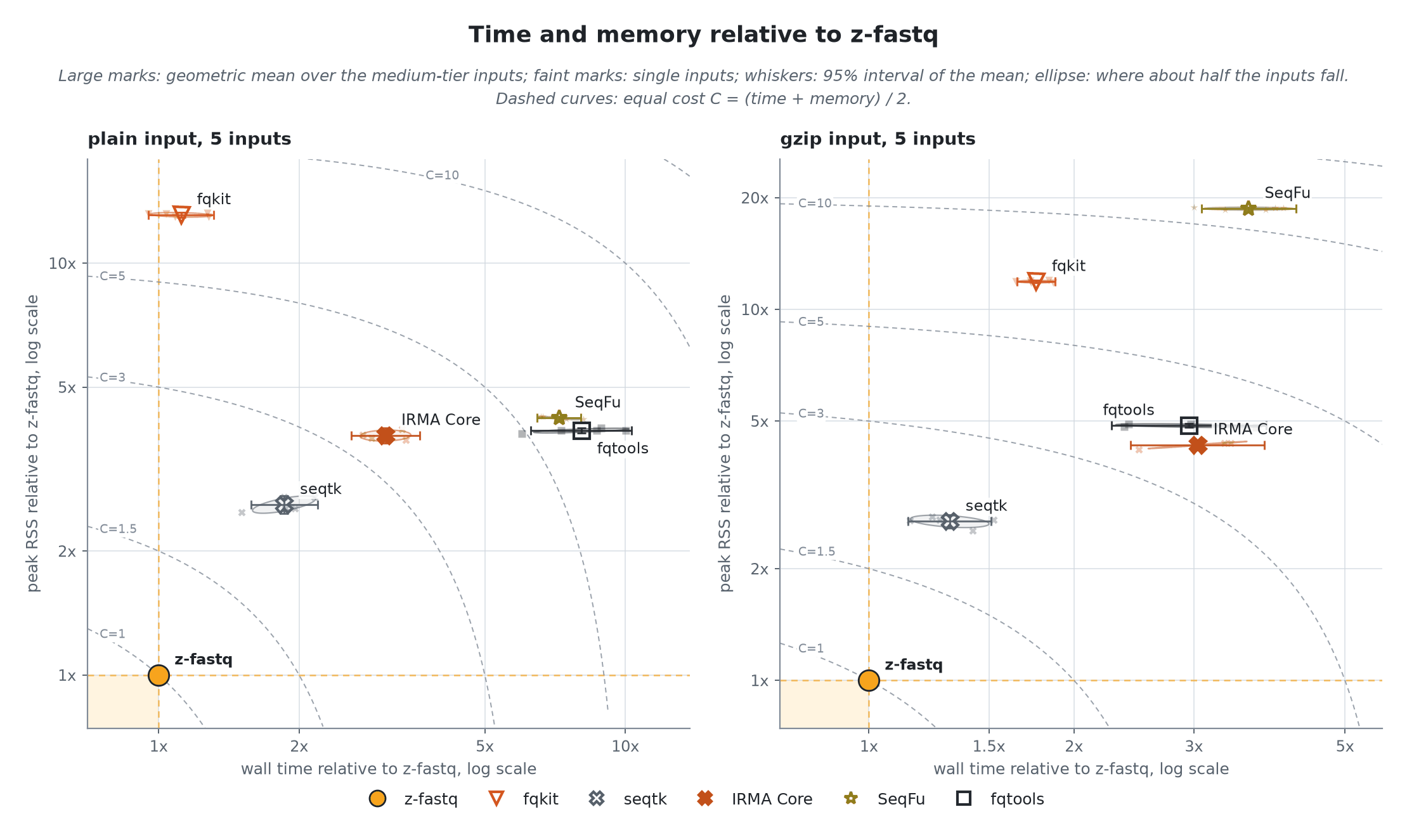
Figure 2. Interleaving: time and peak memory relative to z-fastq. fqkit is faster on plain input, but it, seqtk, SeqFu, and fqtools also write output from broken pairs with exit status 0. The layout benchmark has the details and the same figure for deinterleaving.
- Paired reads: how mate names are matched.
- Sampling: paired samples come out interleaved.
- Recipes: an interleaved gzip file in one line.