Repository navigation
Performance
z-fastq is built to finish a FASTQ job quickly on one core while holding only a few MiB of memory, and to stop on a broken record instead of passing it on. This page explains how that is measured, what the comparison shows, and where another tool is the better choice. Every number comes from the benchmark summary, which links to one report per command.
- Right answers first. Every tool's output is checked against an independent truth before anything is timed: the record count recorded when the corpus was cut, fastp's own records for trimming, FastQC-Rust's tables for QC. A tool is timed only on the inputs it got right.
- The same conditions for every tool. Each case runs all its tools in one batch on a pinned CPU each, with the input already in the page cache, so a disk does not decide the result. Thread counts are compared separately, on as many physical cores as threads.
- Real data. Public sequencing runs (Illumina, BGISEQ, ONT, PacBio) and synthetic shapes that change one thing at a time, from 1 MiB to 1 GiB, plain and gzip.
- Wall time and peak memory. Wall time comes from the runner, peak memory and CPU time from the kernel for the tool alone. Peak memory can lag the true peak by up to about 0.5 MiB, so smaller memory differences are not a result.
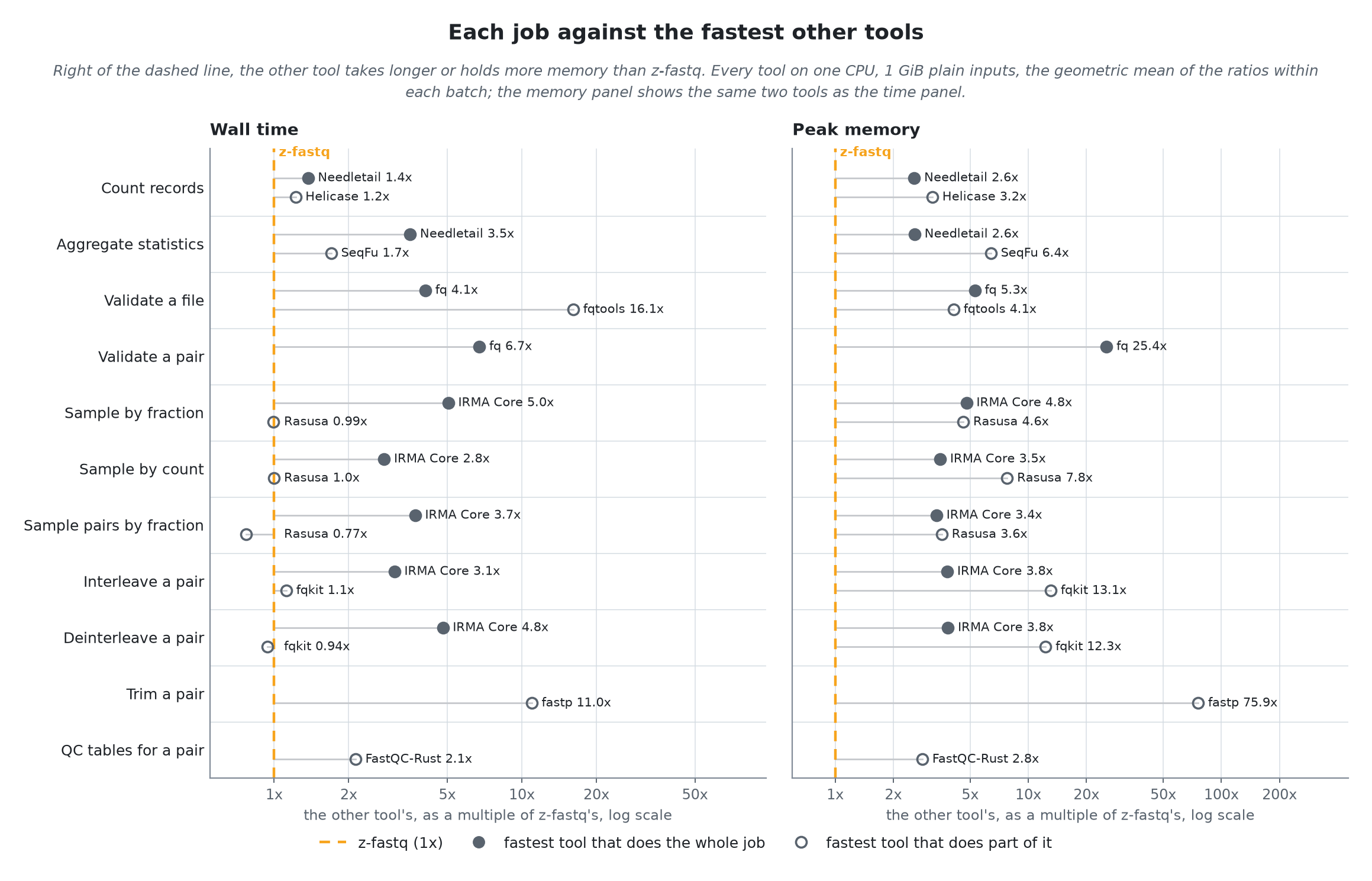
Figure 1. Each job against the fastest other tools, on 1 GiB inputs and one CPU each. Right of the dashed line, the other tool takes longer or holds more memory. Filled marks do the whole job; hollow marks do part of it. The benchmark summary has the table behind it.
A tool counts as complete only when it does everything z-fastq does on that job, checks included; a partial tool skips some of it, such as checking the pair names or writing the reads. The two are drawn apart and never ranked together: a partial tool can be faster because it does less.
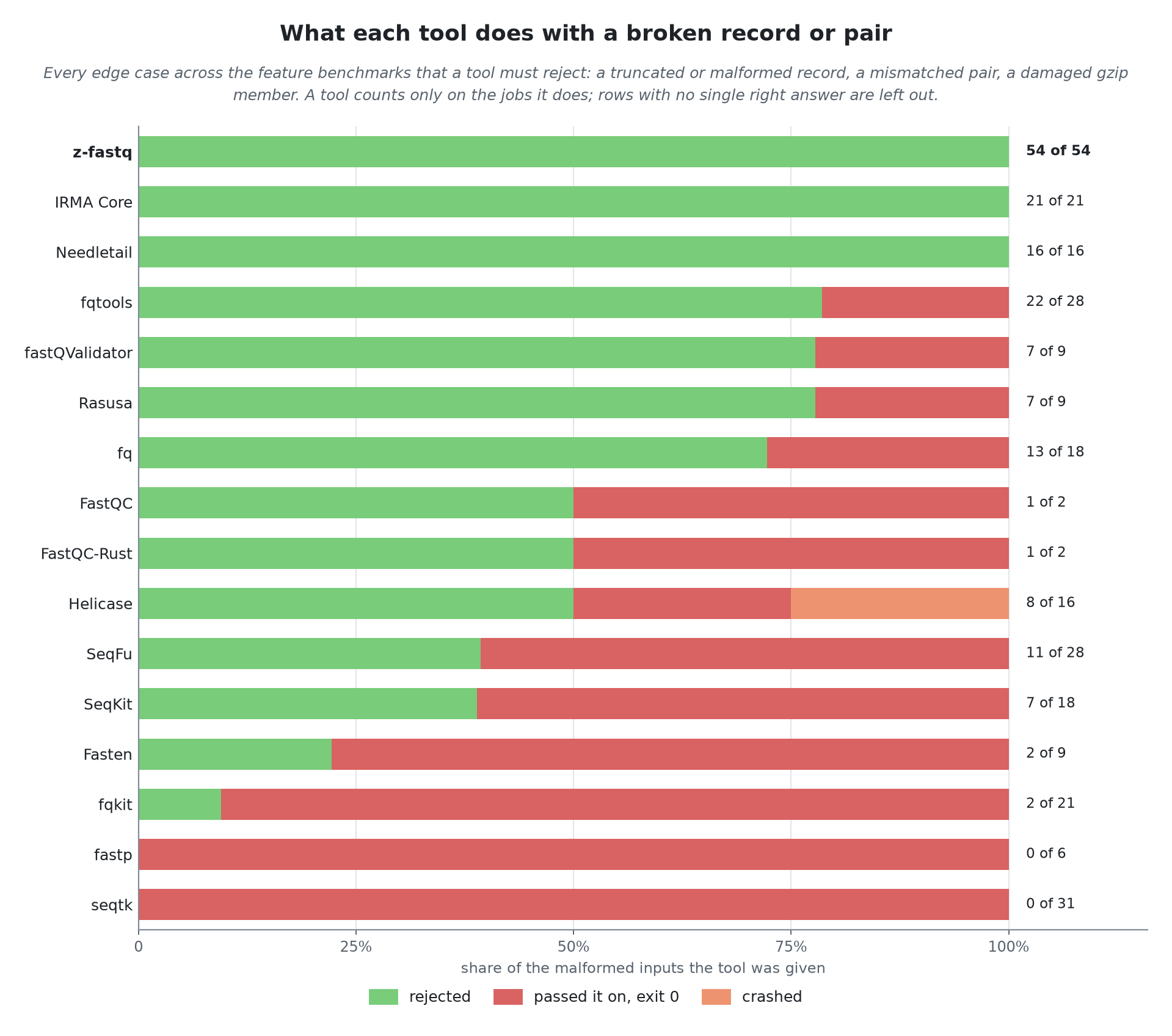
Figure 2. Of the malformed inputs in the edge cases (truncated records, mismatched lengths, a wrong separator line, mates out of step, damaged gzip), how many each tool rejected. A tool counts only on the jobs it does.
Speed is only half of a comparison. A tool that writes output from a truncated record and exits with status 0 leaves a pipeline no way to notice, and the error surfaces later, if at all. z-fastq stops with the record, the byte offset, and the rule it broke (Validation).
z-fastq runs every command on one thread. Some other tools use more, so the benchmarks also run them at 2, 4, 8, and 16 threads on as many physical cores, against z-fastq on one.
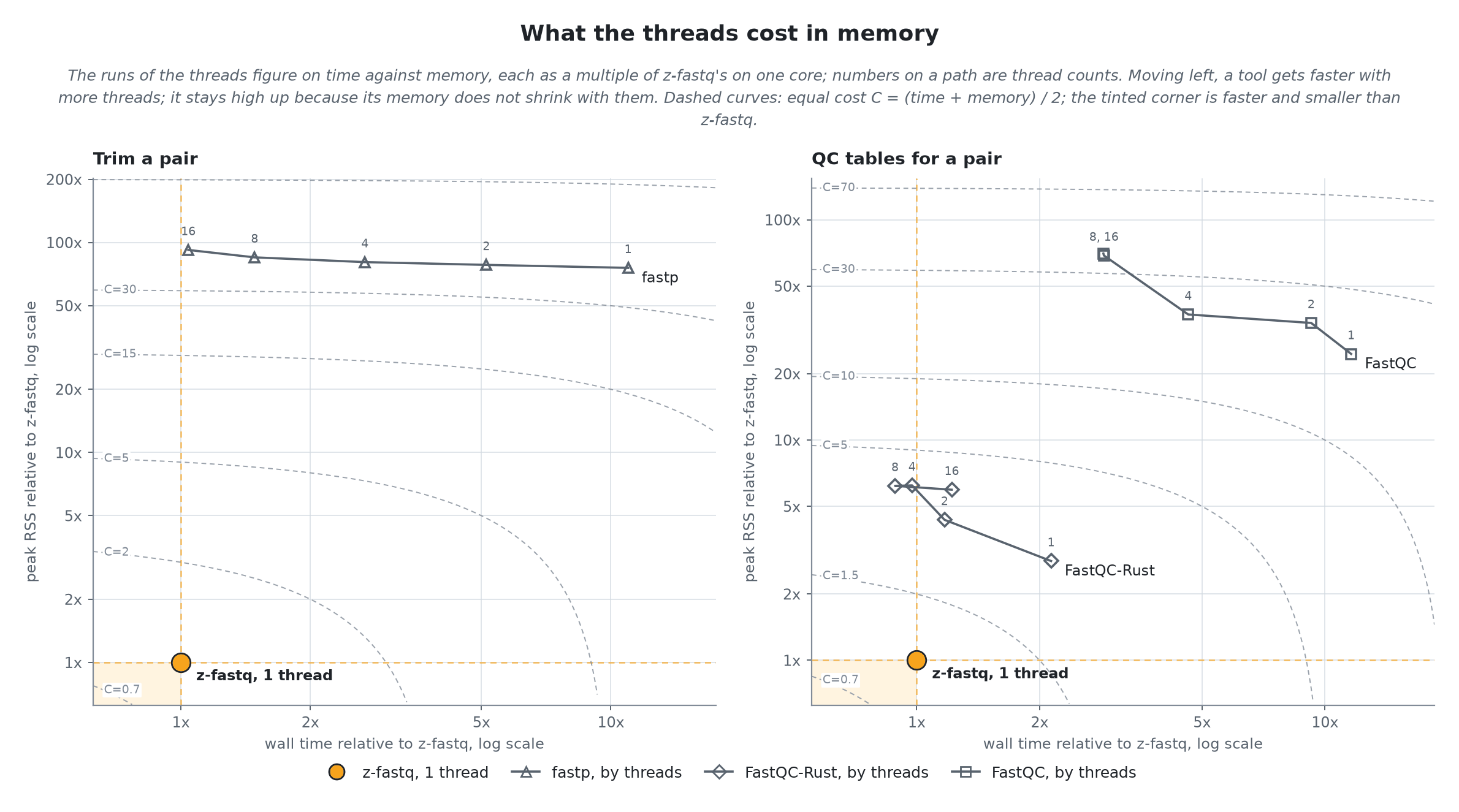
Figure 3. Trimming and QC tables at 1 to 16 threads, on time against memory relative to z-fastq on one core; the numbers on each path are thread counts. Threads move a tool left (faster) but not down: its memory stays many times z-fastq's. The process benchmark has the CPU time at each count.
With enough threads, fastp and FastQC-Rust match z-fastq's wall time, and they pay for it twice: in CPU time, several cores' worth for the same job, and in memory, which threads do not shrink.
One thread and bounded memory make the cost of a run known before it starts: a run of z-fastq on one file needs one core and a few MiB, whatever the file's size. That is what lets a workflow run many files or samples side by side, one per core, instead of a few samples with many threads each, without a run running out of memory halfway.
The trade-off is a single large file on an otherwise idle machine. A tool that spreads one file over 16 cores can finish it sooner than one core can, as Figure 3 shows for the QC tables. z-fastq does not split one file across cores yet.
The summary lists these from the current results; they are worth knowing before choosing:
- Sampling pairs by fraction: Rasusa is faster, as a partial tool that checks less of each record.
- Deinterleaving: fqkit is slightly faster, with many times the memory and fewer checks.
- QC tables with threads: FastQC-Rust passes z-fastq's one core from 4 threads.
- Trimming with many threads: fastp at 16 threads comes close to z-fastq's one core, and passes it on some gzip inputs.
Every command streams, so its memory does not grow with the size of the input: across the benchmarks, from 1 MiB to 1 GiB of FASTQ, z-fastq's peak stays within a few MiB, and moves only with the shape of the reads. The exceptions are documented and deliberate: exact-count sampling keeps a small entry per chosen record, and the pair duplication rate a few bytes per pair (Limits and supported formats).
Each command's benchmark is a script under bench/ in the repository; bench/FEATURE/run.sh release checks every tool and times it, and run.sh summary rebuilds the summary from the reports. The contributor guide covers the tools and data they need.
- Choosing a FASTQ tool: where z-fastq fits, and where another tool fits better.
- Limits and supported formats: memory, line lengths, and what is not supported.
- Validation: the checks behind Figure 2.
- References: the compared tools, their versions, and the data.