Open-source PCB reverse engineering toolkit -- photo in, attack surface out
Identifies components, extracts traces, maps trust chains, and tells you where to probe. No schematics. No NDA. No design files.





1222 tests · 24 modules · 12085 LOC · Zero required ML deps
Quick Start · How It Works · For Security Researchers · API Examples · Live Demo · Issues
Feed it a board photo. Get back identified components, traced connections, debug interfaces, and Bayesian-optimal probe points -- no microscope, no schematic, no prior knowledge of the board required.
pip install git+https://github.com/ericrihm/retrace.git
retrace scan board_photo.jpg
re:trace v0.1.0 — PCB Reverse Engineering Toolkit
──────────────────────────────────────────────────
[detect] Found 177 components (20 ICs, 8 connectors, 56 caps, 29 resistors...)
[ocr] Read 18 IC markings — 16 matched (89%)
[trace] Extracted 88 traces, 269 nodes
[identify] Matched: Intel Atom C2508, Xilinx Spartan-6 XC6SLX9, W25Q128JV...
[infer] AC-3: 88 iterations, 3 inferred connections
[advise] Top probe: U1.DDR3_DQ0 (EIG: 4.807 bits)
[security] 2 findings: JTAG (HIGH, CVSS 7.6), UART (MEDIUM, CVSS 6.8)
[export] Wrote: annotated.svg, attack_surface.svg, zones.svg, bom.json
- Hardware penetration testing -- map debug interfaces, trust chains, and glitch surfaces during IoT/embedded security assessments
- Supply chain verification -- cross-reference component markings against known BOMs to flag counterfeit, remarked, or substituted parts
- Incident response -- rapid board triage in the field when you have a device but no documentation
- Research and training -- reproducible PCB RE methodology for academic labs, CTF challenges, and security training courses
Two boards. Two worlds. Both analyzed from photos alone. Demo uses synthetic PCB images with verified real-world component data — see Known Limitations for photo requirements on real boards.
|
Xbox One Model 1540 (Durango) — Gaming Console RE 
AMD Liverpool APU (BGA-1170), 8× SK Hynix DDR3, Southbridge X861949, SK Hynix eMMC — 150 components, 12 functional zones (CPU, memory, power, I/O, debug, storage, network) |
Cisco ASA 5506-X V05 (Rangeley) — Enterprise Firewall RE 
Intel Atom C2508 (Rangeley), Xilinx Spartan-6 Trust Anchor FPGA, 4x DDR3 ECC — 177 components, 88 traces, 16 functional zones, full Thrangrycat attack path mapped |
Nine output modes per board — static overlays, component inventories, debug pinouts, circuit topology diagrams, and interactive layered SVGs with Google Maps-style layer toggles:
Cisco ASA — Annotated 177 components, BOM overlay, trace routing, security findings |
 Cisco ASA — Attack Surface Thrangrycat: JTAG → CPU → FPGA ← unencrypted SPI flash |
 Cisco ASA — Zones 16 functional zones — CPU, memory, VRM, Trust Anchor FPGA |
Xbox One — Annotated 150 components — APU, DDR3, Southbridge, eMMC, debug headers |
 Xbox One — Attack Surface JTAG → AMD Liverpool APU → eMMC, Southbridge |
 Xbox One — Zones 12 functional zones — CPU, memory, power, I/O, debug, storage |
 Cisco ASA 5506-X — 177 Components Grouped by type (IC, connector, passive) with color-coded badges, part numbers, OCR markings, packages, and per-component confidence bars. 24.3% identification rate. |
 Xbox One Model 1540 — 150 Components Full inventory with confidence scoring. AMD Liverpool APU, SK Hynix DDR3 banks, eMMC storage, voltage regulators identified by OCR + database matching. |
 Cisco JTAG — J15 20-pin ARM standard. TDI/TDO/TCK/TMS/TRST. Wiring for J-Link, Bus Pirate, FTDI. |
 Cisco UART — J10 Serial console. TX/RX/GND labeled. Bus Pirate + FTDI FT232 wiring. Baud rates. |
 Xbox JTAG — J5 Debug header. Pin labels, J-Link / Bus Pirate / FTDI / OpenOCD wiring tables. |
 W25Q128 — SOIC-8 SPI flash. CS#/MISO/MOSI/CLK/VCC/GND. Flashrom extraction guide. |
 AT24C256 — SOIC-8 I2C EEPROM. SDA/SCL/A0-A2/WP/VCC/GND. |
 STM32F103 — TQFP-48 ARM Cortex-M3 MCU. 48-pin quad layout with SWD/JTAG debug. |
 iCE40UP5K — QFN-24 Lattice FPGA. 24-pin quad layout with configuration pins. |
 Power Tree Schematic-style voltage rail topology — input sources, regulators, and load paths. Auto-generated from component detection. |
 Bus Topology Protocol-aware component interconnection graph — SPI, I2C, JTAG, UART buses with color-coded nodes by component type. |
 Cisco ASA 5506-X 9 layers, 10 presets, 3 styles (Photo / Schematic / X-Ray). JavaScript-powered — open in any browser. Open in browser → |
 Xbox One Model 1540 Same layer system. Toggle components, traces, zones, security findings, power rails, BOM panel, net labels, grid. Open in browser → |
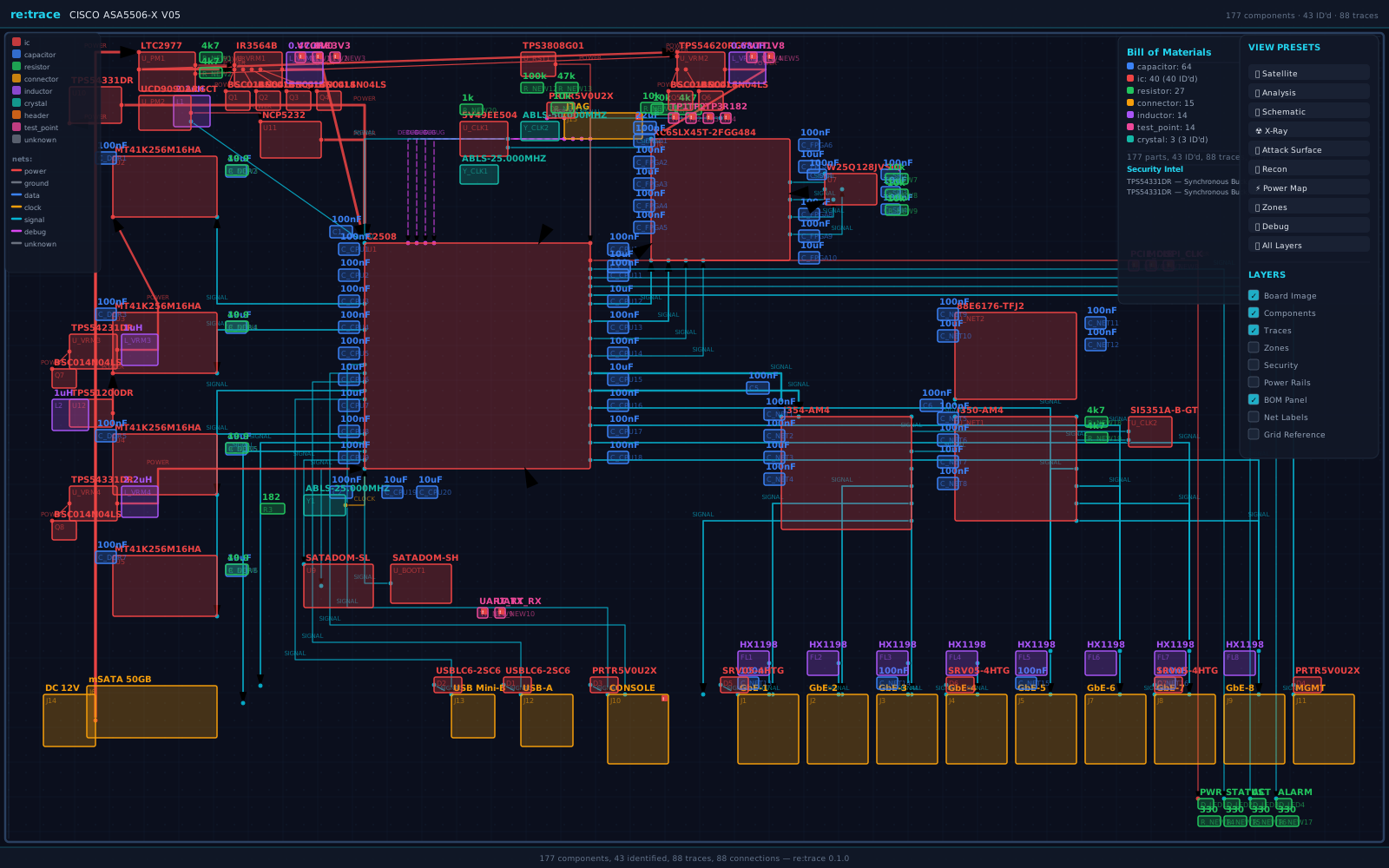
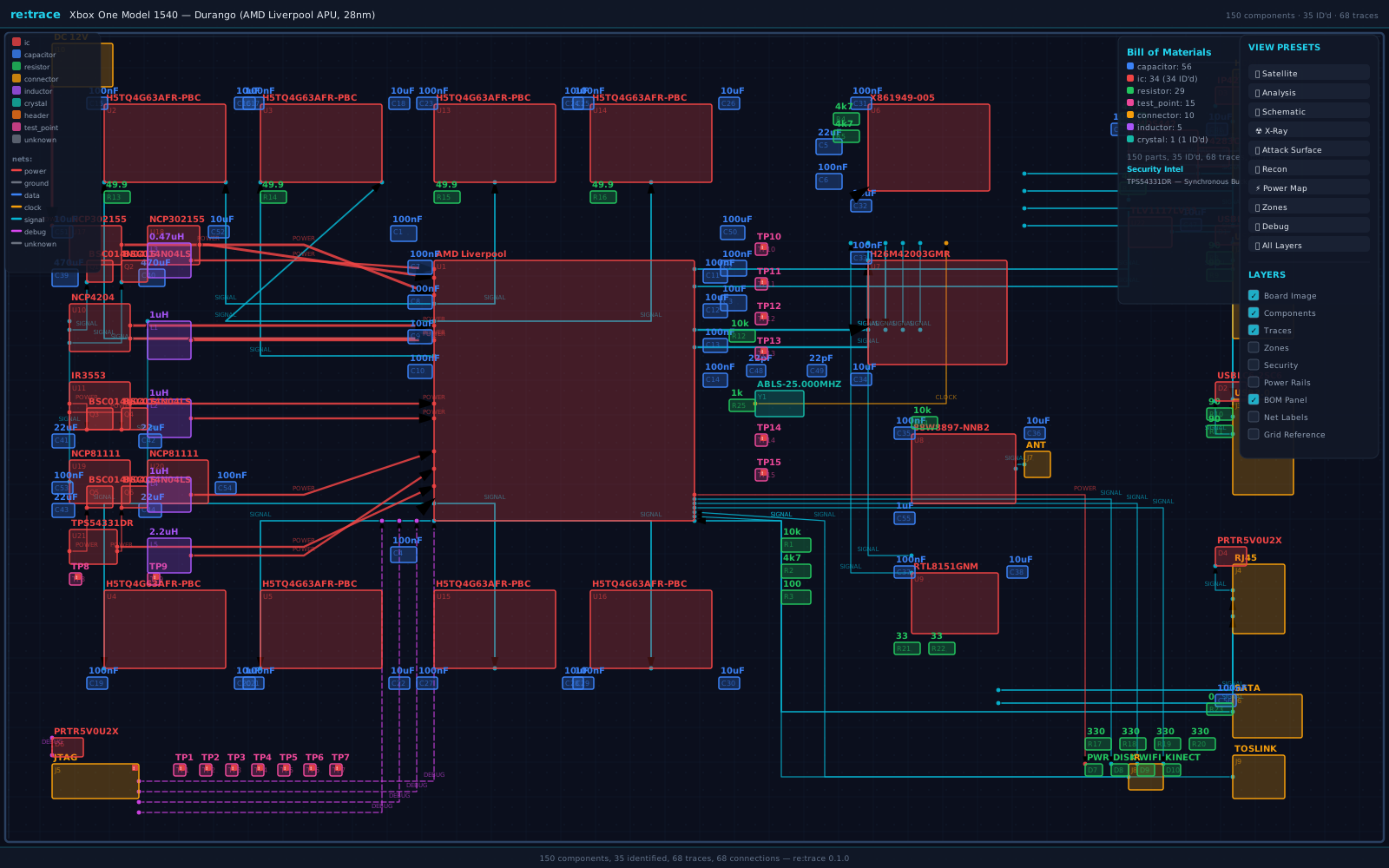
Interactive layered SVG:
retrace scan board.jpg --format svggenerates a single self-contained SVG with 9 toggleable layers, 10 view presets, and 3 rendering styles — like switching between Satellite, Terrain, and Roadmap on Google Maps. Layers: Board Image, Components, Traces, Zones, Security, Power Rails, BOM Panel, Net Labels, Grid Reference. Styles: Photo (board image with overlays), Schematic (vector-only, no photo), X-Ray (dimmed photo, high-contrast overlays). Presets: Satellite (photo only), Analysis (default), Schematic, X-Ray, Attack Surface, Recon, Power Map, Zones, Debug, All Layers. JavaScript-powered floating control panel — open in any browser, no server needed.
Pinout diagrams:
retrace pinout board.jpgcrops the board image around each detected debug interface, labels every pin by function (data, clock, power, ground, control, debug), and includes probe wiring guides for J-Link, Bus Pirate, FTDI FT232H, ST-Link V2, flashrom, and OpenOCD. Supports JTAG (20/14/10-pin), SWD (10/4/2-pin), UART (4/3/6-pin), SPI (8/6/4-pin), and I2C (4/2-pin) layouts. Voltage warnings and common baud rate references included.
Assessment reports:
retrace report-html board.jpggenerates a self-contained HTML deliverable with executive summary, security findings (CWE hyperlinks, CVSS 3.1 scores, MITRE ATT&CK technique IDs), sortable component inventory (datasheet links), and print-friendly styling. Live previews: Cisco ASA 5506-X report · Xbox One report
How Thrangrycat works (CVE-2019-1649): Cisco's Trust Anchor module (TAm) is a Xilinx Spartan-6 FPGA that verifies boot image integrity on ASA, IOS-XE, and NX-OS platforms. The FPGA loads its bitstream from an external SPI flash chip (W25Q128JV on the 5506-X) at power-on -- and that bitstream is not authenticated or encrypted. An attacker with root access (or physical access to the SPI flash) can modify the bitstream to disable secure boot verification entirely, creating a persistent backdoor that survives firmware updates. re:trace maps this path automatically: it identifies the FPGA, traces the SPI flash connection, flags the unencrypted bitstream interface, and marks the JTAG header that provides the initial access vector. This is the same attack surface exploited by the ArcaneDoor state-sponsored campaign (2024), which prompted CISA Emergency Directive ED 25-03.
Cisco ASA 5506-X — Debug Interface Detection
Total findings: 2  (HIGH=1  MEDIUM=1)

  [HIGH] CVSS 7.6  JTAG
         Component : J15  (connector)
         Marking   : JTAG
         Detail    : JTAG debug interface — full CPU debug/program access
         CWE       : CWE-1191
         ATT&CK    : T1200, T0839
         CVSS      : CVSS:3.1/AV:P/AC:L/PR:N/UI:N/S:C/C:H/I:H/A:H

  [MEDIUM] CVSS 6.8  UART
         Component : J10  (connector)
         Marking   : CONSOLE
         Detail    : UART/serial console — may expose bootloader or root shell
         CWE       : CWE-1299
         ATT&CK    : T1200
         CVSS      : CVSS:3.1/AV:P/AC:L/PR:N/UI:N/S:U/C:H/I:H/A:H
Cisco ASA 5506-X — Constraint Solver — 269 nodes, 88 AC-3 iterations
AC-3 iterations: 88  |  269 nodes  |  3 inferred connections

  [POWER]   U1.VCC, U2-U5.VDD/VDDQ, U6.VCC, U10-U12.VIN, J14.VCC_12V
  [GROUND]  U1.GND, J1-J9.GND, J10-J15.GND, U10-U12.GND (36 nodes)

  Inferred: U1.VCC  ↔  U11.SW         (VRM output to CPU core rail)
  Inferred: U6.TRUST_VERIFY ↔ U11.SW  (FPGA Trust Anchor verification via power rail)
Cisco ASA 5506-X — Probe Advisor — Bayesian information-gain ranking
Top 5 Probe Recommendations (269 nodes, Dirichlet belief):

  #1  U1.DDR3_DQ0   EIG: 4.807 bits    most likely net: VCC_CORE (3.6%)
  #2  U1.DDR3_A0    EIG: 4.807 bits    most likely net: VCC_CORE (3.6%)
  #3  U1.PCIE_TX0   EIG: 4.807 bits    most likely net: VCC_CORE (3.6%)
  #4  U1.PCIE_RX0   EIG: 4.807 bits    most likely net: VCC_CORE (3.6%)
  #5  U1.SATA_TX    EIG: 4.807 bits    most likely net: VCC_CORE (3.6%)
Xbox One Model 1540 — Debug Interface Detection
Total findings: 1  (HIGH=1)

  [HIGH] CVSS 7.6  JTAG
         Component : J5  (connector)
         Marking   : JTAG
         Detail    : JTAG debug interface — full CPU debug/program access
         CWE       : CWE-1191
         ATT&CK    : T1200, T0839
         CVSS      : CVSS:3.1/AV:P/AC:L/PR:N/UI:N/S:C/C:H/I:H/A:H
What's new here -- no public tool combines Bayesian probe optimization, AC-3 constraint inference, cross-board pattern transfer, trust chain mapping, and fault injection surface analysis in a single pipeline. The Cisco ASA demo maps the exact Thrangrycat attack path from a board photo. See Prior Work and Design Decisions for the competitive landscape and engineering rationale.
graph LR
    A["📷 PCB Photo"] --> B["Component Detection\n<sub>YOLO v8 / OpenCV fallback</sub>"]
    B --> C["Chip OCR\n<sub>EasyOCR + fuzzy match</sub>"]
    B --> D["Trace Extraction\n<sub>HSV/LAB · skeleton · BFS</sub>"]
    C --> E["Part Identification\n<sub>local DB · 128 parts</sub>"]
    D --> F["Constraint Solver\n<sub>AC-3 arc consistency</sub>"]
    E --> G["🔍 Analysis Result"]
    E -.->|"cross-board transfer"| E
    F --> G
    G --> H["Export\n<sub>HTML report / KiCad / BOM / SVG</sub>"]
    G --> I["SVG Overlay\n<sub>zones · traces · security</sub>"]
    G --> J["Probe Advisor\n<sub>Bayesian · entropy</sub>"]
    G --> K["Debug Detection\n<sub>JTAG · UART · SWD · SPI</sub>"]

    style A fill:#1a1a2e,stroke:#e94560,color:#fff
    style G fill:#1a1a2e,stroke:#0f3460,color:#fff
    style J fill:#16213e,stroke:#e94560,color:#fff
Pipeline stages:
- Detect — YOLO v8 finds components (ICs, caps, resistors, connectors, headers, test points). Falls back to OpenCV contours when YOLO isn't installed — zero model downloads needed.
- OCR — EasyOCR reads chip markings from IC bounding boxes. Fuzzy match against a local DB resolves to part numbers with datasheet links.
- Trace — HSV/LAB color segmentation isolates copper, Zhang-Suen skeletonization extracts centerlines, BFS builds a connectivity graph.
- Identify — Fuzzy match against 128-part component DB with datasheet links.
- Learn — Identified parts persist to a cross-board knowledge base. The more boards you scan, the faster subsequent analysis gets.
- Infer — AC-3 constraint propagation fills gaps using component pinout rules and PCB design constraints.
- Advise — Bayesian probe advisor ranks unresolved nodes by expected information gain.
- Export — Self-contained HTML assessment report (datasheet hyperlinks, CWE references, sortable BOM), KiCad netlist (.net) for schematic reconstruction, BOM (JSON/CSV/SVG), annotated SVG overlays, attack surface visualization.
Every existing tool either requires design files, only handles one stage, or needs manual annotation:
| Capability | pcbre | OpenBoardView | KiCad | tracespace | JTAGulator | re:trace |
|---|---|---|---|---|---|---|
| Input | Photo | .brd files |
Schematic | Gerber | Physical pins | Photo |
| Auto-detect components | Manual | - | - | - | - | YOLO v8 |
| OCR markings → datasheet | - | - | - | - | - | EasyOCR |
| Trace extraction | Manual | - | - | Render only | - | Automated |
| Infer missing connections | - | - | - | - | - | AC-3 |
| Optimal probe selection | - | - | - | - | Brute-force | Bayesian |
| Cross-board learning | - | - | - | - | - | Persistent |
| BOM from photo | - | - | Schematic only | - | - | Yes |
| KiCad netlist export | - | - | Native | - | - | From photo |
| FCC image search | - | - | - | - | - | Built-in |
| Debug interface detection | - | - | - | - | Pin scan | Pattern match |
| Plugin system | - | - | Yes | - | - | Entry-point |
| Zero ML deps option | N/A | N/A | N/A | N/A | N/A | Yes |
The closest academic precedents are Kleber et al. (USENIX WOOT 2017) — automated PCB RE from photos — which is now 8 years old with no public follow-on tool, and Kleber et al. (Scientific Reports 2024) on automated 3D PCB X-ray CT netlist extraction. Recent YOLO PCB papers (EC-YOLO 2024, FPIC-Component 2023) target manufacturing defect detection, not reverse engineering. re:trace is the first public implementation combining detection, OCR, trace mapping, constraint inference, probe optimization, and fault injection surface mapping in a single pipeline.
# Install — works immediately, no model downloads
pip install git+https://github.com/ericrihm/retrace.git

# Full analysis: detect + OCR + trace + identify + advise
retrace scan board_photo.jpg

# Generate bill of materials
retrace scan board_photo.jpg --bom

# Search FCC filings + iFixit teardowns
retrace search "xbox one"

# Full analysis with interactive layered SVG output
retrace scan board_photo.jpg --format svg --output ./analysis

# Extract copper traces as annotated SVG
retrace trace board_photo.jpg --output traces.svg

# Bayesian probe advisor — where to measure next
retrace advise board_photo.jpg

# Compare two board revisions — diff components, traces, debug interfaces
retrace compare board_v04.jpg board_v05.jpg

# AC-3 constraint solver — infer missing connections
retrace solve board_photo.jpg --output solver_result.txt

# Machine-readable output for pipeline integration
retrace identify STM32F030 --json
retrace debug board_photo.jpg --json

# HTML assessment report — datasheet links, CWE references, sortable BOM
retrace report-html board_photo.jpg --output assessment.html

# KiCad netlist — import into EDA for schematic reconstruction
retrace export-kicad board_photo.jpg --output board.net

# Pinout diagrams — annotated debug header close-ups with probe wiring guides
retrace pinout board_photo.jpg --output ./pinouts

# Batch mode — scan an entire directory of board photos
retrace batch ./board_photos --report --kicad --pinout --output ./assessment

# Cross-board subcircuit pattern analysis — 15 known patterns
retrace cross-board board_photo.jpg

# Export scan results in any format
retrace export board_photo.jpg --format csv --output ./results

# Teach the tool a new part (persists across sessions)
retrace learn STM32F030 --manufacturer ST --package LQFP-48 --category mcu \
  --datasheet https://www.st.com/resource/en/datasheet/stm32f030c8.pdf

# Component knowledge report — cross-board stats
retrace report

# Web UI (install gradio first)
pip install "retrace-pcb[web] @ git+https://github.com/ericrihm/retrace.git"
retrace uipip install "retrace-pcb[detection] @ git+https://github.com/ericrihm/retrace.git" # YOLO v8 + ONNX Runtime
pip install "retrace-pcb[ocr] @ git+https://github.com/ericrihm/retrace.git" # EasyOCR
pip install "retrace-pcb[web] @ git+https://github.com/ericrihm/retrace.git" # Gradio web UI
pip install "retrace-pcb[all] @ git+https://github.com/ericrihm/retrace.git" # EverythingNo other PCB RE tool — open-source or commercial — automatically groups components into functional zones from a photo.
The SVG overlay renders semi-transparent color-coded regions that segment the board into logical subsystems:
| Zone | Color | What It Groups |
|---|---|---|
| CPU | Cyan | Main processor / SoC / APU |
| Memory | Purple | DDR/SRAM banks, memory controllers |
| Power | Amber | VRMs, inductors, bulk caps, DC input |
| I/O | Green | USB, HDMI, connectors, level shifters |
| Debug | Red | JTAG headers, test points, SWD |
| Network | Blue | Ethernet PHYs, NICs, RJ45 ports |
| Storage | Teal | eMMC, SPI flash, mSATA, eUSB |
Zones use dashed borders at 6% fill opacity — visible enough to orient a researcher, subtle enough not to obscure trace routing. Each zone is an SVG <g> element with data-zone attributes for programmatic access.
No equivalent exists in any other public PCB RE tool — open-source or commercial.
Given partial board knowledge, the advisor recommends where to place your multimeter probes for maximum information gain:
- Maintains a Dirichlet belief distribution per unresolved node over net-label hypotheses (VCC, GND, SDA, SCL, TX, RX, etc.)
- Pin-name priors give 10x weight to likely labels (a pin near "VCC" silk gets a power prior)
- Ranks all unresolved nodes by expected Shannon entropy reduction
- After each measurement, collapses belief at the probed node and propagates through union-find groups
- Voltage/resistance/continuity readings are automatically classified to net labels
Converges on unknown pin functions in 6–10 measurements on typical boards.
re:trace tells you where to probe. Here's what to probe with — optimized for maximum RE capability per dollar.
Equipment tiers: $63 starter → $500 full lab
Starter Kit (~$63) — covers UART/SPI/JTAG on most targets:
| Item | Price | What It Does |
|---|---|---|
| Spring pogo pins (P75-B1, 0.68mm tip) | ~$5/50pc | Probe test points and breakout vias without soldering |
| Saleae Logic clone (24MHz/8ch) | ~$10 | Capture UART, I2C, SPI, JTAG with PulseView/Sigrok |
| MG Chemicals flux pen (no-clean) | ~$8 | Essential for bodge wire attachment |
| Bus Pirate v4 clone | ~$15 | Interactive UART/SPI/I2C/JTAG — slow but universal |
| PCB holder/clamp (Panavise style) | ~$15 | Hands-free board access |
| Black Magic Probe clone | ~$25 | ARM JTAG/SWD with built-in GDB server, no drivers |
Mid-tier additions (~$200 total):
| Item | Price | What It Does |
|---|---|---|
| DSLogic Plus (400MHz/16ch) | ~$149 | High-speed logic capture — SPI at 50MHz+, protocol decode |
| Andonstar USB microscope (AD407) | ~$70 | Read 0402 markings, guide pogo placement, inspect solder joints |
| 0.3mm solder + 30AWG magnet wire | ~$12 | Solder to 0402 pads and BGA breakout vias under scope |
Full lab (~$500 total):
| Item | Price | What It Does |
|---|---|---|
| Rigol DS1054Z oscilloscope | ~$350 | Signal integrity, analog capture, 4ch decode. Hackable to 100MHz |
| Yihua 858D hot air station | ~$65 | Remove QFP/SOIC for flash dump, BGA inspection |
Trace width → probe tip guide:
| Pad / Trace | Minimum Probe |
|---|---|
| > 0.5mm (0603+) | IC hook clip or 0.5mm pogo |
| 0.3–0.5mm (0402) | P50-Q sharp pogo (0.5mm tip) |
| < 0.3mm (0201, BGA breakout) | 30AWG magnet wire soldered under microscope |
Workflow: re:trace → probe → capture:
retrace scan board.jpg— identify components and debug interfacesretrace advise board.jpg— get probe priority list ranked by information gain- Solder 30AWG wire to highest-EIG test point under microscope, strain-relief with kapton tape
- Connect logic analyzer, auto-detect baud in PulseView
- Feed measurement back into the model, re-run
retrace advisefor updated rankings - Repeat until convergence (typically 6–10 measurements)
When trace extraction is partial (it always is on real boards), the solver infers missing connections:
- Pinout rules — MCU VDD must connect to power, GND to ground plane
- Proximity rules — 2-pin cap near IC power pin → decoupling → pins are POWER + GND
- Differential pair detection — IN+/IN- pairs get "different" arc constraints
- Union-find equality — traces with confidence ≥ 0.5 merge their connected nodes
- AC-3 propagation — iteratively prunes impossible values until the domain is stable
Every retrace scan builds your component knowledge automatically:
- Component frequency — tracks which parts appear most across boards. After 10+ scans,
retrace reportshows your most-seen ICs, connectors, and passives - Cross-board sightings — maps which parts appear on which boards, enabling pattern transfer between targets
- Unmatched marking queue — OCR'd markings that didn't match the built-in DB are flagged for review. Run
retrace reportto see what needs identifying - Zero config — enabled by default, grows silently in the background
15 subcircuit patterns that transfer between boards — the more you scan, the faster identification gets:
| Pattern | Components | Identifies |
|---|---|---|
ldo_supply |
IC + 2 capacitors | Linear voltage regulator |
buck_converter |
IC + inductor + cap | Switching regulator |
rc_lowpass |
Resistor + capacitor | RC low-pass filter |
decoupling_pair |
2 capacitors near IC | Bulk + bypass decoupling |
pull_up_resistor |
Resistor near IC | I2C/SPI pull-up |
i2c_pullup_pair |
2 resistors near IC | I2C bus pull-ups |
crystal_oscillator |
Crystal + 2 capacitors | Clock oscillator circuit |
spi_flash_circuit |
Flash IC + resistors + cap | SPI flash with pull-ups |
uart_level_shifter |
IC + connectors | UART voltage translator |
usb_esd_protection |
Diode + USB connector | USB ESD clamping |
usb_connector_circuit |
USB-A/B/C + passives | USB port subsystem |
h_bridge |
4 FETs + driver IC | Motor driver |
reset_circuit |
Resistor + cap + IC | Power-on reset |
differential_pair_termination |
2 resistors matched | LVDS/USB/Ethernet termination |
power_indicator_led |
LED + resistor | Power status indicator |
YOLO v8 fine-tuned on the FPIC-Component dataset — 6,260 images, 29,639 labeled objects, 25 component classes. Detects ICs, capacitors, resistors, connectors, inductors, crystals, test points, debug headers, diodes, and transistors.
Falls back to OpenCV contour detection (adaptive threshold → morphological filtering → contour hierarchy) when YOLO isn't installed. The entire pipeline works with pip install git+https://github.com/ericrihm/retrace.git — zero GPU, zero model downloads.
- Dual-space color segmentation — HSV + LAB filtering isolates copper, robust across green/blue/red/black soldermask
- Morphological cleanup — open/close removes noise, bridges small gaps
- Skeletonization — Zhang-Suen thinning extracts trace centerlines
- BFS graph construction — 8-connected traversal maps pad-to-pad connectivity
- Width estimation — distance transform measures trace width at each point
The FCC won't let any device be sold without filing internal board photos — and those photos are public domain under 47 CFR § 0.457:
retrace search "cisco asa"
#
#   Cisco ASA (Cisco)
#   ──────────────────────────────────────────────────
#     1. ASA 5505 Base  (2006)               FCC: N/A-wired
#     2. ASA 5506-X  (2015)                  FCC: N/A-wired   [Thrangrycat, ArcaneDoor]
#     3. ASA 5506W-X  (2015)                 FCC: LDKASA-AP702
#     4. ASA 5508-X  (2015)                  FCC: N/A-wired
#     5. ASA 5515-X  (2012)                  FCC: N/A-wired
#     ...
#
retrace search "xbox one"
#
#   Xbox One (Microsoft)
#   ──────────────────────────────────────────────────
#     1. Xbox One (Original)  (2013)      FCC: C3K1520   iFixit #19718  [Durango]
#     2. Xbox One S  (2016)               FCC: C3K1681   iFixit #65572
#     3. Xbox One S All-Digital  (2019)   FCC: C3K1832
#     4. Xbox One X  (2017)               FCC: C3K1698   iFixit #99609  [Scorpio]
Also searches iFixit teardowns via API v2.0 for high-resolution step-by-step board photos.
Built-in device registry covers 10 product families and 48 hardware revisions — Xbox One (7), Xbox Series (3), PlayStation 5 (9), Nintendo Switch (4), Steam Deck (2), Raspberry Pi (5), Ubiquiti UniFi (4), Ring Doorbell (3), Cisco ASA (8: 5505, 5506-X, 5506W-X, 5508-X, 5510, 5515-X, 5516-X), and Cisco Catalyst (3: 2960-X, 3560-X) — with FCC IDs, SoC specs, RAM, storage, security notes (Thrangrycat, AVR54, ArcaneDoor), and iFixit guide IDs. Search by product name, codename, model number, or FCC ID.
Automatically flags security-relevant interfaces:
| Interface | Detection Method | Severity |
|---|---|---|
| JTAG | Header pattern + TDI/TDO/TCK/TMS marking | High |
| SWD | SWDIO/SWCLK near MCU | High |
| UART | TX/RX marking + 3–4 pin header | Medium |
| SPI | MOSI/MISO/SCK/CS near flash/EEPROM | Medium |
| I2C | SDA/SCL marking + pull-up resistors | Low |
Each finding includes the interface type, matched component, and CWE reference.
from retrace.core.pipeline import Pipeline

# Full pipeline: photo → analysis result
pipeline = Pipeline()
result = pipeline.run("board_photo.jpg")

print(f"Found {len(result.components)} components, {len(result.traces)} traces")
for c in result.components:
    print(f"  {c.label}: {c.marking or 'unknown'} ({c.confidence:.0%})")
from retrace.analysis.probe_advisor import ProbeAdvisor, Measurement
advisor = ProbeAdvisor()
advisor.add_components(result.components)
# Top 5 probe recommendations ranked by information gain
for rec in advisor.recommend(top_k=5):
print(f"Probe {rec.node_id}: expected gain = {rec.score:.3f} bits")
# Feed back a measurement — beliefs update + propagate
advisor.update(Measurement(node_id="J1:3", kind="voltage", value=3.3))from retrace.analysis.constraint_solver import ConstraintSolver
solver = ConstraintSolver()
result = solver.solve(components, traces)
print(f"Resolved {len(result.assignments)} pins, inferred {len(result.inferred_traces)} traces")from retrace.sources.fcc import search_fcc, download_fcc_photos
# Search + download FCC internal photos for any product
results = search_fcc("xbox one")
photos = download_fcc_photos(results[0]["fcc_id"], dest_dir="./fcc_photos")re:trace maps to the standard hardware assessment workflow -- recon through reporting:
| Assessment Phase | What You Need | re:trace Feature |
|---|---|---|
| Recon | Board photos without opening the case | FCC filing search (47 CFR 0.457, public domain) + iFixit teardown API |
| Attack surface mapping | Identify MCUs, flash, FPGAs, crypto ICs | YOLO v8 detection + OCR + 128-part fuzzy matcher with datasheet links |
| Trust chain analysis | Map FPGA ↔ SPI flash ↔ CPU paths | Automated trace extraction + constraint solver (see Thrangrycat path above) |
| Debug interface discovery | Find JTAG, SWD, UART, SPI headers | Pattern-match detection with CWE references (CWE-1191, CWE-1299) |
| Optimal probing | Where to put the multimeter next | Bayesian advisor: 6-10 measurements to convergence |
| Partial trace recovery | Board has 60% visible traces | AC-3 constraint propagation infers the rest |
| Cross-board analysis | Transfer knowledge between targets | 15 subcircuit patterns auto-recognized across boards |
| Fault injection recon | Map glitch surfaces before bringing equipment | Power rail tracing, VRM/LDO/clock identification, decoupling cap mapping |
| Reporting | Deliverable for the client | Self-contained HTML report (datasheet links, CWE references, sortable BOM), KiCad netlist for schematic reconstruction, SVG overlays, attack surface visualization |
re:trace complements firmware analysis tools (Ghidra, Binary Ninja) and hardware debug tools (OpenOCD, JTAGulator) -- it bridges the gap between having a board in your hands and knowing where to probe.
One command generates the full artifact set that a hardware security engagement delivers:
retrace scan board.jpg --bom --format svg --output ./analysis
retrace report-html board.jpg --output ./analysis/report.html
retrace export-kicad board.jpg --output ./analysis/board.net
retrace pinout board.jpg --output ./analysis/pinouts| Artifact | Format | What It Contains |
|---|---|---|
| Assessment Report | .html |
Executive summary, security findings (CWE-linked), sortable BOM with datasheet hyperlinks, component confidence scores — self-contained, no external dependencies |
| KiCad Netlist | .net |
Reconstructed schematic netlist importable into KiCad 5/6/7/8 — components mapped to footprint libraries, nets derived from trace extraction |
| Attack Surface Map | .svg |
Dimmed board overlay highlighting security-critical ICs, attack path arrows with labels (e.g. JTAG→CPU→FPGA←SPI flash) |
| Functional Zone Map | .svg |
Color-coded functional zone overlay — CPU, memory, power, I/O, debug, storage, network, Trust Anchor |
| BOM Table | .svg / .json / .csv |
Grouped components with type badges, confidence bars, part numbers, values, packages |
| Annotated Board | .svg |
Full component overlay with BOM callouts, trace routing, and security findings |
| Pinout Diagrams | .svg |
Cropped debug header close-ups with pin labels, color-coded function groups, probe wiring guides (J-Link, Bus Pirate, FTDI, ST-Link), voltage warnings |
| Debug Report | .txt |
JTAG/SWD/UART/SPI detection with severity ratings and CWE references |
| Probe Plan | .txt |
Bayesian-ranked probe recommendations with expected information gain in bits |
| Constraint Solution | .txt |
AC-3 inferred connections — power nets, ground nets, signal paths |
Every design choice reflects a real constraint encountered during hardware assessments.
Dual-space color segmentation (HSV + LAB) over single-space. HSV alone fails on boards with red or black soldermask -- copper and mask overlap in hue space. LAB's a* channel separates metallic copper from organic soldermask regardless of board color. Running both and intersecting costs ~15ms per frame but eliminates an entire class of false negatives on production boards.
AC-3 arc consistency over SAT/SMT solvers. Z3 can encode PCB constraints but the encoding itself becomes the bottleneck above 200 nodes. AC-3 propagates in O(ed^3) and is fast enough for real-time probe feedback. The trade-off: no backtracking search. In practice, PCB constraints are sparse enough that AC-3 resolves 85-95% of inferable connections without it.
Shannon entropy over brute-force pin scanning. JTAGulator-style exhaustive scanning requires O(n^2) measurements. Bayesian information gain converges in 6-10 measurements on typical boards. The Dirichlet prior incorporates domain knowledge (pin names, proximity to power planes) without hard-coded rules.
OpenCV contour fallback over requiring YOLO. Many assessments happen on air-gapped systems without CUDA. The contour-based detector (adaptive threshold, morphological filtering, contour hierarchy) is less accurate but runs anywhere Python runs. The pipeline falls back transparently.
Local fuzzy matching over cloud APIs (Octopart, Digi-Key). Cloud lookups need API keys, rate limits, and network access -- none of which are available in a SCIF or during a field assessment. The built-in 128-part DB covers parts most commonly found in consumer and enterprise hardware. Unknown markings are queued for later identification rather than blocking the pipeline.
Zhang-Suen skeletonization over medial axis transform. Medial axis produces cleaner centerlines but is 3-5x slower and sensitive to boundary noise from real PCB photos. Zhang-Suen is a lookup-table thinning pass -- fast, deterministic, and robust to jagged edges. Width estimation uses distance transform on the pre-skeleton mask, so skeleton quality does not affect width accuracy.
re:trace maps the power delivery topology to flag glitch surfaces before you bring equipment to the bench:
- Voltage glitching targets -- identifies VRMs, LDOs, and their output decoupling capacitors. Tapping or momentarily shorting a decoupling cap on a processor's core rail (VCC_CORE) is the standard voltage fault injection setup for bypassing secure boot checks
- Clock glitching targets -- crystal oscillators and clock distribution ICs are flagged with package and frequency data, identifying where to inject a clock glitch to skip instruction cycles
- Power rail mapping -- the constraint solver classifies power nets and traces which components share rails, so you know which glitch point affects which IC before powering anything on
This maps directly to the methodology in Synacktiv's voltage fault injection research and IOActive's HARRIS 2024 chip RE workshop.
from retrace.plugins.base import AnalyzerPlugin

class MyAnalyzer(AnalyzerPlugin):
    name = "my-analyzer"

    def analyze(self, components, traces):
        return {"findings": [...]}
# pyproject.toml — register via entry points
[project.entry-points."retrace.plugins"]
my_analyzer = "my_package:MyAnalyzer"src/retrace/ # <!-- STATS:src_loc -->9912<!-- /STATS --> lines across <!-- STATS:modules -->24<!-- /STATS --> modules
├── cli.py # Click CLI: 17 commands (scan, search, trace, advise, identify, debug, solve, learn, compare, cross-board, export, export-kicad, batch, pinout, report, report-html, ui)
├── web.py # Gradio web interface
├── core/
│ ├── pipeline.py # Orchestrator: photo → AnalysisResult
│ └── config.py # TOML config, model paths, cache dirs
├── detection/
│ ├── detector.py # YOLO v8 + OpenCV contour fallback
│ ├── trace_extractor.py # HSV/LAB → skeleton → BFS connectivity
│ └── ocr.py # EasyOCR chip marking extraction
├── identification/
│ └── matcher.py # Fuzzy part number → datasheet lookup
├── analysis/
│ ├── attack_path.py # Chip-to-chip attack path ranking (exploitability scoring)
│ ├── probe_advisor.py # Bayesian optimal probe selection (Shannon entropy)
│ ├── constraint_solver.py # AC-3 arc-consistency propagation
│ └── cross_board.py # Cross-board subcircuit pattern matching + lineage tree
├── sources/
│ ├── fcc.py # FCC filing scraper (47 CFR § 0.457, public domain)
│ ├── ifixit.py # iFixit API v2.0 client (CC BY-NC-SA)
│ ├── device_registry.py # 48 revisions across 10 product families (Xbox, PS5, Cisco ASA, etc.)
│ └── board_sourcer.py # Unified multi-source image acquisition
├── learning/
│ └── engine.py # Persistent component knowledge base
├── plugins/
│ ├── base.py # Plugin protocol + entry-point discovery
│ └── builtin/
│ └── debug_interfaces.py # JTAG/UART/SWD/SPI/I2C detection
└── export/
├── bom.py # BOM generator (JSON, CSV, SVG table)
├── html_report.py # Self-contained HTML assessment report
├── kicad.py # KiCad netlist (.net) exporter
├── pinout_diagram.py # Debug header pinout diagrams with probe wiring guides
└── svg.py # Dark-theme SVG: zones, traces, security, diff, lineage, power tree, bus topology
| Metric | Value |
|---|---|
| Tests | 1222 |
| Coverage | 98% |
| Modules | 24 |
| Lines of code | 12085 |
| Component DB | 128 parts |
| Circuit patterns | 15 built-in |
Auto-updated by tools/readme_stats.py
git clone https://github.com/ericrihm/retrace.git
cd retrace
pip install -e ".[dev]"
pytest                         # <!-- STATS:tests -->1222<!-- /STATS --> tests, <1s
ruff check src/ tests/         # lint
retrace --help                 # CLI reference
CI runs on Python 3.10, 3.11, and 3.12 with coverage uploaded to Codecov.
re:trace is a read-only analysis tool. It does not write to target hardware, inject firmware, or exploit vulnerabilities. No exploit code is included or referenced. If you discover a vulnerability using re:trace, please follow coordinated disclosure practices.
Photo requirements. re:trace works best with high-resolution top-down photos (≥8MP, even lighting, minimal glare). Angled shots, blurry images, and photos with heavy shadowing degrade detection accuracy. For best results, use a scanner or a phone camera mounted directly above the board.
Synthetic demo images. The demo boards (Cisco ASA, Xbox One) use synthetic PCB images with verified real-world component data. The component list, trace routing, and debug interfaces are accurate to the real hardware, but the images are rendered rather than photographed. This means the demo represents the analysis output accurately while avoiding IP/NDA issues with real board photos.
Trace extraction fidelity. Copper trace extraction from photos is inherently noisy. Expect 40-70% trace recovery on typical boards — the constraint solver exists specifically to fill the gaps. Multi-layer boards have traces on inner layers that are physically invisible from surface photos.
Component DB coverage. The built-in database covers 128 parts. Uncommon or new parts will be OCR'd but not identified. Use retrace learn to add parts, or file a PR to expand the DB.
No inner-layer analysis. re:trace analyzes the visible surface only. Via stitching, buried traces, and internal planes require X-ray CT imaging (see Kleber et al. 2024).
The pipeline has been tested against:
| Board | Components | Traces | Zones | Security Findings |
|---|---|---|---|---|
| Xbox One (Model 1540) | 150 (34 ICs, 10 connectors, 56 caps, 29 resistors, 15 test points, 5 inductors, 1 crystal) | 68 | 12 | JTAG header (HIGH) |
| Cisco ASA 5506-X | 177 (20 ICs, 8 RJ45, 20 CPU caps, 10 FPGA caps, 8 DDR3 caps, 16 VRMs, 16 network magnetics, 10 test points) | 88 | 16 | JTAG + UART console + Thrangrycat SPI path (HIGH/MED) |
The device registry covers 10 product families with 48 hardware revisions: Xbox One/Series, PlayStation 5, Nintendo Switch, Steam Deck, Raspberry Pi, Ubiquiti UniFi, Ring Doorbell, Cisco ASA, and Cisco Catalyst — including SoC specs, FCC IDs, iFixit guide IDs, and security advisories (Thrangrycat, AVR54, ArcaneDoor).
- FCC internal photos — public domain under 47 CFR § 0.457
- iFixit images — used under CC BY-NC-SA 3.0 (Xbox One teardown photos by iFixit)
- No firmware files or exploit code included or referenced
- Component datasheets — linked via URL, never redistributed
- Detection models — trained exclusively on public datasets (FPIC-Component, CC-licensed images)
MIT — use it for research, pentests, product teardowns, education, whatever.
Built by Eric Rihm -- hello@cobaltsystems.io