


Automated Instagram follower bot using Selenium WebDriver
This tool is provided for educational purposes ONLY.
- ❌ Using automation on Instagram violates their Terms of Service
- ❌ Your account may be restricted, shadowbanned, or permanently banned
- ❌ Not affiliated with or endorsed by Instagram/Meta
- ⚖️ Users assume all legal and ethical responsibility
- 🔒 Use at your own risk - preferably on test accounts only
The author is not responsible for any consequences of using this tool.
InstaFollowBot is an automated Instagram bot built with Python and Selenium that sends follow requests to the followers of a target Instagram account. The bot mimics human behavior to avoid detection.
- 🎯 Target User's Followers: Follow all followers of a specific account
- 🤖 Automated Following: Hands-free operation with Selenium
- 🔄 Smart Delays: Random delays between actions to appear human
- 📊 Progress Tracking: Visual progress indicator
- 🌐 WebDriver Support: Chrome WebDriver integration
- 📝 Logging: Track bot activities and errors
- ⚙️ Configurable: Customize settings easily
- Python 3.7 or higher
- Google Chrome browser
- ChromeDriver (matching your Chrome version)
-
Clone the repository:
git clone https://github.com/ernakkc/instaFallowBot.git cd instaFallowBot -
Install ChromeDriver:
- Download from ChromeDriver Downloads
- Match your Chrome version:
chrome://version - Add to PATH or place in project directory
-
Install dependencies:
pip install -r requirements.txt
# Your Instagram credentials
USERNAME = "your_instagram_username"
PASSWORD = "your_instagram_password"

# Target account whose followers you want to follow
TARGET_ACCOUNT = "target_username"

# Optional settings
MAX_FOLLOWS = 100  # Maximum follows per session
DELAY_MIN = 2      # Minimum delay between actions (seconds)
DELAY_MAX = 5 # Maximum delay between actions (seconds)# Recommended settings to avoid detection
FOLLOW_LIMIT_PER_HOUR = 20
FOLLOW_LIMIT_PER_DAY = 150
USE_RANDOM_DELAYS = True
HEADLESS_MODE = False # Set True for background operationpython app.pyfrom instaFallowBot import InstagramBot
bot = InstagramBot(
username="your_username",
password="your_password",
target="target_account",
max_follows=50
)
bot.login()
bot.follow_target_followers()
bot.close()- Opens target account's followers list
- Scrolls through followers
- Clicks follow button for each user
- Random delays between follows
- Skips already followed accounts
import random
import time

# Random delays
delay = random.uniform(DELAY_MIN, DELAY_MAX)
time.sleep(delay)

# Random scroll amounts
scroll_amount = random.randint(200, 400)- Login failure detection
- Rate limit detection
- Connection error recovery
- Element not found handling
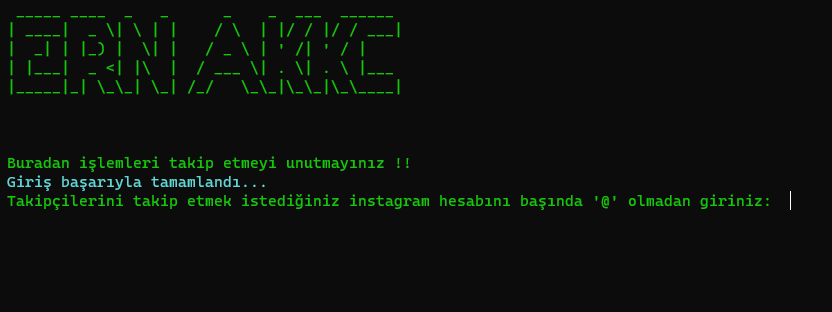
Bot Interface and Progress Tracking
- Test Account First: Use a disposable account initially
- Enable 2FA: Protect your main account with two-factor authentication
- Limit Daily Actions: Stay under Instagram's unofficial limits:
- Max 150-200 follows per day
- Max 60 follows per hour
- Spread actions throughout the day
- ✅ Use random delays (2-5 seconds minimum)
- ✅ Don't run bot 24/7
- ✅ Vary your actions (follow, like, comment)
- ✅ Monitor for action blocks
- ✅ Stop immediately if you get warnings
- New accounts (< 3 months): 20-30 follows/day
- Regular accounts (3-6 months): 100-150 follows/day
- Established accounts (> 6 months): 150-200 follows/day
# Check Chrome version
chrome://version

# Download matching ChromeDriver
# Add to PATH or use:
driver_path = "/path/to/chromedriver"- Check credentials in
userInfo.py - Disable 2FA or use app-specific password
- Clear browser cookies
- Try logging in manually first
- Instagram UI may have changed
- Update selectors in code
- Check internet connection
- Increase wait times
# If you get action blocked:
# 1. Stop the bot immediately
# 2. Wait 24-48 hours
# 3. Reduce daily limits
# 4. Increase delays between actionsinstaFallowBot/
├── app.py # Main bot script
├── userInfo.py # Configuration file
├── requirements.txt # Python dependencies
├── chromedriver.exe # WebDriver (Windows)
├── LICENSE # MIT License
└── README.md # This file
from selenium.webdriver.chrome.options import Options

options = Options()
options.add_argument('--headless')
options.add_argument('--disable-gpu')
driver = webdriver.Chrome(options=options)options = Options()
options.add_argument('--proxy-server=http://proxy:port')# Only follow accounts with specific criteria
def should_follow(user):
# Check follower count
# Check bio keywords
# Check post count
return TrueLogs are saved in bot_logs.txt:
[2026-01-29 14:23:10] Bot started
[2026-01-29 14:23:15] Login successful
[2026-01-29 14:23:20] Followed @user1
[2026-01-29 14:23:25] Followed @user2
...
Contributions welcome! Please note:
- Maintain ethical automation practices
- Add proper error handling
- Update documentation
- Test thoroughly before submitting
This software is provided "as is" without warranty. The author is not responsible for:
- Account suspensions or bans
- Violation of Instagram's Terms of Service
- Misuse of the software
- Legal consequences
Always comply with Instagram's Terms of Service and applicable laws.
This project is licensed under the MIT License.
Eren Akkoç
- GitHub: @ernakkc
- Email: ern.akkc@gmail.com
For Educational Purposes Only