Repository navigation
Comfy Clean v1.5.8


✨ Comfy Clean v1.5.8 ✨
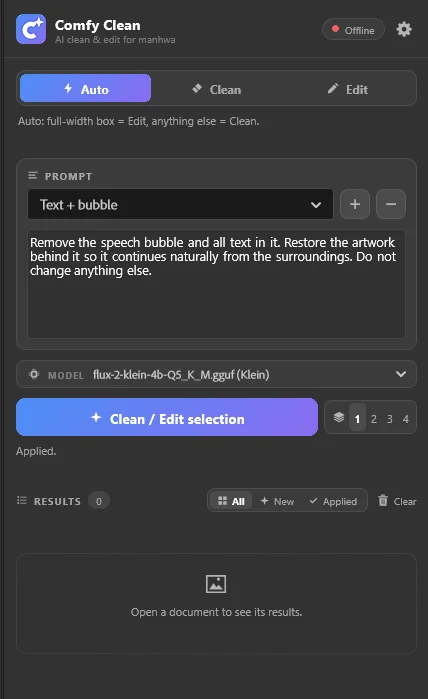
🧹 AI clean & edit for manhwa, right inside Photoshop
Select the text, bubble, SFX or watermark → click once → a clean page from your own local ComfyUI. 🔒 100% local.
🆕 What's changed
- 1.5.8: switching tools with a shortcut no longer jumps back to the previous tool in Auto mode
🇬🇧 English
📥 Install
- ⬇️ Download
ComfyClean.ccxfrom the Assets list below. - 🖱️ Double-click it. Creative Cloud installs the plugin.
- 🔄 Restart Photoshop, then open Plugins › Comfy Clean.
📋 You also need
| 🖼️ Photoshop 2022 (23.3) or newer | tested on 2024 and 2026 |
| 🧩 ComfyUI, up to date, running locally | default http://127.0.0.1:8188 |
| 🤖 A model: Flux.2 Klein · Flux.1 Kontext · Flux.1 Fill | plus its text encoder and VAE: the panel shows download links for anything missing |
| 🔌 comfyui-inpaint-nodes | needed for Clean's color match |
⚡ Quick start
▶️ Start ComfyUI (or set its folder in Settings and let the panel start it).- 🟢 Wait for the green dot, make a selection, pick a preset.
- ✨ Click Clean selection, check the preview, then ✅ Apply or 🗑️ Discard.
📖 Full guide: README
🇮🇷 فارسی
📥 نصب
۱. ⬇️ فایل ComfyClean.ccx را از بخش Assets پایین همین صفحه دانلود کنید.
۲. 🖱️ روی آن دابلکلیک کنید تا Creative Cloud پلاگین را نصب کند.
۳. 🔄 فتوشاپ را دوباره باز کنید و از Plugins › Comfy Clean پنل را باز کنید.
📋 اینها را هم لازم دارید
| 🖼️ Photoshop 2022 (نسخهٔ 23.3) یا جدیدتر | روی 2024 و 2026 تست شده |
| 🧩 ComfyUI بهروز و در حال اجرا روی همین کامپیوتر | پیشفرض http://127.0.0.1:8188 |
| 🤖 یک مدل: Flux.2 Klein · Flux.1 Kontext · Flux.1 Fill | بههمراه انکودر متن و VAE؛ برای هر فایل کم، پنل لینک دانلود نشان میدهد |
| 🔌 comfyui-inpaint-nodes | برای color match حالت Clean لازم است |
⚡ شروع سریع
۱.
۲. 🟢 منتظر نقطهٔ سبز بمانید، یک انتخاب بسازید و یک پرامپت آماده بردارید.
۳. ✨ روی Clean selection بزنید، پیشنمایش را ببینید و ✅ Apply یا 🗑️ Discard کنید.
📖 راهنمای کامل: README
💙 Made with care by E.MKH · ساختهشده با ❤️ توسط E.MKH