Repository navigation

Looking for the standalone Vulkan layer? See MAKO Renderer v4.6.0.
What's new in MAKO Decky v4.6.0

Release codename: Tempest
“By dawn, the fleet understood: the tempest was a road with teeth.”
Mira Valen, Charts of the Drowned Horizon
Tempest brings faster, leaner Frame Generation and steadier pacing through the matching Renderer, alongside per-game shader tuning, smoother controller navigation and clearer support reports.
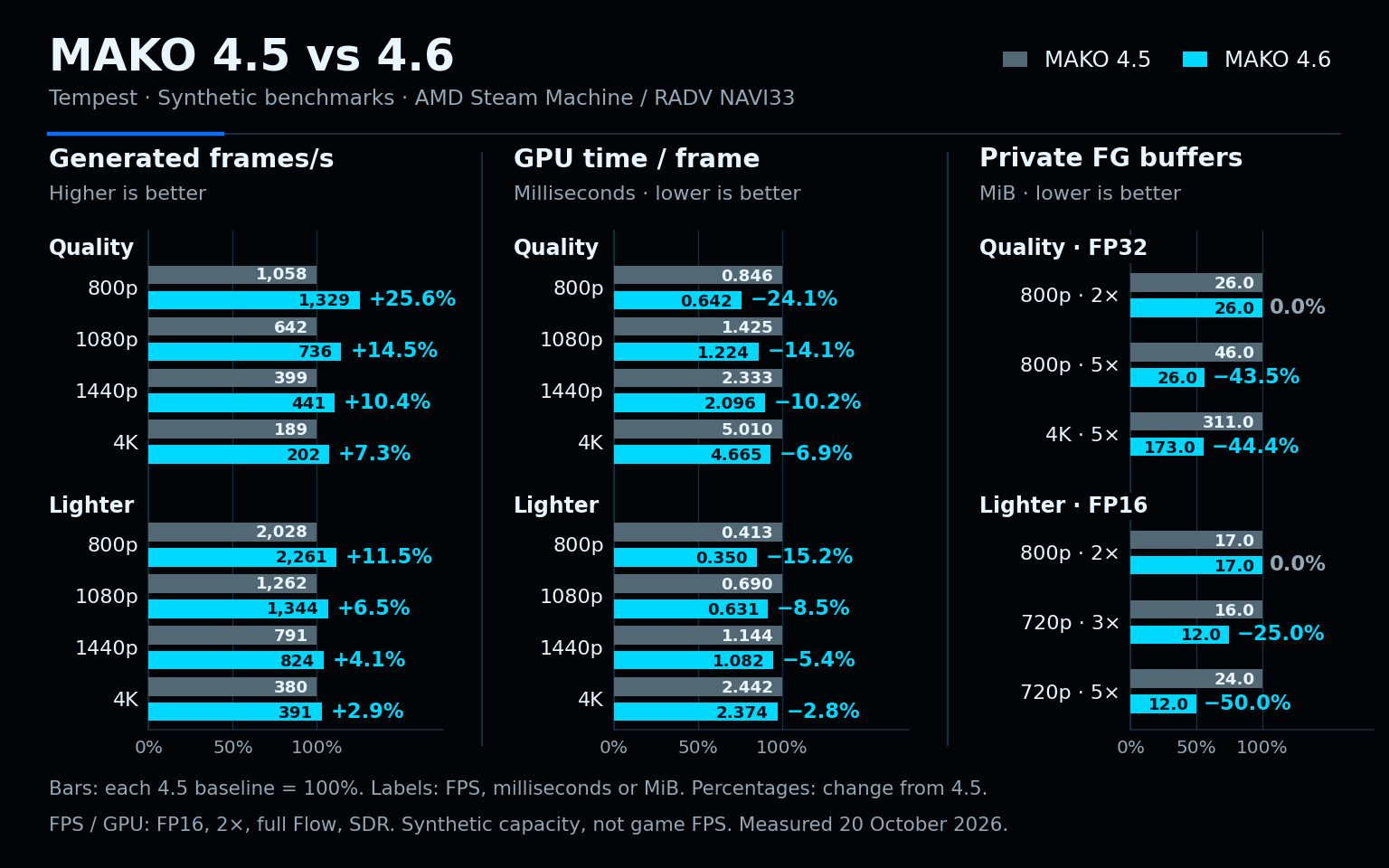
Native source-build comparison on AMD Steam Machine (NAVI33/RADV). Synthetic results; game FPS and Steam Deck gains were not measured. Buffer memory excludes model weights, shared images, driver memory and game VRAM.
- GPU Headroom: Under Performance, choose a 5%, 10%, 15% or 20% GPU reserve and adjust it live during Frame Generation. The matching Renderer gradually reduces real FPS using supported AMD utilization readings. Adaptive can add generated frames within its ceiling; Fixed can lower output FPS. Off by default, saved per profile and power mode, and mutually exclusive with Dynamic Cadence Recovery. Brief spikes can still reach 100%, and unavailable telemetry leaves normal pacing active.
- Faster Frame Generation: The matching Renderer reduces CPU and GPU overhead in Fixed and Adaptive with FP16 or FP32. The chart above compares Quality and Lighter throughput and GPU time with v4.5.0. In-game gains depend on the game, hardware and settings.
- More efficient FP16 Quality: The matching Renderer automatically uses a leaner compute path for supported native FP16 Quality models on AMD’s RADV driver, preserving model weights, precision and Flow Scale without adding image buffers. It applies to Fixed and Adaptive, bridge and non-bridge, with VRR on or off. Enable Allow FP16 and leave Lighter FG Model and Ultra Performance off. Steam Deck and other AMD/RADV handhelds can use this path; their performance gains have not yet been measured.
- Lower overhead for Quality and Lighter: The matching Renderer spends less CPU time submitting GPU work in Fixed 2× and Adaptive steps that produce one generated frame. This applies automatically with either model, FP16 or FP32, and bridge or non-bridge modes, preserving image quality and Flow Scale.
- Lower FG working-buffer memory: Generated outputs share temporary image storage, reducing private buffer allocations at higher multipliers. The chart includes unchanged 800p 2× controls and measures FG working buffers rather than total MAKO or game VRAM.
- Less CPU work for Scaling and Shaders: The matching Renderer reuses scaling preparation, and the bundled shader system reduces temporary allocations during frame presentation. Your scaling method, sharpness, shader effects and effect order are preserved.
- Adaptive and FIFO stability: The matching Renderer preserves proven Adaptive workloads after brief image-availability misses and retains qualified Smooth Cadence pacing through short cadence dips. Sustained slowdowns and unsuccessful higher-multiplier trials still trigger the existing safeguards.
- More reliable multiplier checks: Adaptive checks the real-frame cost after pacing settles and refreshes older comparisons when needed. Brief bursts of queued frames no longer repeatedly restart these checks. When both workloads reach the target, MAKO prefers the lower multiplier.
- Better use of frame-cap waits: Eligible capped Fixed and Adaptive paths coordinate frame preparation with output timing, including supported Scaling and bridge paths, avoiding consecutive pacing waits while preserving your configured cap.
- Gamescope timing compatibility: The matching Renderer improves bridge feedback handling, VRR timing interpretation and presentation deadlines. Newer Gamescope reports and optional Vulkan timing on non-bridge surfaces are used when supported, with existing pacing retained otherwise. This does not require replacing SteamOS’s Gamescope.
- Customize shaders per game: Select Customize shaders to adjust selected bundled and compatible custom effects with sliders, toggles, choices and colour controls. Reset shader to defaults restores the selected effect.
- Live shader adjustments: Changes save with the selected profile and are shared across its AC and battery modes. They apply live when Shaders was enabled at game launch; rebuilding an effect may cause a brief hitch. The editor opens beside the game, and Hide controls collapses it while comparing results.
- Clearer shader controls: Palettes such as Nostalgia’s Custom palette use colour swatches, sliders and exact-value fields. Sliders follow the author’s step size with consistent controller increments. Numeric fields hide floating-point display noise without changing stored values or saving untouched fields.
- Smoother controller navigation: Focused controls stay visible when entering settings tabs or leaving the effects list. Collapsing the list reveals the next focused action without restoring stale scroll positions. Unavailable actions are skipped, and closing the shader editor returns to the selected MAKO section in Decky’s Quick Access panel.
- Shared MangoHud layouts: Profiles with MangoHud enabled can use an optional
~/.config/mako-render/mangohud.conf, shared with the standalone Renderer launcher. Creating or removing it takes effect on the next game launch without resaving profiles. Keep the usualmako-run %command%launch option. Requires host-installed MangoHud; Flatpak games and simultaneous Shaders remain unsupported. - Native FPS above the Adaptive target: With Fractional Adaptive and Automatic Real Frame Priority, sustained native FPS can exceed Target FPS without generation when Base FPS Cap is off or at least the target. Manual caps remain enforced.
- More complete translations: Performance, HDR, scaling and Remote Play controls have more consistent translated labels and explanations across MAKO Decky and the configuration app. Thanks to Tak-attack for the Japanese improvements in PR #91.
- Better support reports: With diagnostics enabled, MAKO Decky retains ten launch sessions instead of five. Reports preserve Wayland errors and multi-line failure details in Steam’s timestamped logs, identify failed presentation waits and available timing capabilities, and keep MAKO Wiz’s guide links usable from GitHub issue comments.
🎮 In-game considerations
Tip
Try V-Sync on and off. The smoother choice depends on the game, FPS cap, VRR, and compositor.
Compare Fixed, Adaptive, and scaling-only modes one at a time. If a feature does not work, try Fullscreen, Borderless Fullscreen, and Windowed. For Scaling, test in-game resolutions and check that Live Status shows Input smaller than Display.
- Adaptive target: Adaptive aims for an average frame rate; it cannot lower a game’s native rate or exceed available GPU and compositor capacity.
- Quality and latency: Higher multipliers and lower real-frame rates can increase ghosting and latency. Smooth Cadence may trade responsiveness for steadier motion.
See the Configuration guide and Troubleshooting guide for complete behaviour and per-game controls.
Important
MAKO does not contain or distribute Lossless Scaling, Lossless.dll, or extracted proprietary model payloads. Frame Generation and LS1 scaling read selected resources at runtime from a lawful, user-supplied Lossless Scaling installation. The open MAKO Scaler does not use it. MAKO does not alter the user’s DLL file, and translated resources remain process-local. Users are responsible for complying with the terms applicable to their copy.
⚠️ Required MAKO Renderer update: Installing the ZIP updates MAKO Decky, but does not replace the shared native Renderer. Open the plugin and select Install MAKO Renderer afterwards.
Installation
New to Decky or installing MAKO Decky for the first time? See the full install and use guide for Decky Loader setup and prerequisites.
- Download
MAKO-Decky-v4.6.0.zipbelow. - On SteamOS, open Decky Loader's settings and enable Developer Mode.
- Choose Developer > Install Plugin from Zip, then select the downloaded ZIP.
- In MAKO Decky, select Install MAKO Renderer. For native Steam/Proton games, add
/home/deck/.local/bin/mako-run %command%to the game’s Steam launch options.
Third-party launcher setup: Follow the quick guides for Heroic, Lutris, EmuDeck, and other Flatpak apps.
Updating an existing MAKO Decky installation
- Quit any game currently using
/home/deck/.local/bin/mako-run. - Uninstall MAKO Decky, then download the newer ZIP from version 4.6.0.
- In Game Mode, open Decky Loader’s settings, choose Developer > Install Plugin from Zip, then select the newer ZIP.
- Restart your Steam Deck or Steam Machine.
⚠️ Required: Open MAKO Decky and select Install MAKO Renderer to install the version bundled in the new ZIP.- In Flatpak Setup, select Update for every prepared application’s matching runtime extension. This replaces its Flatpak layer with the engine bundled in the new ZIP while preserving its preparation and per-game Wrapper commands.
Existing profiles and Steam launch options are retained. The shared native Renderer and launcher are re-created in step 5; shared Flatpak extensions are retained, then refreshed in step 6.
Before you play
- Test MAKO per game. Start with Frame Generation and Scaling disabled, then enable one path at a time before combining them.
- If you use Frame Generation or LS1 scaling, confirm the detected
Lossless.dllpath before launching. Leaving it blank permits normal discovery. The open MAKO Scaler does not need it. - Do not combine
mako-runwith another frame-generation or scaling Vulkan wrapper for the same game.
Bundled MAKO Renderer 4.6.0
- Includes checksum-verified
MAKO-Renderer-v4.6.0-linux.tar.xz. - Corresponding MAKO Decky source:
plugin-v4.6.0. - Corresponding MAKO Renderer source:
render-v4.6.0, pinned by commit and checksum in the ZIP metadata.