



📖 hypermarkdown.org — the documentation. What the format is, why it exists, and every construct in it. Start there.
HyperMarkDown (.hmd) is ordinary markdown plus links to knowledge graph: you
write the name of a card and it is resolved for you, a card can be built out of
other cards, and a linter checks the whole graph. Every .md file is already
valid .hmd, so a tree is adopted one rename at a time.
See [[tokens#Rotation|the rotation window]], and say it once rather than twice:

![[tokens#^definition]]
This repository is both halves of the project:
- the language — its specification, the records that argue it, and the website they are published as
- and the tools that implement it, one package each under
tools/.
Each carries its own version, README, changelog, and license.
hmd — the CLI, the library, the MkDocs plugin


The Python line, published to PyPI as
hypermarkdown: the hmd command
(lint, render, graph), the library under it, and a MkDocs plugin that
builds a tree of cards into a website. Canonical — where two implementations
disagree, this one defines the answer. It will also host the language server.
@hypermarkdown/core — the TypeScript implementation



A second implementation of the format, not extension code. It answers to the same conformance corpus the canonical tool does.
VS Code extension — live preview for .hmd


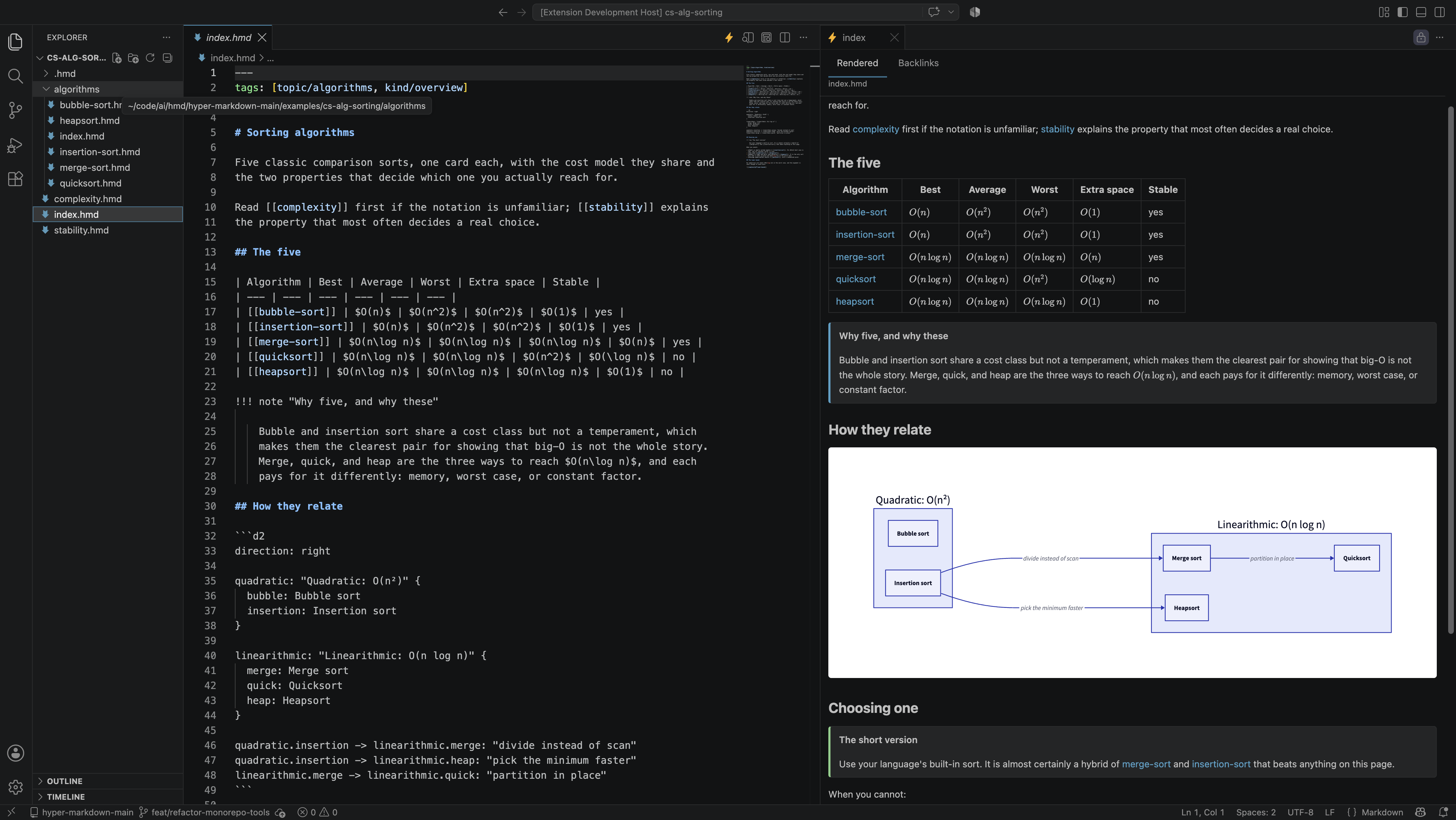
Live preview that keeps the embed boundary visible, backlinks, red links, and diagnostics. Today it is the preview and the viewer, rendered in TypeScript, so there is nothing to install to see a card. Completion and the rest of the language-server features arrive with the Python server.
ext install hypermarkdown.hmd-vsc-ext
examples/— runnable fixture wikis, linted by both, andexamples/conformance/cases/— the language-neutral corpus that arbitrates between the two implementationsdoc/— the knowledge base the website is built from: the book, the.hmdwiki, and the numbered proposals that specify everythingtests/— the repository's own guards, for its prose and its site
- DEVELOP.md — the language and the website: how the documentation tree is organised, the four versions, and how hypermarkdown.org is published. Read this first.
- A tool's own guide for its code — the Python tool, the TypeScript core, the extension. Each carries that tool's test loop, gates, and release.
doc/proposals/— numbered specifications. A change to the format or the tooling starts as one; reserve its number indoc/proposals/README.md.- Progress is tracked per proposal, in
doc/proposals/HMD-NNNN/STATUS.md, and updated in the same commit that changes the code. - Kanban board - in
doc/issues/**, for the repository's own work, and for the language and the website, as well as the tools. The board is public, but the issues are owned by the contributors team.
Most contributions are to the language and the site — the prose, the proposals,
the .hmd wiki — and that work needs Python even though none of it is Python:
this repository's documentation is a wiki, built by the MkDocs plugin the
Python tool ships. The sync installs that toolchain; the serve gives you a local
preview on 127.0.0.1:8000 that rebuilds as you edit.
git clone https://github.com/ewiger/hypermarkdown
cd HyperMarkDown
uv sync --locked      # MkDocs, the plugin, and the `hmd` command
uv run mkdocs serve   # preview the book and the wiki as you write
Writing .hmd in a tree of your own needs none of that today — the VS Code
extension previews a card beside the file you are typing
in, and the preview is TypeScript end to end. Install it from the marketplace,
or build the VSIX from this clone: its
README.
Before opening a PR, run whichever half you touched:
uv run python -m pytest    # the Python tool and the site
npm install && npm test    # the TypeScript tools
Feature requests, issues and PRs are welcome at
GitHub issues.
Once accepted, a PR should be merged into the main branch, and the issue closed. Again, Kanban board - in doc/issues/**, for the contributors (or agents) to track the progress of the issue and the PR internally.
MIT — see LICENSE.