Releases: extsvforest/codex-weekly-usage-indicator
Release list
v1.8.0 — Soft Paper accounts and Korean / English

v1.8.0 — Soft Paper accounts and Korean / English
See your remaining usage at a glance, compare your saved Codex accounts, and switch when you choose.
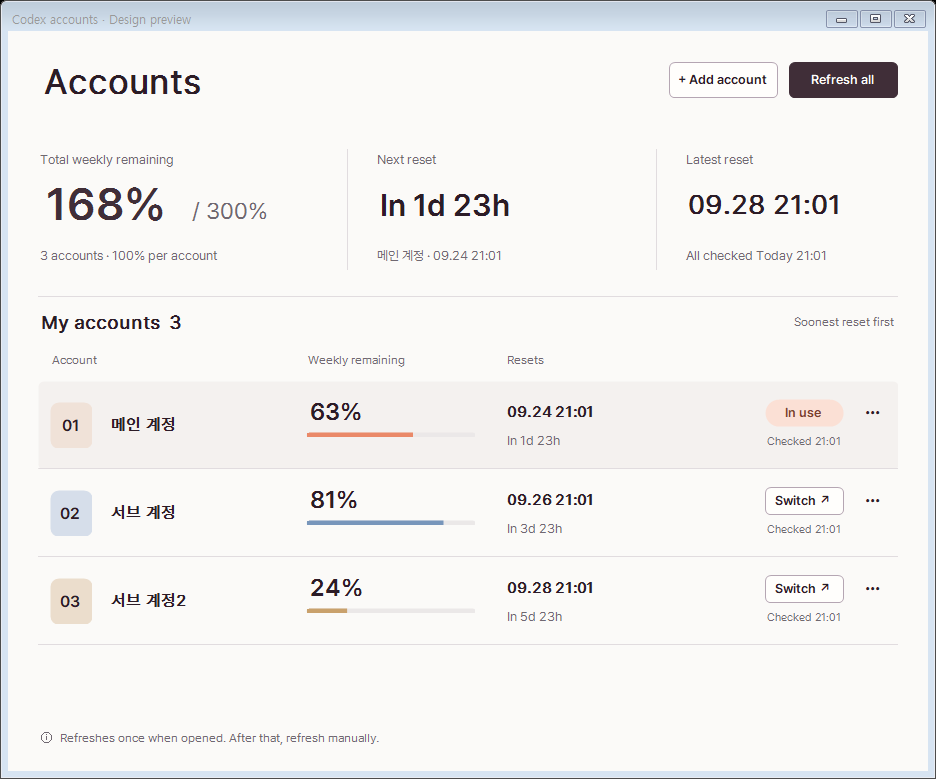
What changed
- A lighter account manager with aligned rows, a clear weekly total, and separate next/latest reset times.
- Stable initial layout and partial refresh updates, with three accounts visible at the default window size on a sufficiently tall display.
- Language / 언어 → 한국어 / English in the widget or tray menu. Your choice is saved. Changing language preserves account names, saved logins, the last combined observation and the manager's size without requesting usage.
- Native screenshots and a simpler usage guide in the README.
- Bundled Pretendard fonts, with their SIL Open Font License included.
한국어
밝은 계정 관리 화면과 한국어·영어 전환을 정식으로 배포합니다. 위젯 또는 트레이 아이콘을 우클릭한 뒤 Language / 언어에서 선택하세요. 기존 설치의 한국어 설정과 계정 이름은 유지됩니다. 언어를 바꾸어도 다시 로그인하거나 사용량을 새로 조회하지 않습니다.
Install or update
Download the Windows ZIP, extract it, and run scripts\install.ps1 from a standalone Windows PowerShell window. Requires the .NET 8 Desktop Runtime. The installer replaces the widget while preserving your preferences and saved accounts. Binaries remain unsigned.
All screenshots use synthetic data. Account switches remain manual; each balance follows its own reset time.
Verification
- Windows CI: 32 regression groups passed, including tooltip stability, account recovery and language switching.
- Korean/English native UI inspected at 100% and 175% scale; language changes retain bounds and issue no usage requests.
- Release EXE and ZIP checksums matched the included SHA256SUMS.txt; downloaded artifacts passed private-path, credential-pattern and debug-symbol scans.
PR: #13
Codex + Claude Usage Indicator v1.7.1
툴팁 깜빡임 수정 패치입니다.
- 화면 가장자리에서 툴팁이 커서를 덮어 반복해서 닫혔다 열리는 문제를 수정했습니다.
- 툴팁은 위젯 바깥에 고정되며, 읽는 동안 새 데이터로 다시 그리지 않습니다. 최신 내용은 다음에 마우스를 올릴 때 표시됩니다.
- 마우스 재진입, 위젯 이동, 메뉴 열기와 숨김 동작을 보완하고 키보드 포커스를 유지합니다.
- 밝은 디자인, 다계정 표시, 계정 전환 및 사용량 조회 방식은 그대로입니다.
검증: 29개 회귀 테스트, 네 모서리에서 실제 마우스를 올린 상태의 표시 안정성·위치·포커스 확인, Windows 빌드 및 배포 파일 무결성 검사.
Windows ZIP을 내려받아 압축을 푼 뒤 포함된 scripts/install.ps1로 설치할 수 있습니다. 기존 설치에도 같은 절차를 사용합니다.
Codex + Claude Usage Indicator v1.7.0
Changes
- Rebuild account management as a light overview and one account list ordered by weekly reset. Three accounts fit the default window, and each row offers a direct switch action plus a compact management menu.
- Show additive weekly remaining usage, the next reset and the latest reset context. Query all registered accounts once per newly opened manager window or through 전체 갱신; no inactive-account background polling.
- Keep incomplete, expired and previous observations distinct. Preserve active login, cancellation cleanup, credential recovery and explicit account switching.
- Reorganize the indicator hover window into current Codex usage, the last combined account observation and each reset, then Claude. Hover does not query accounts; the light tooltip preserves keyboard focus and measures text at the target display DPI.
Verification
29 regression groups, native Windows UI and tooltip checks, 175% DPI captures and a live all-account query through the production callback. GitHub-built EXE and ZIP checksums are verified before publication. No credential-vault migration is required.
Download and extract the ZIP, then run scripts/install.ps1 from a standalone Windows PowerShell window. Existing settings and saved accounts are preserved.
Codex + Claude Usage Indicator v1.6.1
사용량 조회 후 임시 파일 정리가 실패하면 로그인 복구 경고가 뜨고 계정 기능이 잠기던 문제를 수정했습니다.
- 로그인 정보 저장이 완료된 상태와 실제 복구가 필요한 상태를 구분합니다. 임시 파일 정리는 Codex를 계속 사용하면서 실행할 수 있습니다.
- 일시적인 파일 잠금을 자동 재시도하고, 조회용 프로세스의 자식까지 종료를 확인합니다. 격리 조회에서 불필요한 플러그인·스킬 시작 작업도 줄였습니다.
- 정리 대기 중에도 계정 이름 변경·삭제·전환을 사용할 수 있습니다. 조회 성공·실패·취소 메시지가 목록 갱신으로 덮이지 않습니다.
- 기존 v1.6.0의 저장 완료된 조회 기록을 그대로 정리할 수 있습니다. 계정 저장소 마이그레이션은 필요하지 않습니다.
전체 25개 회귀 테스트 그룹과 실제 계정 관리 화면을 통한 기존 오류 정리·비활성 계정 조회를 검증했습니다. 현재 Codex 로그인과 작업은 유지됩니다. 최초 파일 삭제 실패를 일으킨 프로세스는 확정하지 않았습니다.
Windows ZIP을 내려받아 압축을 풀고, 독립 실행한 Windows PowerShell에서 scripts\install.ps1을 실행하세요. 기존의 계정 저장소와 설정은 유지됩니다. EXE 무결성은 SHA256SUMS.txt로 확인할 수 있습니다.
Codex + Claude Usage Indicator v1.6.0
저장된 다른 Codex 계정의 사용량을 로그인 전환 없이 수동 조회할 수 있습니다.
- 계정 관리 패널에서 계정을 선택하고 사용량 조회를 누르세요.
- 주간·5시간 잔여량, 초기화 시각, 마지막 성공한 확인 시각을 표시합니다.
- 현재 Codex 로그인과 작업은 유지됩니다. 다른 계정은 버튼을 누를 때만 조회합니다.
- 실패·취소 시 마지막 확인값을 유지하고, 조회 중 갱신된 로그인 정보는 안전하게 보존합니다.
- 사용량 이력·직전 대비 변화·인원별 분석은 추가하지 않았습니다.
조회가 비정상 종료되면 중단된 조회 복구 안내에 따라 Codex 작업을 마친 뒤 복구하세요. 이전 버전으로 되돌리기 전에도 중단된 조회는 이 버전에서 먼저 복구해야 합니다.
Windows 빌드·회귀검사, 실제 계정 조회, 화면 배율·포커스 검증을 완료했습니다. ZIP에는 실행 파일, 설치·제거 스크립트와 SHA256SUMS가 포함됩니다.
Codex + Claude Usage Indicator v1.5.1
Manual Codex accounts
- Register the current account and add another account through the official browser login in an isolated local profile.
- Select a saved account explicitly, finish and close your Codex work, then confirm the switch. The tool checks for running Codex processes before applying the login and reopening the desktop.
- Manage account names with a dedicated editor, and distinguish current usage from dated saved values. The compact indicator keeps percentages and bars only.
- Protect saved Codex logins with Windows CurrentUser DPAPI, restrictive local permissions and recoverable writes. Claude credentials remain owned by Claude Code.
Interaction fixes
- Preserve keyboard focus while the topmost widget appears, reappears or refreshes.
- Improve registration feedback, cancellation, scaled layouts and small-window scrolling.
- Preserve the independent supervisor and per-user installation behavior from v1.3.4.
Install or upgrade
Download and extract CodexWeeklyUsageIndicator-v1.5.1-win-x64.zip. Open a standalone Windows PowerShell window, change to the extracted folder, and run ./scripts/install.ps1. Keep the included scripts together. Requires Windows 10/11 and the .NET 8 Desktop Runtime. Binaries are unsigned; verify SHA256SUMS.txt before running.
Account management is optional and manual. It does not rotate accounts automatically, pool quotas, or poll inactive accounts. Saved accounts live separately from the application and are preserved during uninstall.
Verification
All 23 regression groups passed locally and in Windows CI, covering usage parsing, helper lifetimes, account storage/recovery and UI interactions. The Actions-built executable and ZIP were downloaded and checked for version, allowed contents, sensitive data and matching SHA-256 checksums before publication. The maintainer confirmed a main-to-secondary account switch and subsequent real Codex use without issues. The return switch has not yet been reported; synthetic tests cover both directions. This release supports local Windows file-based ChatGPT authentication; unsupported managed/keyring configurations are rejected.
Full change: #8
Codex + Claude Usage Indicator v1.3.4
Changes
- Launch independently of Codex through a per-user Windows logon task, without elevation or a stored password.
- A lightweight supervisor restarts an abnormally terminated widget after one minute, with up to 999 retries. Normal menu Quit ends both processes and stays closed until the next logon or manual task start.
- Preserve settings during upgrades and remove the scheduled task during uninstall.
- Detect packaged-app AppData redirection before changing existing tasks or processes.
Install or upgrade
Download and extract the Windows ZIP. Open Windows PowerShell from the Start menu, change to the extracted directory, and run ./scripts/install.ps1. Keep the included scripts together. Avoid running installation/removal from inside packaged apps such as Codex, where Windows may redirect files to an app-private location.
Two WeeklyUsageIndicator.exe processes are expected: one supervisor and one widget window. Running the EXE directly does not enable supervision. Stopping the supervisor or scheduled task disables recovery until the task is started again.
Verification
19 regression tests and Windows CI passed. Live Windows tests covered scheduler-owned launch, 60-second recovery after forced widget termination, normal Close without restart, installation/removal/reinstallation, settings preservation, and redirection rejection. The published ZIP and installed executable checksums were verified. An actual Codex app update was not replayed as part of these tests.
Full change: #7
Codex + Claude Usage Indicator v1.3.3
What's Changed
- Fix Claude limits disappearing without reset times by @GiantForestStudio in #6
Full Changelog: v1.3.2...v1.3.3
Contributors

Assets 5
Codex + Claude Usage Indicator v1.3.2
What's Changed
- Make Claude usage reliable across cold starts by @GiantForestStudio in #5
Full Changelog: v1.3.1...v1.3.2
Contributors
Assets 5
Codex + Claude Usage Indicator v1.3.1
What changed
- Keeps the last successful Claude value visible during temporary rate limits, network failures, timeouts, and Anthropic 5xx responses.
- Uses a ten-minute Claude cache, honors server
Retry-After, and falls back to progressive 5 / 10 / 15-minute retries when the server gives no timing. - Shows the last successful Claude update and next retry time in the hover tooltip.
- Adds dependency-free regression coverage for caching, retries, recovery, authentication, malformed responses, and tooltip status.
Codex and Claude still refresh independently, and the existing right-click Claude visibility toggle is unchanged.
Full changelog: v1.3.0...v1.3.1