AssetsLess
LESS CSS is a dynamic stylesheet language. It allows greater flexibility in the way you write CSS files: including support for variables, mixins and more.
Compiled assets in Play 2.0 must be defined in the app/assets directory. They are handled by the build process, and LESS sources are compiled into standard CSS files. The generated CSS files are distributed as standard resources into the same public/ folder as the unmanaged assets, meaning that there is no difference in the way you use them once compiled.
Note that managed resources are not copied directly into your application
publicfolder, but maintained in a separate folder intarget/scala-2.9.1/resources_managed.
For example a LESS source file at app/assets/stylesheets/main.less will be available as a standard resource at public/stylesheets/main.css.
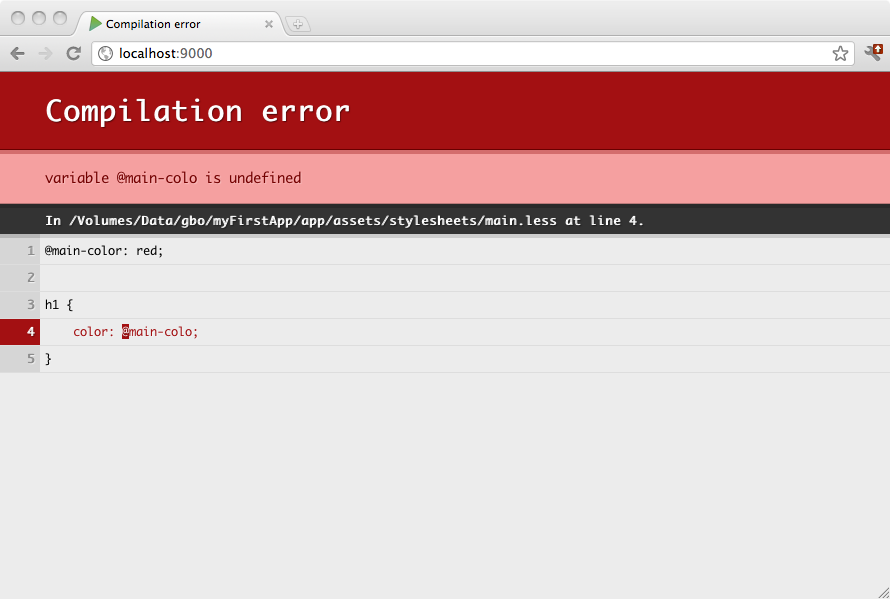
LESS sources are compiled automatically during a compile command, or when you refresh any page in your browser while you are running in development mode. Any compilation errors will be displayed in your browser:
You can split your LESS source into several libraries, and use the LESS import feature.
To prevent library files from being compiled individually (or imported) we need them to be skipped by the compiler. To do this, partial source files must be prefixed with the underscore (_) character, for example: _myLibrary.less.
Here is an example layout for using LESS in your project:
app
 └ assets
    └ stylesheets
       └ main.less
       └ utils
          └ _reset.less
          └ _layout.less
With the following main.less source:
@import "utils/_reset.less";
@import "utils/_layout.less";

h1 {
    color: red;
}
The resulting CSS file will be compiled as public/stylesheets/main.css, and you can use this in your template as any regular public asset:
<link rel="stylesheet" href="@routes.Assets.at("stylesheets/main.css")">A more compact version of the file is also generated:
<link rel="stylesheet" href="@routes.Assets.at("stylesheets/main.min.css")">