JavaTemplates
Play 2.0 comes with a new and really powerful Scala-based template engine. This new template engine’s design was inspired by ASP.NET Razor, specifically it is:
- compact, expressive, and fluid: it minimizes the number of characters and keystrokes required in a file, and enables a fast, fluid coding workflow. Unlike most template syntaxes, you do not need to interrupt your coding to explicitly denote server blocks within your HTML. The parser is smart enough to infer this from your code. This enables a really compact and expressive syntax which is clean, fast and fun to type.
- easy to learn: it enables you to quickly be productive with a minimum of concepts. You use all your existing Scala language and HTML skills.
- not a new language: we consciously chose not to create a new language. Instead we wanted to enable developers to use their existing Scala language skills, and deliver a template markup syntax that enables an awesome HTML construction workflow with your language of choice.
- editable in any text editor: it doesn’t require a specific tool and enables you to be productive in any plain old text editor.
Note: Even if the template engine uses Scala as expression language it is not a problem for a Java developer. You can almost use it as the language was Java.
Remember that a template is not a place to write complex logic. You don't have to write complicated Scala code here. Most of the time you will access data from your model object such as:
myUser.getProfile().getUsername()The parameter types are specified using a suffix syntax. Also The generic types are specified using the
[]symbols instead of the standard<>java ones, such asList[String]. But this is exactly the same.
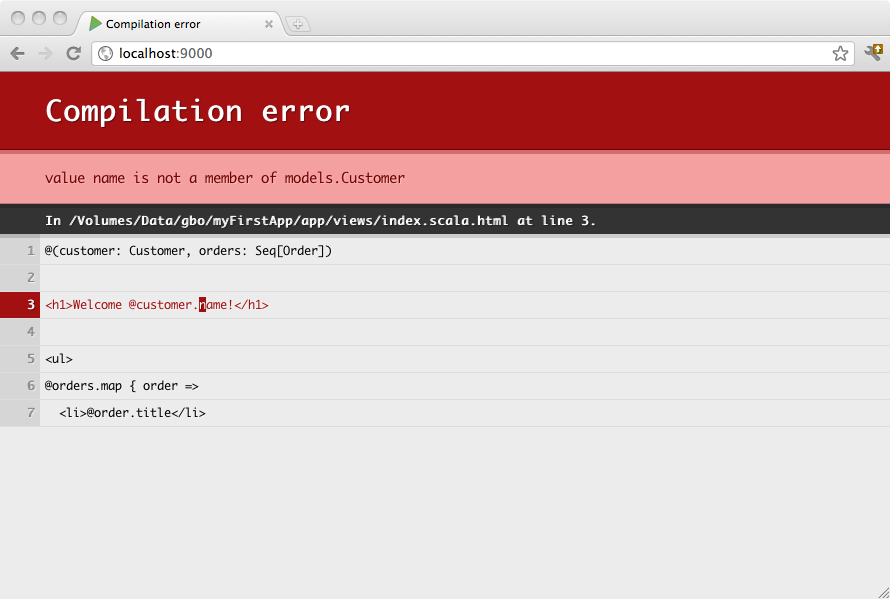
Templates are compiled, so you will see any errors right in your browser:
A Play Scala template is a simple text file, that contains small blocks of Scala code. They can generate any text-based format, such as HTML, XML or CSV.
The template system has been designed to feel comfortable to those used to working with HTML, allowing web designers to easily work with the templates.
Templates are compiled as standard Scala functions, following a simple naming convention: If you create a views/Application/index.scala.html template file, it will generate a views.html.Application.index class that have a render() method.
For example, here is a simple template:
@(customer: Customer, orders: List[Order])

<h1>Welcome @customer.name!</h1>

<ul>
@for(order <- orders) {
  <li>@order.getTitle()</li>
}
</ul>
You can then call this from any Java code as you would call a function:
Content html = views.html.Application.index.render(customer, orders);The Scala template uses @ as the single special character. Every time this character is encountered, it indicates the begining of a dynamic statement. It does not require you to explicitly close the code-block - this will be inferred from your code:
Hello @customer.getName()!
       ^^^^^^^^^^^^^^^^^^
          Dynamic code
Because the template engine automatically detects the end of your code block by analysing your code, this syntax only supports simple statements. If you want to insert a multi-token statement, explicitly mark it using brackets:
Hello @(customer.getFirstName() + customer.getLastName())!
       ^^^^^^^^^^^^^^^^^^^^^^^^^^^^^^^^^^^^^^^^^^^^^^^^^^
                          Dynamic Code
You can also use curly brackets, to write a multi-statements block:
Hello @{val name = customer.getFirstName() + customer.getLastName(); name}!
       ^^^^^^^^^^^^^^^^^^^^^^^^^^^^^^^^^^^^^^^^^^^^^^^^^^^^^^^^^^^^^^^^^^^
                                  Dynamic Code
Because @ is a special character, you’ll sometimes need to escape it. Do this by using @@:
My email is bob@@example.com
A template is like a function, so it needs parameters, which must be declared on the first line of the template file:
@(customer: models.Customer, orders: List[models.Order])You can also use default values for parameters:
@(title: String = "Home")Or even several parameter groups:
@(title:String)(body: Html)You can use the for keyword, in a pretty standard way:
<ul>
@for(p <- products) {
  <li>@p.getName() ($@p.getPrice())</li>
}
</ul>
If-blocks are nothing special. Simply use Scala’s standard if statement:
@if(items.isEmpty()) {
  <h1>Nothing to display</h1>
} else {
  <h1>@items.size() items!</h1>
}You can create reusable code blocks:
@display(product: models.Product) = {
  @product.getName() ($@product.getPrice())
}

<ul>
@for(product <- products) {
  @display(product)
}
</ul>
Note that you can also declare reusable pure code blocks:
@title(text: String) = @{
  text.split(' ').map(_.capitalize).mkString(" ")
}

<h1>@title("hello world")</h1>
Note: Declaring code block this way in a template can be sometime useful but keep in mind that a template is not the best place to write complex logic. It is often better to externalize these kind of code in a Java class (that you can store under the
views/package as well if your want).
By convention a reusable block defined with a name starting with implicit will be marked as implicit:
@implicitFieldConstructor = @{ MyFieldConstructor() }
You can define scoped values using the defining helper:
@defining(user.getFirstName() + " " + user.getLastName()) { fullName =>
  <div>Hello @fullName</div>
}You can import whatever you want at the beginning of your template (or sub-template):
@(customer: models.Customer, orders: List[models.Order])

@import utils._

...You can write server side block comments in templates using @* *@:
@*********************
 * This is a comment *
 *********************@
You can put a comment on the first line to document your template into the Scala API doc:
@*************************************
 * Home page.                        *
 *                                   *
 * @param msg The message to display *
 *************************************@
@(msg: String)

<h1>@msg</h1>
By default the dynamic content parts are escaped following the template type (e.g. HTML or XML) rules. If you want to output a raw content fragment, wrap it in the template content type.
For example to output raw HTML:
<p>
  @Html(article.content)
</p>
Next: Common use cases