Chorus is a self-hosted AI engineering team. A long-running orchestrator turns a repo goal into tickets, assigns role-based agents, runs the AI coding CLIs in isolated worktrees, pushes ticket branches, and opens GitHub pull requests for human review.
Chorus is BYOAI: Bring Your Own AI. You bring the AI subscriptions, accounts, or API keys you already use. Chorus supplies the orchestration, dashboard, worktrees, logs, cost/quota awareness, and PR workflow around Codex, Claude Code, and Gemini CLI.
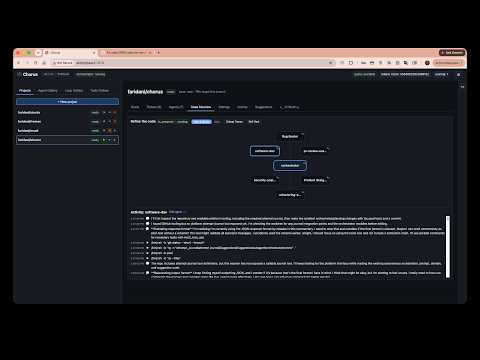
Watch the demo video on youtube
Agent CLIs are powerful by design. Chorus currently drives them with bypass modes
such as codex exec --dangerously-bypass-approvals-and-sandbox, Claude Code
permission bypass, and Gemini's yolo approval mode. That is useful for
unattended coding, but it is not something you should run directly on your
everyday host filesystem.
Run Chorus in a container when you can. The container keeps the dangerous agent process tree away from the host while still giving it a persistent Chorus data directory, GitHub auth, and BYOAI CLI credentials.
Bare-metal mode is available for operators who deliberately want it. Use it only on a dedicated machine, VM, or account where AI agents can safely create files, run commands, install packages, and modify cloned repositories.
- A GitHub account with access to the repositories Chorus will clone and open PRs against.
- At least one AI backend account: Codex, Claude Code, or Gemini CLI.
- For container mode, a container runtime:
- macOS: Apple
containerfrom https://github.com/apple/container, Docker Desktop, Podman, or OrbStack. - Linux: Docker Engine or Podman.
- Windows: Docker Desktop or Podman Desktop with Linux containers enabled.
- macOS: Apple
- For bare-metal mode, Node 22+, npm 10+, Git, GitHub CLI, and the AI CLI tools you want Chorus to use.
The container image installs Node 22, Git, GitHub CLI, and the Codex, Claude, and Gemini CLI frontends. Your accounts and tokens stay in a host-mounted container home directory.
Optional, but recommended. The example omits dataDir, so Chorus uses the
default ~/.chorus on bare metal and the launcher-provided container data path
in container mode:
cp chorus.config.example.json chorus.config.jsonThe launch scripts mount chorus.config.json into the container when it exists.
They also force the daemon to use container-safe defaults:
CHORUS_HOST=0.0.0.0inside the containerCHORUS_PORT=7878inside the containerCHORUS_DATA_DIR=/var/lib/chorusinside the container
The dashboard is published on the host as http://127.0.0.1:7878.
For Apple container, install it and start its system service:
container system startBuild and run Chorus:
./deploy/mac/run-container.sh startFor Docker Desktop, Podman, or OrbStack on macOS, use the OCI launcher:
./deploy/linux/run-container.sh startAuthenticate inside the container:
./deploy/mac/run-container.sh shell
gh auth login
codex login
# Also authenticate whichever other BYOAI CLIs you use, such as claude or gemini.
exit
Open http://127.0.0.1:7878.
Useful commands:
./deploy/mac/run-container.sh logs
./deploy/mac/run-container.sh shell
./deploy/mac/run-container.sh stop
./deploy/mac/run-container.sh statusInstall Docker or Podman, then run:
./deploy/linux/run-container.sh startThe script auto-selects Docker first, then Podman. To force one:
CHORUS_CONTAINER_RUNTIME=podman ./deploy/linux/run-container.sh startAuthenticate inside the container:
./deploy/linux/run-container.sh shell
gh auth login
codex login
# Also authenticate whichever other BYOAI CLIs you use, such as claude or gemini.
exit
Open http://127.0.0.1:7878.
Useful commands:
./deploy/linux/run-container.sh logs
./deploy/linux/run-container.sh shell
./deploy/linux/run-container.sh stop
./deploy/linux/run-container.sh statusInstall Docker Desktop or Podman Desktop and make sure Linux containers are enabled. From PowerShell:
.\deploy\windows\run-container.ps1 startIf PowerShell blocks local scripts, allow local signed scripts for your user:
Set-ExecutionPolicy -Scope CurrentUser RemoteSignedAuthenticate inside the container:
.\deploy\windows\run-container.ps1 shell
gh auth login
codex login
# Also authenticate whichever other BYOAI CLIs you use, such as claude or gemini.
exit
Open http://127.0.0.1:7878.
Useful commands:
.\deploy\windows\run-container.ps1 logs
.\deploy\windows\run-container.ps1 shell
.\deploy\windows\run-container.ps1 stop
.\deploy\windows\run-container.ps1 statusThe scripts keep state outside the image so rebuilds do not erase your setup:
| Platform | Chorus data | Container home / CLI auth |
|---|---|---|
| macOS/Linux | ~/.chorus-container/data |
~/.chorus-container/home |
| Windows | %USERPROFILE%\.chorus-container\data |
%USERPROFILE%\.chorus-container\home |
Override these with:
CHORUS_DATA_DIR_HOST=/path/to/data CHORUS_HOME_DIR_HOST=/path/to/home ./deploy/linux/run-container.sh startOn Windows:
$env:CHORUS_DATA_DIR_HOST="D:\chorus\data"
$env:CHORUS_HOME_DIR_HOST="D:\chorus\home"
.\deploy\windows\run-container.ps1 startPreferred setup is interactive login inside the container shell:
gh auth login
codex login
You can also pass provider tokens from the host environment before launch. The scripts inherit these variables when they are set:
OPENAI_API_KEYANTHROPIC_API_KEYGEMINI_API_KEYGOOGLE_API_KEYGITHUB_TOKENGH_TOKEN
To skip installing the AI CLIs during image build because you maintain your own image layer:
CHORUS_INSTALL_AI_CLIS=false ./deploy/linux/run-container.sh start- Open the dashboard at http://127.0.0.1:7878.
- Click New project.
- Paste a GitHub repository URL.
- Chorus clones the repo, finds or asks for
docs/SPEC.md, generates tickets, and starts assigning work to agents. - Agents work on per-ticket branches in isolated worktrees.
- Chorus pushes completed ticket branches and opens GitHub PRs.
- A human reviews and merges the PR. Chorus never merges to
mainby itself.
All platform scripts support the same actions:
start     Build the image and start a fresh Chorus container.
restart   Same as start.
shell     Open an interactive shell inside the running container.
logs      Follow daemon logs.
stop      Stop the container.
rm        Remove the container.
status    Show runtime status.
Set CHORUS_PORT to publish a different host port:
CHORUS_PORT=8787 ./deploy/linux/run-container.sh startUse bare-metal mode when you explicitly want Chorus and its AI agents to run directly on the host. This is the simplest path operationally, but it gives the AI CLI process tree access to the same OS account, filesystem permissions, SSH keys, package managers, and network access that you have.
Recommended bare-metal setup:
- Run on a dedicated machine, VM, or separate OS account.
- Keep
hostset to127.0.0.1unless the dashboard is behind a trusted private network. - Keep
terminal.allowRemoteClientsdisabled unless you understand that it exposes an interactive shell through the dashboard. - Do not point Chorus at repositories or directories you are not willing to let AI agents modify.
Install prerequisites with Homebrew or your preferred package manager:
brew install node git gh
npm install -g @openai/codex@latest @anthropic-ai/claude-code@latest @google/gemini-cli@latest
Authenticate the local tools:
gh auth login
codex login
# Run claude and gemini once if you want those BYOAI backends available.
claude
gemini
Build and launch Chorus:
cp chorus.config.example.json chorus.config.json
# Optional: edit chorus.config.json. Prefer "host": "127.0.0.1" for bare metal.
npm install
npm run build
npm --workspace @chorus/dashboard run build
node packages/daemon/dist/main.js
Open http://127.0.0.1:7878.
For 24/7 macOS operation, edit deploy/com.chorus.daemon.plist with your local
paths, then install it:
cp deploy/com.chorus.daemon.plist ~/Library/LaunchAgents/
launchctl load ~/Library/LaunchAgents/com.chorus.daemon.plistInstall Node 22+, npm 10+, Git, and GitHub CLI with your distro package manager or the official upstream installers. Then install the AI CLIs:
npm install -g @openai/codex@latest @anthropic-ai/claude-code@latest @google/gemini-cli@latestVerify the local toolchain:
node --version
npm --version
git --version
gh --version
codex --version
Authenticate:
gh auth login
codex login
# Run claude and gemini once if you want those BYOAI backends available.
claude
gemini
Build and launch:
cp chorus.config.example.json chorus.config.json
# Optional: edit chorus.config.json. Prefer "host": "127.0.0.1" for bare metal.
npm install
npm run build
npm --workspace @chorus/dashboard run build
node packages/daemon/dist/main.js
Open http://127.0.0.1:7878.
Install Node.js, Git, and GitHub CLI with Windows Package Manager or your preferred installers:
winget install OpenJS.NodeJS.LTS Git.Git GitHub.cli
npm install -g @openai/codex@latest @anthropic-ai/claude-code@latest @google/gemini-cli@latest
Restart PowerShell so the new tools are on PATH, then authenticate:
gh auth login
codex login
# Run claude and gemini once if you want those BYOAI backends available.
claude
gemini
Build and launch:
Copy-Item chorus.config.example.json chorus.config.json
# Optional: edit chorus.config.json. Prefer "host": "127.0.0.1" for bare metal.
npm install
npm run build
npm --workspace @chorus/dashboard run build
node packages/daemon/dist/main.js
Open http://127.0.0.1:7878.
For code changes and tests:
npm install
npm run build
npm --workspace @chorus/dashboard run build
node packages/daemon/dist/main.js
Run tests:
npm test
python3 -m unittest discover -s testsChorus is a TypeScript monorepo:
packages/core          Shared types, config, events, tools, agents
packages/db            SQLite migrations and repositories
packages/backends      Codex, Claude, and Gemini CLI adapters
packages/orchestrator  Ticket dispatch, agent runs, reconciliation, PR flow
packages/web           Fastify API, WebSocket feed, dashboard serving
packages/daemon        Composition root and long-running process
apps/dashboard         React/Vite control panel
agents                 Built-in role templates
There is also an agent-generated Python implementation under src/chorus/ and
tests/ kept for reference and review.
Chorus is open source. You can run it yourself with your own container runtime and BYOAI accounts. If you do not want to maintain a long-running machine, container runtime, upgrades, or agent credentials, use the paid managed infrastructure option for a ready-deployed Chorus environment.