Repository navigation
Troubleshooting
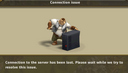
Problem: your client used to work and now you see guy with a hammer every time you try to start the game
Solution: Most common reason for that is parameter --fastlogin. In short - just replace --fastlogin by smth like this:
client.exe --autologin --login "xxx@gmail.com" --password mypassword
For full explanation please read details about fastlogin option there Main page
If you see such a screen, the first reason could be a UbiCollect. Disable it and try accessing without it.

If the error persists, it may be due to temporary difficulties in accessing the game servers. To check if this is the case, try opening this file in your browser:
Solution: Add the following lines to the hosts file: 23.213.161.26 ubistatic-a.akamaihd.net 23.213.161.12 ubistatic-a.akamaihd.net
To make changes to the hosts file, open it in Notepad with Administrator privileges!
It is located at: Windows ➝ System 32 ➝ drivers ➝ etc
You can get the latest ShockwaveFlash (.swf) file here: https://github.com/fedorovvl/tso_client/raw/master/client.swf
There is no need to clear any caches in the game client. That is a "legacy" from the time when we used to play in the browser.
If the portable client asks you to clear the cache, uncheck the "UpStream SWF" option and restart the client. (On new versions Upstream SWF shouldn't be able to be checked/unckecked, swf file is automatically downloaded)
If the script version (accessed through the "Old client" button on the homepage) asks you to clear the cache, download the latest Flash file and replace it in %localappdata%\Ubisoft\The Settlers Online.
Folder for files used by the portable version: %localappdata%\tso_portable
Folder for the browser-based script version and Old Client by default: %localappdata%\Ubisoft\The Settlers Online
Please note that the file in the folder should be named "client" with the .swf extension. It should not have any numbers, letters, symbols, extra periods, or spaces - client.swf.