Releases: ferretgeek/cliproxyapi-dashboard
Release list
CPA-X v2.2.1 — 更新健康检查与 502 稳定性修复

CPA-X v2.2.1 — 更新健康检查与 502 稳定性修复
下载
本版本来自一次真实生产故障回归。CLIProxyAPI 可选插件被删除后,外部 systemd ExecStartPost 恢复钩子仍然残留,使主服务反复经历“短暂可用—启动超时—重启”,最终表现为间歇 502 Bad Gateway。
该残留属于服务器 unit 生命周期问题,必须在目标服务器清理;CPA-X v2.2.1 同时修复了会放大或掩盖此类故障的更新、版本检查和兼容轮询行为。
重点修复
- 更新成功不再只判断进程或 systemd 状态。CLIProxyAPI 必须为
active,且携带 Management Key 请求/v0/management/config返回 HTTP200。 - 新版本健康检查失败时自动恢复旧二进制;回滚后的旧版本也必须通过相同的真实管理接口检查。
- 同一版本更新失败后默认等待 6 小时,连续失败按指数退避,最长 24 小时;状态保存到
data/auto_update_state.json,面板重启后仍然有效。 - 新版本出现时自动清除旧版本退避;用户手动强制更新仍可立即执行。
- 未配置 GitHub Token 时优先解析官方
releases/latest跳转,并通过稳定资产名下载 release 与 checksum,不再优先消耗匿名 API 限额。 - 停止启动旧 usage 后台轮询任务,清空统计也不会请求已废弃端点;实时请求数继续来自增量日志,已有 Token/费用历史继续读取本地兼容数据。
- 面板状态新增失败次数、失败版本、下次重试时间与剩余等待秒数,界面会直接说明退避原因。
新增默认配置
CLIPROXY_PANEL_AUTO_UPDATE_FAILURE_BACKOFF_SECONDS=21600
CLIPROXY_PANEL_AUTO_UPDATE_FAILURE_BACKOFF_MAX_SECONDS=86400
CLIPROXY_PANEL_SERVICE_HEALTH_TIMEOUT_SECONDS=45
旧 .env 无需迁移;缺少字段时会自动使用以上默认值。
验证
- Python 编译检查通过。
- 29 项 pytest 回归测试通过。
- 新增覆盖:真实管理接口健康检查、健康失败回滚、退避指数与跨重启保存、匿名 Release 跳转优先、废弃 usage 轮询不再启动、清空统计不触发旧接口。
English
CPA-X v2.2.1 hardens the update path after a production incident where a stale external systemd ExecStartPost hook repeatedly timed out CLIProxyAPI startup and caused intermittent 502 Bad Gateway responses.
- Post-update success now requires both an active systemd unit and HTTP
200from authenticated/v0/management/config. - The restored binary must pass the same check after rollback.
- Failed versions back off for 6 hours initially, exponentially up to 24 hours, with retry state persisted across panel restarts.
- A different release clears stale backoff state; manual forced updates remain available.
- Anonymous release checks prefer GitHub's official
releases/latestredirect and stable asset URLs before the API. - Deprecated background usage polling is no longer started, and clearing statistics does not contact removed usage endpoints.
- Status responses and the UI expose the failed version, failure count, and next retry time.
CPA-X v2.2.0 — 跨时区与长期运行稳定版
CPA-X v2.2.0 — 跨时区与长期运行稳定版
CPA-X 是面向 CLIProxyAPI 的现代化监控与管理面板。本版本集中修复国内/海外服务器时区差异、自动更新误判、备份膨胀、统计重复累计与日志性能问题,并重新设计了兼顾可读性的响应式深浅色界面。
我应该下载哪个?
- Windows 或普通用户: CPA-X-v2.2.0.zip
- Linux / macOS 服务器: CPA-X-v2.2.0.tar.gz
- 校验下载完整性: SHA256SUMS.txt
两个发行包内容相同,均包含面板、X.txt、依赖清单、Docker 配置及 Windows/Linux 安装脚本;不包含密钥、运行数据或缓存。
解压后安装
Windows
powershell -ExecutionPolicy Bypass -File scripts/install.ps1Linux
bash scripts/install.sh安装完成后默认访问 http://服务器地址:8080。Linux 版本可使用 systemd 服务控制与安全自动更新;Docker 模式适合监控运行。
本版重点
- 自动识别日志时区,统一 UTC/RFC 3339 输出,适配国内外服务器和容器/宿主机时区不一致。
- 更新前完成下载、校验或隔离构建,原子替换并自动回滚,避免长时间停机。
- 备份增加数量、天数和总容量三重限制,清空统计不再复制或截断大型日志。
- 强制优先加载仓库
X.txt,完整保留当前 181 条语录。 - 兼容 CLIProxyAPI v6 累计用量与 v7 用量队列,避免断线、重启和模式切换造成重复计数。
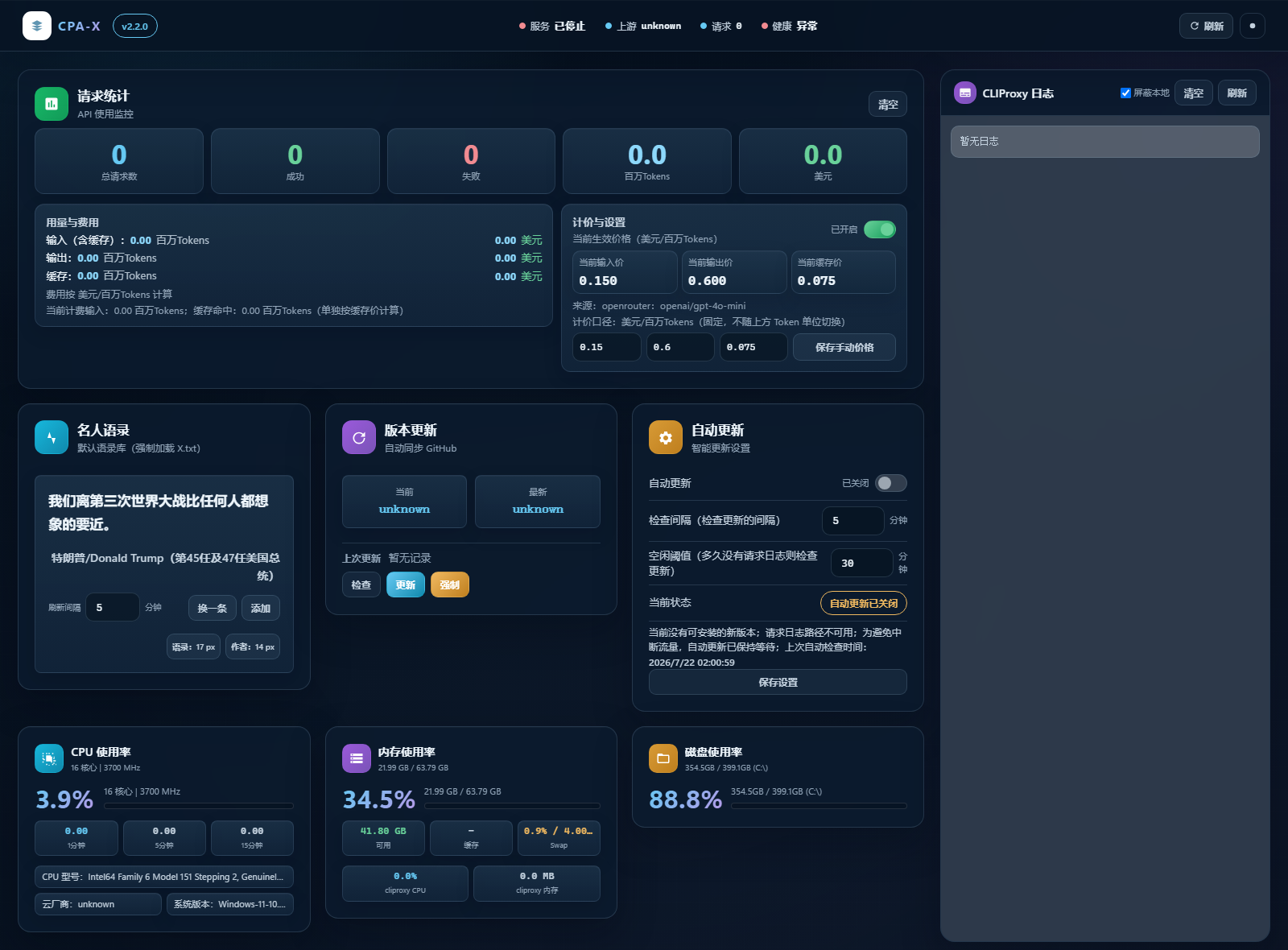
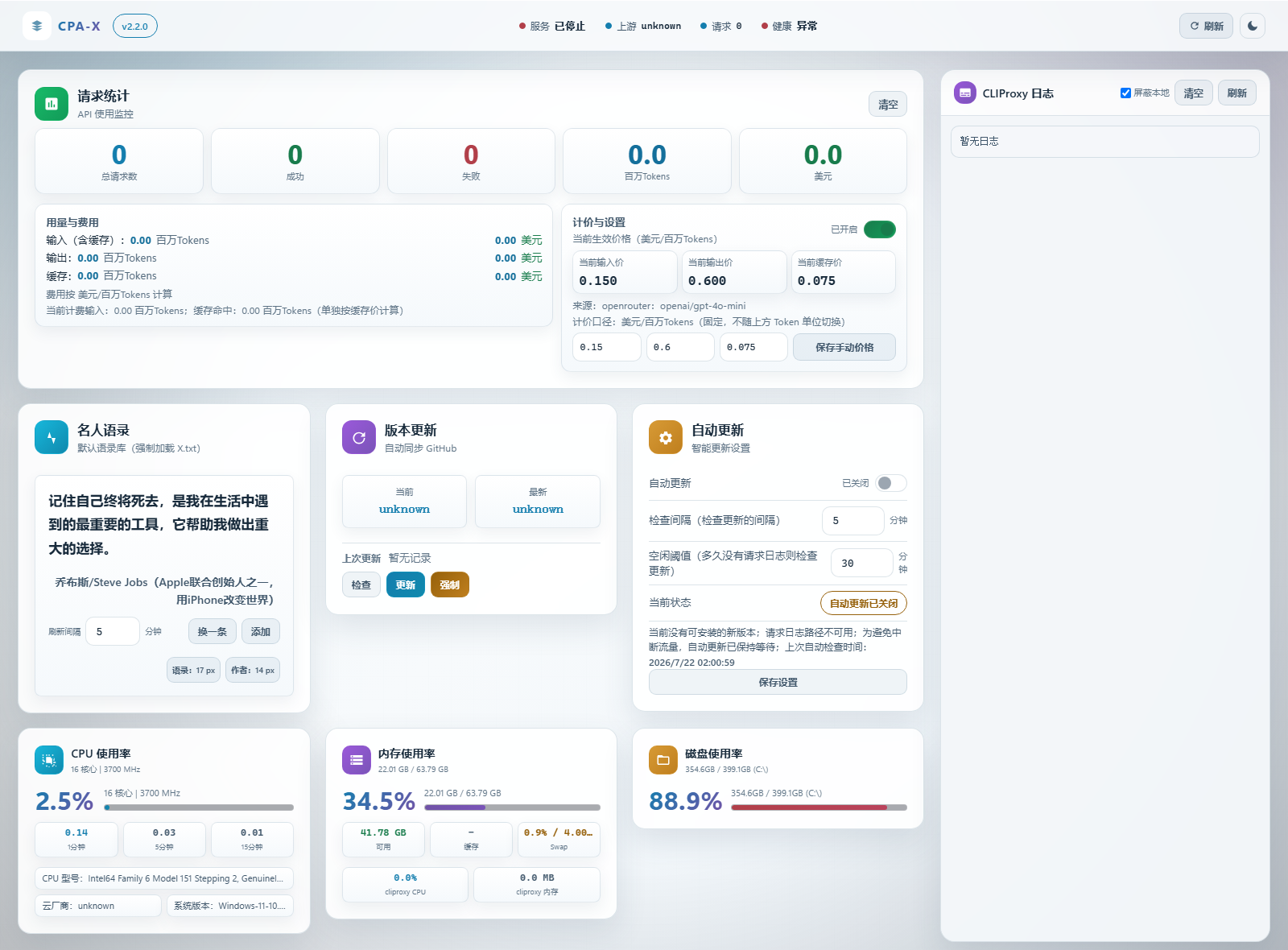
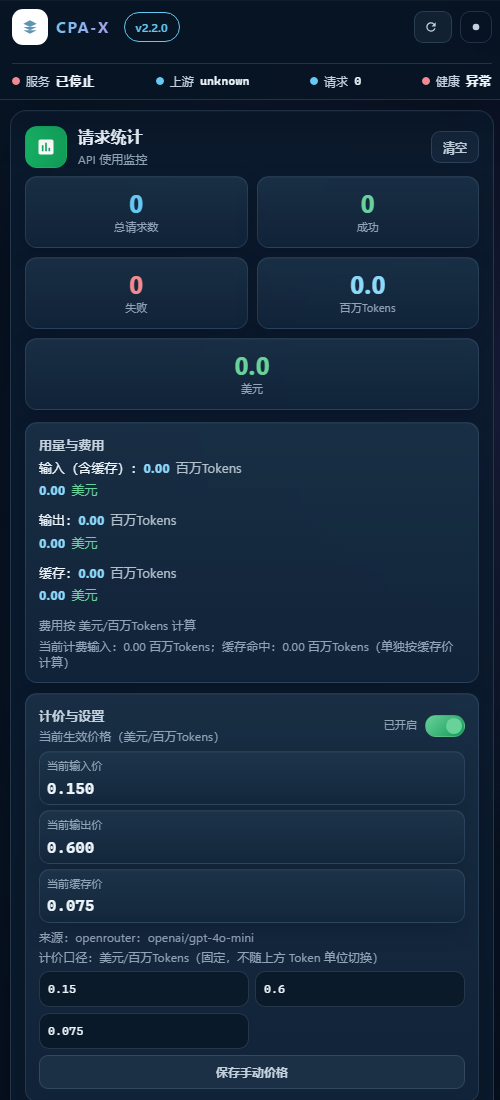
- 全新深色/浅色响应式 UI,支持桌面、平板和手机,移除外部字体依赖并提高文字对比度。
- 增强访问控制、原子写入、输入校验、归档安全与资源限制。
最新界面截图
深色主题
浅色主题
移动端
完整更新说明 / Full Changelog
中文
这是一次完整的稳定性、时区、磁盘、性能与界面修复版本。
时区与自动更新
- CLIProxyAPI 的无偏移本地日志时间不再被错误追加
Z;API 统一输出 UTC RFC 3339,浏览器再转换为本地时间。 - 新增
auto、本机、固定 UTC 偏移和 IANA 时区支持;auto可处理面板容器与日志宿主机时区不同的场景。 - 日志缺失、时钟超前或时区无法可靠判断时,不再误判为空闲并打断流量。
- 更新版本改为语义比较,本地版本更高、
v前缀差异和预发布版本不会再误触发更新。 - 下载/校验或隔离构建在服务在线时完成;停机窗口只执行原子替换、启动和稳定性检查,失败自动回滚。
- release 默认强制校验 SHA-256,并拒绝不安全归档路径、链接、特殊文件、超大下载和超大解压内容。
磁盘与统计
- 二进制回滚点默认只保留 2 个,并同时限制保留天数和总逻辑大小;排序使用备份名中的创建时间,不再受
copy2保留 mtime 干扰。 - 清空统计不再复制或截断可能非常大的 CLIProxy 日志,彻底移除该路径造成的磁盘膨胀和日志丢失。
- 首次日志扫描默认限制为最近 64 MiB,之后按 inode/偏移增量解析,支持轮转、截断和未写完的尾行。
- 上游用量接口暂时断线时,磁盘快照只用于显示,不再被当成计数器归零;并发刷新、恢复连接和上游重启不再重复累计。
- 同时兼容 CLIProxyAPI v6 累计用量接口与 v7 短期用量队列;队列按 15 秒轮询并立即持久化,模式切换不会重复计数。
- 上游离线期间清空统计会等待首个实时快照作为新基线,避免旧数据“复活”。
默认语录与后端质量
- 仓库根目录
X.txt现在始终强制加载;兼容缺少出自:和重复出自:的历史行,完整加载当前 181 条内容。 - 配置、统计、历史记录与
.env改用同目录临时文件 +fsync+ 原子替换;密钥文件默认使用严格权限。 - 移除 shell 命令拼接,校验 systemd unit、URL、价格、请求头、配置大小和 API 测试目标。
- 默认同源 API;跨域必须显式配置来源。新增安全响应头和无需密钥、只暴露最小信息的
/api/healthz。 - 生产启动优先使用 Waitress;后台标签页暂停前端轮询,上游故障增加短暂退避,降低无效请求与阻塞。
- 修复安装器首次复制示例配置后无法写入自动探测路径的问题,并可发现已停止的 systemd unit。
前端
- 移除 Google Fonts 网络依赖,采用跨平台系统字体与等宽数字字体栈。
- 重做深色/浅色配色、表面层次、字体对比度、间距和焦点状态。
- 移除卡片固定高度与整页
overflow: hidden,新增桌面、平板和手机布局,长语录、设置和日志不再裁切。 - 字号下限提高到 12px;语录默认 17px,取消长时间打字机动画,优先保证阅读。
- 补齐按钮类型、输入框名称、键盘开关状态与减少动画偏好;修复验证结果和模型字段的 HTML 注入风险。
- 日志区“清空”现在只清除当前浏览器显示,不再修改服务日志文件。
验证
- 新增 pytest 回归测试,覆盖语录、时区、URL、语义版本、日志增量/轮转/半行、空闲安全、断线统计、备份淘汰、访问控制、安装器和响应式 DOM。
- Python 编译、Ruff、Bandit(无高危项)、JavaScript 语法、DOM/可访问性和 Docker Compose 配置均纳入发布检查。
English
This is a comprehensive stability, time-zone, disk-usage, performance, and UI repair release.
Time zones and updates
- Offset-less CLIProxyAPI local timestamps are no longer mislabeled with
Z; APIs emit UTC RFC 3339 and browsers localize it. - Added automatic inference, system-local, fixed-offset, and IANA time-zone modes, including host/container time-zone mismatches.
- Missing logs or clock skew can no longer be mistaken for idle time and interrupt live traffic.
- Update checks now use semantic version ordering.
- Downloads/checks or isolated source builds happen while the service remains online; only atomic replacement and startup validation require downtime, with rollback on failure.
- SHA-256 verification is required by default, and unsafe or oversized release archives are rejected.
Disk and statistics
- Binary rollback points default to two and are capped by count, age, and total logical size.
- Clearing statistics no longer copies or truncates large service logs.
- Initial log parsing is bounded to the latest 64 MiB, then continues incrementally across partial lines, truncation, and rotation.
- Cached outage snapshots no longer reset or double-count live usage, and offline clears establish a fresh baseline on recovery.
- Supports both the CLIProxyAPI v6 cumulative endpoint and v7 short-lived usage queue, with 15-second durable polling and transition baselines.
Quotes, backend, and deployment
- Repository-root
X.txtis always loaded; all 181 current lines are preserved, including legacy malformed source markers. - Persistent files and
.envuse atomic writes; shell command composition was removed and sensitive inputs are validated. - API access is same-origin by default, security headers were added, and
/api/healthzprovides a minimal unauthenticated liveness probe. - Waitress is the preferred production server. The installer now applies detected paths on first install and detects inactive systemd units.
Frontend and verification
- Removed Google Fonts, redesigned both themes for higher contrast, removed clipping/fixed card heights, and added complete desktop/tablet/mobile layouts.
- Improved minimum font sizes, focus states, input labels, keyboard switch semantics, reduced-motion support, and dynamic-content escaping.
- Added regression coverage for the critical time-zone, update-safety, disk, usage, installer, security, quote, log, and responsive-DOM paths.
CPA-X v2.1.2
CPA-X v2.1.2 Release Notes / 更新说明
中文
这是一次稳定性与安全保护补丁,重点修复自动备份堆积、CPA 管理密钥错误重试、以及默认语录库缺失问题。
修复
- 自动更新创建 CLIProxyAPI 二进制备份后,现在只保留最近 5 个备份。
- 旧的同名备份会自动清理,避免长时间运行后备份文件无限增长。
- CPA 管理密钥连续 10 次返回 401/403 后,面板会暂停继续请求管理接口,避免错误密钥无限重试导致上游封禁。
- 保存新的 CPA 管理密钥后,会自动解除暂停并重置失败计数。
改进
- 面板新增显眼的 CPA 管理密钥错误横幅,并提供手动保存新密钥入口。
/api/status和/api/config/management-key会返回管理密钥状态,便于前端提示和自动化检查。- 默认名人语录库改为项目根目录
X.txt,并随仓库发布,避免默认语录为空。 .env.example、.env.docker.example和 README 已补充CLIPROXY_PANEL_QUOTES_PATH说明。
English
This is a stability and safety patch focused on backup retention, CPA management key retry protection, and the default quote library.
Fixes
- Auto-update binary backups now keep only the latest 5 backup files.
- Older matching backups are removed automatically to prevent unbounded disk growth.
- After 10 consecutive 401/403 responses from the CPA management API, the panel stops further management API requests to avoid repeated invalid-key retries.
- Saving a new CPA management key resets the failure counter and unlocks management API requests.
Improvements
- Added a prominent management-key error banner with a manual key update field.
/api/statusand/api/config/management-keynow expose management key health for UI and automation checks.- The default quote library now uses repository-root
X.txt, which is included in the release. .env.example,.env.docker.example, and README now documentCLIPROXY_PANEL_QUOTES_PATH.
CPA-X v2.1.1
CPA-X v2.1.1 Release Notes / 更新说明
This file keeps GitHub Release notes and README references in sync.
这个文件用于让 GitHub Release 和 README 保持同步。
中文(v2.1.1)
一句话说明
这是一个补丁版更新。主要目的有两个:
一是把“当前主分支最新代码”和“GitHub 最新发行版”重新对齐,避免你看到“代码已经变了,但发行版还是几天前”的混淆;
二是把这段时间已经完成的界面、文档和安全收口,统一体现在一个新的正式发行版里。
你能直接感受到的变化
- 自动更新卡片现在会直接告诉你:
- 有没有新版本
- 现在是不是空闲
- 还要等多久才会进入空闲
- 下次自动检查还要等多久
- 为什么现在还没有自动更新
- 前端已经移除导出入口,避免把敏感内容通过浏览器下载链接带出去。
- 主配置写回默认关闭,面板现在更偏“查看 + 自动更新”,不再默认改线上主配置。
这次补发版主要解决什么
- 之前
v2.1.0的 Release 发布时间还是旧的,所以很容易让人误以为“发行版没更新”。 - 现在单独发出
v2.1.1,这样 GitHub 上看到的最新 Release、发布时间、说明文字、主分支代码就一致了。 - 文档、README、Release 说明、预览图都已经和当前界面同步。
如果你是普通用户,需要知道什么
- 想看状态、日志、统计、模型:照常使用。
- 想用自动更新:照常使用,状态说明会比以前更清楚。
- 想修改主配置:现在默认不允许。
只有你明确接受风险,才需要在.env里手动设置:
CLIPROXY_PANEL_CONFIG_WRITE_ENABLED=true
这版还同步了什么
- README 英文版、中文版都换成了最新界面预览图。
- 旧的历史说明文档已经清理,仓库里的说明文件更清楚,不容易看混。
- 这次 Release 同时附带中文和英文说明,而且改成了更容易读懂的写法。
English (v2.1.1)
Short version
This is a patch release. It has two goals:
first, to realign the latest code on main with the latest GitHub Release, so users do not get confused by “the code has changed, but the release still looks old”;
second, to ship the recent UI, docs, and safety updates as one clear official release.
What users will notice
- The auto-update card now clearly shows:
- whether a new version is available
- whether the system is idle right now
- how long until the idle condition is met
- how long until the next auto-check
- why auto-update has not started yet
- Frontend export entries are removed to reduce the risk of exposing sensitive data through browser download links.
- Main-config writeback is now disabled by default. The panel is safer out of the box and no longer edits the live main config unless you explicitly allow it.
What this patch release fixes
- The old
v2.1.0release could look outdated because the release page still showed an older publish time. v2.1.1is published so the latest Release page, publish time, release notes, and currentmainbranch all line up again.- Docs, README, release notes, and preview screenshots are now aligned with the current UI.
What normal users need to know
- If you only need status, logs, stats, or models: nothing gets harder.
- If you use auto-update: it should now be much easier to understand what it is waiting for.
- If you want to edit the main config: it is blocked by default.
Only enable it if you fully accept the risk by setting:
CLIPROXY_PANEL_CONFIG_WRITE_ENABLED=true
Also updated in this release
- English and Chinese README files now use the latest built-in UI screenshots.
- Old historical docs were removed so the repo is easier to understand.
- The release notes are provided in both Chinese and English, using simpler wording.
CPA-X v2.1.0
CPA-X v2.1.0 Release Notes / 更新说明
This file keeps GitHub Release notes and README references in sync.
这个文件用于让 GitHub Release 和 README 保持同步。
中文(v2.1.0)
一句话说明
这次更新主要做了三件事:
让自动更新更好懂、让高风险操作默认更安全、让文档和预览图全部同步到最新状态。
你能直接感受到的变化
- 自动更新卡片现在会直接告诉你:
- 有没有新版本
- 现在是不是空闲
- 还要等多久才会进入空闲
- 下次自动检查还要等多久
- 为什么现在还没有自动更新
- 前端已经移除导出入口,避免把敏感内容通过浏览器下载链接带出去。
- 主配置写回默认关闭,面板现在更偏“查看 + 自动更新”,不再默认改线上主配置。
修复了什么问题
- 修复空闲判断时间不准的问题。
以前有时会把“已经空闲”误判成“还在忙”,现在改好了。 - 自动更新状态不再只给一个模糊结果,前端会显示更具体的原因和倒计时。
- 文档、README、Release 说明、预览图都已经和当前界面同步。
如果你是普通用户,需要知道什么
- 想看状态、日志、统计、模型:照常使用。
- 想用自动更新:照常使用,状态说明会比以前更清楚。
- 想修改主配置:现在默认不允许。
只有你明确接受风险,才需要在.env里手动设置:
CLIPROXY_PANEL_CONFIG_WRITE_ENABLED=true
这版还同步了什么
- README 英文版、中文版都换成了最新界面预览图。
- 旧的历史说明文档已经清理,仓库里的说明文件更清楚,不容易看混。
English (v2.1.0)
Short version
This release focuses on three things:
clearer auto-update status, safer defaults for risky actions, and fully synced docs / screenshots.
What users will notice
- The auto-update card now clearly shows:
- whether a new version is available
- whether the system is idle right now
- how long until the idle condition is met
- how long until the next auto-check
- why auto-update has not started yet
- Frontend export entries are removed to reduce the risk of exposing sensitive data through browser download links.
- Main-config writeback is now disabled by default. The panel is safer out of the box and no longer edits the live main config unless you explicitly allow it.
What was fixed
- Fixed incorrect idle-time calculation.
In some cases, the panel could think the system was still busy even when it was already idle. - Auto-update status is now easier to understand, with clearer reasons and countdowns.
- Docs, README, release notes, and preview screenshots are now aligned with the current UI.
What normal users need to know
- If you only need status, logs, stats, or models: nothing gets harder.
- If you use auto-update: it should now be much easier to understand what it is waiting for.
- If you want to edit the main config: it is blocked by default.
Only enable it if you fully accept the risk by setting:
CLIPROXY_PANEL_CONFIG_WRITE_ENABLED=true
Also updated in this release
- English and Chinese README files now use the latest built-in UI screenshots.
- Old historical docs were removed so the repo is easier to understand.
CPA-X v2.0.0
CPA-X v2.0.0 Release Notes / 更新说明
本文件用于 GitHub Release 与 README 的同步更新(中英双语)。
This file is intended to keep GitHub Releases and README in sync (bilingual).
中文(v2.0.0)
亮点(面向 AI 部署/运维)
- 新增
scripts/doctor.py:自动探测 systemd unit / 二进制路径 / config.yaml / auth_dir / 日志路径,并 只补缺省值 写入.env(避免覆盖用户显式配置)。 - 仓库文档升级为 AI-first:
AGENTS.md、AI_DEPLOY_CN.md提供可执行闭环与验收方式。 - 增加 Docker/容器部署支持:
Dockerfile、docker-compose.yml、.env.docker.example、.dockerignore(明确容器场景的功能边界)。
正确性与体验
- Token 口径修正:
total_tokens不再重复计入cached_tokens;费用计算不再对 cached 重复计费。 - Tokens 单位自适应:总 tokens 显示按规模自动切换 百万 → 千万 → 亿(超过亿固定为亿)。
- 自动更新设置体验修复:输入框不再被 5 秒轮询刷新“打回原值”。
更新稳定性
- GitHub 限流鲁棒性:更新检测/下载在 API 失败时具备 fallback,减少
latest=unknown。 - Release 更新增强:支持多种二进制名识别;更新前备份,启动失败自动回滚。
- 安全解压:防止 tar 路径穿越与链接条目。
定价(费用估算)
- 新增“价格自动同步”(默认开启):当手动价格为 0 时,从 OpenRouter 同步权威定价并换算为“美元/百万Tokens”;手动价格仍然优先,可一键关闭自动同步。
安全默认值(可能影响部署方式)
- 面板默认监听
127.0.0.1(更安全)。如需局域网访问,请显式设置CLIPROXY_PANEL_BIND_HOST=0.0.0.0。 - 可选设置
CLIPROXY_PANEL_PANEL_ACCESS_KEY,启用后/api/*需要携带X-Panel-Key或panel_key。
English (v2.0.0)
Highlights (AI-first deployment & operations)
- Added
scripts/doctor.py: auto-detects systemd unit / binary / config.yaml / auth_dir / log path and writes missing defaults into.env(never overwrites non-empty values by default). - Upgraded documentation for AI agents:
AGENTS.mdandAI_DEPLOY_CN.mddescribe the full deploy + verify loop. - Added Docker/container support:
Dockerfile,docker-compose.yml,.env.docker.example,.dockerignore(with clear feature boundaries for container mode).
Correctness & UX
- Fixed token accounting:
total_tokensno longer double-countscached_tokens; cost estimation no longer double-charges cached tokens. - Adaptive token units: total tokens auto switches M → 10M → 100M (stays at 100M scale above that).
- Fixed auto-update settings UX: inputs no longer get overwritten by the 5s polling refresh.
Update robustness
- GitHub rate-limit resilience: version check/download includes a fallback path to reduce
latest=unknown. - Release update hardening: supports multiple binary names; backup + rollback on start failure.
- Safer tar extraction: blocks path traversal and link entries.
Pricing (cost estimation)
- Auto pricing sync (enabled by default): when manual pricing is 0, fetches authoritative pricing from OpenRouter and converts to “USD per 1M tokens”. Manual overrides remain priority, and auto sync can be disabled.
Security defaults (may affect deployments)
- Default bind host is
127.0.0.1(safer). For LAN access, setCLIPROXY_PANEL_BIND_HOST=0.0.0.0. - Optional
CLIPROXY_PANEL_PANEL_ACCESS_KEY: when set,/api/*requiresX-Panel-Keyorpanel_key.
v1.0.0
新增
- 一键安装脚本(Linux/Windows)
- AI 可读安装清单(install.json)
修复
- 过滤面板自发请求,避免影响自动更新
- 安装脚本支持含空格路径与 Windows python/py
使用
- Linux: bash scripts/install.sh
- Windows: powershell -ExecutionPolicy Bypass -File scripts/install.ps1