Bug: Folders ending with a dot character aren't displayed properly #10169

Description

Description
Files does not display correctly WSL folders ending with a dot, and cannot interact with them (no way to open a directory named toto... for example).
Steps To Reproduce
- Open a terminal in WSL
- Create a folder named
foo...by typingmkdir foo... - Navigate to this directory in Files (for example:
\\wsl$\Ubuntu-22.04\tmp)
Notice how:
- the folder's name is
fooinstead offoo... - double-clicking on the folder does nothing
Steps to fix
- Allow users to properly navigate to these locations
- Display the proper name
Files Version
Version 2.13.12.0
Windows Version
version 10.0.19044.2075
Relevant Assets/Logs
Screenshot of Files displaying the tmp folder, and below how the folder is supposed to look like:
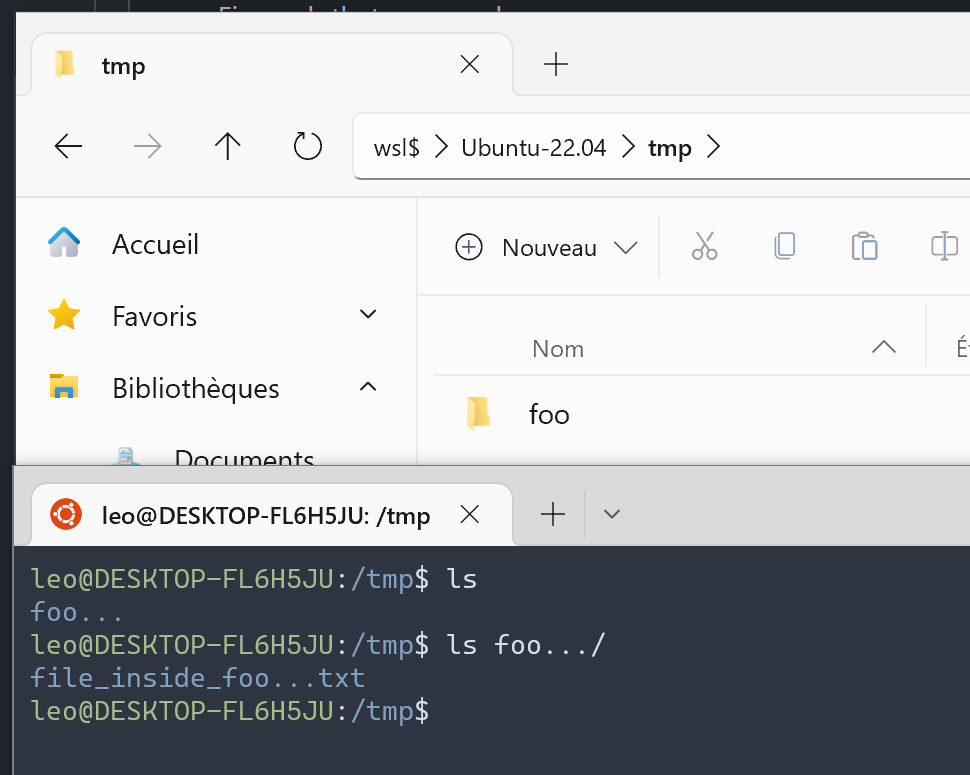
explorer.exe displays the folder correctly but cannot access it:

react-explorer can display and access it correctly:
