Is your feature request related to a problem?
Depending of the size of the file list the preview pane is either to the right or at the bottom.
This is a bit uncomfortable when e.g. previewing documents (pdf or word): The preview is often to small and with two (file) panes it happens that one pane shows the preview to the right and the other at the bottom.
Also the details pane is not always needed and it should be possible to hide it.
Describe the solution
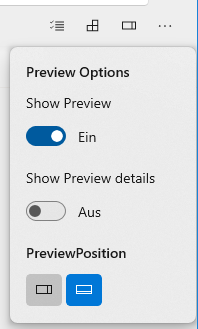
The "Toggle the preview pane" Buttons should be extended to a flyout menu providing the following options:
- Show Preview (On / Off)
- Show Preview Details (On / Off)
- Set Preview Position (Right / Bottom)
Example:
Remarks:
- Should the preview pane options be valid only for the current tab or for all tabs?
- Instead of a simple fly out: A split button could be useful to quickly toggle the preview pane and setting the options when expanding the menu.
- Position and size of the pane could be applied on all tabs whereas toggling the pane could be per tab / file pane
Scope
| Capability |
Priority |
| Add flyout menu with the options mentioned above |
Must |
| Synchronize the selected options (inclusive position and size?) in the AppSettings |
Must |
| Load preview pane options (inclusive position and size) from the AppSettings at start up |
Must |
| Remove size limitation of preview pane |
Should |
| Translations |
Should |
Additional comment
I already implemented a working version of the proposal, but not all requirements are fulfilled. So in case you are interested tell me how to commit the code (branch?).

Is your feature request related to a problem?
Depending of the size of the file list the preview pane is either to the right or at the bottom.
This is a bit uncomfortable when e.g. previewing documents (pdf or word): The preview is often to small and with two (file) panes it happens that one pane shows the preview to the right and the other at the bottom.
Also the details pane is not always needed and it should be possible to hide it.
Describe the solution
The "Toggle the preview pane" Buttons should be extended to a flyout menu providing the following options:
Example:

Remarks:
Scope
Additional comment
I already implemented a working version of the proposal, but not all requirements are fulfilled. So in case you are interested tell me how to commit the code (branch?).