Boundary conditions
ℹ️ Updated to BFDS 7.2.x and Blender 5.2.x
This wiki page explains how to set and link boundary conditions to the object geometries.
- The Blender Object and its Material data-blocks
- Setting the boundary condition of
OBSTandVENTnamelists - Setting the boundary conditions of
GEOMnamelists - Disappearing
SURF
Blender Material data-blocks controls the appearance of a Blender Object:
its color, texture, and how the light interacts with it.
The shape of each object can be decorated by one or more materials.
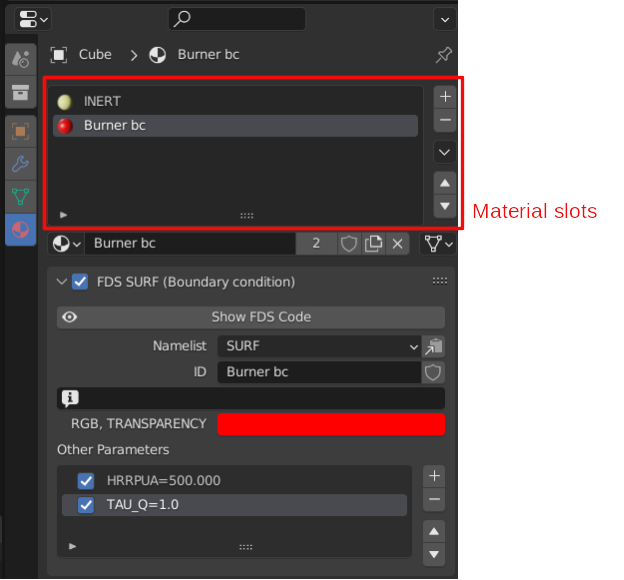
At the very top of the Material tab of the Properties panel, you find the material slots,
the list of all the materials that are referenced by the object
and can be used to set the appearance of the shape faces.
When looking at the list of the material slots, the currently selected slot sets the active material.
As with all Blender data-blocks, even Blender Material data-blocks can be shared
between objects and .blend files.
BFDS uses those same materials to define the boundary conditions, by:
- exporting/importing the corresponding
SURFnamelists, and - applying them to specific namelists through the
SURF_IDparameter.
In BFDS, the active material of the object with OBST and VENT namelists
is exported as its SURF_ID boundary condition.
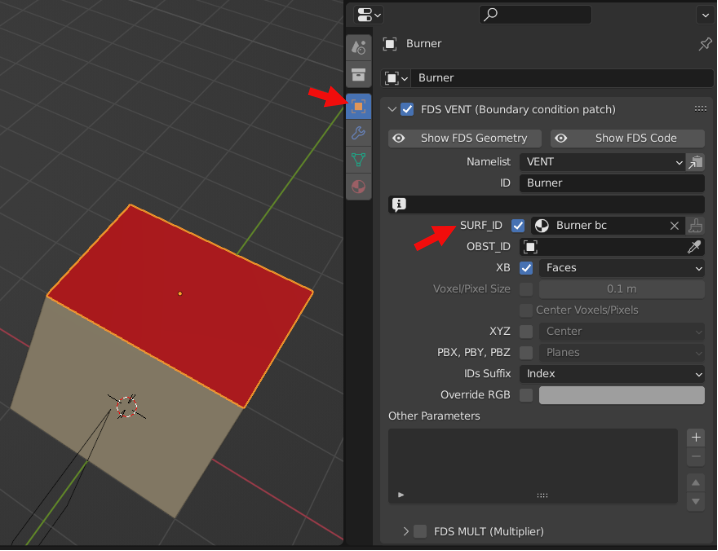
The Material tab of the Properties panel contains the parameters of the linked SURF namelists.
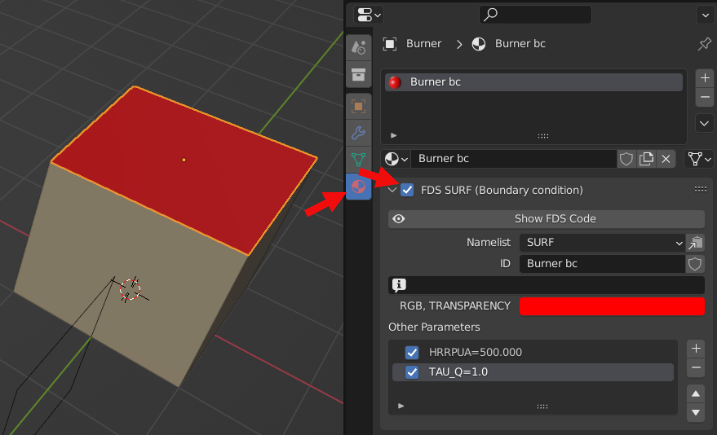
By default, the SURF namelist gets exported only when called by any of the exported objects.
Here is an example of the exported FDS namelists:
&SURF ID='Burner bc' RGB=255,0,0 HRRPUA=500.0 /
&VENT ID='Burner' SURF_ID='Burner bc' XB=-1.,1.,-1.,1.,1.,1. /
Conversely, the SURF_IDS and SURF_ID6 parameters of the OBST namelist are not supported.
If you need to define different boundary conditions on the faces of an OBST parallelepiped,
add one or more VENTs over the appropriate faces.
The GEOM geometric namelist extends the traditional box-shaped OBST obstacle
to a free-form obstacle in the fluid domain, as explained in the complex geometries page.
With GEOM, you can assign different boundary conditions to each face of the triangulated surface.
The available boundary conditions are linked into the GEOM line by the SURF_ID parameter.
and then applied to each face through an index in the FACES parameter.
See the FDS User's Guide for further details.
BFDS exports/imports these indices so each face is assigned to the right boundary condition from SURF namelists.
To add multiple boundary conditions to a GEOM object:
- add several
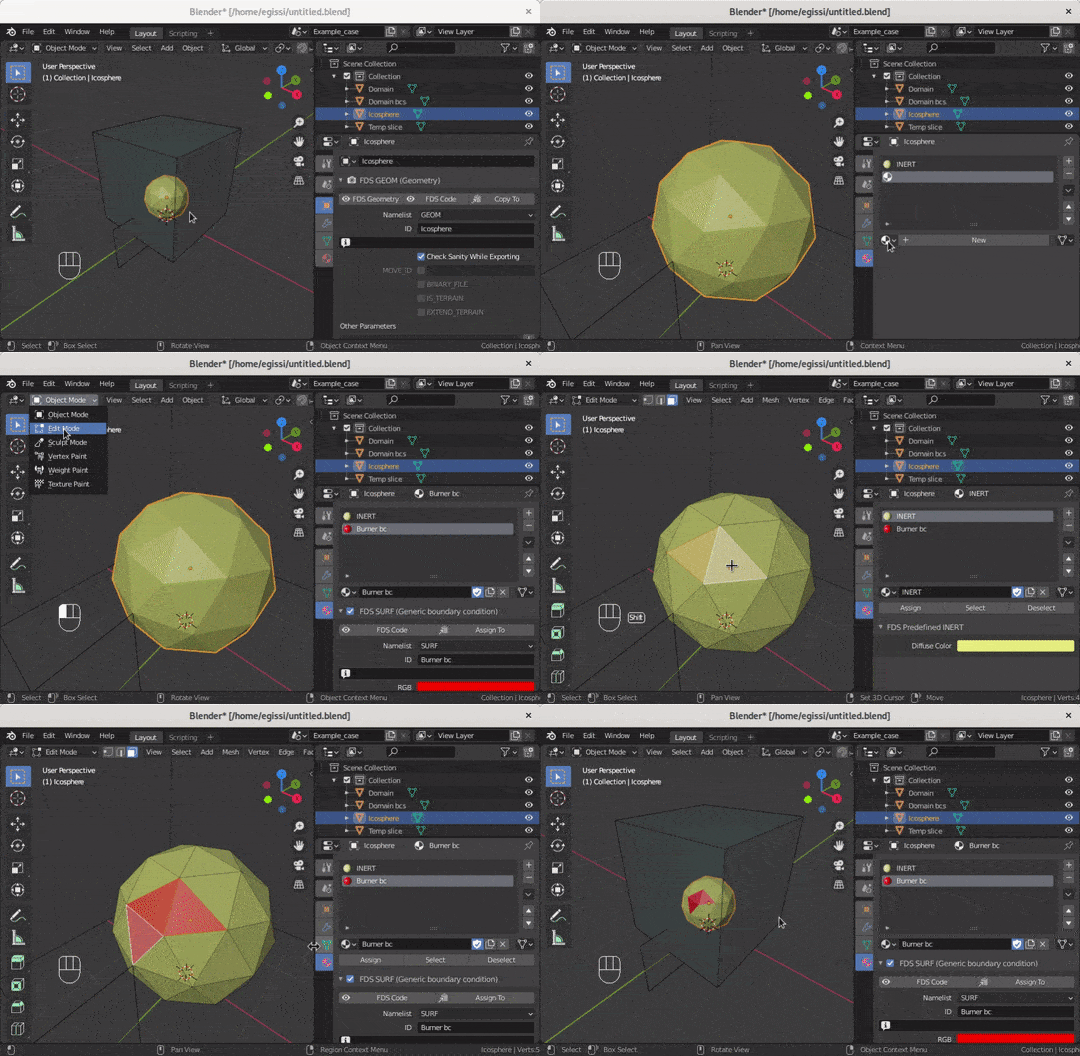
Blender Materialdata-blocks to itsMaterial slots, - then assign each material to selected faces of the object’s shape.
The following screencast shows how to add a new Material to the Material slots
and then assign that boundary condition to a few faces of the Object shape.
Here is an example of the exported FDS namelists:
&SURF ID='Burner bc' RGB=255,0,0 HRRPUA=500.0 /
&GEOM ID='Example' SURF_ID='INERT','Burner bc' BINARY_FILE=... /When saving, Blender removes unused datablocks.
So if the Blender Material that exports a certain SURF namelist is not referenced
by any Blender Object it is automatically purged.
To prevent this, enable the Fake User shield in the Material Property tab.
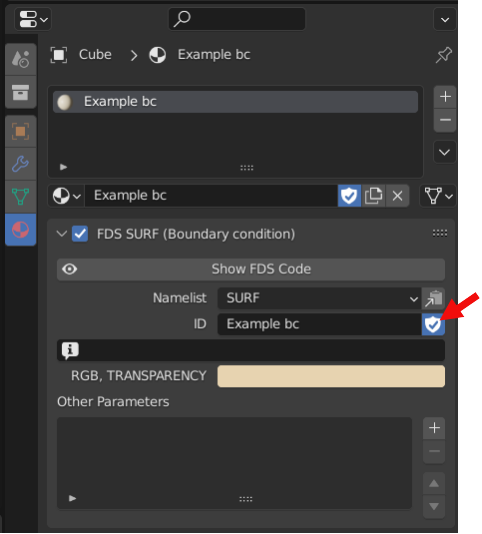
See the Material Slots page of the Blender Manual for further details.
See this page for a detailed explanation.