


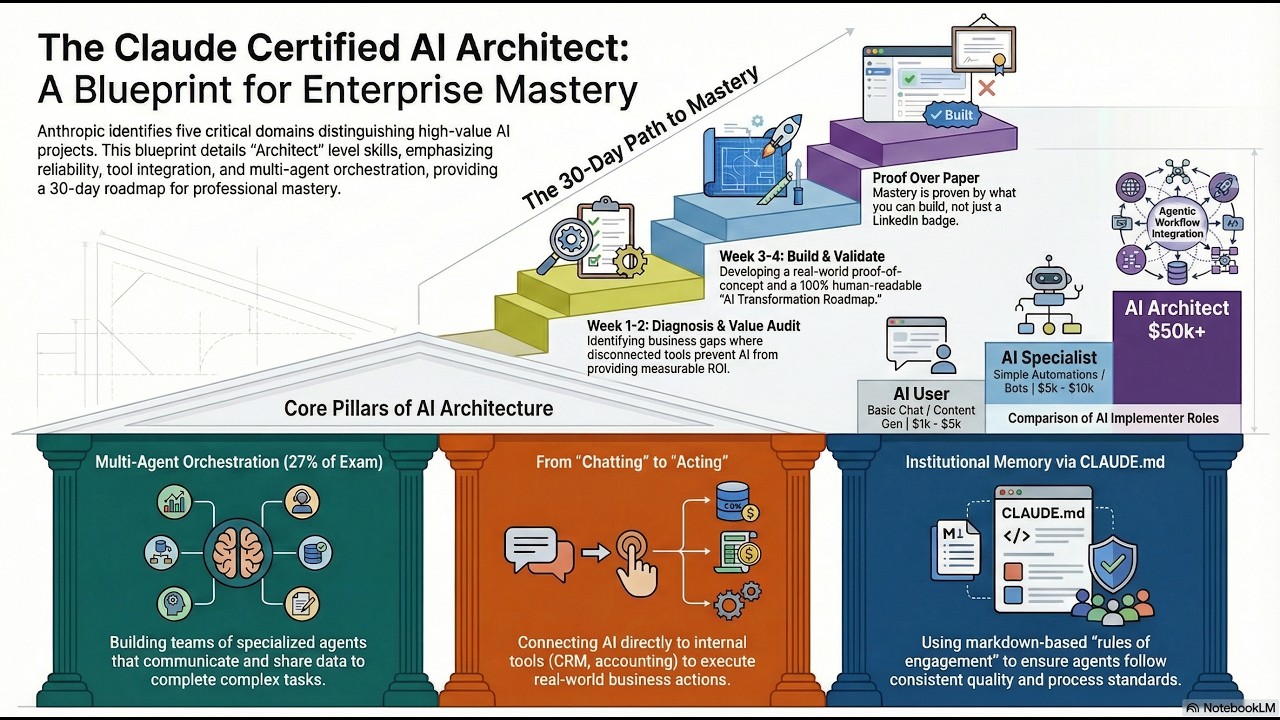
A complete study system for the Claude Certified Architect (CCA) track from Anthropic. It combines the long-form guide, captured course notes, cheat sheets, and a deployed study app in one repo.
- Live: cac-snowy.vercel.app
- Local:
npm install && npm run dev→ http://localhost:24301
| Component | What it is |
|---|---|
/cca skill |
Claude Code skill that coaches you through exam prep |
src/ |
Next.js 16 study dashboard — 17-course library, MCQ quizzes, diagrams gallery, Google sign-in |
guides/ |
Entry point for long-form guides and study references |
courses/ |
Captured course notes, lesson indexes, and diagrams |
cheat/ |
Condensed cram sheets and quick-reference material |
| If you want to... | Open |
|---|---|
| Read the guide index | guides/README.md |
| Jump straight to the canonical exam guide | docs/cca-guide.md |
| Browse the captured course library | courses/README.md |
| Review the cheat sheets | cheat/README.md |
| Launch the study dashboard | src/ — run npm run dev |
The repo now has four primary entry points:
guides/README.mdfor long-form orientation and study pathsdocs/README.mdfor canonical source documentscourses/README.mdfor the imported 17-course librarycheat/README.mdfor fast review material
The Next.js dashboard in src/ mirrors the imported courses/ content so the study dashboard and repo content stay aligned.
The courses/ folder currently includes 17 Anthropic course captures (141 lessons with full ~530-word markdown notes, 27 outline-only lessons) ranging from Claude 101 and Claude Code 101 through MCP, subagents, agent skills, and AI fluency tracks. Every lesson renders in the dashboard with a hero image, diagram, and video link.
The quiz and long-form guide still map back to the five exam domains:
- Prompt Engineering & AI Fluency
- Claude Code Development
- Agentic Architecture
- Model Context Protocol
- Projects, Artifacts & Skills
- Global top header — sticky bar shows
CCA · v2.1on the left and a Sun/Moon theme toggle on the right; theme toggle moved out of the footer to a single canonical slot. - Full lesson assets on every page — extended the lesson schema with
diagram/image/videofields. Each of the 168 lessons now renders (a) a course-branded SVG hero, (b) a diagram (topic PNG for the 141 captured lessons, generated inline SVG for the 27 outline lessons), (c) a video link card to Anthropic's YouTube channel (per-lesson video IDs can be added viascripts/lesson-videos.json). - Prebuild asset pipeline —
scripts/generate-lesson-assets.mjsregeneratespublic/lessons/**from source PNGs undercourses/**on everynpm run dev/npm run build. Generated media is gitignored so the repo stays lean; Vercel rebuilds it on each deploy. - Bug fix — the lesson detail page was resolving markdown paths at
../(from the pre-flatten layout) and reading files outside the repo. Fixed to resolve atprocess.cwd().
Follow-up: move generated media to s3://com27/cca/lessons/ via /abc-s3 once the central S3 credentials are rotated (current keys return InvalidAccessKeyId).
- Start in guides/README.md to understand the overall study path.
- Read the main guide in docs/cca-guide.md.
- Work through the imported course notes in courses/README.md.
- Use cheat/CHEAT.md for review and memorisation.
- Run
npm run devand open http://localhost:24301 for progress tracking and quiz practice.
| Resource | Purpose |
|---|---|
| Guides index | Long-form reference material in this repo |
| Docs index | Canonical source documents |
| Courses index | Lesson-by-lesson notes from captured training courses |
| Cheat index | Fast review sheets and memorisation aids |
| Anthropic Cookbook | Canonical code examples |
| Skilljar Training Courses | Official Anthropic training modules |
| claudecertifications.com | Certification portal and reference material |
| Live study app | Production deployment on Vercel |
cca/                        # github.com/flexappdev/cca → cac-snowy.vercel.app
├── README.md
├── LICENSE
├── package.json            # Next.js 16 app at repo root (Vercel auto-detects)
├── next.config.ts
├── vercel.json             # framework: nextjs (pinned for prod)
├── src/                    # Next.js dashboard — localhost:24301
│   ├── app/                # routes — /, /domains, /diagrams, /quiz, /progress, …
│   │   └── api/auth/       # NextAuth v5 [...nextauth] catch-all
│   ├── auth.ts             # NextAuth config (Google provider)
│   ├── components/         # QuizCard (MCQ), DiagramCard, AppHeader, SignInButton, …
│   ├── data/courses.json   # 17 courses, 168 lessons, 15 quiz questions
│   └── lib/
│       ├── courses.ts      # taxonomy + QUIZ_QUESTIONS with options/correctIndex
│       └── course-diagrams.tsx  # 17 inline editorial SVGs, one per course
├── scripts/
│   ├── generate-lesson-assets.mjs   # runs on prebuild + predev
│   └── lesson-videos.json           # optional per-lesson YouTube ID overrides
├── guides/
│   └── README.md           # Human-friendly guide index
├── docs/
│   ├── README.md           # Canonical docs index
│   └── cca-guide.md        # Comprehensive exam guide
├── courses/
│   ├── README.md           # Index of the 17 imported course folders
│   └── */index.md          # Per-course lesson navigation / capture status
├── .claude/
│   └── skills/
│       └── cca/
│           └── SKILL.md    # Claude Code /cca skill
└── cheat/
    ├── README.md           # Cheat-sheet index
    └── CHEAT.md            # Condensed quick-reference guide
The /cca Claude Code skill acts as an exam coach. Install it once, then invoke from any Claude Code session.
Install:
mkdir -p ~/.claude/skills/cca
curl -o ~/.claude/skills/cca/SKILL.md \
  https://raw.githubusercontent.com/flexappdev/cca/main/.claude/skills/cca/SKILL.md
Or manually: copy .claude/skills/cca/SKILL.md → ~/.claude/skills/cca/SKILL.md
Usage:
/cca               # Status + what to study next
/cca quiz          # Random practice question
/cca domain 3      # Deep dive into exam domain 3
/cca cheat         # Compact cheat sheet
/cca app           # Launch study dashboard at localhost:24301
/cca plan          # Personalised study plan
/cca resources     # Curated links
- Neon Postgres + Drizzle ORM added. Two tables:
lesson_completions(composite PK onuser_email + domain_id + lesson_id) andquiz_attempts(append-only history of every answer). Migration lives atdrizzle/0000_regular_saracen.sql. - Four new API routes —
GET /api/progressreturns the signed-in user's completions + attempts;POST /api/progress/lessonupserts/deletes a completion;POST /api/progress/quizappends an attempt;POST /api/progress/syncone-shot migrates anonymous localStorage progress on first sign-in. - Hybrid client store (
src/lib/progress.ts) — localStorage when signed out; on sign-in,activateRemoteFor(email)uploads any local progress once, then pulls the merged server snapshot into a synchronous in-memory cache sogetDomainProgressstays sync.ProgressSyncBridge(mounted insideAuthProvider) drives it fromuseSession(). - Quiz attempts persisted — every MCQ pick fires
POST /api/progress/quizwhen signed in. - Env:
DATABASE_URLin.env.example. If unset the app boots fine and everything stays local — API routes 503 cleanly.
- MCQ quizzes — all 15 questions across the 5 domains now render 4 hand-written options with instant right/wrong feedback and inline explanations. No more self-scoring.
/diagramspage — new gallery route with one editorial Cleverfox-style SVG per course (17 diagrams: layer stacks, agent loops, MCP architecture, orchestrator/worker nested, capabilities quadrant, etc.). Sidebar gains a Diagrams nav item.- Google Auth — sign-in button in the top-right header via NextAuth v5. Needs
AUTH_SECRET,AUTH_GOOGLE_ID,AUTH_GOOGLE_SECRETin.env.localand Vercel env vars (template at.env.example). - Light mode fix — 11 page containers were hard-coding
bg-[#0a0a0a]; now every route inheritsbg-slate-50 dark:bg-[#0a0a0a]so the theme toggle is finally clean.
Global top header, per-lesson diagram/image/video fields, Vercel file-tracer include for courses/** (fixed the empty-lesson bug), asset-generation scripts on prebuild.
Auth ships wired but inert until three env vars are set. About 5 minutes:
npx auth secret→ paste into.env.localasAUTH_SECRET=…- Create an OAuth 2.0 Client at console.cloud.google.com/apis/credentials:
- Origins:
http://localhost:24301,https://cac-snowy.vercel.app - Redirect URIs:
<each origin>/api/auth/callback/google
- Origins:
- Copy Client ID →
AUTH_GOOGLE_ID, Client Secret →AUTH_GOOGLE_SECRET - Add all three to Vercel (Settings → Environment Variables), redeploy
Until then the sign-in button renders but Google returns 400.
v2.1 delivered the first pass of the full-lessons ambition. Next milestones:
- ✅ Text (v2.1) — captured notes per topic in
courses/<n>-<slug>/<lesson>.md(141 lessons at ~530 words avg; 27 outline-only) - ✅ Diagrams (v2.1) — one diagram per lesson (topic PNG for captured, generated SVG for outline)
- ✅ Images (v2.1) — course-branded SVG hero per lesson
- ✅ Video (v2.1) — YouTube channel link card per lesson (per-lesson video IDs land via
scripts/lesson-videos.json) - ⏳ v2.2 — swap SVG heroes for
/iadNano Banana raster heroes; upload media tos3://com27/cca/lessons/via/abc-s3 - ⏳ v2.3 — 30–60s explainer video per lesson via
/abc-videospipeline - ⏳ v2.4 — long-form editorial diagrams via
/abc-diagramsskill (replaces the current topic PNGs for the 141 captured lessons)
MIT — Mat Siems, 2026