Floop Search v1.1.0

Floop Search


Track Navigation System for REAPER.

Overview
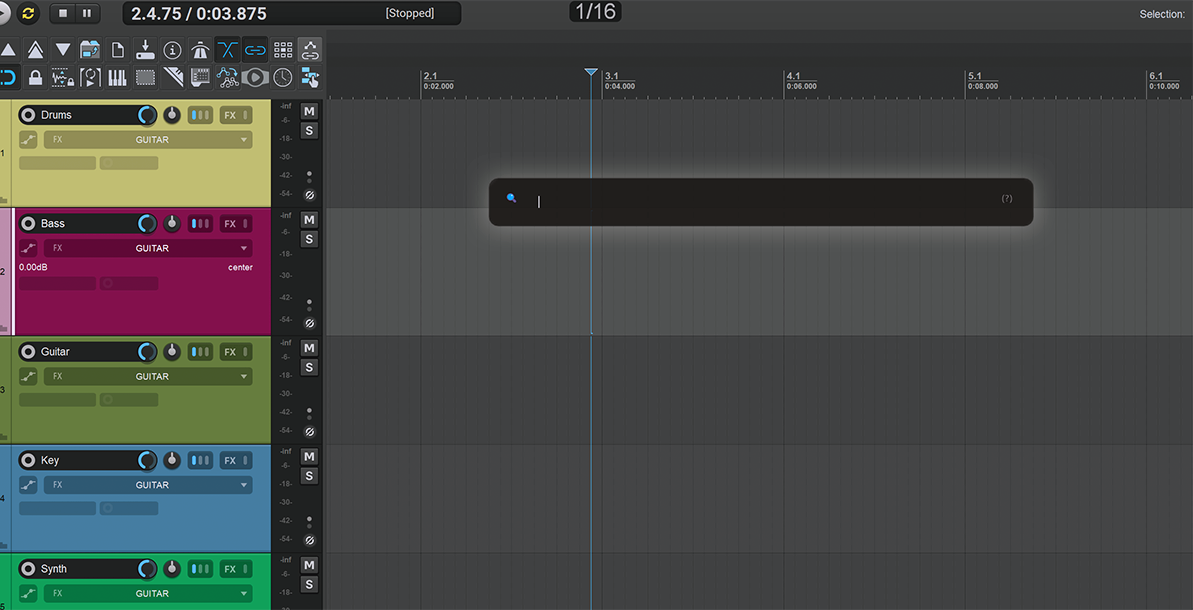
Floop Search is a Lua script for REAPER that brings a search bar for rapid track navigation, selection, and previewing.
It features a sleek, floating, animated interface that stays out of your way until you need it.
Designed for speed and keyboard-centric workflows, it allows you to find any track by name or track number without touching the mouse.
Screenshots

Key Features
- Modern Search UI: Floating search bar that animates and expands to show results.
- Fast Search: Instantly filter tracks by Name or Track Number.
- Multi-Query Support: Use a comma (
,) to search multiple groups at once (e.g. 'kick, snare'). - Keyboard Navigation: Full control using Arrow keys, Enter, and Esc.
- Preview Solo: Temporarily solo tracks while navigating results to quickly audition content (Hold ALT).
- State Restoration: Automatically restores original track selection, solo states, and colors upon exit.
- Undo Safe: All track selections are safely grouped into a single Undo block.
- Visual Feedback: Matches highlight colors (red) for clear visibility during navigation.
- Auto-Focus: Smart window focus handling for immediate typing.
Requirements
- REAPER v7.5x or later.
- ReaImGui: "ReaScript binding for Dear ImGui" installed via ReaPack. Minimum version required: 0.10.2+.
Compatibility
- REAPER: Developed and tested on v7.5x+ (Windows).
- Operating Systems:
- Windows: Fully tested and supported.
- macOS / Linux: Designed with cross-platform compatibility in mind, but not personally tested on these systems. Feedback is welcome!
Installation
The easiest way to install and keep the script updated is via ReaPack.
Method 1: ReaPack (Recommended)
-
Install Prerequisites:
- Open Extensions > ReaPack > Browse Packages.
- Search for and install:
ReaScript binding for Dear ImGuiSWS/S&M Extension
- Restart REAPER.
-
Add the Repository:
- Open Extensions > ReaPack > Import Repositories...
- Copy and paste this URL:
https://github.com/floop-s/floops-reaper-scripts/raw/main/index.xml - Click OK.
-
Install the Script:
- Open Extensions > ReaPack > Browse Packages.
- Search for
Floop Search. - Right-click > Install.
- Click Apply.
Method 2: Manual Installation
- Install ReaImGui:
- Go to Extensions > ReaPack > Browse Packages.
- Search for and install
ReaImGui. - Restart REAPER.
- Install the Script:
- Copy
Floop Search.luato your REAPER Scripts folder.
- Copy
- Load the Action:
- Open Actions List (
?). - Load
Floop Search.lua. - (Recommended) Assign a Global + Text shortcut (e.g.,
Ctrl+Space) to launch/toggle while typing.
- Open Actions List (
Usage
- Launch the script.
- Type to search:
- Part of a name (e.g., "Voc", "Kick").
- Track number (e.g., "12").
- Navigate:
- UP / DOWN: Move through results.
- ALT (Hold): Preview Solo the highlighted track.
- Confirm:
- ENTER: Select track, scroll to view, expand parents, and close script.
- Cancel:
- ESC: Close without changes (restores previous state).
Troubleshooting
- "ReaImGui API not found": Install ReaImGui via ReaPack.
- Shortcut not working: Ensure Scope is "Global + Text".
Support Development
If you find my scripts useful and want to support their development, you can buy me a coffee on Ko-fi:

Author
Developed by Flora Tarantino
Project home: https://www.floratarantino.com/floop-reaper-scripts/
License
Licensed under the GNU General Public License v3.0 (GPL-3.0)
See the LICENSE.txt file in the main repository for details.