Floop Studio Trainer v1.3

Floop Studio Trainer


A tempo-training tool for REAPER.
Overview
Floop Studio Trainer is a Lua script for REAPER that allows you to practice your instrument inside REAPER using either an audio track or the metronome. You can set the number of repetitions for a selected section and define how many BPM to increase at a time.
Once configured, the script automatically increases the project BPM after each cycle, enabling uninterrupted practice without manual interaction.
The script also displays the remaining repetitions.
Screenshots
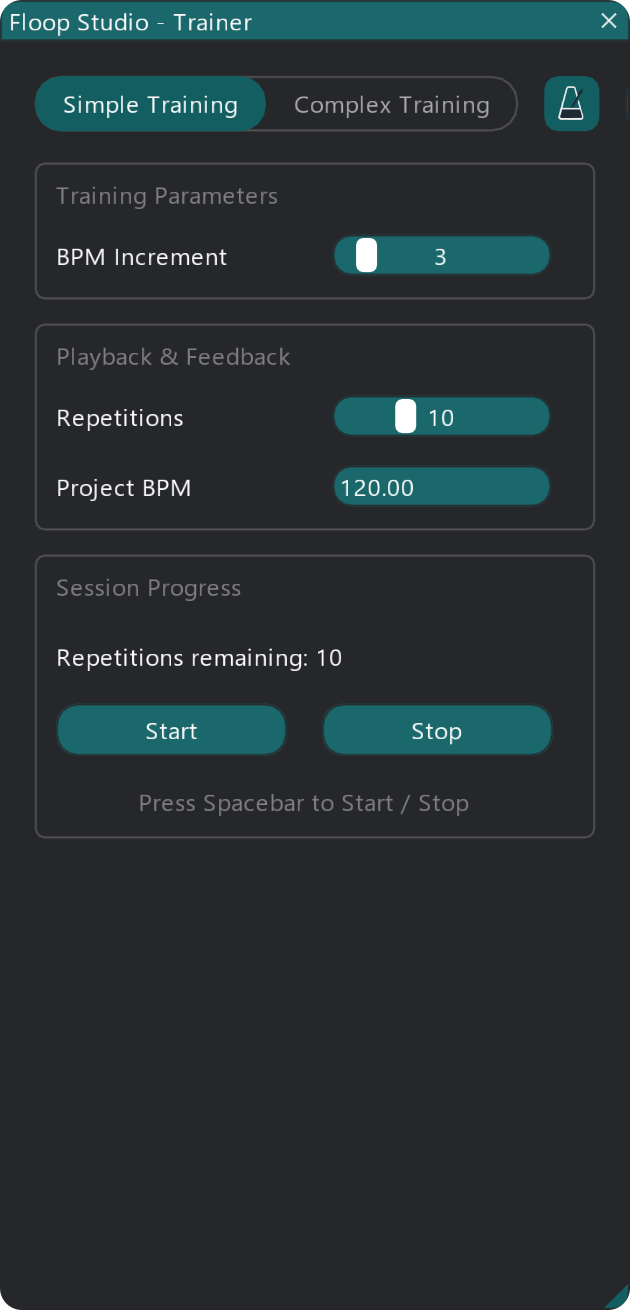
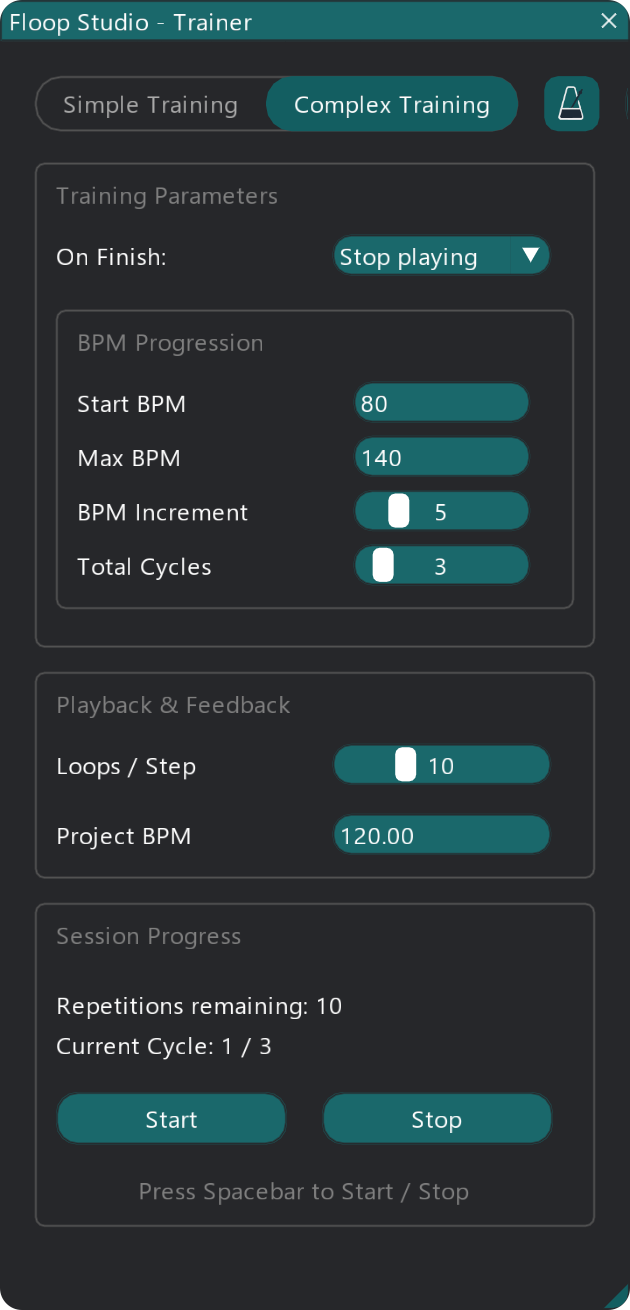
Key Features
- Dual Training Modes: Choose between Simple Training (basic repetitions) and Complex Training (advanced cycles, start/max BPM, and end behaviors).
- Automated BPM Increase: Automatically raises the project tempo after a set number of repetitions.
- Hands-Free Practice: Focus entirely on your instrument without needing to touch the mouse or keyboard.
- Visual Feedback: Real-time countdown of remaining repetitions and current cycle tracking.
- Metronome Control: Toggle the metronome directly from the script interface via a custom interactive icon.
- Safe Tempo Restoration: Option to automatically restore the original project BPM when closing the script.
- Synchronization Safety: Integrated in-app help to ensure correct Timebase settings for audio tracks.
- User-Friendly GUI: Clean interface built with ReaImGui, featuring Framed Groups and dynamic resizing.
Requirements
- REAPER (latest version recommended).
- ReaImGui: "ReaScript binding for Dear ImGui" installed via ReaPack. Minimum version required: 0.10.2+.
Compatibility
- Operating Systems: Windows, macOS, Linux (cross-platform support via REAPER's API).
Installation
Method 1: Via ReaPack (Recommended)
- Import the Repository:
- Go to Extensions > ReaPack > Import Repositories....
- Paste the repository URL: https://github.com/floop-s/floops-reaper-scripts/raw/main/index.xml
- Click OK.
- Install the Script:
- Go to Extensions > ReaPack > Browse Packages.
- Search for
Floop Studio Trainer. - Right-click the package and select Install.
- Click Apply and restart REAPER.
- Note: ReaPack should automatically install the required
ReaImGuidependency. If not, please install it manually via ReaPack.
Method 2: Manual Installation
- Install ReaImGui:
- Go to Extensions > ReaPack > Browse Packages.
- Search for and install
ReaImGui: ReaScript binding for Dear ImGui. - Restart REAPER.
- Install the Script:
- Copy the entire
floop-studio-trainerfolder (includingIMG/metro-nome.png) into your REAPER Scripts folder. - Path:
REAPER > Options > Show REAPER resource path > Scripts.
- Copy the entire
- Load the Action:
- Open the Actions List (
?). - Click New Action > Load ReaScript....
- Select
floop-studio-trainer.lua. - (Optional) Assign it to a shortcut or custom toolbar button.
- Open the Actions List (
Quick Start
- Select a time range in the timeline that you want to loop.
- Enable Looping (Repeat) in the Transport controls.
- Run Floop Studio Trainer from the Actions List.
- Set your desired Number of repetitions and BPM increment.
- Press Start.
- Start playback and begin practicing! The script will handle the tempo changes for you.
Important: To ensure correct synchronization of audio items during tempo changes, set either the Project Timebase or the relevant Track Timebase to Beats (position, length, rate)'.
Optional (Recommended): If you want a count-in before playback starts, open Metronome Settings in REAPER and enable:
- Count-in before playback
- Metronome enabled during playback
Parameters
Training Modes
- Simple Training: Basic mode where the tempo increases continuously after a set number of repetitions.
- Complex Training: Advanced mode where you can define a specific BPM range (Start to Max) and repeat the entire progression for a specified number of cycles.
Simple Mode Settings
- BPM Increment: Sets the amount of BPM to add after each cycle.
Complex Mode Settings
- On Finish: When you reach Max BPM, choose what happens next: stop the training, repeat the training from Start BPM, or keep playing at the maximum speed until you stop (Stop playing, Restart from Start BPM, Keep playing at Max BPM).
- Start BPM: The initial speed where the training begins.
- Max BPM: The target maximum speed limit.
- BPM Increment: How many BPM to add at each new step.
- Total Cycles: How many times to repeat the whole sequence (from Start to Max BPM).
Example (Complex Training)
Goal: increase speed in clear steps, while repeating each tempo a few times before moving on.
- Mode: Complex Training
- Start BPM: 80
- Max BPM: 120
- BPM Increment: 5
- Loops / Step: 3
- Total Cycles: 2
- On Finish: Stop playing / Restart from Start BPM / Keep playing at Max BPM
Playback & Feedback
- Repetitions (or Loops / Step): Defines how many times the loop plays before the BPM increases.
- Project BPM: Manually view or edit the current project tempo (Press Enter to apply).
Global Controls
- Metronome Icon: Toggles the REAPER metronome on or off.
- Restore BPM on Exit: If enabled, the project tempo reverts to its initial state when you close the script.
- Start / Stop: Controls the training session (can also be triggered using the Spacebar).
Troubleshooting
- "ReaImGui not found": Install via ReaPack and restart REAPER.
- Audio not following tempo changes: Check the "Important" note above regarding Timebase settings. Your audio track must be set to 'Beats (position, length, rate)'.
- Loop not working: Ensure you have created a time selection and enabled the "Repeat" button in REAPER's transport.
- No count-in: Enable count-in options in REAPER's Metronome Settings (see Quick Start note above).
- Doubled click at loop end (metronome): With some custom metronome click sounds, you may hear a doubled click at the loop boundary. Switching back to REAPER's default metronome sounds usually resolves it.
Support Development
If you find my scripts useful and want to support their development, you can buy me a coffee on Ko-fi:

Author
Developed by Flora Tarantino
Project home: https://www.floratarantino.com/floop-reaper-scripts/
License
This project is licensed under the GNU General Public License v3.0 (GPL-3.0).
See the LICENSE.txt file in the main repository for details.