Flutter generates build/Pods.build/Release-iphonesimulator in the ios folder #90446

Description

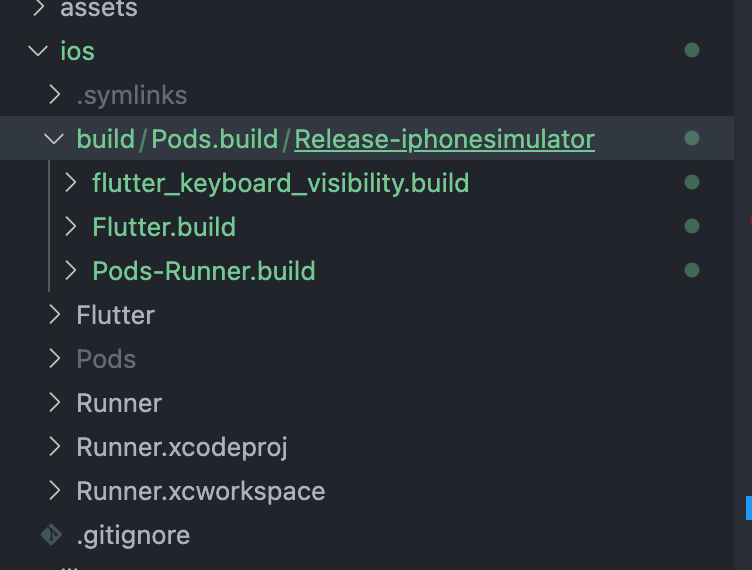
Whenever I imported some packages that depend on platform-specific API, Flutter started to generate the above folder which seems shouldn't be there.
Steps to reproduce:
- Import any packages that make iOS platform API. (shared_preference, cached_network_image confirmed)
- Make sure you use the code from that package you imported.
- Run the application. (Maybe you need to run the app twice)
After the above steps are completed, Flutter starts to generate that folder. This folder keeps coming even after deleting the package causes the issue and after running flutter clean, deleting Podfile, Podfile.lock and pubspec.lock.
My Flutter version is 2.5 and I used the iOS simulator.
flutter doctor -v
[✓] Flutter (Channel stable, 2.5.0, on macOS 11.5.2 20G95 darwin-x64, locale en-KR)
    • Flutter version 2.5.0 at /Users/username/flutter
    • Upstream repository https://github.com/flutter/flutter.git
    • Framework revision 4cc385b4b8 (13 days ago), 2021-09-07 23:01:49 -0700
    • Engine revision f0826da7ef
    • Dart version 2.14.0

[✓] Android toolchain - develop for Android devices (Android SDK version 31.0.0)
    • Android SDK at /Users/username/Library/Android/sdk
    • Platform android-31, build-tools 31.0.0
    • Java binary at: /Applications/Android
      Studio.app/Contents/jre/Contents/Home/bin/java
    • Java version OpenJDK Runtime Environment (build 11.0.10+0-b96-7281165)
    • All Android licenses accepted.

[✓] Xcode - develop for iOS and macOS
    • Xcode at /Applications/Xcode.app/Contents/Developer
    • Xcode 12.5.1, Build version 12E507
    • CocoaPods version 1.11.2

[✓] Chrome - develop for the web
    • Chrome at /Applications/Google Chrome.app/Contents/MacOS/Google Chrome

[✓] Android Studio (version 2020.3)
    • Android Studio at /Applications/Android Studio.app/Contents
    • Flutter plugin can be installed from:
      🔨 https://plugins.jetbrains.com/plugin/9212-flutter
    • Dart plugin can be installed from:
      🔨 https://plugins.jetbrains.com/plugin/6351-dart
    • Java version OpenJDK Runtime Environment (build 11.0.10+0-b96-7281165)

[✓] VS Code (version 1.60.1)
    • VS Code at /Applications/Visual Studio Code.app/Contents
    • Flutter extension version 3.26.0

[✓] Connected device (2 available)
    • iPhone 11 Pro (mobile) • D4E290AB-1DDD-427B-A777-9C0A68858ED3 • ios            •
      com.apple.CoreSimulator.SimRuntime.iOS-14-5 (simulator)
    • Chrome (web)           • chrome                               • web-javascript •
      Google Chrome 93.0.4577.82

• No issues found!