NestedScrollView and SliverAppBar and ExpansionPanelList looks well on debug mode but not well on release mode #91999

Description

There is something wrong with NestedScrollView and SliverAppBar on Flutter for Web.
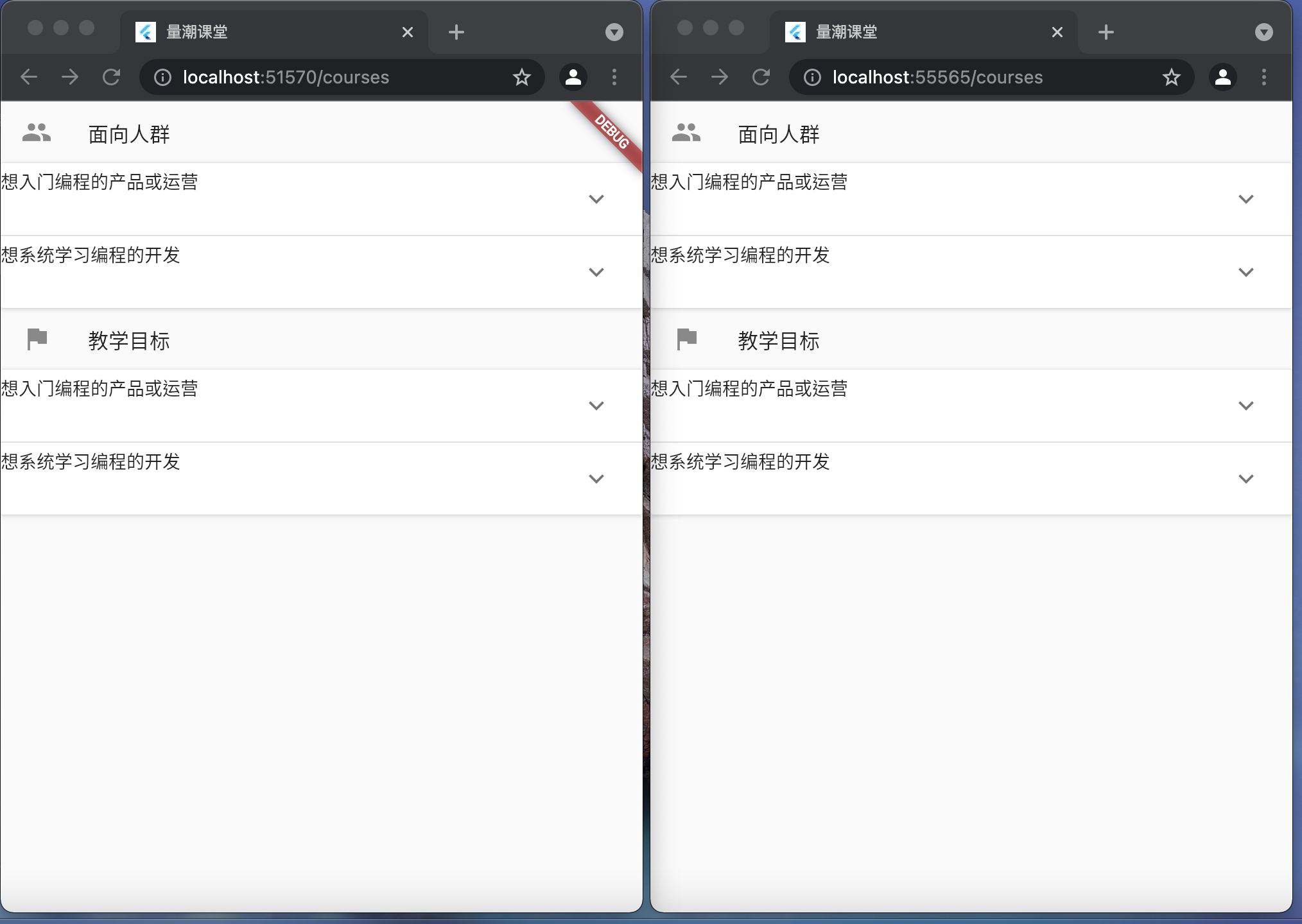
This is the UI with debug mode on the left and release mode on the right.

When the pinned for SliverAppBar changes to false, it works partly like this:

Code sample
import 'package:flutter/material.dart';

import '../models/course.dart';
import '../widgets/course_detail.dart';
import '../widgets/course_content.dart';
import '../widgets/pinned_bottom_bar.dart';


class CourseRoute extends StatelessWidget {
  /// 课程页面

  final List<String> tabs = <String>['详情', '目录'];

  final String courseTitle = 'Python编程入门';
  final String courseIntro = '第一门编程课,学习编程思想和Python语言';

  @override
  Widget build(BuildContext context){
    return Scaffold(
      body: Stack(
        children: [
          DefaultTabController(
            // https://flutter.dev/docs/cookbook/design/tabs
            length: tabs.length,
            child: NestedScrollView(
              // https://api.flutter.dev/flutter/widgets/NestedScrollView-class.html
              headerSliverBuilder: (BuildContext context, bool innerBoxIsScrolled){
                return <Widget>[
                  CourseSliverAppBar(
                    courseTitle: courseTitle,
                    courseIntro: courseIntro,
                    tabs: tabs,
                    innerBoxIsScrolled: innerBoxIsScrolled,
                  )
                ];
              },
              body: CourseTabBarView(
                children: <Widget>[
                  // 列表长度等于tabs.length
                  CourseDetailList(),
                  CourseContent(),
                ]
              )
            ),
          )
          // CourseBottomWidget(),
        ]
      ),
    );
  }
}

class CourseSliverAppBar extends StatelessWidget {
  /// 课程页面SliverAppBar

  final String courseTitle;
  final String courseIntro;
  final List<String> tabs;
  final bool innerBoxIsScrolled;

  CourseSliverAppBar({
    required this.courseTitle,
    required this.courseIntro,
    required this.tabs,
    required this.innerBoxIsScrolled
  });

  @override
  Widget build(BuildContext context){
    return SliverOverlapAbsorber(
      handle: NestedScrollView.sliverOverlapAbsorberHandleFor(context),
      sliver: SliverAppBar(
          expandedHeight: 200,
          pinned: true,
          forceElevated: innerBoxIsScrolled,
          // 头部
          title: Text(courseTitle),
          centerTitle: true,
          flexibleSpace: FlexibleSpaceBar(
            // https://api.flutter.dev/flutter/material/FlexibleSpaceBar-class.html
            title: Text(courseIntro),
            titlePadding: EdgeInsets.all(50),
          ),
          // 底部
          bottom: PreferredSize(
            preferredSize: Size.fromHeight(40),  // 临时设一个高度
            child: TabBar(
              /// 标签栏
              tabs: tabs.map((String name) => Tab(text: name)).toList(),
            ),
          )
      ),
    );
  }
}

class CourseTabBarView extends StatelessWidget {
  /// 课程页面标签视图

  final List<Widget> children;

  CourseTabBarView({
    required this.children
  });

  @override
  Widget build(BuildContext context) {
    return TabBarView(
      children: children.map((Widget child){
        return SafeArea(
          top: false,
          bottom: true,  // 底部小概率可能有不规则
          child: CustomScrollView(
            slivers: [
              SliverOverlapInjector(
                handle: NestedScrollView.sliverOverlapAbsorberHandleFor(context),
              ),
              SliverToBoxAdapter(
                child: child,
              )
            ],
          )
        );
      }).toList(),
    );
  }
}
Logs
There is no useful log for the situation since everyone looks the same.
flutter doctor:
Doctor summary (to see all details, run flutter doctor -v):
[✓] Flutter (Channel dev, 2.6.0-5.1.pre, on macOS 11.6 20G165 darwin-x64, locale
    zh-Hans-CN)
[✓] Android toolchain - develop for Android devices (Android SDK version 30.0.2)
[✓] Xcode - develop for iOS and macOS (Xcode 12.5.1)
[✓] Chrome - develop for the web
[✓] Android Studio (version 4.1)
[✓] VS Code (version 1.61.0)
[✓] Connected device (2 available)

• No issues found!
debug mode:
Performing hot restart...
Waiting for connection from debug service on Chrome...
Restarted application in 728ms.
release mode:
Launching lib/main.dart on Chrome in release mode...
Compiling lib/main.dart for the Web...