Enchantment

Enchantments are a special type of Active Effect that makes changes on the item to which they are added, rather than the actor like normal Active Effects. They are configured in much the same way as normal Active Effects, but rely on different attribute keys that are documented below.
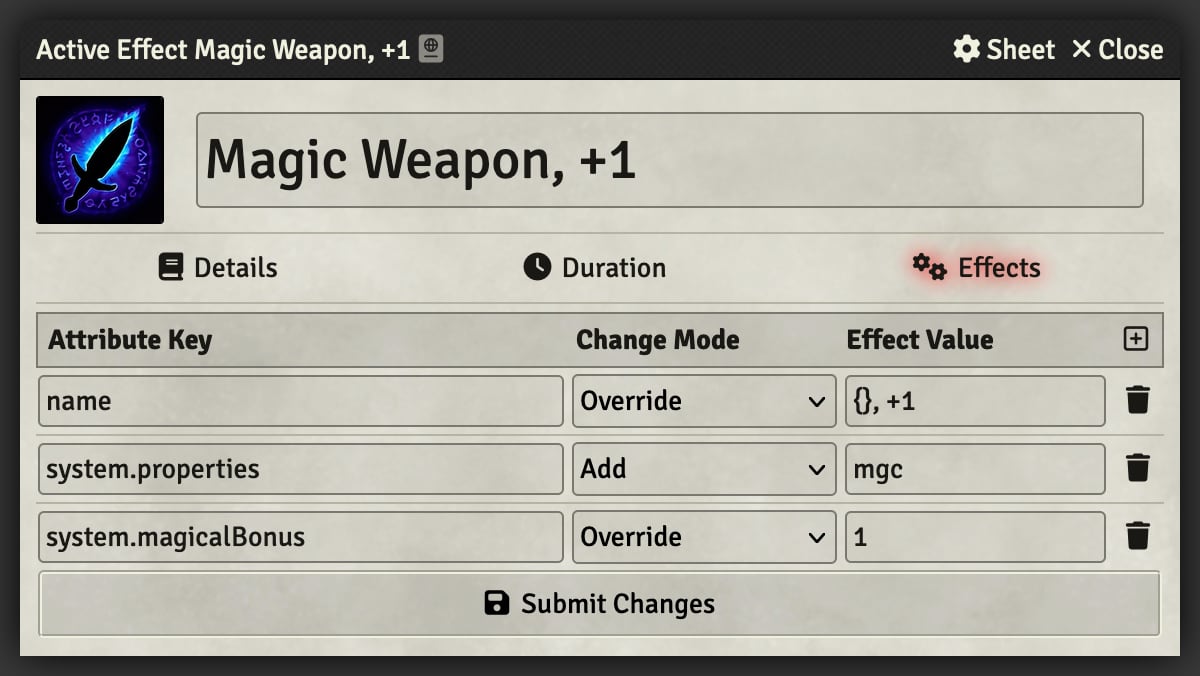
In the example above, the spell "Magic Weapon" is configured to modify the name of the item to add +1 to the end, add the magical property, and set the magical bonus. The name is set using a change format that allows for referencing the original name using a pair of curly brackets ({}) and the override change mode. This allows for more complex changes to the item's name than would normally be possible with active effects.
This describes how to create Active Effects used as Enchantments. This differs from the Active Effect Guide in that these are changes to items instead of the actors. If you're creating an Active Effect to add to the Additional Effects section when configuring an Enchantment, then use that guide.
Because of the differences in item types, there are separate sections for each type that can be enchanted. This uses the same Legend that the Active Effect Guide does in addition to:
-
[string]- A string value -
[file]- A file path, e.g.icons/svg/mystery-man.svg
These examples are common across item types, meaning they'll work equally well for a Weapon or Equipment.
name
img
system.description.value
                   chat
       properties
You can reference the original name using a pair of curly brackets ({}) and the override change mode (e.g. {}, +1 for a +1 weapon would result in Shortsword, +1).
| Attribute Key | Change Mode | Effect Value | Roll Data? |
|---|---|---|---|
name |
Override | [string] |
No |
| Attribute Key | Change Mode | Effect Value | Roll Data? |
|---|---|---|---|
img |
Override | [file] |
No |
You can reference the original description using a pair of curly brackets ({}) and the override change mode (e.g. {} <p>Some more description</p>) or use the add change mode to add to the end of the existing description. Note that any added description should be written using HTML, which can be copied from an existing item using the "Source HTML" button in the description editor.
| Attribute Key | Change Mode | Effect Value | Roll Data? |
|---|---|---|---|
system.description.value |
Override | [string] |
No |
The valid effect values depend on the item type, and in the case of consumables the subtype, which are documented below.
| Attribute Key | Change Mode | Effect Value | Roll Data? |
|---|---|---|---|
system.properties |
Add | [string] |
No |
Weapon Properties
Weapon Property Abbreviation Adamantine adaAmmunition ammFinesse finFirearm firFocus focHeavy hvyLight lgtLoading lodMagical mgcReach rchReload relReturning retSilvered silSpecial spcThrown thrTwo-Handed twoVersatile verSource:
CONFIG.DND5E.validProperties.weapon
Equipment Properties
Equipment Property Abbreviation Magical mgcStealth Disadvantage stealthDisadvantageSource:
CONFIG.DND5E.validProperties.equipment
Tool Properties
Tool Property Abbreviation Magical mgcSource:
CONFIG.DND5E.validProperties.tool
Ammunition Properties
Ammunition Property Abbreviation Adamantine adaMagical mgcSilvered silSource:
CONFIG.DND5E.validProperties.consumableandCONFIG.DND5E.itemPropertiesthat haveisPhysical: true
Scroll Properties
Scroll Property Abbreviation Magical mgcRitual ritualSomatic somaticVerbal verbalSource:
CONFIG.DND5E.validProperties.consumableandCONFIG.DND5E.validProperties.spellminusmaterial
Consumable Properties
Consumable Property Abbreviation Magical mgcSource:
CONFIG.DND5E.validProperties.consumable
Container Properties
Container Property Abbreviation Magical mgcWeightless Contents weightlessContentsSource:
CONFIG.DND5E.validProperties.container
Loot Properties
Loot Property Abbreviation Magical mgcSource:
CONFIG.DND5E.validProperties.loot
system.proficient
       magicalBonus
| Attribute Key | Change Mode | Effect Value | Roll Data? |
|---|---|---|---|
system.proficient |
Upgrade | 1 |
No |
Make the weapon magical by adding the Magical property and an optional Magical Bonus that will be added to attack and damage rolls.
| Attribute Key | Change Mode | Effect Value | Roll Data? |
|---|---|---|---|
system.properties |
Add | mgc |
No |
system.magicalBonus |
Override | [number] |
No |
system.proficient
       armor.value
             magicalBonus
             dex
       strength
| Attribute Key | Change Mode | Effect Value | Roll Data? |
|---|---|---|---|
system.proficient |
Upgrade | 1 |
No |
Make the armor magical by adding the Magical property and an optional Magical Bonus that will be added to AC.
| Attribute Key | Change Mode | Effect Value | Roll Data? |
|---|---|---|---|
system.properties |
Add | mgc |
No |
system.armor.magicalBonus |
Override | [number] |
No |
system.proficient
       ability
       bonus
       chatFlavor
| Attribute Key | Change Mode | Effect Value | Roll Data? |
|---|---|---|---|
system.proficient |
Upgrade | 1 |
No |
| Attribute Key | Change Mode | Effect Value | Roll Data? |
|---|---|---|---|
system.bonus |
Add | [formula] |
Yes |
system.magicalBonus
Make ammunition magical by adding the Magical property and an optional Magical Bonus that will be added to the attack/damage rolls.
| Attribute Key | Change Mode | Effect Value | Roll Data? |
|---|---|---|---|
system.properties |
Add | mgc |
No |
system.magicalBonus |
Override | [number] |
No |
system.capacity.value
                type
| Attribute Key | Change Mode | Effect Value | Roll Data? |
|---|---|---|---|
system.properties |
Add | weightlessContents |
No |
This documents the Usage section on spells.
system.activation.type
                  value
                  condition
       duration.value
                units
                special
       range.value
             units
             special
       target.template.count
                       contiguous
                       type
                       size
                       width
                       height
                       units
              affects.count
                      type
                      choice
                      special
       uses.max
            recovery
| Attribute Key | Change Mode | Effect Value | Roll Data? |
|---|---|---|---|
system.range.value |
Multiply | 2 |
No |
system.range.long |
Multiply | 2 |
No |
| Attribute Key | Change Mode | Effect Value | Roll Data? |
|---|---|---|---|
system.uses.max |
Override | [formula] |
Yes |
system.uses.recovery |
Add | { "period": "lr", "type": "recoverAll" } |
No |
Recovery Period Values
Uses Per Abbreviation Short Rest srLong Rest lrDay dayDawn dawnDusk duskStart of Initiative initiativeStart of Turn turnStartEnd of Turn turnEndEvery Turn turnSource:
CONFIG.DND5E.limitedUsePeriods
This documents the Action section on item sheets, common to many item types.
system.damage.bonus
              parts
              types
       chatFlavor
To add a bonus to the first damage part, using the same damage type, you can use system.damage.bonus. If you wish to add a new damage part with its own damage type, you'll want to add to system.damage.parts. Since damage is both a roll formula and damage type, you need to include both when adding extra damage.
| Attribute Key | Change Mode | Effect Value | Roll Data? |
|---|---|---|---|
system.damage.bonus |
Any | [number] |
Yes |
system.damage.parts |
Add | [["2d6", "fire"]] |
Yes |
There are two ways to change the damage type using an enchantment. If the item being affected is a weapon or ammunition, then the base damage on the item can be changed directly. For other item types, or if you want to change the damage type for all activities on an item, then the system.damage.types key can be used.
| Attribute Key | Change Mode | Effect Value | Roll Data? |
|---|---|---|---|
system.damage.base.types |
Add/Override | [damage type] |
No |
system.damage.types |
Add/Override | [damage type] |
No |
Damage Types
Damage Type Abbreviation Acid acidBludgeoning bludgeoningCold coldFire fireForce forceLightning lightningNecrotic necroticPiercing piercingPoison poisonPsychic psychicRadiant radiantSlashing slashingThunder thunderSource:
CONFIG.DND5E.damageTypes
Enchantments can also target changes to item activities based on their type. This is done using the format activities[<type>].<change path>.
| Attribute Key | Change Mode | Effect Value | Roll Data? |
|---|---|---|---|
activities[attack].attack.ability |
Override | [string] |
No |
| Attribute Key | Change Mode | Effect Value | Roll Data? |
|---|---|---|---|
activities[attack].attack.bonus |
Override | [formula] |
Yes |
activities[attack].attack.flat |
Override | `true | No |
| Attribute Key | Change Mode | Effect Value | Roll Data? |
|---|---|---|---|
activities[attack].attack.critical.threshold |
Downgrade | [number] |
No |
A bonus can be added to the save DC of an activity regardless of how the save DC is determined.
| Attribute Key | Change Mode | Effect Value | Roll Data? |
|---|---|---|---|
activities[save].save.dc.bonus |
Any | [formula] |
Yes |
If you want to completely replace the save DC for an item, it can be done by overriding the calculation mode with an empty value and setting formula.
| Attribute Key | Change Mode | Effect Value | Roll Data? |
|---|---|---|---|
activities[save].save.dc.calculation |
Override | No | |
activities[save].save.dc.formula |
Override | [formula] |
Yes |