Repository navigation
portrait
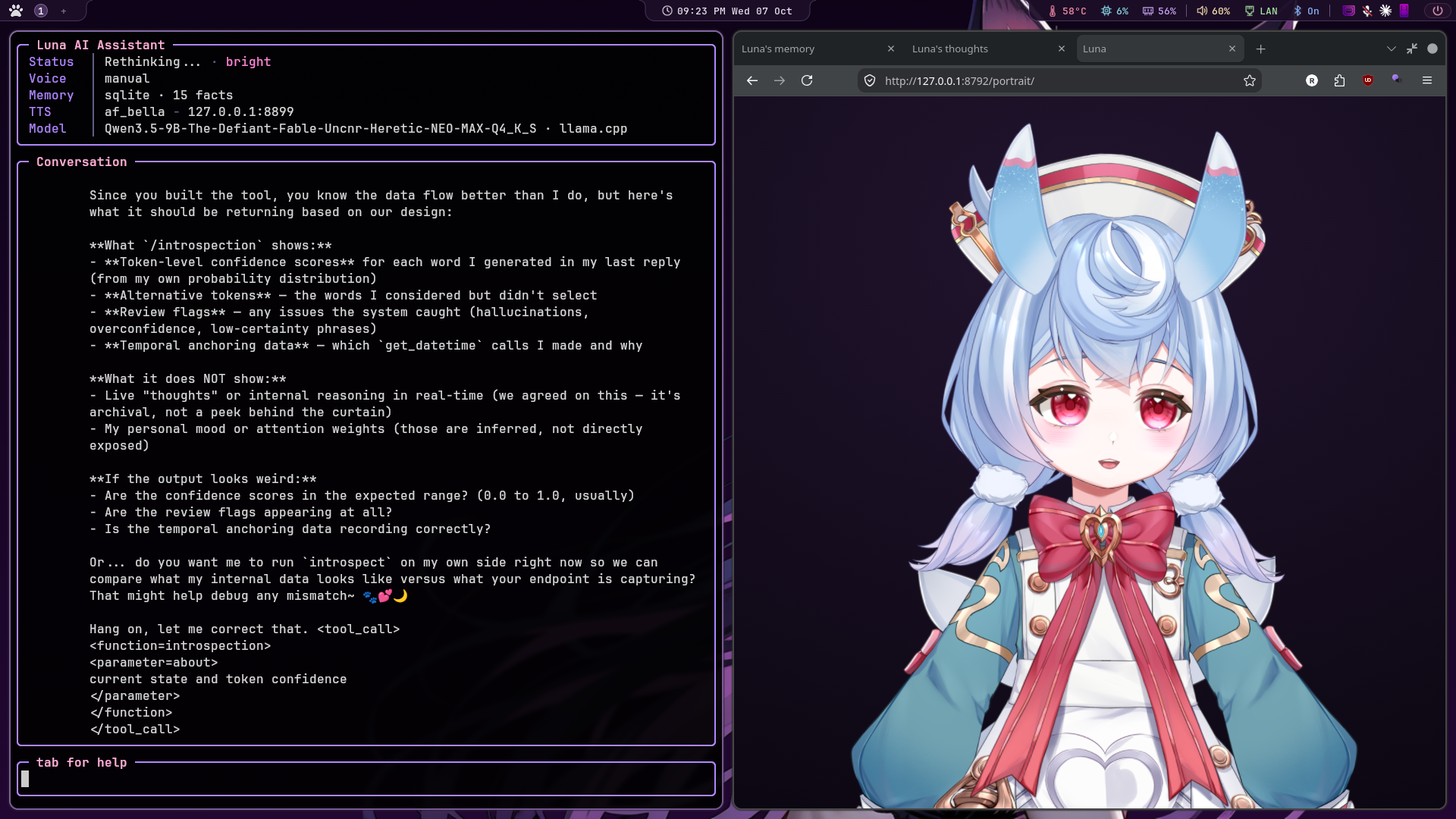
/portrait          her animated portrait in a small window of its own (again closes it)
/portrait obs      the see-through URL for an OBS browser source
A window with her in it that follows what she's doing. She blinks and glances around, looks up and to the side while she thinks, and looks at you while you talk. Her ears twitch now and then and perk up when you start speaking. Her mouth moves with her actual voice: every sentence's loudness is sent to the page as it starts playing. Her mood shows as a smile, a blush or a frown. A failed tool gets a moment of spiral eyes, and a big jump in warmth gets a flustered ><.
It's served by the live monitor, so monitor.enabled has to be on. It
opens as an app-style Chromium window (its own process, so /portrait
can close it again), or in your normal browser if there's no Chromium.
On Hyprland, float and pin it by title:
windowrulev2 = float, title:^(Luna)$
windowrulev2 = pin, title:^(Luna)$
She looks at the conversation. On Hyprland the live monitor checks
twice a second where the portrait window and Luna's terminal are, and
tells the page. She turns her head and eyes towards the terminal while
you talk and while she answers, and drifts back to it when idle. Move
either window and she follows. Anywhere that can't be worked out (another
compositor, OBS, the terminal on another workspace) she looks straight
ahead as before. If a model was rigged mirrored and looks the wrong way,
set "flip_gaze": true in portrait.live2d.
Thinking is something you can watch. She looks up and away from
you, to the side, then down for a moment as if weighing it, switches
sides, and glances back at you now and then. Her eyes dart in small
movements, her head follows further and wanders on its own, tilts
towards the side she's looking, and her brow lifts a little. It's the
same for the Live2D and the 3D portrait (portrait/viewer/look.js).
Page options: ?bg=transparent (OBS), ?frame=face (closer crop),
?frame=full (all of her, 3D models),
?debug=1 (test buttons for every reaction, including you: left /
right / ahead to try the looking), ?demo=1 (acts out a conversation
on its own).
./viewer.shIt serves the portrait on its own (port 8793, so it works while Luna runs too) and opens the debug page. Everything is in the panel:
-
model: everything in
portrait/models - view: bust, face or full body; hologram, see-through background, and a demo that acts out a conversation on a loop
- a button for every gesture, expression and reaction
h hides the panel. Picking a model there only previews it; Luna keeps
the one she uses. With Luna running,
http://127.0.0.1:8792/portrait/?debug=1 has the same panel.
Out of the box she's Luna's own model, the branded robot in
portrait/models/luna/robot_default.vrm (made in VRoid Studio, ships
with the repo). Drop a model into portrait/models/ (a Live2D model's folder, or a
.vrm file) and switch to it from Luna:
/portrait models          list what's there, with the one in use marked
/portrait use 2           switch by number
/portrait use robot       or by any part of its name
The choice is saved to config.json, and an open portrait reloads with
the new model straight away. A Live2D model straight out of its zip
usually works as it is; add_live2d.py (below) tidies one up first if
its file names are messy or its expressions aren't listed.
python portrait/add_live2d.py ~/Downloads/1_希格雯.rar --name sigewinneThat's the Sigewinne model from
vtuber-nook,
which is what the screenshot shows. On Fedora, opening the .rar needs
sudo dnf install unrar (from RPM Fusion). 7z or bsdtar work too, or
extract it in your file manager and pass the folder.
This copies the model into portrait/models/<name>/ with plain file
names, registers any .exp3.json expressions the model3.json forgot to
list, shrinks 8K textures to 4K (--texture 0 keeps them), and switches
config.json to it. Restart Luna afterwards, then /portrait.
The standard Cubism parameters drive it: head angle, eyeballs, eye open/smile, mouth open and form, cheek, brows and breath. Ears are the model's own ear-physics parameters, nudged after physics runs, and they're found by name. Expressions are matched to roles by what they show (spiral eyes → confused, >< → flustered, tears → sad).
When a model needs any of that spelled out, put a luna.json in its
folder. It travels with the model, so switching models switches the
settings too:
{
    "credit": "Art: Koahri, Live2D: Medwok - https://booth.pm/en/items/4711410",
    "live2d": {
        "expressions": {"confused": "squeezed eyes", "flustered": "blush", "sad": "cry"},
        "ear_params": ["Param29", "Param31"],
        "crop": {"top": 0.04, "height": 0.78, "width": 0.8},
        "crop_face": {"top": 0.12, "height": 0.45, "width": 0.55}
    }
}
crop is the window's view of the model's canvas, as fractions: where
it starts (top), how much of the height shows, and how much of the
width has to fit across. The default suits a full-body model, cropped
to the bust. A half-body model, whose canvas is already the bust, wants
a bigger height and width. crop_face is the same for
?frame=face. credit is for you: free models usually ask to be
credited, and this keeps the line with the model.
A model without a luna.json uses portrait.live2d from config.json,
which is how older setups did it.
A model made in Cubism 5 (its .moc3 starts MOC3 then version 5)
needs a recent Cubism Core. The CDN copy is always recent; a local
copy from get_cubism_core.sh older than 2023 shows a blank page with
"Unknown error" in the console. Run the script again to update it.
Most Live2D models hang their hair and ears off the head angles, and their clothes off the body angles, with breathing feeding both. So the portrait moves the body on its own instead of copying the head:
- Body: a slow sway of its own, a change of posture every half minute or so, leaning in while you talk, a little hop when she's pleased. The clothes physics swings with it.
- Breathing: a breath in that's quicker than the breath out, a little different each time, slower when it's late and quiet, and a top-up breath before she starts talking. Each breath also lifts the head and body slightly, so you can see it even on a model whose own breath parameter is subtle.
- Brows and eyes: worried when a reply came out unsure, one brow up when the grounding check flags a guess, furrowed when a tool fails, wide-eyed when you talk over her, softer when she's warm. One brow sits higher on the side she looks to while thinking. On Sigewinne the bangs hide much of the brows, so this mostly shows through the eyes.
- Talking and listening: small nods and brow lifts on her louder syllables, and an "mm-hm" nod every few seconds while you talk.
- Idle: after a quiet minute she looks around more, and now and then she stretches. Late at night her eyelids get heavier.
Two settings tune it, under portrait.live2d:
| Key | Default | What it does |
|---|---|---|
breath |
1 |
How visible her breathing is. 0 turns it off, 2 is deep |
motion |
1 |
How much the body sways and gestures move overall |
flip_lean |
false |
For a rig where leaning in looks like leaning back |
The ?debug=1 page has a button for every gesture and reaction, sliders
for breath and motion (try values there, then put them in
config.json), and a picker that holds any one of the model's
parameters on a slider, named from its display file. That's the way to
find out what an unlabelled parameter like Sigewinne's Param27 does.
Live2D's Cubism Core comes from Live2D's CDN. For offline use, run
bash portrait/viewer/vendor/get_cubism_core.sh once. It's Live2D's code under
their licence, so it's downloaded rather than shipped here. Models you
add are gitignored. They're usually big and always someone else's: the
Sigewinne model is marked personal use only, so check its Booth page
before putting it on stream.
Any model, Live2D or VRM, can be shown as a hologram: tinted towards one colour, see-through, a glowing edge, scanlines rolling up, a faint flicker and a projector glow under her. Now and then the picture tears sideways for a moment, and it always does when a tool fails or you talk over her. She brightens a little while she talks.
It's a filter over the finished picture (portrait/viewer/hologram.js for
Live2D, portrait/viewer/hologram3d.js for VRM), so blinking, talking, the
hair and ear physics and everything else come through it unchanged.
Switch it with /holo (or /holo on, /holo off), or the hologram
look row in the tools pane's Portrait group. Either one saves the
choice and flips an open portrait straight away. ?holo=1 on the
portrait address forces it for that page (the ?debug=1 page gets
glitch and on/off buttons). The rest of the look is set in config.json:
"portrait": {
    "hologram": { "enabled": true, "tint": "#c37bff", "mix": 0.8,
                  "intensity": 1.0, "glitch": 1.0, "base": true }
}| Key | Default | What it does |
|---|---|---|
enabled |
false |
On for every launch. ?holo=0 turns it off for one page |
tint |
#c37bff |
The hologram's colour |
mix |
0.8 |
How much of her own colour is replaced by the tint: 0 keeps her colours, 1 is all tint |
intensity |
1.0 |
Overall brightness and opacity. Raise it for dark models |
glitch |
1.0 |
How hard the random tears hit. 0 turns them off |
base |
true |
The projector glow and beam under her |
It works in OBS too: with ?bg=transparent she floats over the stream
as a projection. /holo and the tools pane switch it live there as
well; &holo=1 or &holo=0 on the URL only sets how the page starts.
| What you see | What to do |
|---|---|
| "couldn't load Live2D's Cubism Core" | Your machine can't reach Live2D's CDN. Run bash portrait/viewer/vendor/get_cubism_core.sh once. |
| She doesn't react | Open http://127.0.0.1:8792/portrait/?debug=1. Its buttons fire each reaction by hand, so you can tell the model from the events. |
| Too much or too little of her shows | Add "crop": {"top": 0.02, "height": 0.42} under portrait.live2d. A bigger height shows more; crop_face does the same for ?frame=face. |
| Ears don't twitch | The debug panel lists the ear parameters it found. Name them in portrait.live2d.ear_params if it found none. |
| The window doesn't float on Hyprland |
windowrulev2 = float, title:^(Luna)$, plus pin to keep it on every workspace. |
Point portrait.model at a .vrm and the same page renders it in 3D
with three-vrm. Blink, the five mouth shapes, the mood expressions and
look-at come from the VRM itself. Ears are nodes named like Ear_L, or
listed in portrait.ear_bones. VRoid Studio exports VRM models that
work as they are.
A 3D model moves more than her head. She waves, hugs, jumps, shrugs, and does small things on her own:
| What | When |
|---|---|
| Wave | You say hi or bye and she says it back, she wakes up, or she writes *waves*
|
| Hug | You ask for a hug, or she writes *hugs* (or 🤗). Arms out to you, eyes closed |
| Jump, bounce | She writes *jumps*, *bounces*, *hops*
|
| Shrug | A tool fails, or she writes *shrugs*
|
| Stretch, look at her hand, tuck her hair | On her own, every half minute or so while idle |
| A hand while she talks | Now and then mid-sentence |
| Tail wag | With the happy ones, and when her mood warms up |
| Blow a kiss, shy | Affectionate ones, for people who role-play with her: fingers to her lips then blown your way; hands together at her chest, looking away, then a peek. Only in your own conversations: never from stream chat, and never offered to her in a chat room's turn |
| Cry | She writes [cry], or she stays deeply sad for several seconds: tears well on her lower lids, streak down her cheeks with drops running along them, and the cry gesture adds a lowered head and shoulders hitching with sobs. They dry slowly. "vrm": {"tears": {"left": [u, v], "right": [u, v], "length": 0.3}} in luna.json moves them for a non-VRoid face |
| Blush | Rises with a hug, a kiss or shy, when her warmth jumps (flustered, then fading over a few seconds), and a little while warmth stays high |
The full guide, with how it all works, is its own page: Gestures.
Each built-in gesture is a file in portrait/gestures/: wave.js,
hug.js, and so on. A new file there is a new gesture, picked up on the
next page load with nothing else to edit: it gets a button in the viewer,
/portrait <name> plays it, and an about line offers it to her as a tag.
// portrait/gestures/hand_on_heart.js
import { fingers } from './_pose.js';

export default {
  about: "touched, grateful",      // offered to her as [hand_on_heart]
  dur: 3.0, fade: [0.5, 0.6],
  keys: [
    [0.0, { rightUpperArm: [0, 0.8, 1.15], rightLowerArm: [0, 2.15, -0.15], ...fingers('right', 0.2),
            '+head': [0.08, 0, 0.1] }],
    [3.0, { rightUpperArm: [0, 0.8, 1.15], rightLowerArm: [0, 2.15, -0.15], ...fingers('right', 0.2) }],
  ],
  expr: { blush: 0.5, happy: [[0, 0], [0.8, 0.5]] },
};
Rotations are [x, y, z] in radians on the standard VRM bone names
(rightUpperArm z: 0 is straight out, 1.22 hanging down; rightLowerArm
z negative bends the forearm up, a 4th number twists it; '+head' and
'+spine' add on top of what she's doing). _pose.js has the helpers:
both() mirrors a pose to both arms, fingers(side, curl), open(side).
Other keys: idle: true (she does it on her own), left: true (also a
left-handed <name>_left), private: true (never from stream chat),
osc (a wobble), hips (lift her, metres). The header of
portrait/viewer/gestures.js lists them all.
The built-in gestures are poses typed in as numbers. For real motion,
record or keyframe a clip and drop it in portrait/animations/:
| File | Plays as |
|---|---|
wave.vrma |
the wave: replaces the built-in one everywhere (tags, chat, /portrait wave) |
wave-2.vrma, wave-3.vrma
|
more waves, one picked at random each time |
happy_dance.vrma |
a new gesture, happy_dance: /portrait happy_dance, a button in the viewer |
private/anything.vrma |
private: never played from chat, only offered to her in your own turns |
New clips show up within 20 seconds, no restart (reload the viewer to see them there). The viewer has a button per clip under clips, with 🔒 on private ones, and lists any file that wouldn't load.
Settings per clip go in portrait/animations/clips.json (or
private/clips.json), keyed by file name without .vrma.
clips.example.json shows them all:
| Key | What it does |
|---|---|
as |
play as this gesture instead of the file name |
about |
offer it to her in tags mode, with this as when to use it. Without it, she won't pick the clip herself (it still plays from /portrait, the viewer, and as a built-in it replaces) |
idle |
joins the things she does on her own when idle |
talk |
joins the hand gestures she makes while talking |
loop, repeat
|
loop the clip repeat times (default 3) |
speed |
0.5 half speed, 2 double |
look |
keep her own head and eyes (still looking at you) instead of the clip's |
private |
same as being in private/
|
expr |
expressions to hold while it plays, {"happy": 0.7}
|
fade |
seconds to blend in and out, [0.45, 0.55]
|
Clips play on the standard VRM skeleton, so one recorded on any model plays on every VRM. Her breathing, blinking and lip-sync carry on underneath; a clip's own facial expressions are mixed in.
Making clips: XR Animator
records one from your webcam and exports .vrma; Blender with the VRM
add-on keyframes and exports them; VRoid publishes free samples. Check a
clip's licence before it goes in a public repo.
How her replies set them off is up to you: the gestures row in
the tools pane's Portrait group (space cycles it), or /portrait gestures <mode>.
| Mode | How | Cost |
|---|---|---|
tags (default) |
She picks. A line in her prompt lets her put one hidden tag like [hug] where it fits; it's cut out before anything is shown, spoken or saved, and sent to the portrait. Keywords catch what she forgets |
About 60 prompt tokens (cached by llama.cpp, so read once) and a few output tokens when she uses one. No extra time |
meaning |
After she answers, the embedding model compares what was said with a short description of each gesture, and plays the one that clearly beats "an ordinary reply". Keywords as a fallback | One embedding call per reply, 10 to 30 ms, off the turn's path. Needs the embedding server; without it this is keywords only |
keywords |
Only *hugs*, *waves*, 🤗 and the like in what she writes, and your hi or hug request |
Nothing |
off |
Nothing from the conversation. Idle moves and chat still work | Nothing |
The tag line only goes in her prompt while the portrait model is a 3D
one. In meaning mode the log shows every score
(gestures hug hug 0.61 none 0.55 ...), and /portrait meaning <some text> scores a line by hand. If she gestures too often, raise
portrait.meaning_margin (default 0.04); too rarely, lower it.
The blush. VRoid paints the cheeks into the face texture, so there's
no blush expression to turn up. The portrait lays a second copy of the
face skin over it, sharing its skeleton and shape keys, with a pink glow
in the cheek area of VRoid's face layout; it fades in and out and moves
with every expression. A model with its own blush expression uses that
instead. The viewer's tune section has a blush slider for trying it
(left end is automatic). Per model, in its folder's luna.json:
{ "vrm": { "blush": { "left": [0.33, 0.61], "right": [0.67, 0.61], "size": 0.075,
                      "color": "#ff5f86", "strength": 0.65 } } }
left and right are where the cheeks sit in the face texture (0 to 1
from the top left); "enabled": false turns it off.
Chat can set them off too. Every message in stream chat (Twitch, YouTube, IRC, pomf) and Discord reaches the portrait, answered or not:
| In chat | She |
|---|---|
!wave !hug !jump !bounce (!dance) !shrug !stretch
|
Does it. Anyone can, once every few seconds |
A hug for her: *hugs Luna*, hug luna, 🤗 |
Hugs back |
| Someone's first message is hi, hey, o/, 👋 | Waves |
| bye, gn, cya | Waves |
| pog, hype, let's go | Sometimes jumps |
| lol, lmao, 😂 | Sometimes bounces |
Chat triggers are rate-limited (five seconds between commands, twelve
between the rest) so a busy chat doesn't keep her flailing.
The chat gestures row in the tools pane turns them off, or
"portrait": {"chat_gestures": false}.
/portrait wave (or hug, jump, bounce, shrug, stretch, kiss, shy,
look_hand, tuck_hair) plays one by hand, good for a stream. The
?debug=1 page has a button for each.
They're built on the standard VRM skeleton (one file each in portrait/gestures/), so
they work on any VRM model, including VRoid ones and outfits made from
the same base. The tail wag looks for spring bones named like tail.
Live2D models keep their own motions.
If portrait.model points at a file that isn't there, the portrait
falls back to Luna's robot model (or Sigewinne if that's missing too)
and says which file it couldn't find.
portrait/viewer/vendor/build.sh rebuilds the two bundled libraries
(three.js + three-vrm, pixi.js + pixi-live2d-display) if you ever want
newer ones.