


CanDoItAll is a local-first .NET 10 Blazor application for governed project delivery, durable process execution, workforce coordination, and AI-agent automation. Product information is available at aicandoitall.com; this repository focuses on the implementation and its engineering contracts.
This repository owns:
- the Blazor host, HTTP API, application composition, and product modules
- project, workflow, process, CRM/HR, plugin, Memory, and automation behavior
- provider-neutral AgentFramework contracts and Microsoft Agent Framework adapters
- PostgreSQL persistence, migrations, runtime templates, tests, and repository tooling
This repository does not own:
- development MCP servers from CanDoItAll.Mcp
- shared Blazor components from CanDoItAll.Components
- family standards and reusable Codex assets from CanDoItAll.SharedInfo
- native Cognitive Memory from CanDoItAll.CognitiveMemory
| Entry point | Responsibility |
|---|---|
CanDoItAll.Web |
Blazor host, HTTP API, OpenAPI, and runtime endpoints |
CanDoItAll.Composition |
Dependency injection and application runtime composition |
src/Modules |
Product-facing bounded modules |
src/Processes |
Durable process model, execution, projections, and persistence |
src/Memory |
Provider-neutral Memory contracts, drivers, and persistence |
src/MAF |
AgentFramework and Microsoft Agent Framework integration |
Templates |
Repository-owned runtime seed and template packs |
CanDoItAll.slnx is the canonical solution.
- the .NET SDK selected by
global.json - PostgreSQL 16 or a compatible supported server
- Docker Desktop or another Compose v2 runtime when using the development database service
- Node.js and npm when rebuilding application Tailwind output
- PowerShell 7 for repository automation; the Windows installer and generated launcher remain compatible with Windows PowerShell 5.1
The Windows installer publishes a self-contained web app and prepares a dedicated PostgreSQL database for that installation:
& .\tools\install\Install-CanDoItAllWebApp.ps1 -StartAfterInstallWhen a working Linux Docker engine is available, database setup uses the isolated
candoitall-webapp-db container and candoitall-webapp-db-data volume on
127.0.0.1:55432. This is one installer-managed container/volume resource set, not a
second Compose project. If Docker is unavailable, the installer downloads the pinned
Windows x64 PostgreSQL 16 archive from EDB and runs a per-user native cluster beneath a
short local, non-UNC install root. Both paths create the same candoitall database and
non-superuser application role; the launcher starts the selected backend and supplies the
exact connection settings to the app. Generated passwords are protected for the current
Windows user and are not stored in the repository or install manifest.
Database setup can also be repaired or rerun independently:
& .\tools\install\Install-CanDoItAllWebAppDatabase.ps1The legacy tools\Install-CanDoItAllWebApp.ps1 entry point remains as a compatibility
wrapper. See installed web app operations for
paths, engine selection, lifecycle, and recovery details.
Run from the repository root:
Copy-Item .env.example .env
docker compose up -d --wait db
dotnet restore .\CanDoItAll.slnx
dotnet run --project .\src\App\CanDoItAll.Web\CanDoItAll.Web.csproj
Open http://localhost:5032. The checked-in database credential is a loopback-only local
development default; replace it before using a shared host.
dotnet restore .\CanDoItAll.slnx
dotnet build .\CanDoItAll.slnx --configuration Release --no-restore /m:1
dotnet test .\CanDoItAll.slnx --configuration Release --no-build --filter "Category!=Playwright&Category!=LiveProcess&Category!=LongRunning&Category!=Quarantined" /m:1
& .\tools\Validation\Test-Documentation.ps1
& .\tools\install\tests\Test-CanDoItAllWebAppInstallScripts.ps1
GitHub-hosted CI is temporarily disabled. Run the applicable checks locally before publishing changes.
The filtered command is the routine repository gate. Environment-dependent and extended test lanes are documented in Testing.
The base Compose model owns only the local development PostgreSQL dependency. It is not the installed web app database. It publishes PostgreSQL on loopback, stores authoritative development data in a named volume, and preserves that volume on normal shutdown.
docker compose --env-file .env.example config --quiet
docker compose up -d --wait db
docker compose down
See container operations and backup and restore.
The main dependency direction is:
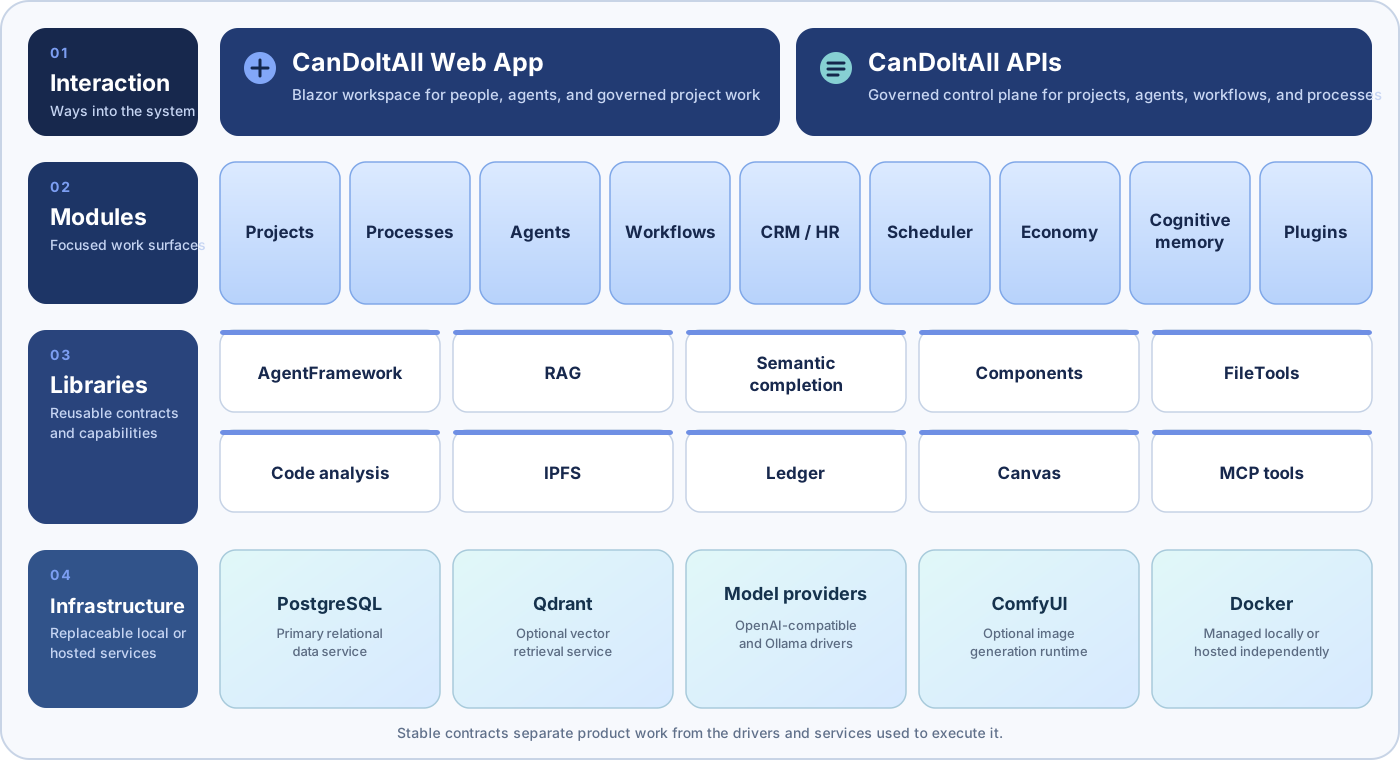
Start with:
Application-specific Tailwind assets live under Tailwind.
npm install --prefix .\Tailwind
npm run tailwind:build
Shared component structure and styling belong to CanDoItAll.Components.
NuGet packaging and publishing are disabled for this repository. Directory.Build.props
sets IsPackable to false for every project. Package metadata and release tooling will
be introduced only with an explicit package contract and validation gate.
The root npm package is private and exists only to run Tailwind commands.
This repository is licensed under the MIT License. The third-party notices preserve the copyright and license terms for external material redistributed by the application.
Code contributions are limited to partners approved by the maintainer. See
CONTRIBUTING.md and contact the fyziktom account on LinkedIn before
opening a pull request.