Releases: gPTPPs/ppsvaulttracker
Release list
PPsVaultTracker v1.1.0-beta

The arrangement update for PPsVaultTracker — see your song, mute per block, and draw your sweeps.
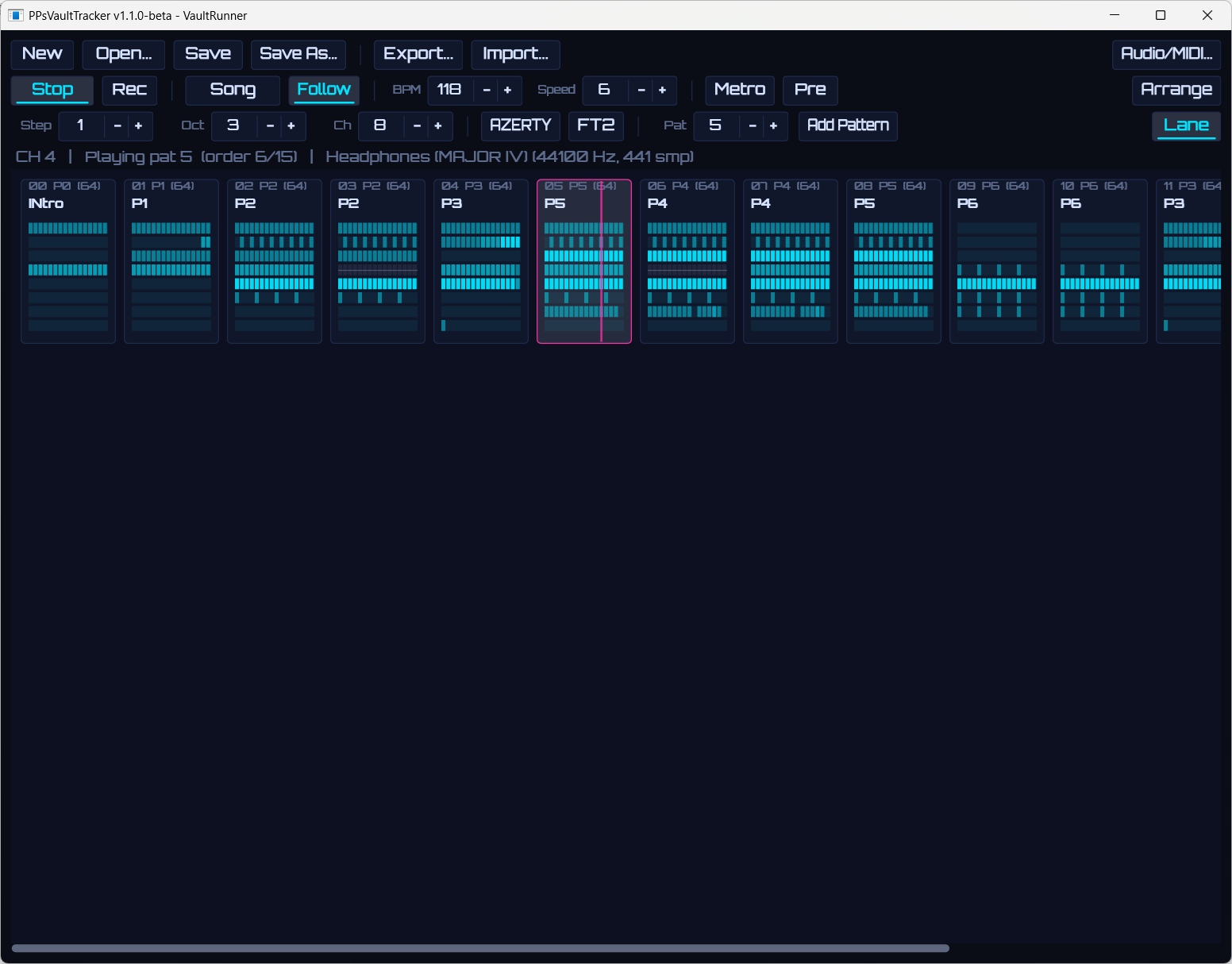
New since v1.0.0-beta
- Arrangement view (
F12or the Tracker/Arrange selector) — the order list as a horizontal timeline: one block per entry with the pattern's name, row count and a per-track note-density mini-map in the track colours. Click to select (playback starts from the selected block), double-click to open in the tracker, drag to reorder, Ctrl+drag to duplicate, right-click to insert/duplicate/remove/rename patterns. - Arrangement matrix — click a track lane inside a block to mute that track for that block (ghosted + strike-through). Perfect for intro/breakdown variants of the same pattern. Playback, MIDI export and stems all honour the mutes; a note still ringing is cut at the muted block's door.
- CC lane — a drawable curve editor over the effect column (Lane toggle, under the grid): pick a CC slot A–H or pitch bend and draw with the mouse instead of typing hex. Grid and lane edit the same data both ways, strokes are undoable (Ctrl+Z), and drawing sends the CC live to the track's plugin — its MIDI Learn catches the controller instantly, no playback needed. Toggle smooth (
~) to ramp a lane at tick resolution between your points — no zipper on filter sweeps, and it exports that way into the.mid. - Pattern names — name your patterns ("Intro", "Drop"…), shown in the arrangement blocks and saved in the project.
- Track identity & reordering — rename tracks (double-click a header or mixer title), give them one of 8 neon accent colours, move them left/right with everything attached (VSTi, inserts, mixer state, CC slots, pattern data), even during playback. Custom names become MIDI track names on export.
- UI polish — regrouped sober toolbar, unified pill value fields, single Play/Stop transport button, mode selectors that read as state, FT2-style sub-column tints in the grid, quieter empty cells, refined playhead, breathing mixer strips.
All .ubt projects from v1.0.0-beta load unchanged (new data is optional and omitted when unused).
Getting started (Windows x64)
- Download
PPsVaultTracker-1.1.0-beta-win64.zip, unzip anywhere, runPPsVaultTracker.exe— nothing to install. - MP3 export needs a
lame.exe(winget install LAME.LAME); the app asks for its location once. - Linux builds from source (see README); CI-tested on Ubuntu 24.04, real-audio testing still pending.
Roadmap
Host-parameter automation for MIDI-less FX plugins, a bundled demo song, the OUTRUN/LATENT visualizers.
License: AGPLv3. Third-party licenses are bundled in the zip.
PPsVaultTracker v1.0.0-beta
First public beta of PPsVaultTracker — a modern VSTi tracker in the FastTracker 2 / ProTracker lineage, by The Unborn / RetroVault.
Highlights
- VST3 hosting — one instrument per track (up to 16), 2 insert FX per channel + master bus
- FT2-style pattern editor — AZERTY/QWERTY piano entry, FT2/ProTracker keymaps, transpose, interpolation, block ops, unlimited undo
- Effect column = native MIDI — per-track CC slots (
Axx–Hxx), pitch bend (Pxx), note delay/cut (Nxx/Kxx); automation exports as plain CC - Live MIDI recording quantized to rows, with metronome and pre-count
- Sample-accurate sequencer — in-callback MIDI generation, song mode with order list
.ubtprojects (readable JSON + plugin states) with rotating autosave- Studio exports — multitrack MIDI (SMF type 1), per-channel WAV stems, master WAV/MP3, plugin tracklist — imports cleanly into Ableton Live
- Module import — MOD/XM/S3M/IT notes via libopenmpt
- RetroVault synthwave theme, Orbitron, and a proper splash screen
Getting started (Windows x64)
- Download
PPsVaultTracker-1.0.0-beta-win64.zip, unzip anywhere, runPPsVaultTracker.exe— nothing to install. - MP3 export needs a
lame.exe(winget install LAME.LAME); the app asks for its location once. - Linux builds from source (see README); CI-tested on Ubuntu 24.04, real-audio testing still pending.
Known limitations / roadmap
- No bundled demo song yet; OUTRUN/LATENT visualizers and CC ramp interpolation are post-beta candidates.
- No internal sampler: module import converts notes only (by design — the DSP is the VSTs' job).
License: AGPLv3. Third-party licenses are bundled in the zip.